
Chat · guide
Is ChatGPT safe? It depends which question you mean
By Alberto Gulotta · Updated · 8 min read
Is chatgpt safe is asked thousands of times a month, and it gets answered mostly by people guessing. It does not need guessing: OpenAI publishes its data settings, what each one does and how long things are kept. This guide quotes those pages and is honest about the parts they do not cover.
“Safe” is four different questions
And they have four different answers, only two of which anybody can look up.
The setting this question is really about
OpenAI’s own instructions, from its Data Controls FAQ.
What that does, in OpenAI’s words: “Your conversations will still appear in your chat history but won’t be used to train ChatGPT.” It applies account-wide — “Once you turn off model training, the setting applies to your entire account. It doesn’t matter which device you’re using” — and it is not a one-way door: “you can change this setting anytime. There are no restrictions.”
Two details worth knowing. The control exists even if you never signed in — signed out, it is behind the question-mark icon in the corner. And turning training off is not the same as turning everything off: OpenAI notes that disabling memory and personalisation “does not disable safety features that may use limited, safety-relevant context in rare, high-risk situations”.
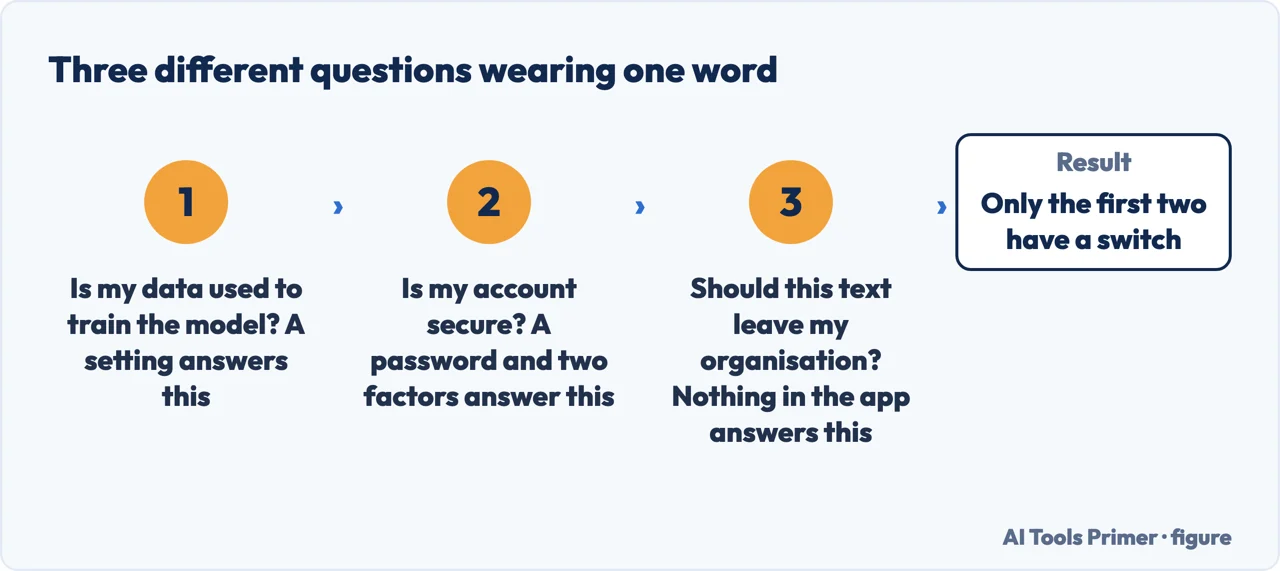
It helps to know what that menu is called and what actually lives in it, because the name promises more than the contents. OpenAI describes Data Controls as the place that lets you “decide how ChatGPT uses your conversations and interactions”, and says they “specifically allow you to choose whether your conversations help improve our models”. That is the scope of the menu: it is about training, not about who can reach your account.
The same switch, three different places
OpenAI lists a separate route for each surface. They are not the same menu.
The routes differ because the options do. Signed out, OpenAI says, “you can choose if your chats are used to help train ChatGPT”; signed in, “you have additional options like exporting your data or deleting your account”. Exporting and deleting are account features, so they only exist once there is an account.
And the stronger option, which fewer people know about
- Temporary Chats “are deleted from our systems after 30 days”
- They “aren’t used to train our models”
- They “may be reviewed only to monitor for abuse”
- They “don’t get saved in your history and don’t create memories”
That is a different setting from the training toggle and a stronger one for a single sensitive conversation. Note the third line rather than skipping it: not used for training is not the same as never seen by anyone. OpenAI says these chats may still be reviewed for abuse monitoring, and a page that quoted only the first two lines would be telling you half of what the company published.
The two settings interact, in a way the FAQ states in one line and most summaries drop. Turning training off leaves your conversations in your history — but if the conversation is a Temporary Chat, OpenAI says it “will be deleted after 30 days” anyway. The history you keep and the training you refuse are two separate decisions, and the temporary option overrides the first of them.
One more line is worth quoting for anyone who dealt with this the hard way, before the setting existed. OpenAI: “If you opted out by contacting support or using our privacy form, your account will represent that request.” An opt-out obtained by email is not quietly dropped when the interface catches up with it.
Which brings us to the question in this cluster that matters most and is answered worst: is chatgpt safe for confidential information. The honest answer has two halves. The first is that the controls above are real and documented. The second is that a setting you can verify says nothing about whether you are allowed to paste that material anywhere — and for work documents, client files, medical details or anything covered by an agreement, permission is the binding constraint, not the toggle. No page on the internet can tell you your employer’s policy, and any page that implies otherwise is guessing on your behalf about something you would be answerable for.
There is also a category difference worth naming. On a business plan the arrangement is not the same as on a personal account — OpenAI states that “our Team, Enterprise, and Edu plans offer additional data controls”. If your organisation has one, the answer to “is this safe for work” may already have been decided for you, in your favour, by somebody who read the contract.
The part no product setting covers, from a security agency. The NCSC frames the risk as the query itself rather than the account: an LLM provider “(or its partners/contractors) are able to read queries, and may incorporate them in some way into future versions”, so the terms and the privacy policy “need to be thoroughly understood before asking sensitive questions”. It adds two things a settings screen cannot: a question can be sensitive because of who is asking it rather than what is in it, and separate questions can be aggregated across one login.
The related searches show how specific the worry has become. Is chatgpt safe to use is the general version. Are chatgpt chats private and chatgpt security risk come from people thinking about the conversation history rather than the answers. And the newer ones — is chatgpt agent mode safe, is chatgpt atlas safe — are about features that do more than answer questions, which is a genuinely different risk and has guides of its own below.
Where to start
Four ways in.
- “I want my chats out of training.”
- It is above. Then the settings
- “Is my account secure?”
- Go to the account
The settings
Every control OpenAI documents, what it changes and what it does not. Quoted rather than summarised, because the difference between the two is where people get misled.
The account
Years of your writing behind one password. The ordinary security questions apply here as they would to email.
Not covered here. It will not tell you ChatGPT is safe or unsafe as a verdict. That word covers four questions and they have different answers.
It will not paraphrase a setting when the company has written it down. Where OpenAI publishes the wording, the wording is quoted with the date it was read — because these pages change, and this one was updated days before we read it.
And it will not decide your confidentiality question for you. That one belongs to your employer, your client or your regulator, and a page that answers it on your behalf is putting you at risk to sound helpful. What holds instead is simple: every setting quoted here comes from OpenAI’s own published help pages.
Living with ChatGPT: the plan, the history and the data
What you are paying for, what it keeps, and how to stop both.
- The same job, in the other places it comes up
- ChatGPT Go vs Plus: what each one actually buys
- How to delete ChatGPT history, and what deleting means
- How to cancel a subscription on iPhone, and when you cannot
Sources
- OpenAI Help Center — Data Controls FAQ, on the training setting, Temporary Chats, retention and business plans — help.openai.com, read 21 August 2026.
- National Cyber Security Centre — ChatGPT and large language models, what’s the risk: the query as the exposure, and the aggregation across one login — www.ncsc.gov.uk, read 4 September 2026.
Written by Alberto Gulotta
Founder and editor of AI Tools Primer, writing from Palermo, Italy. Thirty-five years of taking computers apart, starting with a Commodore 64 — the long version is on the about page.
Something wrong on this page? Write to aitoolsprimer@gmail.com and it gets fixed.
Written on 21 August 2026 · last checked 4 September 2026.
Independence and limits
No affiliate links and no paid placements anywhere on this site. Nobody pays to appear here, and no company has seen this page before you did.
This is general information, not professional advice. Where a page touches money, health, safety or the law, it names its source and the date it was read — and your situation may still differ. See the privacy page and the cookie policy.