The island of tools
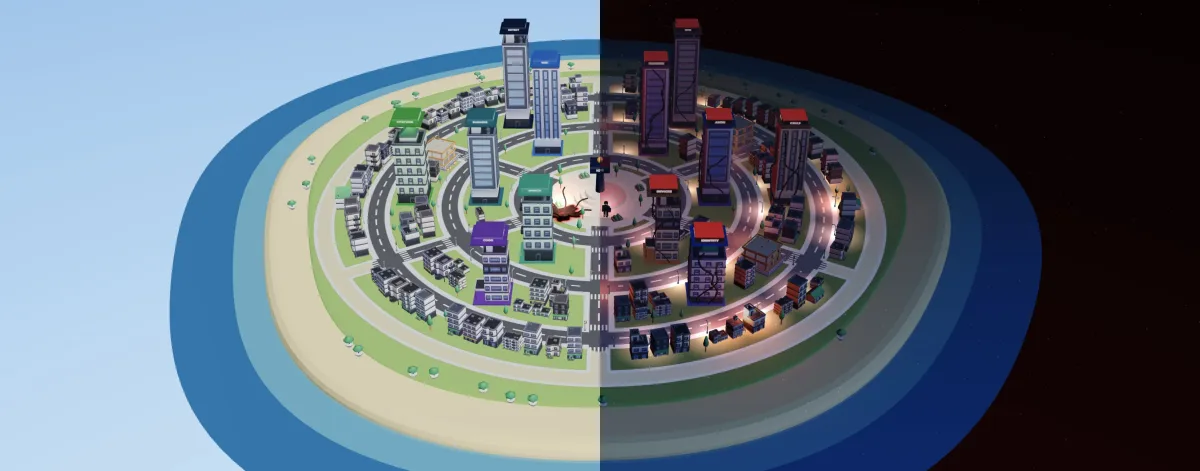
Two sides of the same city. On the bright side, fourteen towers for the work you choose to do — documents, images, video, business, study, AI. On the dark side, twelve for the things that happen to you: passwords, malware, scams, leaks. Every tower is a subject, every floor a guide, and nothing here is paid for.
One tower for each kind of work
Three districts — the tools you open in a browser, the software you have to choose, and AI. A tower is a hub: the pillar page for that subject. Each floor is a cluster, a group of guides that belong together.
Docs
PDF, Word, spreadsheets, charts, invoices and signatures.
Detect
AI detectors, humanisers, plagiarism and word counts.
Images
Removing backgrounds, resizing, converting and fixing photos.
Web
Domains, certificates, DNS and making a site mobile friendly.
Video
Converting and compressing video, subtitles and screen recording.
Software
Windows, Android, file recovery and maintenance.
Screens
Lines, spots, flicker, and a screen that will not answer.
iPhone
Settings, unwanted contact, location and starting over.
Business
Invoices, how long to keep records, and emailing customers.
Citations
Citation styles, reference lists, and how to study and take notes.
Resume
Resumes, cover letters, interviews and leaving a job.
Speech
Transcription, voice typing, recording a call and voice scams.
Chat
What a chatbot keeps of what you type, and who owns it.
Code
Coding assistants, and what they cost you in checking.
One tower for each way things go wrong
Turn the island over and the same city comes back darker. Staying safe online — VPNs, passwords, malware, throwaway identities — and the dark web itself: what it is, how it works, and what you actually risk.
VPN
What a tunnel changes, and what it does not.
Password
Password managers, the second factor, and getting back in.
Malware
Removing it device by device, and whether you need antivirus.
Temp mail
Throwaway addresses and permanent aliases: what each is for.
Calls
Phishing email and scam calls: what to check before acting.
Anon
The browsers, and what private browsing does not hide.
Dark web
What the dark web actually is, and what it is not.
Breach
What to do first when your details leak, and getting back in.
Devices
Private messaging, and how much of it is really encrypted.
Tor
What the Tor browser is for, and when a VPN is the wrong tool.
Identity
When somebody starts using your details: what to do first.
Footprint
Taking down what is public about you, and closing old accounts.
Who writes this, and how to look around
Everything that is not a tower: who is behind the guides, how to search them, what happens to your data, and the city you can walk in three dimensions.
How we check
Every guide is built from the sources it names, each with the date it was read, and checked again before it goes online.
Checked the month we publish
Prices, plans and limits are read from the maker’s own pages the month a page goes out, and the page carries that date.
Checked against sources
Official documentation, regulators, standards bodies and the vendors’ own pages, each named on the page with the date it was read.
Quotations named
Every quotation comes from a source named on the page.
Before you trust a word of it
The things people ask us first, answered without hedging.
Do tool makers pay to appear here?
No. No sponsored placements, no paid rankings, no vendor sees a review before it goes live. Today there are no affiliate links on the site at all. If we ever add one, it is marked above the link and it never changes the verdict.
How do you pick which tools to cover?
By what people are actually looking for, measured on search data, not by what launched loudest this week. Each hub is a field of work; the guides inside it answer the questions that field keeps asking.
Are prices kept up to date?
We check every price the month we publish, and every price on a page carries the date it was read. Prices change, and the date tells you how old the figure is.