
Docs · guide
Split PDF: the ways that need no website at all
By Alberto Gulotta · Updated · 7 min read
Almost every result for split pdf is a website that wants your document uploaded to it. Some of them are good. But before you use one it is worth knowing that the computer in front of you can probably already do this, and in one case the instruction is a single sentence.
On a Mac, it is a drag
Apple’s documentation for Preview, the application already installed on every Mac.
“You can also create a new PDF by dragging thumbnails from a PDF sidebar to the desktop.”
Open the document, choose View > Thumbnails, select the pages you want, drag them out. Nothing is installed, nothing is uploaded, and the original is untouched. To go the other way and remove pages instead, Apple’s instruction is equally short: select the pages, “then press the Delete key on your keyboard (or choose Edit > Delete)”.
Windows has no equivalent drag, but it has something nearly as direct: any application that can open a PDF and print can also print to a PDF, and a print dialog is where you choose which pages go in. Chrome documents its half of that plainly — the destination list includes “Save as PDF” — and the guides below set out the exact route on each system, with the version differences each vendor documents.
Before reaching for a website, it is worth remembering what a PDF usually is. Contracts, bank statements, medical letters, passports, tax returns. Splitting one on a website means sending the whole document — including the pages you were trying to separate off — to somebody else’s computer.
Sometimes that is a perfectly reasonable trade. The point is that it should be a decision, taken with the site’s own published policy in front of you, rather than the default because it was the first result. The guides below cover the offline routes first for that reason, not out of squeamishness.
Buried at the end of Apple’s page about rearranging pages is the instruction that does the whole job: “You can also create a new PDF by dragging thumbnails from a PDF sidebar to the desktop.” Open the PDF in Preview, “choose View > Thumbnails or View > Contact Sheet”, select the pages you want — Command-click for ones that are not adjacent — and drag them out onto the desktop. What lands there is a new PDF containing only those pages. The original is not touched, nothing is uploaded, and there is no dialogue to fill in.
The other route is subtractive and behaves differently: “choose View > Thumbnails or View > Contact Sheet, select the page or pages to delete, then press the Delete key”. That edits the document you have open rather than producing a second one — and Preview saves automatically, so the deletion is the file unless you duplicated it first.
Apple attaches one warning to deleting that has nothing to do with pages: “when you delete a page from a PDF, all the annotations on the page are removed as well.” Highlights, notes and signatures anchored to that page go with it, and they do not reappear if the page is put back from elsewhere. If the annotations matter, the drag-to-desktop route is the safer one, because it copies rather than removes.
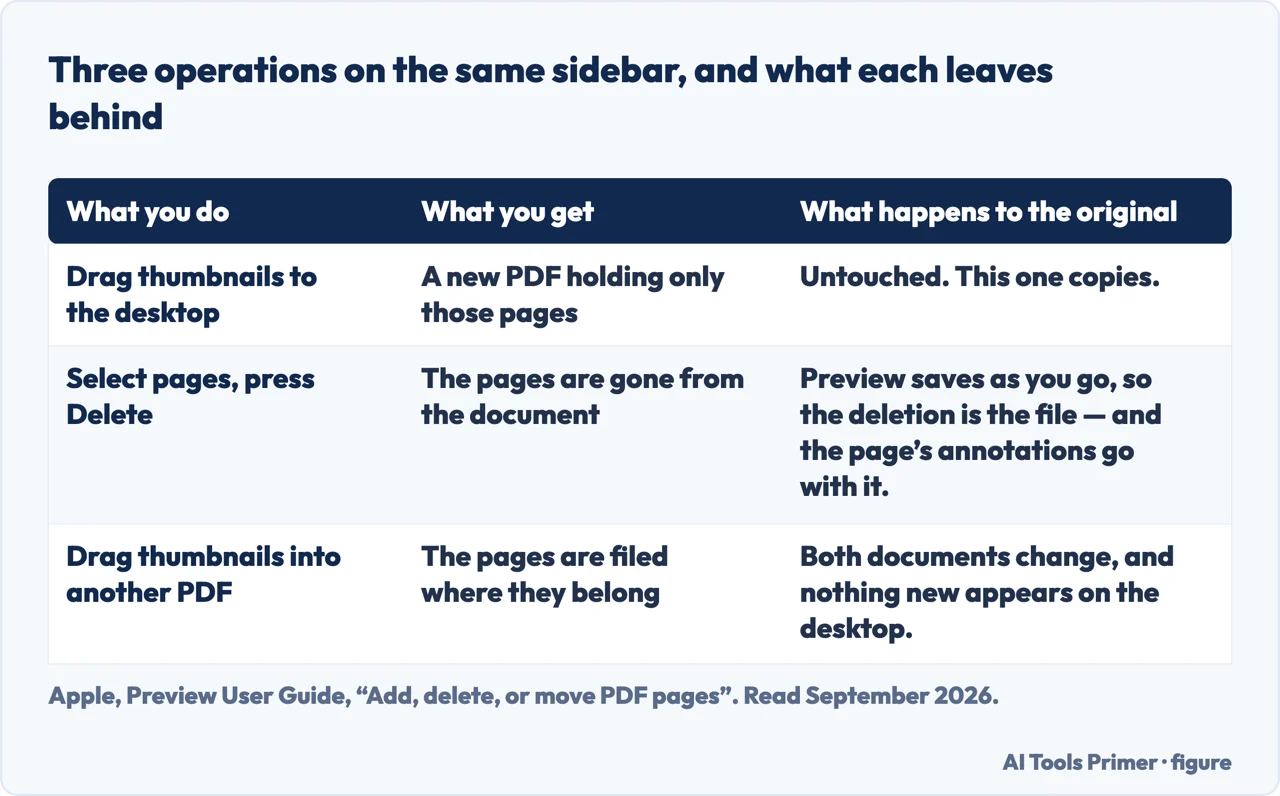
Apple documents a third operation on the same page, and it is the one to reach for when the pages belong somewhere rather than nowhere: “Move a page from one PDF to another: in each PDF, choose View > Thumbnails or View > Contact Sheet, then drag thumbnail images from one PDF to the other.” Splitting and filing become the same gesture, without a new file appearing on the desktop in between.
There is a second, quieter reason to prefer the offline routes, and it has nothing to do with privacy. A page pulled out with Preview or printed to a new PDF stays a real PDF: the text is still text, still searchable, still selectable. Some conversion routes flatten each page into a picture of itself, which looks identical and is no longer searchable — and you generally find out months later, when you need to search for something and cannot.
The way people ask for this shows what they are really doing. How to split pdf pages and how to split a pdf into multiple files are two different jobs: one person wants a few pages out, the other wants a large document broken into parts. Pdf split and splitting of pdf are the same request typed impatiently. And extract pages from pdf is the clearest phrasing of all, because extracting is usually what is actually wanted — the original stays as it is, and something new comes out of it.
Which is the distinction the guides below are organised around, because choosing the wrong one is how people end up with a folder full of documents they did not want and no copy of the one they started with.
Where to start
Four ways in.
- “I need it broken into several files.”
- Go to breaking it up
- “The file will not let me.”
- That is when it will not work
Breaking it up
Dividing a document into several, rather than pulling one piece off. Different job, different tools, and easy to do accidentally.
When it will not work
The documents that resist. Usually there is a specific reason, and usually it is fixable once you know which one you have.
Not covered here. It will not send you to an upload site as the first answer. For most of these jobs the software is already on the machine, and the file never has to leave it.
It will not describe a step it has not checked with the maker. Where Apple, Microsoft or Google document the route, the words are theirs; where they do not, the guide says so.
And it will not rank the online splitters yet. That needs the same documents — a scanned contract, a two-hundred-page report, a protected file — through each of them, with what each site keeps published alongside the result. What holds instead is simple: the instructions quoted on this page come from Apple’s and Google’s own documentation.
A PDF that is not the shape you need
Too many pages, too few, locked, or wrong: what people do to a PDF between receiving it and sending it on.
- The same job, in the other places it comes up
- How to merge multiple PDF files without uploading them
- How to edit a PDF: what you actually need for it
- PDF password: locking and unlocking a file
Sources
- Apple on adding, deleting and moving PDF pages in Preview — that pages can be moved between PDFs by dragging thumbnails from one to the other, that a new PDF can be created by dragging thumbnails from a PDF sidebar to the desktop, that pages are deleted by selecting them in Thumbnails or Contact Sheet and pressing Delete, and that deleting a page also removes all the annotations on it — support.apple.com, read 24 August 2026.
- Apple Support — Add, delete, or move PDF pages in Preview on Mac, including creating a new PDF by dragging thumbnails to the desktop — support.apple.com, read 21 August 2026.
- Google Chrome Help — Print from Chrome, on choosing a destination and saving as PDF — support.google.com, read 21 August 2026.
Written by Alberto Gulotta
Founder and editor of AI Tools Primer, writing from Palermo, Italy. Thirty-five years of taking computers apart, starting with a Commodore 64 — the long version is on the about page.
Something wrong on this page? Write to aitoolsprimer@gmail.com and it gets fixed.
Written on 21 August 2026 · last checked 5 September 2026.
Independence and limits
No affiliate links and no paid placements anywhere on this site. Nobody pays to appear here, and no company has seen this page before you did.
This is general information, not professional advice. Where a page touches money, health, safety or the law, it names its source and the date it was read — and your situation may still differ. See the privacy page and the cookie policy.