
Audio · guide
Google Docs voice typing, and who is doing the listening
By Alberto Gulotta · Updated · 7 min read
The searches next to google docs voice typing tell you what this guide is worth. “Speech to text software” is a commercial search; “voice to text software” is more commercial still. People are shopping for something that has been sitting in the Tools menu of a free word processor for years.
Where it is
Google’s own steps, read 21 August 2026.
Google: “Click Tools and then Voice typing. A microphone box appears.” Then “when you’re ready to speak, click the microphone”, and — the instruction people skip — “Speak clearly and at a normal volume and pace.”
To stop, you say it rather than click it: “Stop listening”. To carry on afterwards, “Resume” — or “Resume with [word or phrase]” to jump back to a particular place in the text.
One requirement decides whether the menu item is there at all. Google: this “works with the latest versions of” Chrome, Edge and Safari. If Voice typing is missing from the Tools menu, the browser is the first thing to check rather than the account or the document.
You have to say the punctuation
Spoken commands Google documents. Saying them is the difference between usable text and one very long sentence.
This is the part that makes people abandon voice typing in the first ten minutes: they dictate a paragraph, get a wall of unpunctuated text, and conclude the feature is poor. It is not — it is waiting to be told. And there is a caveat from Google worth knowing before you rely on it: “Punctuation might not be available in every language.” The dictation may work in your language while the commands do not.
Two habits make the difference between dictation that saves time and dictation that costs it. Speak in whole sentences and say the punctuation as you go — going back to insert commas afterwards takes longer than the dictation did. And accept that the first pass is a draft: voice typing is fast at getting words down and indifferent to whether they are the right ones, which makes it excellent for a first version and poor for a final one.
The obvious route is stop, click, correct, restart. Google documents the shorter route: “if you make a mistake while you’re typing with your voice, you can move your cursor to the mistake and fix it without turning off the microphone. After you correct the mistake, move the cursor back to where you want to continue.” The dictation does not have to be a single unbroken take.
There is also a second opinion already on the page, offered quietly: “you might get suggestions on some words. To find the list of suggested alternatives, from the voice-typed text, right-click on words underlined in gray.” A grey underline in a voice-typed paragraph is not a spelling error — it is the recogniser saying it was unsure, and offering what else it heard.
And the commands go far past punctuation. Google lists a vocabulary for editing and for moving: “Select [word or phrase]”, “Select all matching text”, “Delete last word”, “Insert link”, and a whole grammar for navigation — “Go to” or “Move to” plus end of paragraph, next heading, previous word, forward [number] characters. When one is misheard there is a check and an undo: “the microphone shows a bubble containing the most recent command. Verify that Docs or Slides heard the right command. If not, you can simply say ‘undo.’”
Who is actually listening
Google states something about this feature that is worth stopping on: “Your web browser controls the speech-to-text service. It determines how your speech is processed and then sends the text to Google Docs or Google Slides.”
So the recognition is not being done by Google Docs. It is being done by the browser you happen to be using, and what happens to the audio on the way is a question about that browser rather than about your document. The same words dictated in Chrome and in Safari are handled by two different companies’ systems.
For a shopping list this is of no consequence. For dictating notes about a client, a patient or a case, it is the whole question — and it is one nobody thinks to ask, because the menu item is inside a document rather than inside a browser setting.
It is also, for anyone who cannot type comfortably, not a convenience at all but the way writing happens. An injury, a condition, a bad week — and there is here a full dictation system with no licence, no subscription and no installation, inside a document that is already shared with whoever needs it. That is worth knowing about before it is needed rather than after.
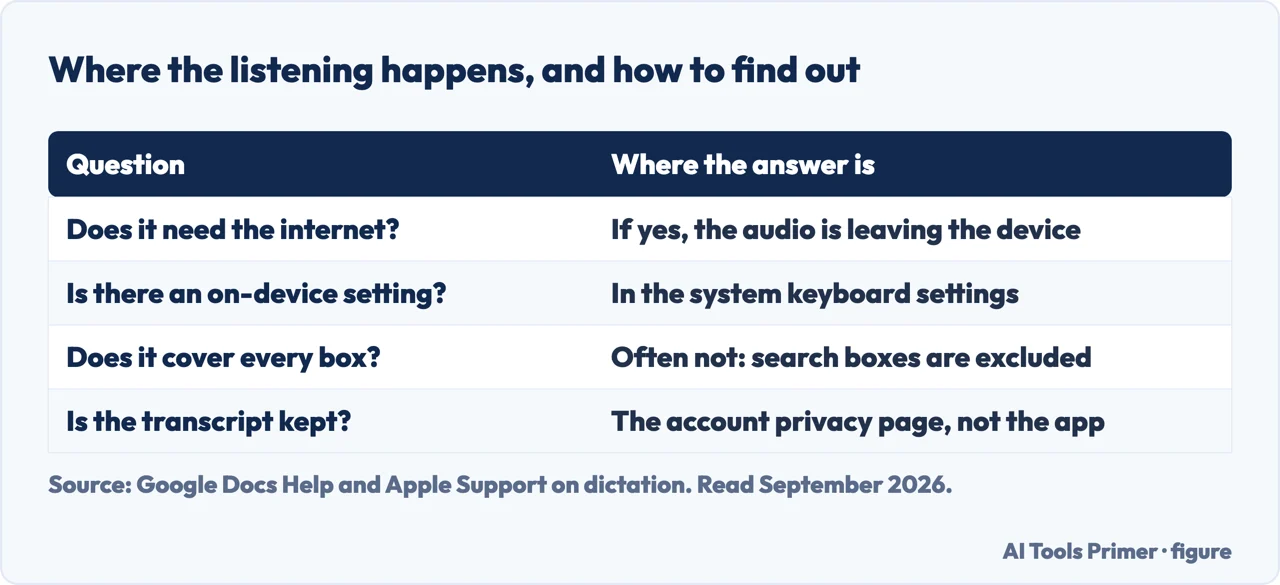
The other dictation tells you where the listening happens, and shows you where to look. Apple documents the question as a setting you can check rather than a promise: “you can check Keyboard settings to see whether you need an internet connection or whether your voice inputs and transcripts for general text Dictation… are processed on your device and not sent to Siri servers.” The distinction is the one to carry to any dictation feature: on-device or on somebody else’s machine, and the answer can differ between one part of the same system and another — Apple itself excludes dictating into a search box from the on-device case.
The phrasings vary and the intent does not. Voice typing in google docs and how to voice type on google docs are the same request; google docs voice typing speech to text is somebody who has been reading about paid tools and is checking whether the free one does the same job. For straightforward dictation into a document, it does — and the guides below are honest about the cases where it does not, starting with audio you have already recorded, which is a different problem with a different answer.
Where to start
Four ways in.
- “I have a recording, not a voice.”
- That is existing recordings
Existing recordings
Voice typing listens live. A file you already have is a different job, and the free options for it are genuinely good.
Not covered here. It will not recommend dictation software before mentioning the one already in the Tools menu.
It will not skip the browser line. Google names three browsers, and a missing menu item is usually that rather than a fault.
And it will not describe the feature as private without saying who processes the audio. Google publishes that it is the browser, and this guide quotes it. What holds instead is simple: the steps, commands and the note about the browser are quoted from Google’s own help pages.
Sources
- Google Docs Editors Help — Type with your voice, including the browser requirement, the spoken commands and the statement that the browser controls the speech-to-text service — support.google.com, read 21 August 2026.
- Apple Support — Dictate messages and documents on Mac: the setting that says whether dictation is processed on the device or sent to a server, and the parts it does not cover — support.apple.com, read 4 September 2026.
Written by Alberto Gulotta
Founder and editor of AI Tools Primer, writing from Palermo, Italy. Thirty-five years of taking computers apart, starting with a Commodore 64 — the long version is on the about page.
Something wrong on this page? Write to aitoolsprimer@gmail.com and it gets fixed.
Written on 21 August 2026 · last checked 4 September 2026.
Independence and limits
No affiliate links and no paid placements anywhere on this site. Nobody pays to appear here, and no company has seen this page before you did.
This is general information, not professional advice. Where a page touches money, health, safety or the law, it names its source and the date it was read — and your situation may still differ. See the privacy page and the cookie policy.