
Docs · guide
How to open a PDF in Google Docs: the Drive route and its limits
By Alberto Gulotta · Updated · 8 min read
How to open a PDF in Google Docs means uploading it to Google Drive and using Open with Google Docs. Google’s Drive Help says the file should be 2 MB or smaller and lists what usually survives and what does not. This page sets out the steps, the limits and where the guides differ.
| Question | Answer | Where it comes from |
|---|---|---|
| How do I open a PDF in Google Docs? | Upload it to Google Drive on a computer, right click it and choose Open with Google Docs | Google Drive Help |
| Is there a size limit? | Google says the file should be 2 MB or smaller | Google Drive Help |
| What is likely to be kept? | Bold, italics, font size, font type and line breaks | Google Drive Help |
| What is not likely to be detected? | Lists, tables, columns, footnotes and endnotes are not likely to be detected | Google Drive Help |
| Can I do it on a phone? | Google’s phone tabs say to go to drive.google.com on your computer | Google Drive Help |
The route: Drive, then Open with Google Docs
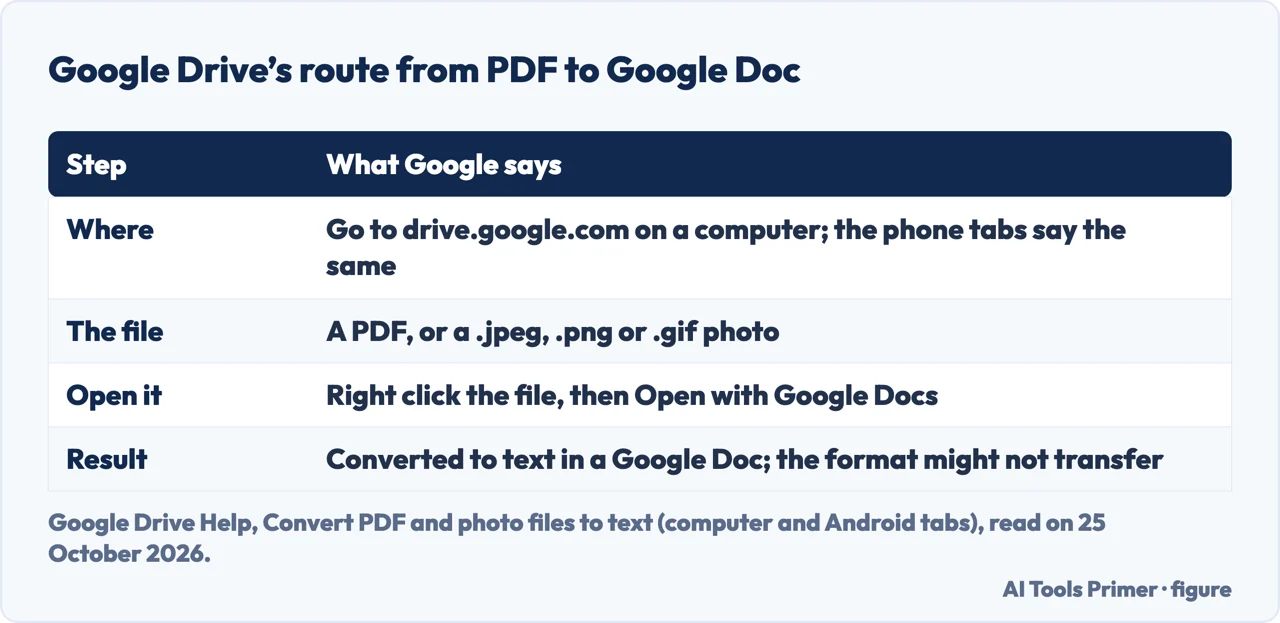
The route goes through Google Drive. Google Drive Help, in its page on converting PDF and photo files to text, gives two steps after you prepare the file: on your computer go to Google Drive, right click a file and click Open with Google Docs. The file is converted, but the format might not transfer. A thread in Google’s Chrome community, dated 7 January 2024, answers a user who wanted to edit a PDF with Docs on a Mac with the same two parts: you cannot edit a PDF directly in Docs, so upload it to Drive and convert it. The Android tab of Google’s page says to convert PDF and photo files to text by going to drive.google.com on your computer, and the steps are the same for the searches how to open a pdf in google docs, how to open pdf in google docs and pdf to google docs.
The guides add the upload step. GeeksforGeeks, updated on 23 July 2025, uploads the file from local storage to Drive, waits for the upload to finish and chooses Google Docs from the options list; the converted file opens in a new tab in Google Docs. Spreadsheet Point says the document is saved as a separate file by default, so your changes are kept in another copy, and that you can save a local copy in .docx format through File, Download, Microsoft Word.
Google’s limits and tips
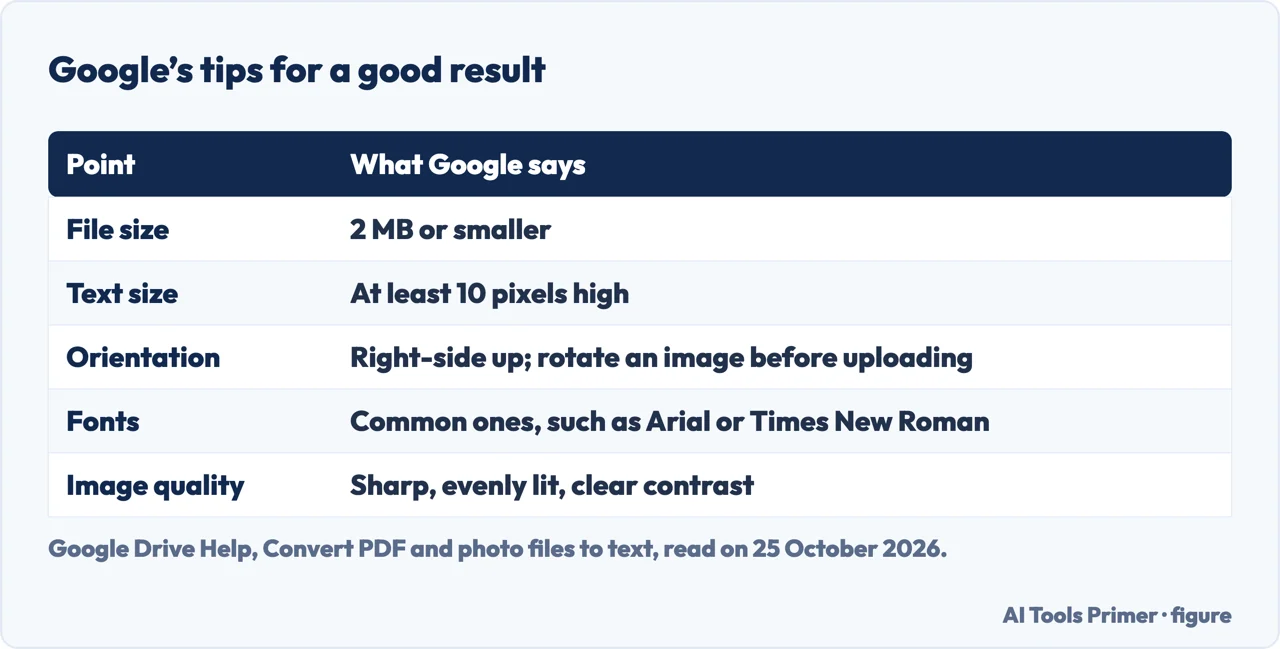
Google lists what to prepare. The format can be a PDF, including a multipage document, or a photo file in .jpeg, .png or .gif. The file should be 2 MB or smaller. Text should be at least 10 pixels high, and documents must be right-side up; if an image faces the wrong way, rotate it before you upload it. Google Drive detects the language of the document, and Google says to use common fonts such as Arial or Times New Roman and sharp images with even lighting and clear contrasts. None of the four guides we read gives the 2 MB limit.
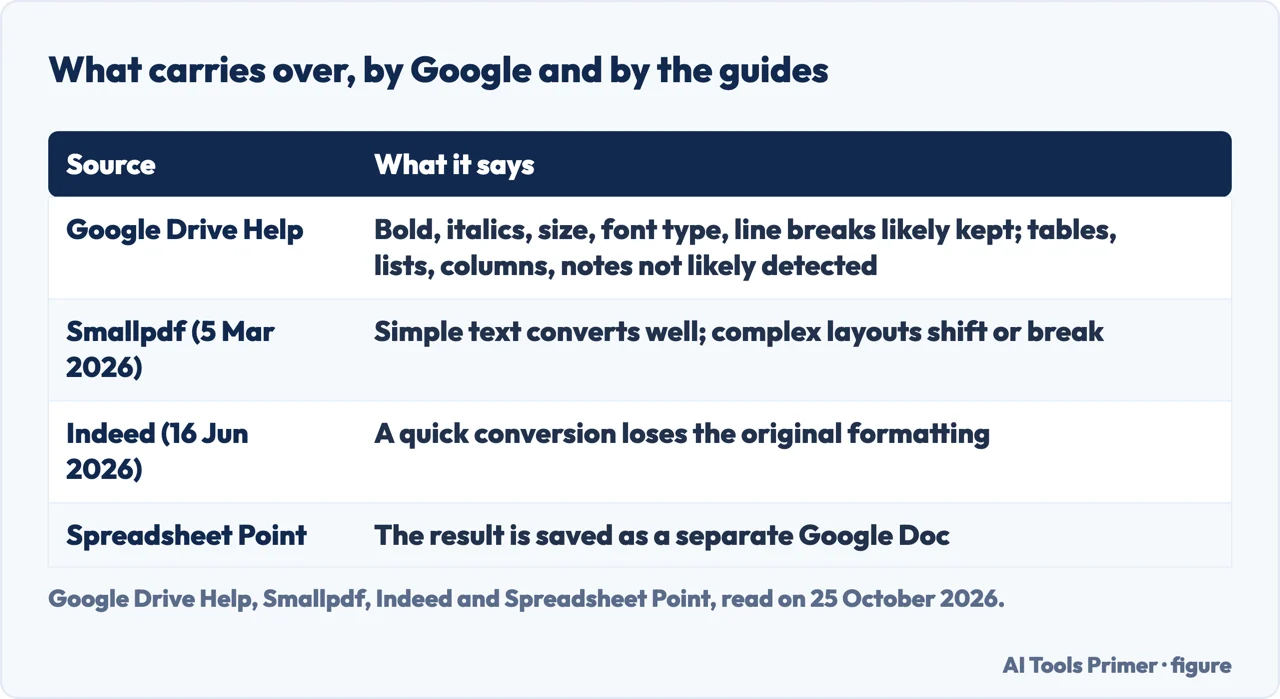
On the result, Google says bold, italics, font size, font type and line breaks are likely to be retained, while lists, tables, columns, footnotes and endnotes are not likely to be detected. Google Workspace’s page on editing PDFs in Docs describes the feature in broader terms: Docs intelligently transforms text, images and layouts so you can make changes, and it offers Gemini in Docs for advanced PDF editing. That page is a product page and does not repeat the 2 MB figure.
What the guides add
Smallpdf, a vendor of PDF tools whose page was modified on 5 March 2026, says to expect simple text to convert well and complex layouts to shift or break, and that knowing when to switch to a dedicated PDF editor avoids broken layouts. Indeed, updated on 16 June 2026, says that uploading a PDF to Drive converts it without its original formatting, and gives a second route through Word for when the formatting matters, as with legal documents or official reports. The people-also-ask box asks how to convert a PDF to Google Docs, whether Google Docs does not open PDFs, why a PDF will not open in Google and how to open a PDF document in Google Sheets. On what we read, Docs opens a PDF only by converting it through Drive, and we found nothing on Sheets.
For a PDF you want to change without converting it, see editing a PDF; for Word, PDF to Word; before you upload a file to any converter, what free converter sites do with your file.
Where to start
Four ways in.
- “Just the steps.”
- Through Drive — steps
- “It looks wrong.”
- Google’s limits — limits
- “Which guide is right?”
- What they add — guides
PDFs, converted and changed
Editing, converting and what to check first.
Questions people also ask
How do I convert a PDF to Google Docs?
Upload the PDF to Google Drive on a computer, right click it and click Open with Google Docs. Google says the format might not transfer and that the file should be 2 MB or smaller.
Does Google Docs not open PDFs?
Not directly: a Google community reply says you cannot edit a PDF directly in Docs and to upload it to Drive and convert it.
Why can’t I open a PDF in Google?
Google’s page names conditions for the conversion: a file of 2 MB or smaller, text at least 10 pixels high, a document that is right-side up, common fonts and sharp images. It does not list error messages.
How do I open a PDF document in Google Sheets?
The pages we read do not cover Google Sheets, so we do not answer that. The Docs route is Drive, then Open with Google Docs.
Not covered here. We did not convert a PDF. The statements come from Google Drive Help (Convert PDF and photo files to text, read on its computer and Android tabs), Google Workspace’s page on editing PDFs in Docs, a Chrome community thread of 7 January 2024, and guides by Smallpdf (modified 5 March 2026), Indeed (updated 16 June 2026), GeeksforGeeks (updated 23 July 2025) and Spreadsheet Point, used for what they claim. Menus and limits change.
The Adobe page was behind a browser check and the Reddit page was not read. Scanned PDFs that need character recognition beyond Drive, handwriting and add-ons from the Workspace Marketplace are not covered here.
The search volume and difficulty behind this page were read in Semrush on 29 August 2026.
Sources
- Google Drive Help — Convert PDF and photo files to text — support.google.com, read 25 October 2026.
- Google Workspace — Edit PDFs in Google Docs — workspace.google.com, read 25 October 2026.
- Google Chrome Community — how do I import / copy a PDF file (7 January 2024) — support.google.com, read 25 October 2026.
- Smallpdf — How To Open & Edit PDFs in Google Docs (modified 5 March 2026) — smallpdf.com, read 25 October 2026.
- Indeed — How To Convert a PDF to a Google Doc (updated 16 June 2026) — www.indeed.com, read 25 October 2026.
- GeeksforGeeks — How to Open a Pdf in Google Docs (updated 23 July 2025) — www.geeksforgeeks.org, read 25 October 2026.
- Spreadsheet Point — How to Open PDF in Google Docs and Fix Common Issues — spreadsheetpoint.com, read 25 October 2026.
Written by Alberto Gulotta
Founder and editor of AI Tools Primer, writing from Palermo, Italy. Thirty-five years of taking computers apart, starting with a Commodore 64 — the long version is on the about page.
Something wrong on this page? Write to aitoolsprimer@gmail.com and it gets fixed.
Written on 25 October 2026.
Independence and limits
No affiliate links and no paid placements anywhere on this site. Nobody pays to appear here, and no company has seen this page before you did.
This is general information, not professional advice. Where a page touches money, health, safety or the law, it names its source and the date it was read — and your situation may still differ. See the privacy page and the cookie policy.