
Docs · guide
Is iLovePDF safe, and Smallpdf? What they publish
By Alberto Gulotta · Updated · 8 min read
Is ilovepdf safe? Is Smallpdf? Almost every guide in this section says, at some point, that a job can be done without uploading the file at all. This is the guide that explains why — and it does it by reading what the upload sites themselves publish rather than by assuming the worst.
What two of the largest actually publish
Read from their own pages on 21 August 2026. Both are more reassuring than the rumours, and both contain something the rumours miss.
iLovePDF
“All files processed within our platform are automatically and permanently deleted within two hours of being processed.”
And plainly: “iLovePDF does not retain user documents.”
Smallpdf
“If you access our services via a User Account, we delete User Files within one hour unless you save them to your file storage.”
On training: “We do not use these files to train models, and no persistent storage of User Files occurs unless you save the results.”
So the folklore that these sites quietly keep everything is not what either of them says. The published position is hours, not forever — and a page that told you otherwise would be doing the same thing it accuses them of: asserting without checking.
Two details the summaries leave out
The clock can restart. Smallpdf: “this retention period is extended every time you reopen the respective User File.” An hour from processing is not an hour from upload if you go back to the download page.
And signing is different from converting. iLovePDF: “We retain signed documents for a maximum of 5 years in compliance with legal requirements.” That is not a loophole — a signature service has to be able to evidence what was signed — but it is a very long way from two hours, and it applies to precisely the documents people care most about.
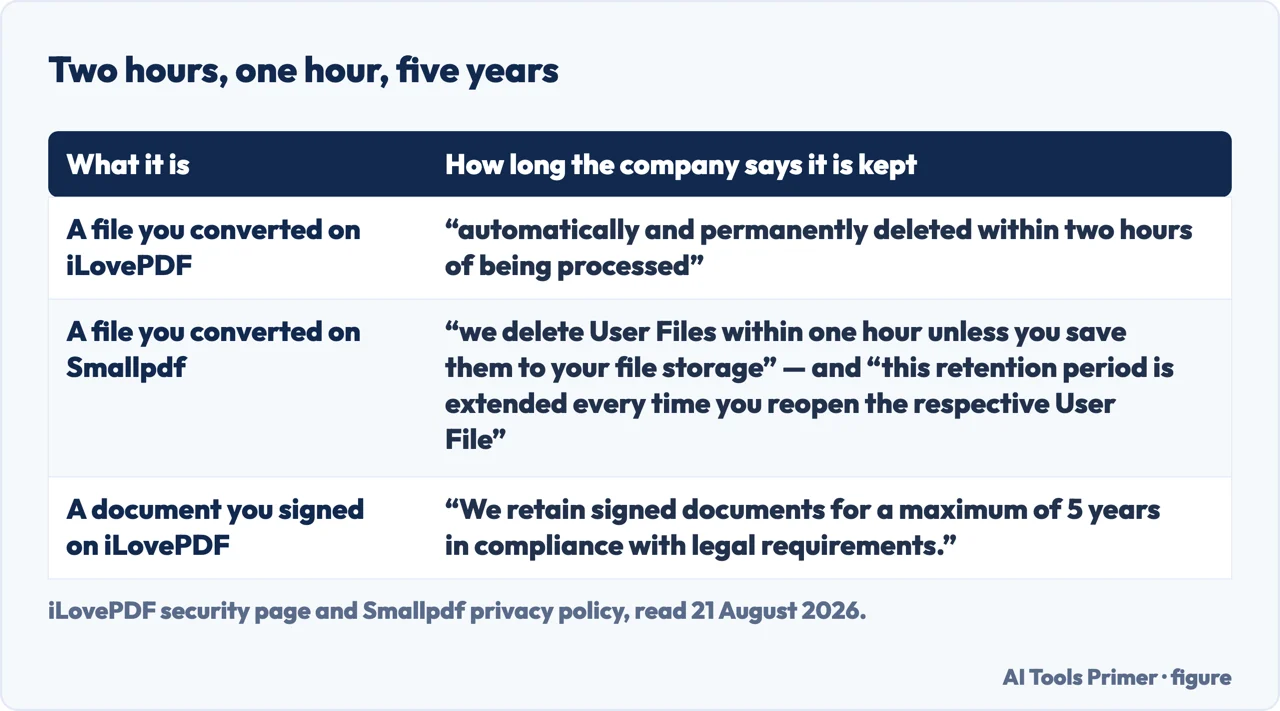
Those two details are the reason this page exists rather than a blanket warning. The risk is not that these companies are lying. It is that the summary in your head — “it gets deleted straight away” — is a simplification of a policy with conditions in it, and the conditions attach to exactly the documents that matter.
A rule that does not require reading a policy every time
The question is not whether a site is trustworthy. It is what the document is.
“Offline” is easier to act on when it has names attached, and each of these is documented by the company that ships it. On a Mac, Preview merges PDFs by dragging page thumbnails between sidebars, creates a new PDF by dragging thumbnails to the desktop, and exports to JPEG, PNG or TIFF from File > Export. In Word, File > Save a Copy > PDF produces the file without a browser involved.
On Windows, Microsoft Edge is a PDF reader as well as a browser — Microsoft documents basic form filling in it, and the ability to “view and validate certificate digital signatures in PDFs”. And any browser’s print dialogue writes a PDF: choosing Save as PDF in the destination list produces a file and prints nothing.
None of that makes the upload sites dishonest — the retention policies quoted above are real and, read carefully, mostly reassuring. It removes the question. A document that never leaves the machine has no retention period to check, no policy to have changed since you last read it, and no second copy to expire.
There is also a category the policies cannot cover, and it is worth naming. A published retention policy describes the intended behaviour of a well-run service. It does not describe what happens if that service is breached, sold, or replaced by a lookalike with a similar name — and the search results for these jobs contain plenty of sites nobody has heard of. The policy you read belongs to the site you meant to visit.
None of which is an argument for never using them. For a public document, an upload site is convenient, free and quick, and the two policies above are careful ones. It is an argument for spending ten seconds on the question before the file leaves the machine, because that is the only moment at which the decision is still yours.
And for the documents where the answer is no, this section has the offline route for nearly every job: converting, merging several files into one, splitting, compressing, signing, filling in a form, turning pictures into a PDF and a PDF into pictures. Each of those guides starts with what is already installed, and none of them asks you to weigh a privacy policy against a deadline.
The neighbouring searches are all the same worry with a different brand attached: is smallpdf safe, is simplepdf safe, secure pdf editor. The answer has the same shape every time — read what the company publishes, note the exceptions, and then ask what the document is. Pdf security as a phrase covers both halves, and only one of them is about the website.
Where to start
Four ways in.
- “It is a private document.”
- Go to doing it offline
- “I already uploaded it.”
- Read after the fact
Doing it offline
The guides that need no upload at all. Between them they cover almost everything anybody does to a PDF.
After the fact
For the file that has already been sent. Some of it can be undone, and knowing which part is worth ten minutes.
Not covered here. It will not claim these sites secretly keep your files. Two of the largest publish deletion within one and two hours, and this guide quotes them rather than the rumour.
It will not stop at the reassuring half. The retention clock can restart, and signed documents are kept for up to five years — both stated by the companies themselves.
And it will not tell you never to upload anything. It will tell you to spend ten seconds deciding, because after the upload the decision is no longer yours to make. What holds instead is simple: every retention figure on this page is quoted from the services’ own published pages.
Sources
- Apple on combining PDFs in Preview on Mac — the thumbnail drag between sidebars, creating a new PDF by dragging thumbnails to the desktop, and the warning that Preview saves changes automatically — support.apple.com, read 24 August 2026.
- Microsoft on the PDF reader in Microsoft Edge — basic form filling, and viewing and validating certificate-based digital signatures in PDFs — learn.microsoft.com, read 24 August 2026.
- iLovePDF — Security, on deletion within two hours and the five-year retention of signed documents — www.ilovepdf.com, read 21 August 2026.
- Smallpdf — Privacy Notice, on deleting user files within one hour, the extension of the retention period, and model training — smallpdf.com, read 21 August 2026.
Written by Alberto Gulotta
Founder and editor of AI Tools Primer, writing from Palermo, Italy. Thirty-five years of taking computers apart, starting with a Commodore 64 — the long version is on the about page.
Something wrong on this page? Write to aitoolsprimer@gmail.com and it gets fixed.
Written on 21 August 2026 · last checked 5 September 2026.
Independence and limits
No affiliate links and no paid placements anywhere on this site. Nobody pays to appear here, and no company has seen this page before you did.
This is general information, not professional advice. Where a page touches money, health, safety or the law, it names its source and the date it was read — and your situation may still differ. See the privacy page and the cookie policy.