
Docs · guide
How to fill out a PDF form, and what to do when it will not let you
By Alberto Gulotta · Updated · 8 min read
How to fill out a pdf form looks like one question and is two. When the form has real fields, there is almost nothing to explain. When it has not — or when it has fields that refuse to accept anything — the explanations that circulate are mostly guesses, and the real reasons are published.
There are two kinds of PDF form, and they behave nothing alike
Which one you have decides everything that follows.
Telling them apart takes a second: click where a box should be. If a cursor appears, you have the first kind. If nothing happens, you have the second — and the answer is not a better application, it is a different technique.
Three documented reasons a form refuses you
All three are stated by the companies themselves, and none of them is your fault.
That middle case is worth dwelling on because it is the one that makes people feel stupid. You open a government form in a browser, the boxes are visibly there, you click one and nothing happens. Nothing is wrong with your computer. Microsoft has written down that its browser does not support that kind of form, and the fix is to open the same file in a different reader rather than to try harder in the same one.
Microsoft’s feature table for the Edge PDF reader carries the limit in brackets, which is where limits usually hide: “Basic form filling (JavaScript forms aren’t supported).” That is a separate refusal from the XFA one above. A form built with scripted fields — the kind that totals a column as you type, or reveals a section once you tick a box — will open, will let you click into boxes, and will not behave. Nothing announces which kind you have until a field fails to do the thing it was built to do.
The same page documents a capability worth knowing about before paying for it elsewhere: “with Microsoft Edge, you can view and validate certificate digital signatures in PDFs.” Microsoft explains what that is checking: “certificate-based digital signatures are commonly used in PDF documents to ensure that the content in the document is the same as what the author intended it to be, and has not been changed.”
Which is the opposite job from filling one in. A signature you apply is a picture of your name; a certificate-based signature you validate is a check that the document has not moved since it was signed. The browser already on the machine does the second one, and Microsoft adds the honest caveat: “we’re actively working on improving the support to address more scenarios.”
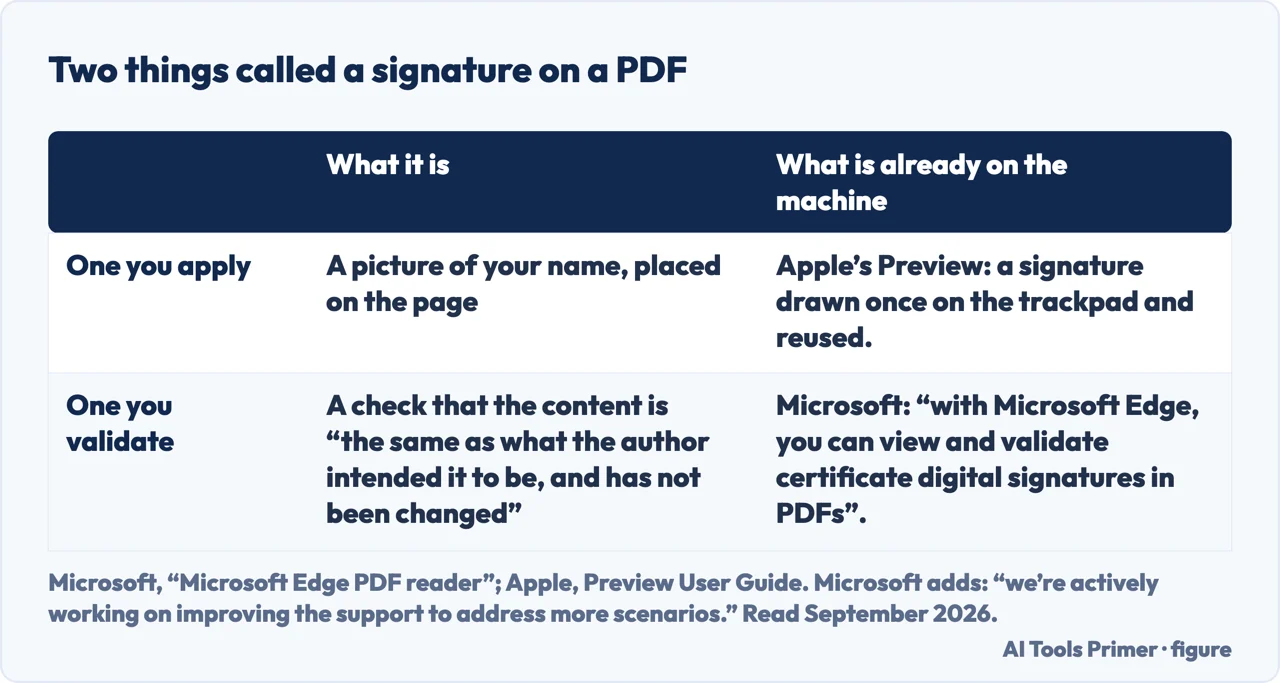
Look at what a form actually is before uploading one
Most of what is offered for this is a website that fills the form for you. Consider what that means for this particular category of document. A form is, by definition, about you — and the ones people cannot fill in are disproportionately the official ones: a tax return, a benefits claim, a visa application, a medical intake sheet, a bank mandate.
Those carry a full name, an address, a date of birth, and often an account or a national identification number. Uploading one to a free service is handing over a tidy, structured, machine-readable set of exactly the fields that identity theft is built from — and the defence against what is built from them is a free credit freeze rather than a subscription, which is what the published figures say about identity theft protection.
Every route on this guide keeps the document on your own machine, and all of them are already installed. That is not caution for its own sake — it is that the cost of being wrong here is high, and the free alternative is genuinely no slower.
For the third case — a form with no fields — the technique is the same everywhere and takes a minute to learn. You place your own text on top of the page, line by line, and then flatten the result so that what you typed becomes part of the document rather than a set of movable objects. That last step is the one people skip, and it is why a filled form sometimes arrives with the answers shifted a centimetre out of their boxes.
The phrasings show where people are stuck. How to fill out a pdf form online and how to fill out a pdf form for free are people looking for a service. How to fill out a form on pdf is somebody describing the problem rather than naming it. And how to fill out a pdf form on iphone is worth answering separately, because the phone case is genuinely different and genuinely good — the form often arrives as an attachment and can be filled and signed without ever reaching a computer.
Where to start
Four ways in.
- “The boxes work.”
- It is above. Then signing and sending
- “There are no boxes.”
- Go to forms without fields
- “It is on my phone.”
- That is on a phone
Forms without fields
A picture of a form. You add the text yourself, and the last step decides whether it stays where you put it.
Signing and sending
Most filled forms need a signature and a way back. Both are free and neither needs an upload.
On a phone
The case that is often easiest of all, because the form arrives where you already are.
Not covered here. It will not send you to a form-filling website. The documents in this category are the ones you should be least willing to upload, and every route here is already on your machine.
It will not describe a refusing form as a fault. Microsoft publishes which form types its reader does not support, and this guide quotes it.
And it will not skip the flattening step. A form whose answers can be dragged out of their boxes has not really been filled in. What holds instead is simple: the limitations quoted here come from Microsoft’s and Apple’s own documentation.
Collecting answers from people
Four ways to put a form in front of somebody and get it back filled in.
- The same job, in the other places it comes up
- How to make a Google Form, and what it records about people
- How to make a QR code for a Google Form, and why it breaks
- How to make a fillable form in Word, and lock it
Sources
- Microsoft Learn — PDF reader in Microsoft Edge, including “Basic form filling (JavaScript forms aren’t supported)” and the note that XFA is not supported — learn.microsoft.com, read 21 August 2026.
- Apple Support — Fill out and sign PDF forms in Preview on Mac, including the form filling toolbar for documents without fields — support.apple.com, read 21 August 2026.
Written by Alberto Gulotta
Founder and editor of AI Tools Primer, writing from Palermo, Italy. Thirty-five years of taking computers apart, starting with a Commodore 64 — the long version is on the about page.
Something wrong on this page? Write to aitoolsprimer@gmail.com and it gets fixed.
Written on 21 August 2026 · last checked 10 September 2026.
Independence and limits
No affiliate links and no paid placements anywhere on this site. Nobody pays to appear here, and no company has seen this page before you did.
This is general information, not professional advice. Where a page touches money, health, safety or the law, it names its source and the date it was read — and your situation may still differ. See the privacy page and the cookie policy.