
Docs · guide
How to sign a PDF, and whether it counts
By Alberto Gulotta · Updated · 7 min read
The easy half, done properly
How to sign a PDF with what you already have
Before the legal ladder below, the mechanics — because what is needed here is to return a document today, and every device in the house can already do it without an account.
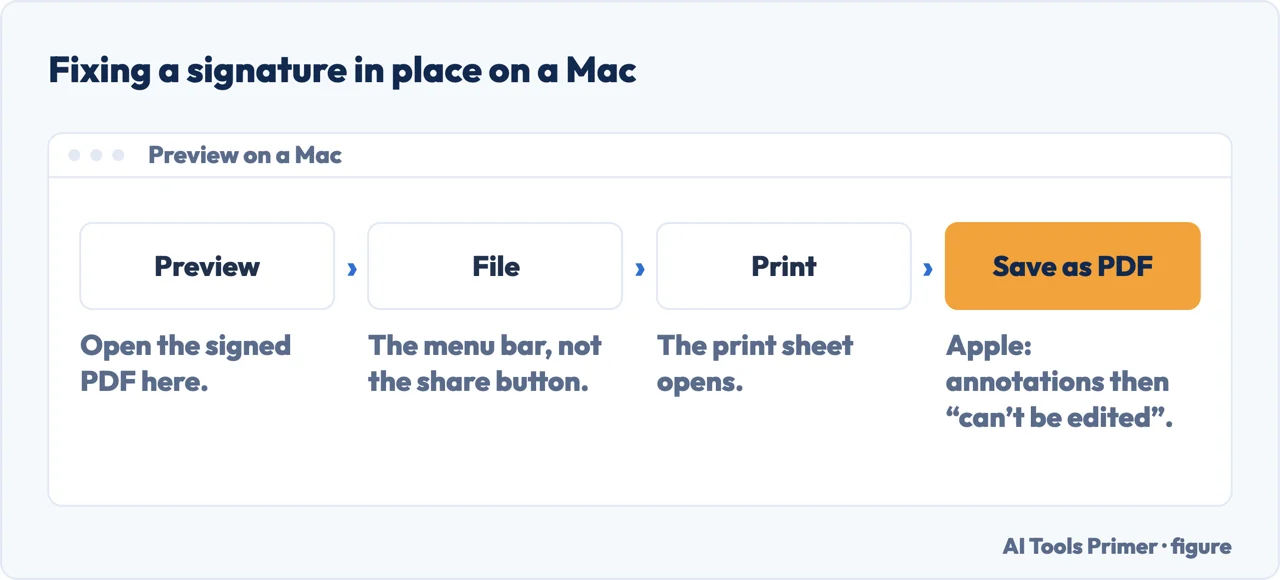
One step decides whether your signature stays where you put it. Saved the ordinary way, it remains a movable object on top of the page — the recipient can drag it off. Apple documents the alternative for a PDF whose annotations should be fixed: “File > Print, then select Save as PDF”, which flattens them so they “can’t be edited”. On a contract that is not a detail.
How to sign a pdf has two answers, and the tools only give you one. A signature generator solves the easy half in about thirty seconds. The hard half — whether the resulting mark counts for anything — is decided by law rather than by software, and almost no tool on the first page of results mentions it.
Both halves matter, and they matter in different situations. Returning a delivery form and signing a lease are not the same act, even though the gesture on screen is identical.
A simple electronic signature
The broadest level. eIDAS defines an electronic signature as “data in electronic form which is attached to or logically associated with other data in electronic form and which is used by the signatory to sign”. A typed name or a drawn scribble can qualify.
An advanced electronic signature
Must be uniquely linked to and capable of identifying the signatory, created so the signatory retains control, and linked to the document so that any later change is detectable. The Commission is explicit that this is still not equivalent to a handwritten signature.
A qualified electronic signature
The only level the European Commission says is “explicitly recognized to have the equivalent legal effect of hand-written signatures all over the EU”. It needs a qualified certificate from a trust service provider — which is why it is not what a free signature tool produces.
The three levels are not three degrees of neatness. The European Commission states the consequence plainly: “while different levels of electronic signatures may be appropriate in different contexts, only qualified electronic signatures are explicitly recognized to have the equivalent legal effect of hand-written signatures all over the EU.” Everything below qualified can still be valid, and often is — but only the top rung carries that automatic, everywhere recognition.
The Commission also says what that buys you in practice: “as their legal effects are equivalent to the ones of handwritten signatures, qualified electronic signatures can be used in any situation, even cross-border, where handwritten signatures are used, such as: contracts (sales, employment, lease, insurance, etc.)”. Cross-border is the word doing the work — a signature accepted at home is not automatically accepted in the next country unless it is qualified.
And underneath all three levels sits the definition that has nothing to do with technology: an electronic signature “is a legal concept capturing the signatory’s intent to be bound by the terms of the signed document”. The drawn squiggle is evidence of intent, not the thing itself. Whether a provider is genuinely qualified is checkable rather than a claim: the Commission publishes it, browsable through the Trusted List.
The searches divide along exactly that line. Signature generator, signature maker and handwritten signature generator are people who want an image. How to sign a pdf and e sign pdf are people with a document open right now. Electronic signature, esignature and digital signature are the legal words, and the last of those means something quite different from the other two. Free electronic signature and sign a document online come from somebody who has just met a paywall.
That ladder is the European framework, quoted from the Commission that publishes it. Other jurisdictions organise it differently, but the shape recurs: at the bottom, almost any mark you intend as a signature; at the top, a certificate issued to a verified person. Free tools live at the bottom, and for most everyday documents that is entirely sufficient.
The way people word this sorts them by what they are about to sign. How to electronically sign a pdf and how to sign a pdf electronically come from somebody returning a form and wanting it done on screen. How to digitally sign a pdf is a different request even though it reads the same: a digital signature, in the technical sense, is a cryptographic certificate rather than a picture of a name, and it is the version an employer or a public body occasionally insists on. The ladder below is where that distinction becomes concrete.
Where to start
Five ways in.
- “I need to sign this and send it back today.”
- Start at signing it yourself
Signing it yourself
Free, offline, already installed. For the overwhelming majority of documents people sign, this wing is the whole answer.
Not covered here. It will not tell you a signature is legally valid. That depends on the document, the jurisdiction and sometimes on the parties, and no web page can answer it for your case. What this guide does is name the framework and quote it, so you know which question to ask and who to ask.
It will not rank the signature services yet. That verdict needs real documents sent to real people, and an account of what the trail looked like afterwards.
And it will not encourage anybody to upload an image of their own signature to a free website. It is one of the few pieces of personal data that is genuinely reusable by somebody else, and the offline routes on the first wing exist precisely so that you do not have to. What holds instead is simple: the legal ladder here is quoted from the European Commission, not summarised from memory.
Paper you will have to find again
Getting something off paper and into a file that still opens, is small enough to send, and counts when somebody asks for it.
- The same job, in the other places it comes up
- How to organize receipts, and how long to keep them
- How to scan a document on iPhone, and on Android
- Compress PDF files: what actually shrinks
Sources
- European Commission on eSignature — the eIDAS definition, the three levels, the advanced requirements and the legal effect of a qualified signature — ec.europa.eu, read 21 August 2026.
- Apple on filling out and signing PDF forms in Preview, including capturing a signature — support.apple.com, read 21 August 2026.
- Microsoft on viewing and validating certificate-based digital signatures in Edge — learn.microsoft.com, read 21 August 2026.
Written by Alberto Gulotta
Founder and editor of AI Tools Primer, writing from Palermo, Italy. Thirty-five years of taking computers apart, starting with a Commodore 64 — the long version is on the about page.
Something wrong on this page? Write to aitoolsprimer@gmail.com and it gets fixed.
Written on 21 August 2026 · last checked 5 September 2026.
Independence and limits
No affiliate links and no paid placements anywhere on this site. Nobody pays to appear here, and no company has seen this page before you did.
This is general information, not professional advice. Where a page touches money, health, safety or the law, it names its source and the date it was read — and your situation may still differ. See the privacy page and the cookie policy.