
Docs · guide
How to organize receipts, and how long to keep them
By Alberto Gulotta · Updated · 7 min read
How to organize receipts is usually answered with folders, apps and colour-coded labels. None of that is the point. The point is what the pile has to be able to do, and two tax authorities state that plainly enough to build a system around.
The system does not have to be clever. It has to prove something.
Most advice on this subject is about folders and apps. The tax authorities are less interested in your filing method than in what it can demonstrate. The United States Internal Revenue Service puts the freedom and the obligation in one sentence: “You may choose any recordkeeping system suited to your business that clearly shows your income and expenses.”
Any system. Clearly shows. That is the whole specification, and it explains why an elegant app used inconsistently is worse than a shoebox used every week.
The IRS also names the thing the system exists to serve: “The responsibility to substantiate entries, deductions, and statements made on your tax returns is known as the burden of proof.” The burden is yours. A receipt is not paperwork — it is the evidence.
How long to keep them
Two authorities, two different answers, both published. Yours may differ again.
United States · IRS
As long as needed “You must keep your records as long as needed to prove the income or deductions on a tax return.” For employment taxes specifically: “Keep all records of employment taxes for at least four years.”United Kingdom · HMRC
At least 5 years “You must keep your records for at least 5 years after the 31 January submission deadline of the relevant tax year.”Notice that neither answer is “one year”, which is the interval a tax return invites you to imagine. And notice that they differ from each other — which is the first reason to check your own country’s rule rather than the first article you find.
A system that survives a bad month
Judged by one criterion: whether it still works when you are busy.
- Capture at the moment, not at the end.Scan the receipt when it is in your hand. Every system that requires a catch-up session fails during the month you most needed it.
- Scan, do not photograph.Both phones have a document scanner built in. A squared, cropped, legible page beats a photograph taken at an angle — and thermal receipts fade, so the scan may outlive the paper.
- Name it so it sorts itself.Date first, in year-month-day order, then who and what. The folder then sorts chronologically without anybody maintaining it.
- One folder per tax year, not per category.Categories change and get argued about. Years do not, and a year is the unit an authority asks about.
- Keep the paper until the period is over.Where the rule is five years, a backup that lives only on one laptop is not a system.
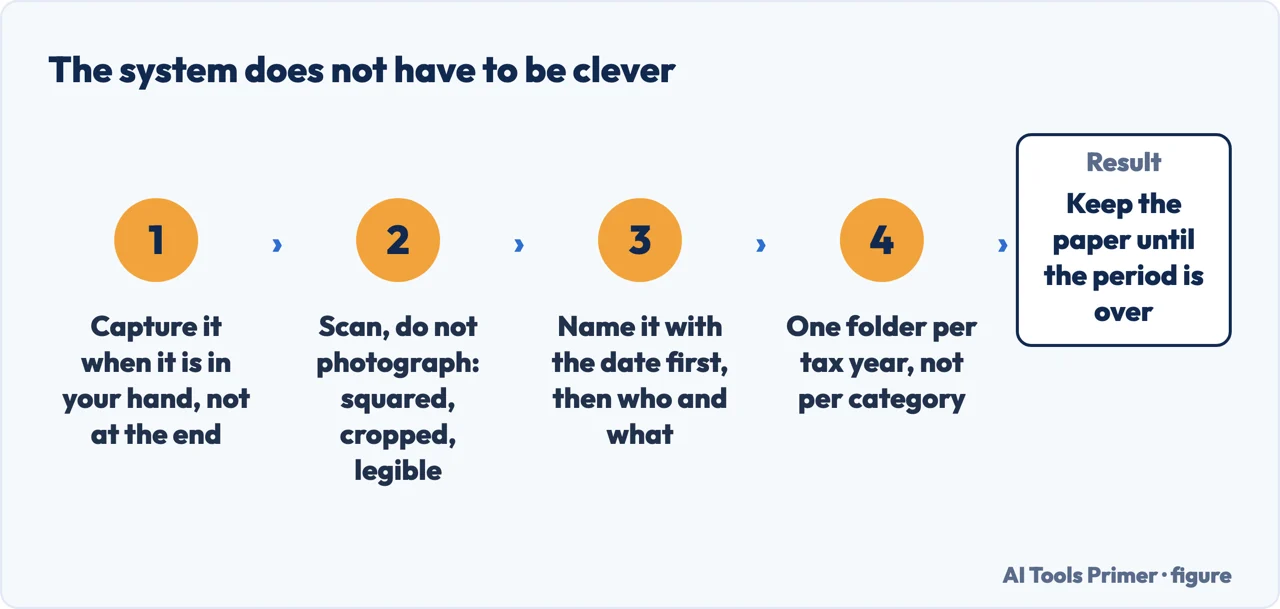
Two of those steps are worth a further sentence. Thermal receipts fade — the ones from card machines and petrol stations are printed with heat rather than ink, and a year in a drawer can leave a blank slip. If the retention period is five years, the scan is not a convenience, it is the record. And date-first naming sounds fussy until the first time somebody asks for “everything from March”, at which point it is the difference between a search and an afternoon.
A word about the apps, since they are what this question mostly returns. Receipt scanners and expense tools are genuinely useful for volume — dozens a week, several people, a business that reimburses. For one person with a handful of receipts a month, the phone’s own scanner and a folder do the same job, cost nothing, and cannot stop working because a subscription lapsed. That last risk is not theoretical for records you are required to keep for years.
The variations show who is asking. How to organize receipts for taxes is the commonest and the one with a deadline attached. How to organize receipts for business is somebody with volume, and the honest answer there is different — that is where software earns its keep. How to organize receipts in a binder is a paper system, which is entirely legitimate: the IRS says any system that clearly shows income and expenses, and a binder does.
This guide reports what tax authorities publish and does not interpret it. It is not tax advice, the rules differ by country and by situation, and a page that tells you what you may deduct is guessing about circumstances it cannot see. What it can do is stop you discovering in year four that you kept nothing from year one.
Where to start
Four ways in.
- “I have a pile of paper.”
- Start at getting them in
- “How long do I keep them?”
- It is above. Then storing them
- “I run a business.”
- Go to volume and software
- “The receipt has faded.”
- Read when the paper fails
Getting them in
Capture is the whole battle. Every system that survives is one where the capture takes ten seconds and happens immediately.
Storing them
Where the records live for as long as the rule requires, which is longer than a phone lasts.
Volume and software
Where the tools genuinely earn their price, and the questions to ask before subscribing to something that holds your records.
When the paper fails
Faded slips, lost receipts, a folder that was thrown out. All of it has happened to everybody, and there is published guidance.
Not covered here. It will not give you tax advice. It reports what two authorities publish, with the dates, and says plainly that your own rules may differ.
It will not sell you an expense app. The scanner already on the phone and a folder per year do the job, and cannot expire.
And it will not pretend the filing method is the hard part. Capturing the receipt in the first ten seconds is, and every system that ignores that fails in a busy month. What holds instead is simple: the retention rules quoted here come from the IRS and HMRC directly.
Paper you will have to find again
Getting something off paper and into a file that still opens, is small enough to send, and counts when somebody asks for it.
- The same job, in the other places it comes up
- How to scan a document on iPhone, and on Android
- How to sign a PDF, and whether it counts
- Compress PDF files: what actually shrinks
Sources
- Internal Revenue Service (United States) — Recordkeeping for small businesses and the self-employed — www.irs.gov, read 21 August 2026.
- GOV.UK (United Kingdom) — Self-employed records: how long to keep your records — www.gov.uk, read 21 August 2026.
Written by Alberto Gulotta
Founder and editor of AI Tools Primer, writing from Palermo, Italy. Thirty-five years of taking computers apart, starting with a Commodore 64 — the long version is on the about page.
Something wrong on this page? Write to aitoolsprimer@gmail.com and it gets fixed.
Written on 21 August 2026 · last checked 5 September 2026.
Independence and limits
No affiliate links and no paid placements anywhere on this site. Nobody pays to appear here, and no company has seen this page before you did.
This is general information, not professional advice. Where a page touches money, health, safety or the law, it names its source and the date it was read — and your situation may still differ. See the privacy page and the cookie policy.