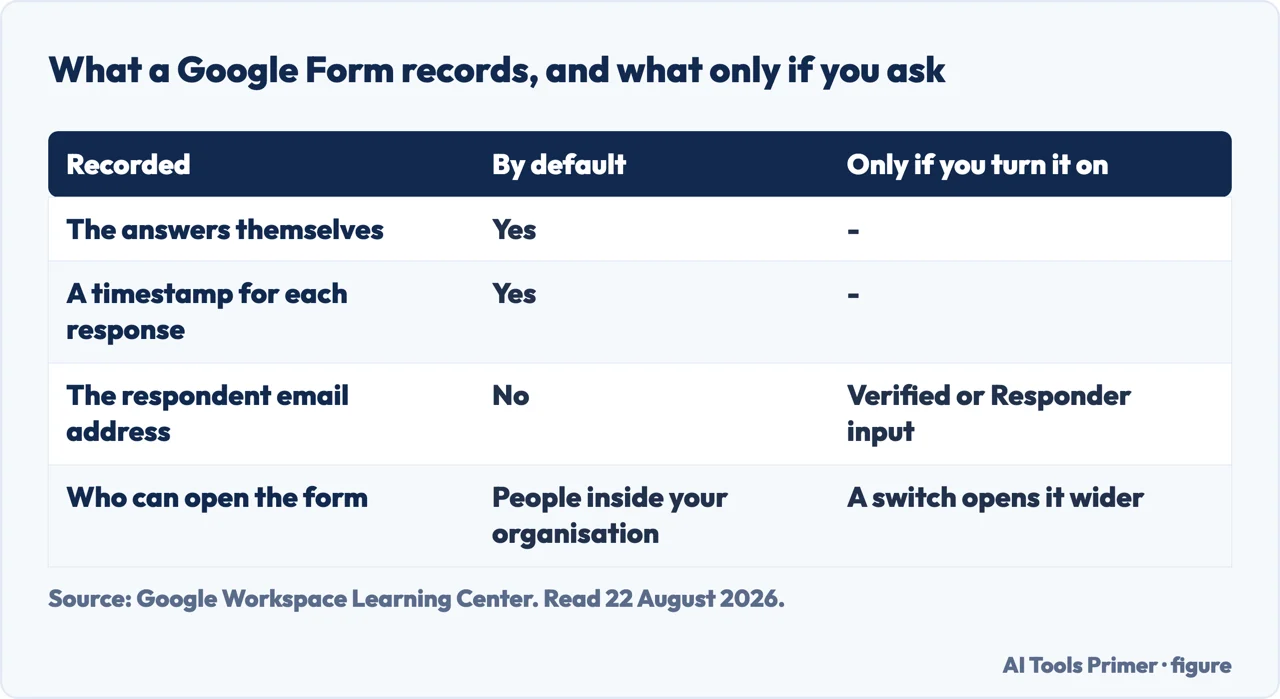
Building the thing takes five minutes. What decides whether how to make a google form ends well is two settings that sit outside the form editor — one controlling who can reach it, the other controlling what it writes down about them. Both have defaults, and on a work or school account the first default is stricter than the form looks.
“By default, access is restricted to people inside your organization. People must
sign in with their email address to access your form.”
Google, describing a form made on a work or school account. That is one sentence and two
consequences: anybody outside the organisation cannot open it at all, and everybody inside
it has had to identify themselves to get in. If you have sent a form out and had no replies, this
is the first thing to check — not the link.
The switch: Settings → beside Responses → turn off
“Restrict to users in [your-company.com] and its trusted organizations”.
What the form keeps, and what it keeps only if you ask. Figure drawn by AI Tools Primer.
That restriction is sensible inside a company and fatal outside one. A form built at work and sent to a supplier, a parent, a customer or a friend will simply refuse them — and the person who built it sees nothing wrong, because for them it opens perfectly. Test the link from an account that is not yours before sending it to anybody.
The second setting is the one people search for by its opposite: how to make a form anonymous. Google offers two ways of collecting an address, and they are not the same thing at all.
Verified
Google records the Google Account address of whoever replies. And the part worth knowing
before you worry about it: “Respondents must confirm their Google Account email address
gets collected with their response. The confirmation displays on each page of the
form.”
Nobody is being recorded quietly. The form says so, repeatedly.
Responder input
The respondent types an address into a field. Google’s description of the effect is plain:
“they will be required to enter their email address before they submit the form.”
Which means it is required but not checked — a difference worth understanding before relying
on the addresses you collect.
The confirmation line in the first card is the one worth quoting to somebody nervous about a form. With Verified, Google says the notice “displays on each page of the form” — not once at the start where it can be missed, but on every page. A respondent who reaches the end without noticing has been told several times.
And the honest reading of the second: an address typed into a box is an address somebody chose to type. It is required, which is not the same as correct. For a competition entry that matters; for a staff survey it may be exactly what you want, because it lets people give an address they are comfortable giving.
If you want neither — a genuinely anonymous form — the arrangement is the absence of both: collection off, and, on a work account, the organisation restriction off too, since a form that requires signing in has already identified everybody who opens it.
Making the thing, in Google’s steps
Go to forms.google.com and click Blank form. Name it — the untitled form is the
one nobody can find again.
Click Add, then choose the question type to the right of the title. Google’s reason for
the Required toggle is refreshingly blunt: it is “to prevent people from not
answering”.
Questions can carry a description, an image, or a YouTube video, all from
the same More menu.
Add Section to break it up — and note what a section does: “Each section starts on a
new page.” It is a page break, not a heading.
Preview, top right, opens in a new window. It is the only way to see the form as the
person filling it in will.
The fourth of those steps is the one that changes how a long form feels. A section is not a heading — Google is explicit that each one starts a new page. That is a decision about pacing rather than about layout: the same ten questions can arrive as one long page or as three shorter ones, and the person filling it in only ever sees the page they are on.
One line about collaborators that deserves to be read before you invite anybody. Google:
“Whoever you invite can edit any part of your form, including responses and where they are
saved.”
Adding an editor is not the same as sharing the form to be filled in. An editor can see every
answer already given, change the questions under them, and move the spreadsheet the replies land
in. For a survey that promised confidentiality, that is a sentence with consequences.
One last practical note about where the answers go. Google mentions almost in passing that an editor can change where responses are saved. That is worth knowing simply because it means the answers have a destination that is separate from the form itself — and if you have ever wondered whether replies still exist after a form was edited, that destination is the thing to go and look at.
Where a Google Form is not the right container at all. Boston University’s research guidance draws the line by subject matter rather than by feature: “if you are not conducting health-related research, Google Forms may be OK to use. However, if you are conducting health- related research we suggest using a BU Microsoft app.” The reasoning applies well outside universities. A form is a fine way to collect opinions, bookings and sign-ups; it is the wrong place for health details, identity documents or anything a regulator would ask you to account for, and no setting inside the form changes that.
The guides below take it four ways: who can open it, what it records, building it, and getting it in front of people.
Not covered here. It will not treat the form as finished when the questions are written. Two defaults decide who can answer and what is recorded, and neither is on the page you build.
It will not describe a form as anonymous while a sign-in is required. On a work account that requirement identifies everybody who opens it.
And it will not call adding a collaborator a way of sharing. Google says an editor can see the responses and change where they are saved. What holds instead is simple: the organisation default and the editor’s access to responses are Google’s own wording.
Collecting answers from people
Four ways to put a form in front of somebody and get it back filled in.
Google Workspace Learning Center — Create your first form in Google Forms (the blank-form and question steps, the Required toggle and Google’s stated reason for it, descriptions, images and video on a question, sections and the note that each starts a new page, Preview, the statement that access is restricted to people inside your organization by default and the switch that removes it, the Verified and Responder input options for collecting email addresses with the confirmation shown on each page, and the note that a collaborator can edit any part of the form including responses and where they are saved) — support.google.com, read 22 August 2026.
Boston University Research Support — Data security in human subjects research: the line between research a Google Form can carry and research it cannot, from an institution that sells no form software — www.bu.edu, read 4 September 2026.
AG
Written by Alberto Gulotta
Founder and editor of AI Tools Primer, writing from Palermo, Italy. Thirty-five years of
taking computers apart, starting with a Commodore 64 — the long version is on the
about page.
Written on 22 August 2026 · last checked 23 September 2026.
§
Independence and limits
No affiliate links and no paid placements anywhere on this site. Nobody pays to appear here,
and no company has seen this page before you did.
This is general information, not professional advice. Where a page touches money, health,
safety or the law, it names its source and the date it was read — and your situation may
still differ. See the privacy page and the
cookie policy.