
Docs · guide
How to send large files via email, without paying
By Alberto Gulotta · Updated · 11 min read
Sending large files via email is already solved, free, by both of the two commonest mail accounts — and one of them does it without being asked. Gmail turns anything over 25 MB into a Google Drive link by itself. Apple Mail offers Mail Drop, which takes 5 GB and costs nothing. A transfer service is the third choice here, not the first.
| Route | Documented ceiling | How long it lasts | Source |
|---|---|---|---|
| Gmail attachment, personal account | 25 MB per message | As long as the message | Gmail Help |
| Gmail attachment, work or school account | Set by your Google Workspace administrator | As long as the message | Gmail Help |
| Gmail above the limit: a Google Drive link | Your Google storage, shared with Drive and Photos | Until you change the sharing | Gmail Help |
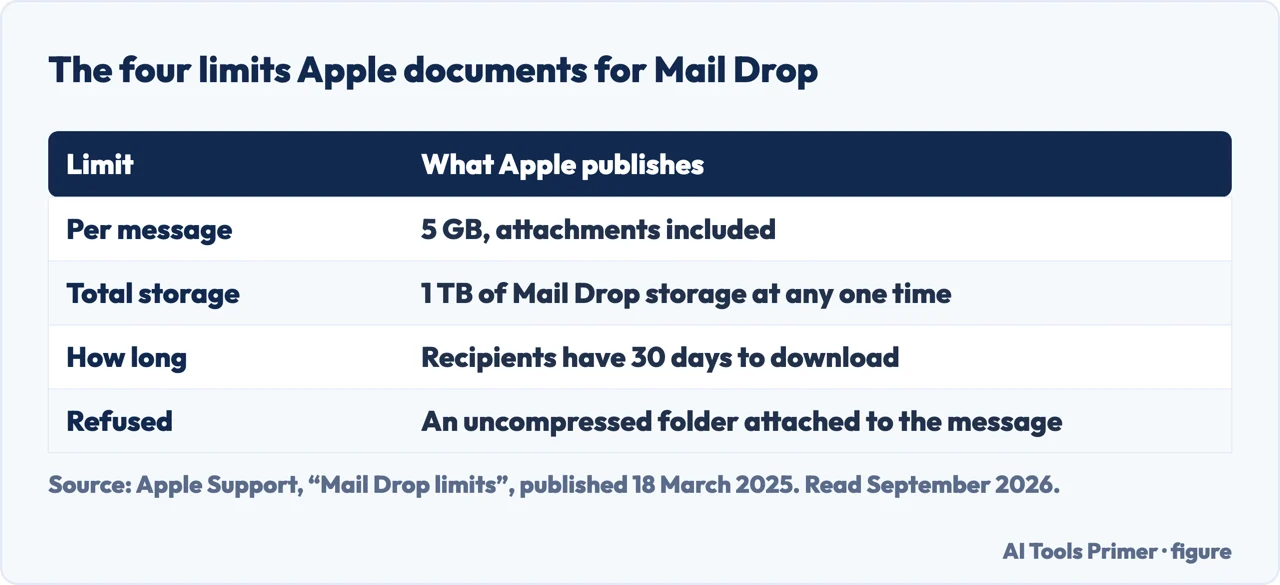
| Apple Mail Drop, one message | 5 GB including attachments | 30 days to download | Apple Support |
| Apple Mail Drop, everything in flight | 1 TB of Mail Drop storage | Frees itself as attachments expire | Apple Support |
Gmail
It does it for you
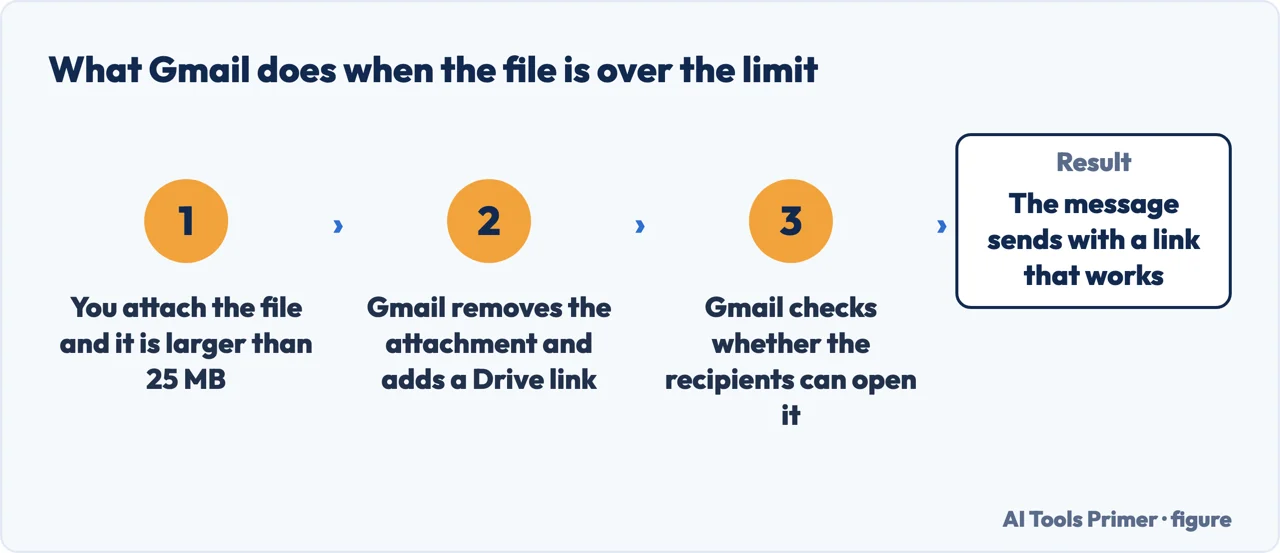
Google: “For personal Gmail accounts, the limit is 25 MB.” Above that, nothing fails — “Gmail automatically removes the attachment and adds it as a Google Drive link in the email.”
Which means the answer is already on the screen of anyone searching this, in a place it is easy not to recognise it as one.
Apple Mail
Mail Drop, free with iCloud
Apple: “With Mail Drop, you can send attachments up to 5 GB in size.” It works from Mail on a Mac, on an iPhone or iPad, and from iCloud.com in any browser.
And the detail that makes it usable: “All files types are supported and attachments don’t count against your iCloud storage.”
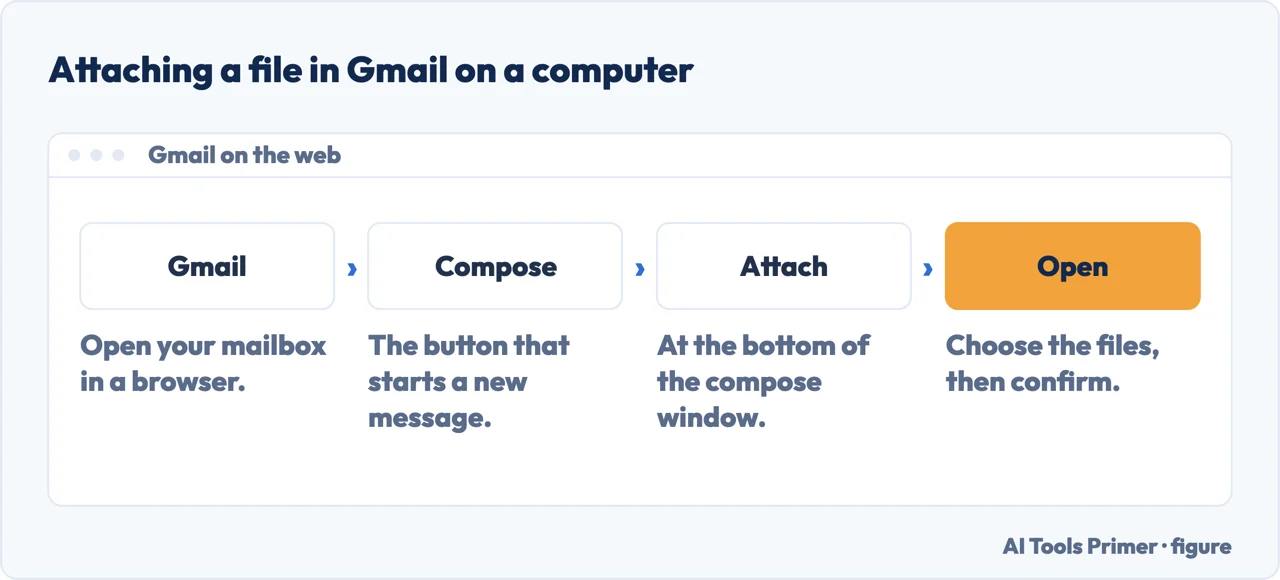
- Open Gmail and click Compose. On a computer, in a browser: the mobile apps behave the same way but the buttons sit elsewhere.
- Click Attach at the bottom of the window. That is the paperclip. Google’s steps run “Click Compose”, then “Click Attach”, then “Choose the files you want to upload”.
- Choose the file and click Open. Nothing tells you yet whether it is too big; the size is decided after the upload, not before it.
- Let Gmail swap it for a link. Over the limit, “Gmail automatically removes the attachment and adds it as a Google Drive link in the email”. You do not have to ask for it.
- Answer the sharing question before you send. Gmail “checks to see if your recipients have access to the file” and prompts you to change the setting if they do not. This is the step people click past, and it is the one that decides whether the link opens.
The limit that matters is not yours
Every guide to this subject tells you your own provider’s ceiling. Apple names the one that actually decides whether the message arrives: “The recipient’s email app might have a smaller message size limit that prevents the attachment from being delivered.”
You can be comfortably inside your own allowance and still have the file bounce, because the person receiving it is on a company mail server with a stricter rule. A link is immune to this and an attachment is not — which is the practical argument for sending a link even when the file would technically fit.
Three things to check before you rely on it
That last one is the commonest silent failure in this whole subject, and it is worth being exact about it. Google does warn you: the prompt appears when the recipients cannot open the file. But it appears once, in the second before you send, and if you take “Anyone with the link” to make it go away, anyone forwarded the message gets the same access — Google’s words: “if the message is forwarded or new people are added to the conversation, they’ll have the same permissions as the people you originally sent the message to.” The narrow choice is behind “More options”, where you can share with the recipients only.
Google states it in one line, under storage rather than under attachments: “Attachments count toward your Google storage. Storage is shared across Drive, Photos, and Gmail. If you reach your storage limit, you can’t send or receive attachments.” A phone quietly backing up photos can therefore stop your email — not the message, the attachments — and nothing in the failure points at Photos. Google’s own cleanup advice is aimed back at the mailbox: “go through your inbox and delete unneeded large attachments. Regularly empty your trash and spam.”
The 25 MB figure is also not universal. “For work and school accounts, your Google Workspace administrator sets the attachment sending limits and attachment receiving limits.” Two numbers, both someone else’s, and either can be lower than the one every guide quotes.
Two smaller refusals worth recognising when they happen. One is by design and permanent: “to prevent viruses, Gmail doesn’t let you attach executable files, like files ending in .exe.” The other is a race rather than a rule: “if you upload files from another device, wait until the upload completes. Then send the attachments in your current message” — and if you cannot wait, “remove the attachments that are uploading from the other device”.
So the order to work through is short, and it costs nothing. Try attaching it. On Gmail, anything over the limit becomes a Drive link by itself. On Apple Mail, you are offered Mail Drop when the message exceeds what your provider accepts — Apple: “Mail will ask you to send the attachments using Mail Drop.” If neither applies, put the file in whatever cloud storage came with your account and send the link deliberately rather than accidentally.
A transfer service earns its place in one situation: sending something to somebody you have no shared platform with, where a link that expires is a feature rather than a problem. That is a real case. It is not the case this page is written for, which is emailing a video to a colleague or a folder of photographs to a relative — and for that, the tools are already in the account.
The way people ask sorts them by what they are sending. How to send a large file through email and how do you email large files are the general version. How to send large video files is the commonest specific one, and it is also the case where compressing first often removes the problem entirely. And send big files free is somebody who has already been quoted a price for something their mail account includes.
One habit is worth more than any of the routes above. Before sending anything large, ask whether it needs to be large. A video exported at a sensible size, a scan made at a sensible resolution, a set of photographs that are not all full-resolution originals — each of those turns a transfer problem into an ordinary attachment, and none of them requires a service.
Where to start
Four ways in.
- “It is a video.”
- Go to making it smaller
- “It has to be private.”
- Read what you are sharing
Making it smaller
Often the real answer. A file that fits needs no service, no link and no expiry date.
What you are sharing
A large file is usually a personal one. This wing is about what leaves with it.
Questions people also ask
How do I attach a file bigger than 25 MB to an email?
In Gmail you attach it as usual. Google documents that above the limit “Gmail automatically removes the attachment and adds it as a Google Drive link in the email”. In Apple Mail, when the message is larger than your provider accepts, “Mail will ask you to send the attachments using Mail Drop”, which takes up to 5 GB.
How do I send a large folder through email?
Compress it first. Apple lists “an uncompressed folder is attached to the message” among the reasons Mail Drop refuses to send, so a folder that would fit as an archive is turned away as a folder. One archive also arrives as one file instead of forty attachments.
Can I send a 100 GB file by email for free?
No, and no free route gets close. Mail Drop stops at 5 GB per message and 1 TB of storage in total; a Google Drive link is bounded by the storage you already have, which is shared with Drive and Photos. Above that you are moving a disk, not sending an email.
Why does a large attachment fail when I am under my own limit?
Two documented reasons. Apple: “the recipient’s email app might have a smaller message size limit that prevents the attachment from being delivered.” And Google: attachments count toward your storage, and “if you reach your storage limit, you can’t send or receive attachments”.
Not covered here. It will not open with a transfer service. Two of the largest mail providers include a free answer, and one of them applies it automatically.
It will not quote only your own size limit. Apple documents that the recipient’s limit can be smaller, and that is the one that decides whether the file arrives.
And it will not rank the transfer services yet. That needs the same files — a long video, a folder of raw photographs, a document with a deadline — through each of them, with what each keeps and for how long published alongside. What holds instead is simple: the limits on this page are quoted from Google’s and Apple’s own documentation.
A video that has to travel with the document
Putting the video in is the easy half. Getting the file to somebody is the other one.
- The same job, in the other places it comes up
- How to embed a video in PowerPoint, so it still plays
- How to compress video without guessing at the result
- MP4 converter: what you are actually converting
Sources
- Gmail Help — Send attachments with your Gmail message, including the 25 MB limit and the automatic Drive link — support.google.com, read 21 August 2026.
- Apple Support — Mail Drop limits, including the 5GB ceiling, the 30-day expiry and the recipient’s own limit — support.apple.com, read 3 September 2026 · page published 18 March 2025.
- Gmail Help — Send Google Drive attachments in Gmail: what Gmail checks before it sends a link, and what forwarding does to the permissions — support.google.com, read 3 September 2026.
Written by Alberto Gulotta
Founder and editor of AI Tools Primer, writing from Palermo, Italy. Thirty-five years of taking computers apart, starting with a Commodore 64 — the long version is on the about page.
Something wrong on this page? Write to aitoolsprimer@gmail.com and it gets fixed.
Written on 21 August 2026 · last checked 3 September 2026.
Independence and limits
No affiliate links and no paid placements anywhere on this site. Nobody pays to appear here, and no company has seen this page before you did.
This is general information, not professional advice. Where a page touches money, health, safety or the law, it names its source and the date it was read — and your situation may still differ. See the privacy page and the cookie policy.