
Video · guide
MP4 converter: what you are actually converting
By Alberto Gulotta · Updated · 9 min read
Before choosing an mp4 converter it is worth knowing what an MP4 is, because it is not what the name suggests. It is not a way of compressing video. It is a box.
An MP4 is a box, not a thing
What Mozilla’s developer documentation calls a media container, read 21 August 2026.
.mp4 — the container
The definition: “A media container is a file format that encapsulates one or more media streams (such as audio or video) along with metadata, enabling them to be stored and played back together.” And the part that matters here: a file’s format “is defined by multiple components, including the audio and/or video codecs used, the media container format (or file type), and optionally other elements such as subtitle codecs or metadata”. The box and its contents are two different decisions.
The specification says the same thing in one line. Mozilla’s reference for media containers lists which browsers support which container, then adds the caveat that decides everything on this guide: “Support is also implied only for the container itself, not for any specific codecs.” Every browser supports MP4. That tells you nothing about whether a particular MP4 will play, and it is why a converter that only relabels the box has not converted anything.
The box is also older than most of the video in it. Mozilla dates the two parts of the format to 1999 and 2003, and describes today’s MP4 as popular “as it supports several of the most-used codecs and is broadly supported” — the container has outlived several generations of the things it carries, which is precisely why the label on it stopped meaning very much.
When MP4 is not the answer. Mozilla’s advice starts from use rather than from format: “your decision should depend on your intended usage”, and playing something back is a different job from recording or editing it. Two cases come out of that. If what you want is an open format rather than the industry default, the guidance is to “consider using one of the open container formats such as FLAC (for audio) or WebM (for video)”. And if you are converting because a specific codec is required at the other end, the instruction is blunt: “make sure the container you choose supports the appropriate codecs” — the container will not supply one it does not carry.
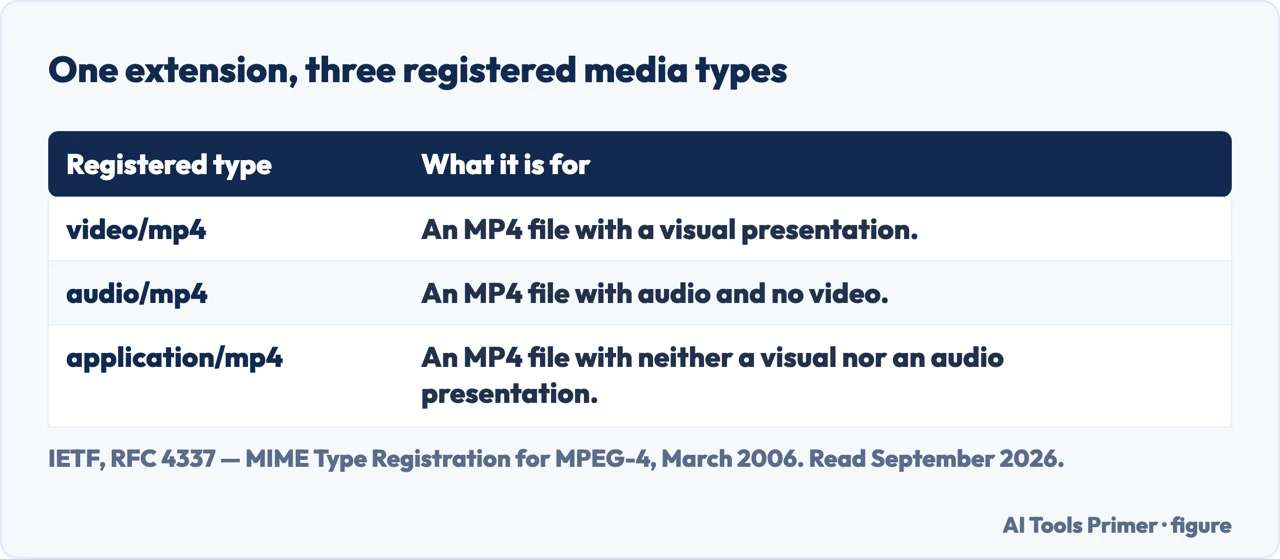
The standards bodies file it the same way, and one of their registrations makes the point better than an explanation would. RFC 4337, “MIME Type Registration for MPEG-4” (March 2006), registers not one media type for these files but three — video/mp4, audio/mp4 and application/mp4, the last of those for files with neither a visual nor an audio presentation. The same box, registered three times, according to what is inside it. It also records where the box came from: “Amendment 1 of the ISO/IEC 14496 standard (also known as version 2) introduced a standard file type, called MP4 files, for encapsulating ISO/IEC 14496 data.” The extension is a declaration about the packaging, not about the contents.
Why one file is sometimes not enough. The reason large sites ship the same video twice is in the same reference: “To optimize compatibility, it’s worth considering providing more than one version of media files”. A browser is offered WebM first and falls back to MP4 if it cannot play it. That is worth knowing before you spend an evening hunting for the single file that plays everywhere — the people whose job this is do not believe there is one.
MOV and MP4 are cousins, not strangers, which is why that particular conversion is usually the easy one. Mozilla traces the lineage plainly: “The MP4 file format is derived from the ISO base media file format, which is directly derived from the QuickTime file format developed by Apple.” A MOV out of an iPhone very often already holds the codecs an MP4 is expected to hold, so the work is repackaging rather than re-encoding — fast, and lossless, because nothing is decoded and squeezed again. The reason to do it at all is reach rather than quality: for the QuickTime container Mozilla records support in “Only older versions of Safari, plus other browsers that supported Apple’s QuickTime plugin”, while MP4 is listed as supported by all browsers.
That single fact explains the thing people find maddening about video: two files can both end in .mp4, both open in the same player on your computer, and one of them will refuse to play on a television, a phone or a website. Nothing is wrong with the file. The box is the same and the contents are not.
It also explains why the same conversion can take four seconds or four hours.
Fast, and free of damage
Changing the box
If the streams inside are already ones the destination accepts, a converter can simply move them into a different container. Nothing is decoded and nothing is re-encoded.
It takes seconds even for a long film, and the picture is bit-for-bit the same. Tools sometimes call this remuxing, or copying the streams.
Slow, and lossy
Changing the contents
If the codec itself has to change, every frame is decoded and encoded again. That is real work for the processor, which is why it takes minutes or hours.
And because these codecs are lossy, the new copy is slightly worse than the old one, every single time. Doing it twice is worse than doing it once.
So the useful question is never “which converter is fastest”. It is: does this job need the contents changed at all? A great many conversions people run — pulling a file into a format an editor will accept, getting something to upload — need only the box changed, and are being done the slow, damaging way by a tool that re-encodes everything by default because that always works.
The neighbouring searches come from the same confusion. Video to mp3 is somebody who wants one of the two streams and can often just take it out of the box untouched. Video converter online and free video converter are people looking for the tool before the question. And mov to mp4 is almost always a container job in disguise: two boxes that frequently hold exactly the same codecs, which is why that particular conversion can be instant.
One warning belongs here rather than in a guide below. A converter site is a stranger’s computer. A holiday video is one thing; a recorded meeting, a lesson, a medical consultation or anything with a face and a voice in it is another, and it is worth reading what the site says it does with the upload before the upload happens. The desktop tools below do all of this without the file leaving your machine.
Where to start
Four ways in.
- “I just need it converted.”
- Go to doing the conversion
- “It is too big to upload.”
- That is size and quality
- “I only want the audio.”
- That is taking one stream
Doing the conversion
The job itself, done in the way that costs least. Offline first, because the file stays yours.
Size and quality
The other reason people convert. Converting is one lever among several, and rarely the first one to pull.
Taking one stream
Getting the audio or the video out on its own — frequently possible without touching either.
Not covered here. It will not recommend an upload site for a private recording. That decision depends on what is in the video, and the page will say so rather than pretend otherwise.
It will not describe a re-encode as lossless. Where a conversion damages the file it will say so, and where it does not, it will say that too.
And it will not rank the converters yet. That needs the same set of files — a phone recording, a screen capture, a film with subtitles — through each tool, timed, with the output inspected. What holds instead is simple: the container and codec facts on this page are quoted from Mozilla’s developer documentation and from the IETF registration of the MP4 media types.
A video that has to travel with the document
Putting the video in is the easy half. Getting the file to somebody is the other one.
- The same job, in the other places it comes up
- How to embed a video in PowerPoint, so it still plays
- How to send large files via email, without paying
- How to compress video without guessing at the result
Sources
- MDN Web Docs — Media container formats, on what a container is and which codecs MP4 can hold — developer.mozilla.org, read 21 August 2026.
- IETF — RFC 4337, MIME Type Registration for MPEG-4, March 2006 (the registration of video/mp4, audio/mp4 and application/mp4, the last for files with neither a visual nor an audio presentation, and the sentence on Amendment 1 of ISO/IEC 14496 introducing the MP4 file type) — www.rfc-editor.org, read 6 September 2026.
Written by Alberto Gulotta
Founder and editor of AI Tools Primer, writing from Palermo, Italy. Thirty-five years of taking computers apart, starting with a Commodore 64 — the long version is on the about page.
Something wrong on this page? Write to aitoolsprimer@gmail.com and it gets fixed.
Written on 21 August 2026 · last checked 5 September 2026.
Independence and limits
No affiliate links and no paid placements anywhere on this site. Nobody pays to appear here, and no company has seen this page before you did.
This is general information, not professional advice. Where a page touches money, health, safety or the law, it names its source and the date it was read — and your situation may still differ. See the privacy page and the cookie policy.