
Video · guide
How to compress video without guessing at the result
By Alberto Gulotta · Updated · 8 min read
Ask how to compress video and you get a list of tools, most of which want the file uploaded first. What you do not get is the one relationship that governs the whole thing, which takes a line and lets you predict the result instead of discovering it.
That is the whole subject, and almost no page answering this question states it. Bitrate is how many bits per second the encoder is allowed to spend, and multiplying it by the length gives you the file. Everything a compressor does is push that number down, either by spending less per second or by having fewer pixels to spend it on. Which means you can work out your answer before you install anything.
What a bitrate should be, according to Google
These are YouTube’s recommended bitrates for uploads — a published quality reference, not a minimum. SDR video, standard frame rates of 24, 25 or 30.
| Resolution | 24 / 25 / 30 fps | 48 / 50 / 60 fps | Roughly, per minute |
|---|---|---|---|
| 2160p (4K) | 35–45 Mbps | 53–68 Mbps | about 300 MB |
| 1440p (2K) | 16 Mbps | 24 Mbps | about 120 MB |
| 1080p | 8 Mbps | 12 Mbps | about 60 MB |
| 720p | 5 Mbps | 7.5 Mbps | about 38 MB |
| 480p | 2.5 Mbps | 4 Mbps | about 19 MB |
| 360p | 1 Mbps | 1.5 Mbps | about 8 MB |
The bitrates are Google’s. The last column is ours, and it is just the arithmetic: 8 Mbps for sixty seconds is 480 megabits, which is 60 megabytes. Google also publishes the audio side — 128 kbps mono, 384 kbps stereo, 512 kbps for 5.1 — which is small enough that it rarely matters, and worth knowing precisely because people go hunting for savings there.
Now the decision becomes a real one. Suppose you have eight minutes of 1080p and a 25 MB limit. At Google’s reference bitrate that footage is around 480 MB, and no amount of careful encoding brings it under 25 without either dropping to a much lower resolution or cutting the length. Knowing that in advance saves an hour of trying settings — and points at the honest answer, which is usually to send a link rather than a file.
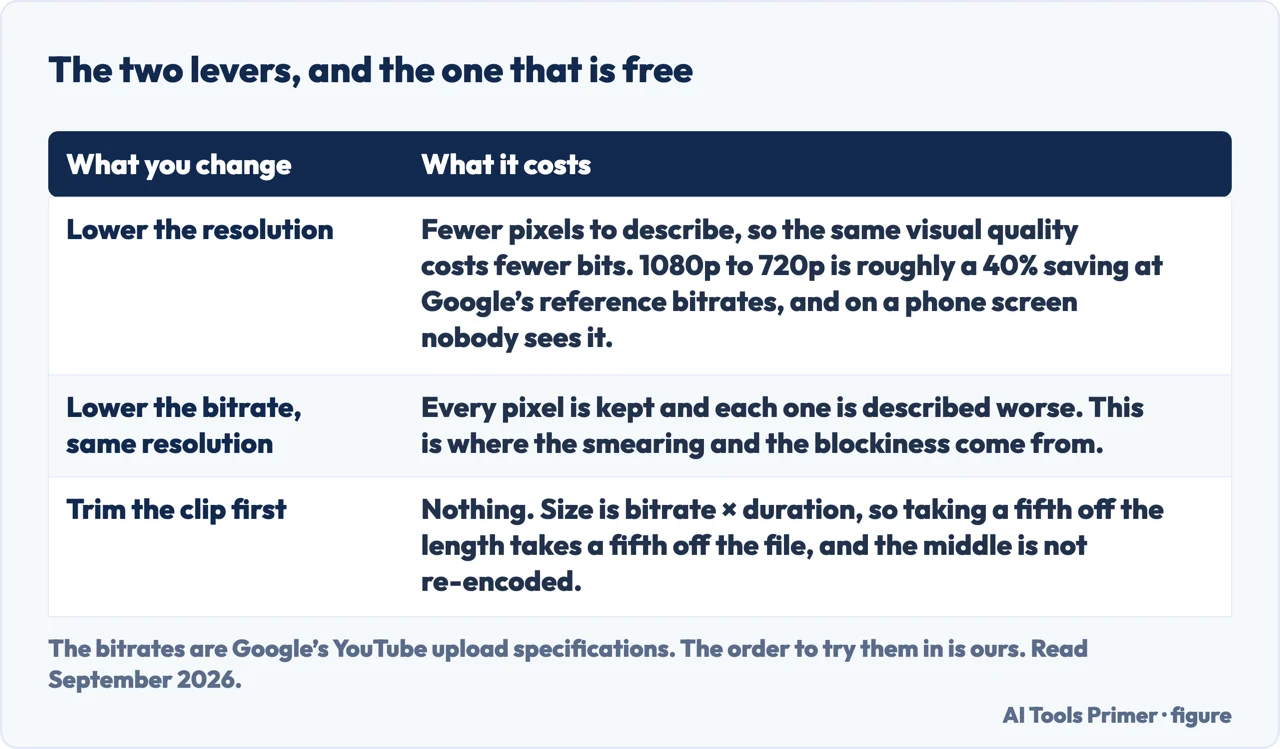
It also explains the two levers, and why one is cheap and the other is not. Lowering the resolution gives the encoder fewer pixels to describe, so the same visual quality costs fewer bits: 1080p to 720p is roughly a 40% saving at Google’s numbers, and on a phone screen nobody will see it. Lowering the bitrate at the same resolution keeps every pixel and describes each one worse, which is where the smearing and blockiness come from. Drop the resolution first.
The asterisk in Microsoft’s instructions
PowerPoint compresses video inside a presentation, which is the right tool if that is where your video lives: File › Info › Multimedia › Compress Media, then Full HD (1080p), HD (720p) or Standard (480p). Microsoft describes the last as being for “when space is limited, such as when you are sending presentations via e-mail”.
Attached to that command is a footnote, and it is a real loss rather than a caveat: “Embedded subtitles and alternate audio tracks are lost in this compression process.” If the video carries captions or a second language track, compressing it here removes them and says nothing further about it.
One limit on the same page: the feature “is available in PowerPoint for Windows, but not on PowerPoint for Mac or PowerPoint for the web”.
What about the free compressor sites. They work, and three of the first eight results for this question are exactly that. The trade is the same one as everywhere else on this issiteyou upload the original in full to a company whose retention terms you have not read, and download a worse copy. For a clip of a landscape that is nothing. For anything with a face, a child, a document or a location in it, it is a decision, and it deserves ten seconds of thought rather than none.
And the thing worth checking first. Trim before you compress. Most videos that are too large are also too long, and cutting the dead thirty seconds at each end costs no quality at all, because the middle is not re-encoded. Since size is bitrate times duration, taking a fifth off the length takes a fifth off the file — and it is the only saving on this page that costs you nothing.
The bitrate tables are quoted from Google’s published YouTube upload specifications, and the PowerPoint instructions and footnote from Microsoft’s own documentation, both read on 22 August 2026 and listed below. The per-minute arithmetic and the advice to drop resolution before bitrate are ours.
Where to start
Four ways in.
- “Will it even fit?”
- Do the arithmetic first — what decides the size
- “It is on my phone.”
- Different answers there — on a phone
- “It is inside a presentation.”
- One command, and a footnote — inside a document
- “I need to send it, not shrink it.”
- Usually the right answer — sending it instead
What decides the size
Bitrate times duration, and Google publishes what the bitrate should be. Everything else on this subject follows from those two facts.
On a phone
The same question with different answers, because the phone has no compress command and Apple documents what to do instead.
Inside a document
A video embedded in a presentation is a different job, with one command and a footnote worth reading before you use it.
Sending it instead
Compressing a video is a delivery problem, and delivery has better answers than destroying picture quality.
Not covered here. It will not open with a list of compressors. The arithmetic tells you whether your target is reachable, and that is worth more than any tool.
It will not treat lowering the bitrate and lowering the resolution as the same move. One is nearly free and the other is where the artefacts come from.
And it will not recommend a compression tool we have not tested. When we have run the same file through several, the results and the dates will appear here. What holds instead is simple: the bitrate tables are quoted from Google’s published YouTube upload specifications and the compression instructions from Microsoft’s own documentation, with the date each was read.
A video that has to travel with the document
Putting the video in is the easy half. Getting the file to somebody is the other one.
- The same job, in the other places it comes up
- How to embed a video in PowerPoint, so it still plays
- How to send large files via email, without paying
- MP4 converter: what you are actually converting
Sources
- Google — YouTube recommended upload encoding settings, including the recommended video bitrates for SDR uploads at standard and high frame rates and the recommended audio bitrates — support.google.com, read 22 August 2026.
- Microsoft Support — Compress your media files, including the Compress Media command, the three quality options and the footnote that embedded subtitles and alternate audio tracks are lost — support.microsoft.com, read 22 August 2026.
Written by Alberto Gulotta
Founder and editor of AI Tools Primer, writing from Palermo, Italy. Thirty-five years of taking computers apart, starting with a Commodore 64 — the long version is on the about page.
Something wrong on this page? Write to aitoolsprimer@gmail.com and it gets fixed.
Written on 22 August 2026 · last checked 5 September 2026.
Independence and limits
No affiliate links and no paid placements anywhere on this site. Nobody pays to appear here, and no company has seen this page before you did.
This is general information, not professional advice. Where a page touches money, health, safety or the law, it names its source and the date it was read — and your situation may still differ. See the privacy page and the cookie policy.