
Video · guide
How to compress a video on iPhone, and when not to
By Alberto Gulotta · Updated · 10 min read
Search how to compress a video on iphone and the first page is a Reddit thread, an App Store listing, an Apple discussion forum, a YouTube video, a data-recovery company and two upload sites. There is no authoritative guide, and there is a reason for that.
There is no compress button on an iPhone.
iOS has no built-in feature that takes an existing video and makes the file smaller. That is why the answers you find are forum threads, App Store listings and upload sites — everybody is answering a question the operating system does not answer.
Which makes the useful question a different one: why do you need it smaller? Almost always it is to send it, or to stop the phone filling up. Both have better answers than compression, and one of them is free and built in.
What actually works, in order of least cost to you
Cost meaning quality lost, money spent, and how much of your video ends up on somebody else’s server.
- Send it without compressing at allIf the reason is email, Apple’s Mail Drop handles it: “If a message, including its attachments, is larger than your Internet Service Provider (ISP) limit, Mail will ask you to send the attachments using Mail Drop.” Nothing is re-encoded, so nothing is lost.
- Trim it insteadMost videos that are too large are also too long. The Photos editor trims the ends without re-encoding the middle, and removing thirty seconds of nothing beats degrading two minutes of something.
- Record smaller next timeSettings › Camera › Record Video. Apple’s formats are “HD, 4K, HD (PAL), and 4K (PAL)” with frame rates of “24, 25, 30, 60, or 120”, and Apple’s note is blunt: “Faster frame rates and higher resolutions result in larger video files.” The phone shows the size per minute beside each option — a real table, for your own model, that no article can give you accurately.
- Share as a linkiCloud, or any service you already pay for. The recipient gets the original quality and you get a URL. The trade is that a copy now lives somewhere else, under somebody else’s terms.
- An app that re-encodes itLast, because it is the only option that permanently destroys picture quality — and because most of the free ones make their money from what you upload, or from advertising inside a process you cannot inspect.
Note what the first two have in common: neither of them is compression. They solve the problem you actually had, which is a file that will not go where you wanted it to go.
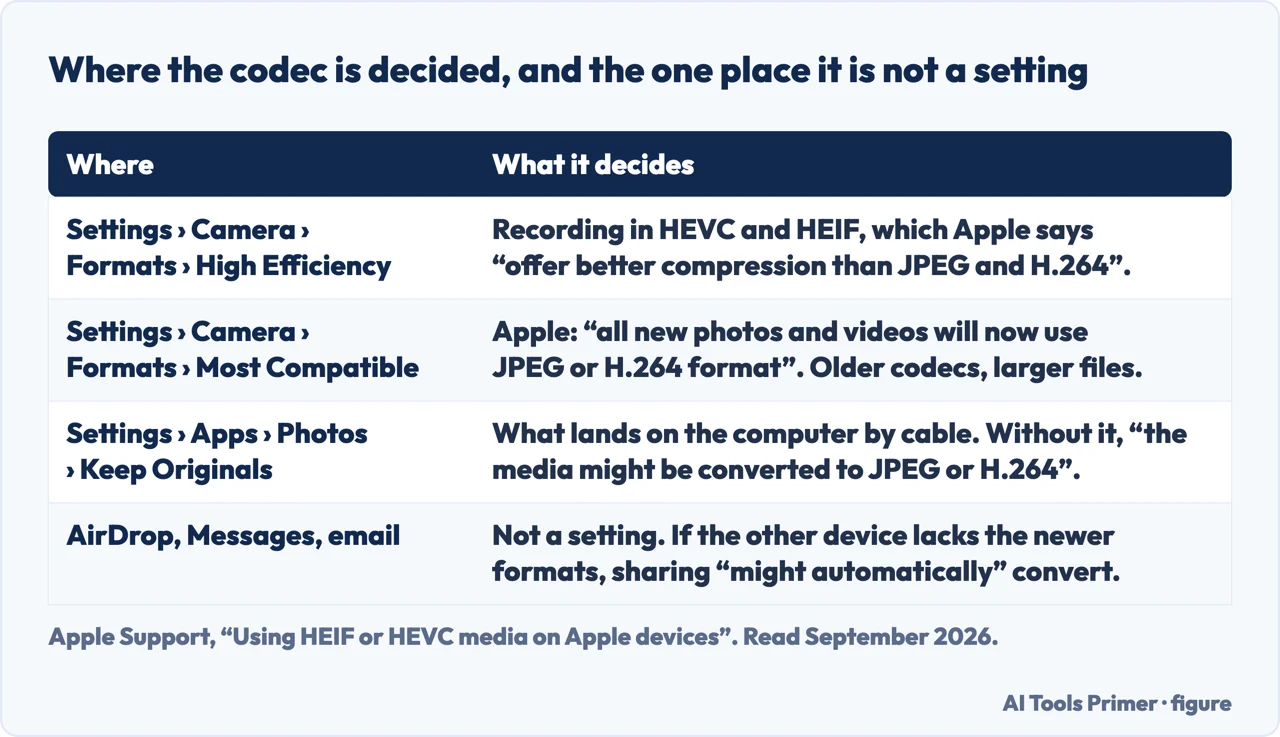
“If sharing this media using other methods, such as AirDrop, Messages, or email, and the receiving device doesn’t support the newer media formats, the media might automatically be shared in a more compatible format, such as JPEG or H.264.”
Apple, read 22 August 2026. Now set it beside Apple’s other sentence: HEVC and HEIF “offer better compression than JPEG and H.264” at the same visual quality. Together they say something nobody on the first page of results mentions — sharing a video off an iPhone can convert it to the less efficient codec, so the copy that arrives is larger than the one you sent. The same switch sits in Settings › Camera › Formats: High Efficiency records HEVC, while Most Compatible means, in Apple’s words, “all new photos and videos will now use JPEG or H.264 format” — older codecs, bigger files. If somebody set that to Most Compatible once to fix a sharing problem, that is why the videos grew.
If you do re-encode, there are numbers published to aim at. Vimeo, which receives a great many phone videos, publishes a bit-rate range for each resolution — 5 to 10 Mbps at 720p, 10 to 20 Mbps at 1080p, 30 to 60 Mbps at 4K — and asks that the native frame rate be kept, with a warning attached: “If your footage exceeds 60 FPS, we will automatically reduce the frame rate.” None of that is a compression app. It is the target one should be hitting, and it is worth having in front of you before accepting whatever a slider was left at.
Why compressing is the worst of the options and not the first. Re-encoding a video decodes every frame and encodes it again at a lower quality. The loss is permanent, it is applied to the whole file rather than to the part that was too long, and it is invisible on a phone screen and obvious on anything larger. If the video matters — a child, a performance, evidence of something — that is a bad trade to make in order to avoid a two-tap alternative.
There is also a version of this that is worth naming plainly: a free online video compressor is a stranger’s server. You are uploading the original, in full, to a service whose retention terms you have not read, in order to download a worse copy. For a clip of your dog that is a shrug. For anything with a face, a document, a location or a child in it, it is a decision rather than a convenience, and it is worth making deliberately.
If the real problem is the phone filling up. Compression is the wrong tool for that too. The options that actually work are moving the originals off the device, turning on the setting that keeps full-resolution copies in iCloud rather than locally, or recording at a smaller format from now on. The storage guides in this section and the Docs section cover the trade-offs, including what happens to your files if you stop paying for the service.
One setting to know before you move anything by cable: Apple notes that on import “the media might be converted to JPEG or H.264”. If you want the files that land on your computer to be the files that were on the phone, the switch is Keep Originals, under Settings › Apps › Photos.
What we have not tested. This guide does not recommend a compression app, because we have not run the comparison that would justify naming one — the same file through several apps, measuring what each one actually does to size and quality, and reading what each says it keeps. Until that exists, a recommendation here would be somebody’s impression, and there are already several of those on the first page.
Everything quoted above is from Apple’s own documentation on the date it was read: the recording formats from the iPhone User Guide, the codec behaviour from Apple’s HEIF and HEVC page, and the Mail Drop limits from Apple Support. The ordering of the options, the argument for trimming before compressing, and the observation that sharing can enlarge a video rather than shrink it, are ours.
Where to start
Four ways in.
- “I need to email it.”
- Mail Drop, above — then sending large files
- “I need to send it on a messaging app.”
- Trim first, see the file itself
- “My phone is full.”
- Different problem — storage
- “It got bigger when I shared it.”
- That is documented behaviour — then recording
Sending large files
Most of these searches are really about getting a file to somebody. Compression is one answer to that and usually the worst one.
The file itself
Format, size and quality are three different things, and confusing them is how people end up with a worse video than they needed.
Storage
If the phone is full, compressing one video is treating a symptom. These guides are about the underlying arrangement.
Recording
The cheapest compression is the file you never made too large. What the settings actually change, and what they cost.
Not covered here. It will not open with a list of apps. The first useful thing to know is that iOS has no compress command, and any page that skips that is selling something.
It will not tell you that sharing a video shrinks it. Apple documents the opposite, and this guide quotes the sentence.
And it will not recommend a compressor we have not tested. When we have run the comparison, it will appear here with the results and the dates. What holds instead is simple: the recording formats and the Mail Drop limits are quoted from Apple’s own documentation, with the date each page was read.
Sources
- Apple — iPhone User Guide, Record a video with your iPhone camera, including the available formats and frame rates and the note that higher resolutions and frame rates make larger files — support.apple.com, read 22 August 2026.
- Apple Support — Using HEIF or HEVC media on Apple devices, including the compression comparison with H.264, the Formats setting, what happens when media is shared, and Keep Originals (published 5 December 2025) — support.apple.com, read 22 August 2026.
- Apple Support — Mail Drop limits, including the 5 GB ceiling, the 30-day expiry, the note on iCloud storage and the recipient-side limit (published 18 March 2025) — support.apple.com, read 22 August 2026.
- Vimeo Help Center — Video and audio compression guidelines, for the codecs Vimeo recommends, the bit-rate range it publishes for each resolution, and its note that footage above 60 fps has its frame rate reduced — help.vimeo.com, read 5 September 2026.
Written by Alberto Gulotta
Founder and editor of AI Tools Primer, writing from Palermo, Italy. Thirty-five years of taking computers apart, starting with a Commodore 64 — the long version is on the about page.
Something wrong on this page? Write to aitoolsprimer@gmail.com and it gets fixed.
Written on 21 August 2026 · last checked 23 September 2026.
Independence and limits
No affiliate links and no paid placements anywhere on this site. Nobody pays to appear here, and no company has seen this page before you did.
This is general information, not professional advice. Where a page touches money, health, safety or the law, it names its source and the date it was read — and your situation may still differ. See the privacy page and the cookie policy.