Search how to reduce image file size and the first page is one Microsoft article and five sites that want you to upload the picture. They work. But before you hand a photograph to any of them, it is worth knowing that “making the file smaller” describes two entirely different operations, with different costs, and that both of them are already on your computer.
operation one
Fewer pixels
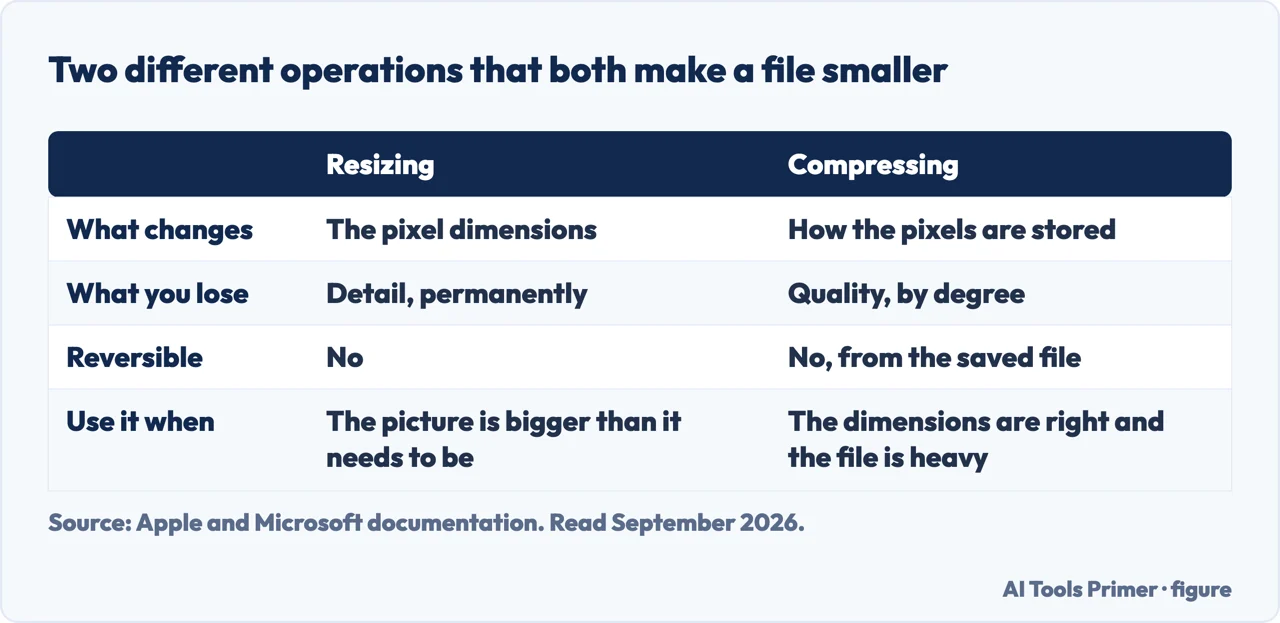
Resizing. A photo 6,000 pixels wide becomes 1,500 wide. Three quarters of the picture
information is discarded and the file shrinks enormously — often by more than 90%.
Nothing that remains is degraded. The image is simply smaller, and it will look soft if anybody
later views it large or prints it.
operation two
The same pixels, stored less faithfully
Compressing. The dimensions do not change. The JPEG encoder is told to approximate more
aggressively, and the file shrinks by rather less.
What you get instead is artefacts — smearing around text and edges, blocks in smooth
areas like skies. Every re-save compounds it, because it compresses the already-compressed copy.
Two operations, two different losses. Figure drawn by AI Tools Primer.
Which one you want is decided by a single question: how large will anybody ever look at this? For a photograph going into an email, a document or a web page, resizing is almost always the right answer and the cheaper one — a picture nobody will view above 1,500 pixels wide gains nothing from the other 4,500, and dropping them costs no visible quality at all. Compression is what you reach for when the dimensions genuinely have to stay.
“The compression options … reduce both file size and picture dimensions based on
how you intend to use the picture, such as in Web pages or e-mail messages.”
Microsoft, describing its own Compress Pictures command, read 22 August 2026. Read it carefully:
the button labelled compress is doing both operations at once. That is the whole reason
this question is confusing. The word is used for two different things, the tools mix them, and a
reader trying to keep quality is never told which one is costing them what.
Both routes, on the machine you already have
Windows — inside an Office document
Select the picture, then the Picture Format tab, then Compress Pictures. Under
Resolution, Microsoft offers three intents: Print, Web, or E-mail — with the
note that “some pictures will only allow one or two of these options”.
Two lines from the same page that make this safe to try: “You can undo compression by selecting
Reset Picture”, and “compression changes will not be saved until you explicitly save
them”.
Mac — Preview, which is already installed
Open the image, then Tools › Adjust Size. To change the dimensions, enter a width or
height, or use “Fit into”; tick Scale proportionally so the other value follows.
To go after the file size directly, Apple’s own instruction: choose Tools › Adjust Size, “then
select ‘Resample image.’ Enter a smaller value in the Resolution field. The new size is
shown at the bottom.” That readout is the useful part — you can watch the number fall and stop
where you like.
And for a folder full of them: “To reduce the file size of multiple images at the same
time, display the images in the same window, select them in that window’s sidebar, then choose
Tools › Adjust Size.” Preview does batches, which is the reason to look at it before reaching for an
upload site in the first place.
The upload sites are not a trap, but they are a decision. Five of the nine results for this question are services that require you to send them the image first. For a product photograph that is nothing. For a scanned document, a photograph of a person, or anything with a location recorded inside it, you are handing a copy to a company whose retention terms you have not read, in order to get back a worse version of a file you already had. The routes above do the same job without the file leaving the machine.
Whichever route you take, keep the original. Both operations are one-way: the discarded pixels are gone and the compression artefacts cannot be removed. Two recoveries exist and are worth knowing. In Office, Reset Picture restores the picture as long as you have not saved. On a Mac, Apple documents a longer reach — File › Revert To › Browse All Versions — which lets you find a version of the image from before the change.
One last thing about repeated saving. A JPEG loses a little each time it is re-encoded, so a file that has been compressed, emailed, saved, edited and compressed again is several generations from the original even if nobody ever chose a low quality setting. If an image is going to be worked on more than once, keep a copy in its original form and compress only the version you send.
The Compress Pictures options and the note about Reset Picture are quoted from Microsoft’s own documentation, and the Preview instructions from Apple’s, both read on 22 August 2026 and listed below. The distinction between the two operations, and the argument about which to use when, are ours.
Not covered here. It will not send you to an upload site first. Both operations are built into the computer you are reading this on, and one of them handles batches.
It will not use “compress” for two different things without saying so. Microsoft’s own wording shows why the confusion exists, and it is quoted here.
And it will not recommend a compression tool we have not tested. When we have run the comparison, it will appear with the results and the dates. What holds instead is simple: the Compress Pictures options and the Preview instructions are quoted from Microsoft’s and Apple’s own documentation, with the date each page was read.
Working on a picture before you use it
Five edits you make to an image between taking it and sending it.
Microsoft Support — Compress a picture, including the note that compression reduces both file size and picture dimensions, the Print, Web and E-mail resolutions, Reset Picture and the point that changes are not saved until you save them — support.microsoft.com, read 22 August 2026.
Apple — Preview User Guide, Crop, resize, or rotate an image in Preview on Mac, including Adjust Size, Resample image, Scale proportionally, the resulting size readout, batch resizing and File › Revert To › Browse All Versions — support.apple.com, read 22 August 2026.
AG
Written by Alberto Gulotta
Founder and editor of AI Tools Primer, writing from Palermo, Italy. Thirty-five years of
taking computers apart, starting with a Commodore 64 — the long version is on the
about page.
Written on 22 August 2026 · last checked 4 September 2026.
§
Independence and limits
No affiliate links and no paid placements anywhere on this site. Nobody pays to appear here,
and no company has seen this page before you did.
This is general information, not professional advice. Where a page touches money, health,
safety or the law, it names its source and the date it was read — and your situation may
still differ. See the privacy page and the
cookie policy.