
Images · guide
How to convert HEIC to JPG, and how to stop needing to
By Alberto Gulotta · Updated · 10 min read
The question of how to convert heic to jpg comes up when an iPhone photograph turns up somewhere that will not open it — a Windows machine, an older laptop, a web form, a printing service, a colleague’s email client.
The format is not a mistake. Apple explains the trade plainly: “HEIF and HEVC offer better compression than JPEG and H.264, so they use less storage space on your devices and iCloud Photos, while preserving the same visual quality.” Smaller files, same picture. The cost is that the rest of the world was slower to support it.
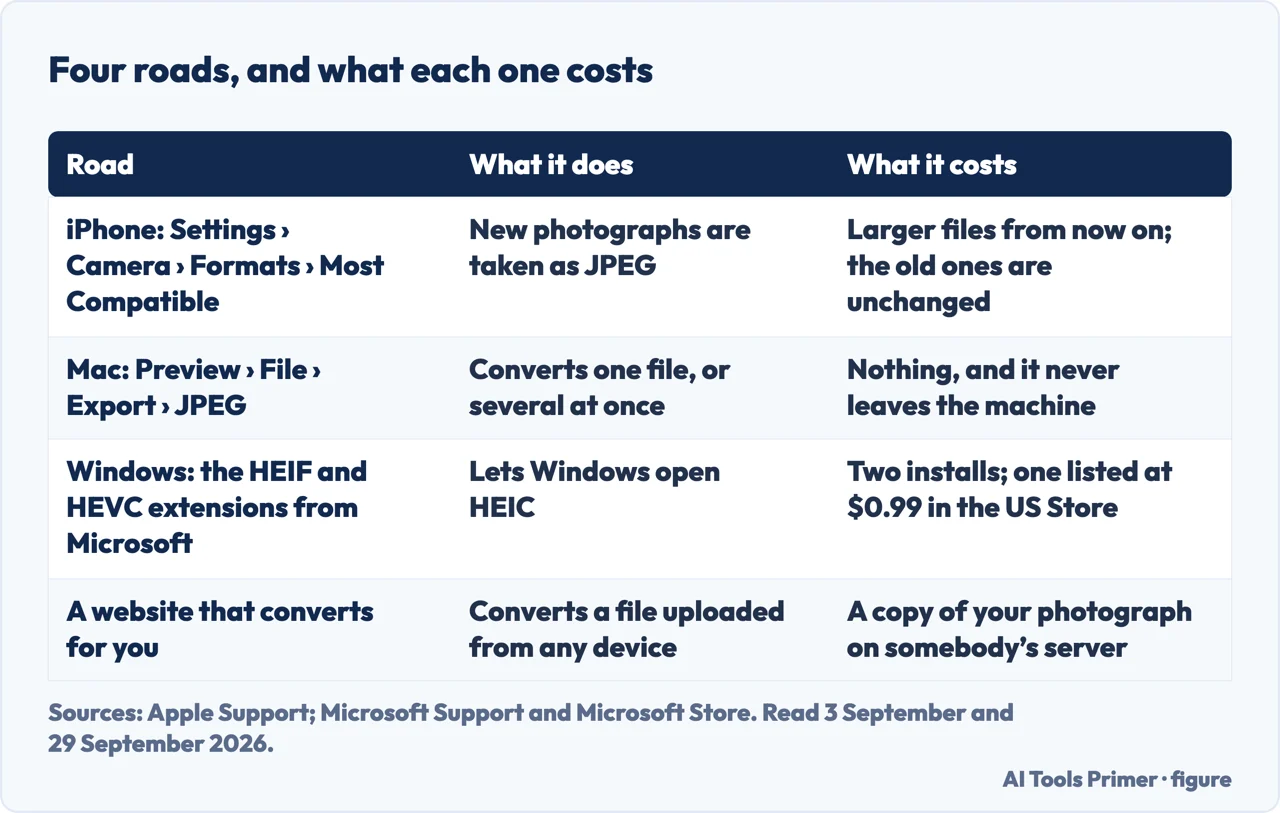
| Road | What it does | What it costs | Source |
|---|---|---|---|
| iPhone: Settings › Camera › Formats › Most Compatible | New photographs are taken as JPEG | Larger files from now on; the photographs you already have are unchanged | Apple |
| Mac: Preview › File › Export › Format: JPEG | Converts one file, or several selected in one window | Nothing, and the picture never leaves the machine | Apple |
| Windows: Microsoft’s HEIF Image Extension, with the HEVC Video Extensions | Lets Windows open HEIC files | Two installs; the HEVC package was listed at $0.99 in the US Microsoft Store when read | Microsoft |
| A website that converts for you | Converts a file uploaded from any device | A copy of your photograph on somebody else’s server | — |
- Decide whether you want to convert or to stop producing them. Converting is a chore that repeats; the camera setting is a decision made once.
- To stop producing them: Settings › Camera › Formats, and choose Most Compatible. From then on the iPhone takes JPEG. The photographs already in the library keep the format they were taken in.
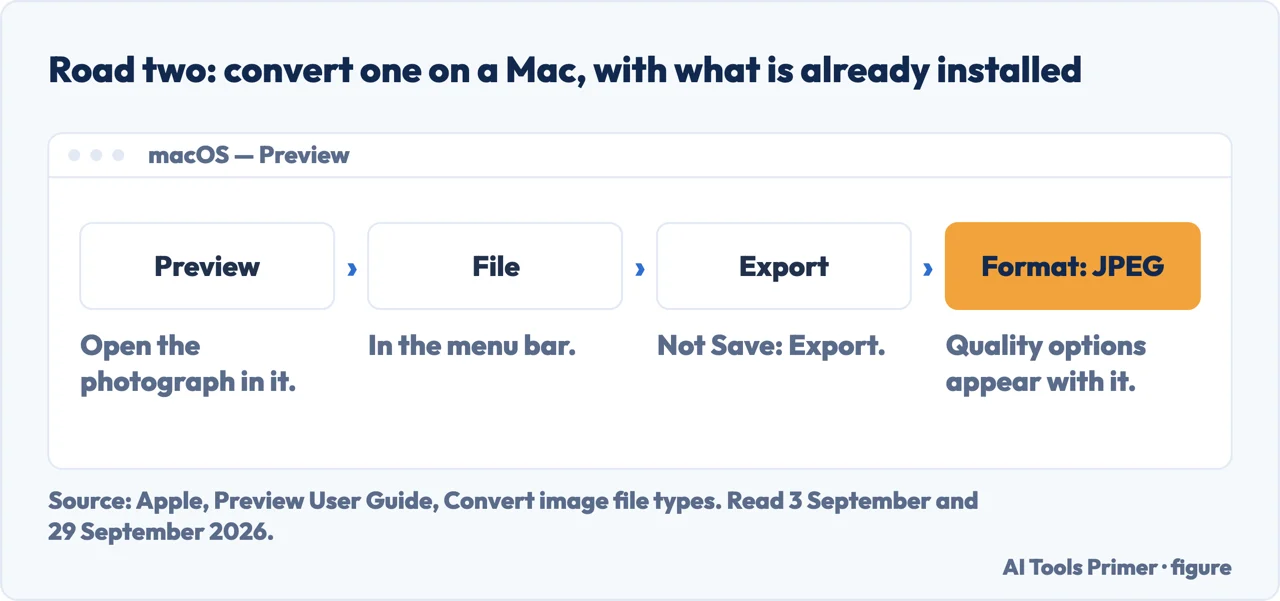
- To convert on a Mac: open the file in Preview, then File › Export. Apple’s own steps. Choose JPEG in the Format menu; you can then adjust the image’s quality.
- To convert several at once, open them in one window — Apple: “open the files in one window, select them in that window’s sidebar, then follow the steps above.”
- On Windows, install Microsoft’s HEIF Image Extension and the HEVC Video Extensions package, which the HEIF extension’s Store page says “must be installed in order to view images stored in HEIF files that use the .heic, .hif or .heif file extensions”. After that Windows can open the files, without sending anything anywhere.
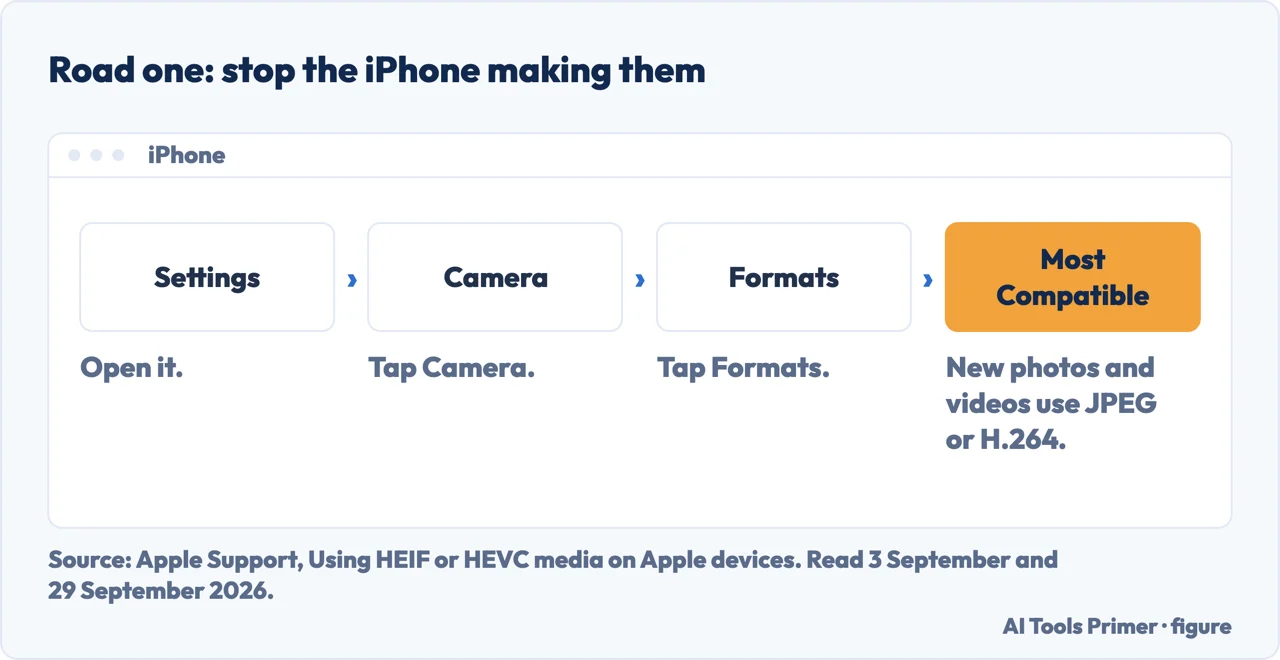
Stop it happening again, in four taps
Apple’s own instructions, quoted from its support page, read 3 September and 29 September 2026.
- Open Settings on the iPhone or iPad
- Tap Camera
- Tap Formats
- Tap Most Compatible
Apple: “All new photos and videos will now use JPEG or H.264 format. To return to using the space-saving HEIF and HEVC formats, choose High Efficiency.” The setting is available only on devices that can capture in HEIF, and it changes new photos — the ones already on the phone stay as they are, which is what the rest of this guide is about. Microsoft, on its OneDrive page, adds that “Some iOS devices no longer have the option to save images as Most Compatible”.
Switching the camera to Most Compatible changes the video codec to H.264. If you keep High Efficiency instead, Apple adds a note on HEVC video: “on some older devices, support for HEVC is affected by the resolution and frame rate (fps) of the video. Resolutions of 1080p or lower and frame rates of 60 fps or lower are more broadly compatible with older devices.”
The setting is a different entry on the same Camera screen: “open Settings, tap Camera, then look in the settings for Record Video and Record Slo-mo.”
Two things your phone may already be doing for you
Two more routes that may convert on their own
Apple: “If sharing this media using other methods, such as AirDrop, Messages, or email, and the receiving device doesn’t support the newer media formats, the media might automatically be shared in a more compatible format, such as JPEG or H.264.”
So emailing the picture, or AirDropping it, may produce a JPEG without anyone asking for one — if the receiving device cannot read the newer format.
Apple: “When you import HEIF or HEVC media from an attached iPhone or iPad into Photos, Image Capture, or a PC, the media might be converted to JPEG or H.264. If you don’t want it to be converted, open Settings, tap Apps, tap Photos, then scroll down and tap Keep Originals.”
Read that the other way round: the cable route may convert unless Keep Originals is chosen. The setting exists to stop it, not to start it.
Neither of these is hidden. Between this and the four taps above, a converter may never enter into it.
And if the reason for converting was size rather than compatibility, at the same quality the conversion goes the wrong way: HEIC is the smaller format for the same visual quality, so a JPEG at that quality makes the file bigger. Resizing the picture reduces it.
The guides below cover WebP and PNG files, and more on photographs.
Converting one by hand, in Apple’s own instructions
Three routes on a Mac, each using software already installed.
- A photo, in Photos or Preview. “Choose File > Export, then choose a format such as JPEG or PNG before saving.”
- A video, in QuickTime Player. “Choose File > Export As… use the pop-up menu to change from Smaller File Size (HEVC) to Greater Compatibility (H.264) before you click Save.” Apple gives the variant too: “If you see an HEVC checkbox instead of a pop-up menu, just deselect the checkbox before saving.”
- A video, from the Finder. “Control-click the video, then choose Services > Encode Selected Video Files… choose an H.264 option from the Settings menu.”
Where to start
Three ways in.
- “Someone sent me a .heic and I cannot open it.”
- Convert it on a Mac, or add the extensions on Windows — converting one
- “I want my iPhone to stop making them.”
- Four taps — stop it happening again
- “I only need the file smaller.”
- Converting may not help — the size question
Other formats
WebP files, and PNG and JPG.
Questions people also ask
Can I change a HEIC file to JPG?
Yes, on a Mac without uploading it anywhere: open it in Preview and use File › Export, choosing JPEG in the Format menu. On Windows, Microsoft’s HEIF Image Extension and HEVC Video Extensions let the system open the file; the HEVC package was listed at $0.99 in the US Store when read.
How do I convert lots of them at once?
In Preview, open the files in one window: Apple’s instruction is to “open the files in one window, select them in that window’s sidebar, then follow the steps above”. The export then applies to the whole selection.
How do I stop my iPhone making HEIC files?
Settings › Camera › Formats, then Most Compatible. New photographs are taken as JPEG from that moment. The ones already in your library keep the format they were taken in.
Why does my iPhone use HEIC at all?
Because it is smaller for the same picture. Apple’s claim is that “HEIF and HEVC offer better compression than JPEG and H.264, so they use less storage space on your devices and iCloud Photos, while preserving the same visual quality.” The cost is everything that cannot open them.
Not covered here. It will not tell you Apple made the wrong choice.
It will not rank the converter sites. On a Mac the conversion can be done locally, an iPhone that offers Most Compatible can take JPEG from the start, and on Windows the files open locally once Microsoft’s extensions are installed — so for those cases no upload is needed.
And it will not treat this as a trivial file-format question. A photograph converted in a hurry can be a passport or a prescription — which is why the offline routes come first on this guide.
One practical note that belongs at the end rather than the beginning. Before converting anything, check whether you need to at all: the route you use to send a photograph can decide the format for you, and some of them may hand over a JPEG without being asked. If the person receiving it can open what arrives, there is nothing to fix. What holds instead is simple: the four-tap fix and the compression claim are both quoted from Apple’s page, read on the dates in the Sources.
More on photographs
Other guides on photographs and their formats, in no particular order.
- The same job, in the other places it comes up
- WebP to JPG: why you keep meeting it
- PNG to JPG: what the conversion costs you
- How to remove metadata from photos — and what stays behind
- How to resize a photo on iPhone, without an app
- How to recover deleted photos from iPhone, and the clock
Sources
- Apple on using HEIF and HEVC media — the compression claim, the Most Compatible setting and what it changes, the resolution and frame-rate note for HEVC video, the conversions that may happen when sharing or importing over USB, and the manual export routes — support.apple.com, read 3 September and 29 September 2026.
- Apple — Convert image file types using Preview on Mac: the File › Export route, the Format menu, the quality option for JPEG and the way to convert several files at once — support.apple.com, read 3 September and 29 September 2026.
- Microsoft Support — Upload HEIF and HEVC photos and videos to OneDrive, for how Windows handles the format and the note that some iOS devices no longer have the Most Compatible option — support.microsoft.com, read 3 September and 29 September 2026.
- Microsoft Store — HEIF Image Extension: that it enables Windows to read and write HEIF files, that the HEVC Video Extensions package must also be installed for .heic files, and that it is listed free — apps.microsoft.com, read 29 September 2026.
- Microsoft Store — HEVC Video Extensions: listed at $0.99 in the US Store — apps.microsoft.com, read 29 September 2026.
Written by Alberto Gulotta
Founder and editor of AI Tools Primer, writing from Palermo, Italy. Thirty-five years of taking computers apart, starting with a Commodore 64 — the long version is on the about page.
Something wrong on this page? Write to aitoolsprimer@gmail.com and it gets fixed.
Written on 21 August 2026 · last checked 30 September 2026.
Independence and limits
No affiliate links and no paid placements anywhere on this site. Nobody pays to appear here, and no company has seen this page before you did.
This is general information, not professional advice. Where a page touches money, health, safety or the law, it names its source and the date it was read — and your situation may still differ. See the privacy page and the cookie policy.