How to recover deleted photos from iphone has a short answer and a hard one, and which you get depends entirely on a date. Apple’s own page states both in its first two sentences, and the first page of Google results is otherwise a recovery vendor’s forum, two Reddit-style threads, a Microsoft community post about an Apple product, and a university page that appears to be spam.
“Anything in your Recently Deleted album stays there for 30 days. After 30 days,
it’s permanently deleted and you can’t get it back.”
Apple, on a page published 15 September 2025 and read on 22 August 2026. That second sentence is
the whole honest answer, and it is the one every recovery-software page is written to talk you
past. Inside the thirty days this takes four taps and costs nothing. Outside them, Apple is telling
you the photograph is gone — not that it is difficult, that it is gone.
On the iPhone or iPad
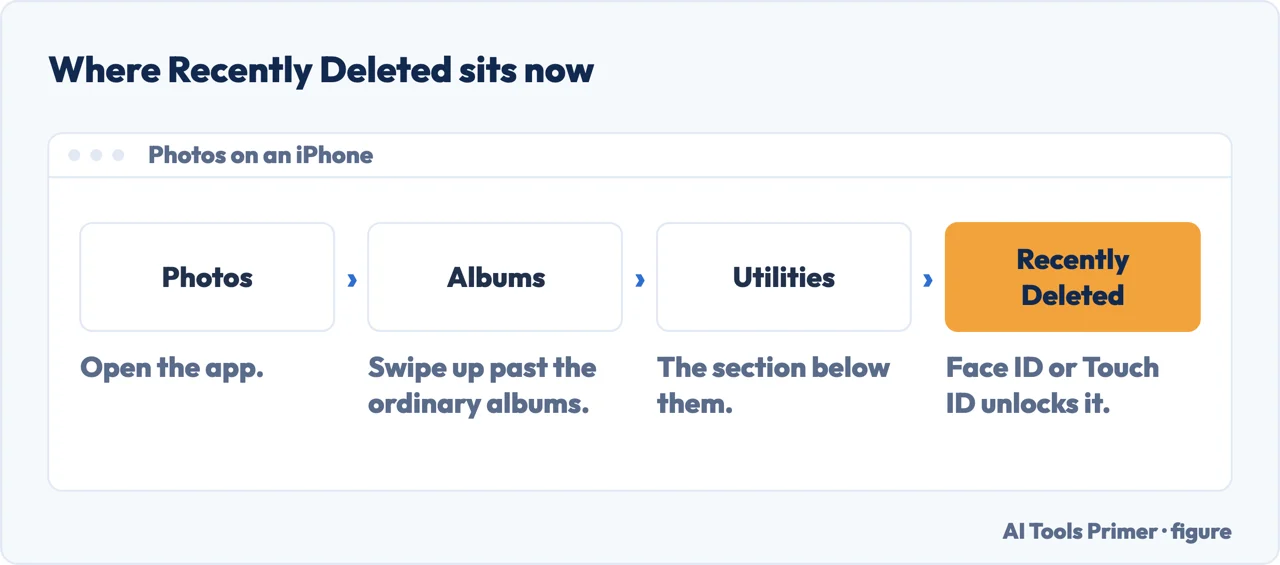
Open Photos, swipe up, then tap Recently Deleted in the Utilities section. It is not
in the main list of albums, which is why people conclude it has disappeared.
Tap View Album, then use Face ID or Touch ID to unlock it. Tap a photo, then
Recover. For several: Select, choose them, the More button, Recover.
On a Mac
In macOS Ventura or later, open Photos and choose Recently Deleted in the Utilities section
of the sidebar. Unlock with Touch ID or your login password, click the photo, click Recover.
On iCloud.com — the one nobody thinks of
Sign in at iCloud.com, open Photos, and select Recently Deleted in the sidebar.
Apple’s own tip if it is not visible: “tap or click the Show Sidebar button in the upper-left
corner.”
This is the route that still works when the phone does not — lost, broken, or in a drawer
somewhere. Any browser will do.
On an Apple Vision Pro
Photos, Collections in the sidebar, scroll to Recently Deleted in the Utilities section,
then View Album and Optic ID or your passcode.
Two reasons the album looks like it has gone
It moved. Recently Deleted is not among the ordinary albums any more — it sits under
Utilities, below them, which on a phone means swiping up past everything else. People scroll
the album list, do not find it, and conclude the photos are unrecoverable.
It is locked. Apple now asks for Face ID, Touch ID or your passcode before it will open. That
is a good change — a borrowed phone no longer shows a stranger everything its owner deleted — but it
also means the album can look like a dead end to somebody who taps it once and gets a prompt they
were not expecting.
It is not among the ordinary albums any more. It sits under Utilities, below them. Figure drawn by AI Tools Primer.
So the first thing to do is check the date, not download anything. If the photograph went yesterday, one of the four routes above has it and the whole thing takes a minute. If it went two months ago, no amount of software changes what Apple has said about its own system — and the pages promising otherwise are selling something.
Where there is still hope after thirty days, it is not in a recovery tool but in the other places the photograph may have been. A picture sent to somebody in Messages or WhatsApp is in that conversation. One posted anywhere is on that service. One that was copied to a computer before the deletion is still on the computer, and one that was in a backup made before the deletion is in the backup. Those are real second copies; the recovery-software route is a claim about a phone that Apple has already told you is finished with the file.
And a note about how the deletion probably happened. Losing photographs this way is not a mistake with one picture — it is clearing space in a hurry, selecting a run of images and deleting them together. If that is what happened, the Recently Deleted album will have all of them, and Apple’s bulk route is the one you want: Select, choose them, the More button, Recover. It is worth doing carefully rather than fast, because you are undoing exactly the kind of hurried selection that caused the problem.
If the phone also backs up to Google Photos, there is a second bin, and it has a clock of its own. Google publishes the rule for that app in the same plain form: “photos and videos in the trash are permanently deleted after 30 days”, and “items that are permanently deleted can’t be restored”. The number matches Apple’s, but it is not the same thirty days — it starts when the item reached that bin, which for a backed-up library is not necessarily the day it left the phone. Google attaches a second deadline with no equivalent on the Apple side: “if you’re inactive in Google Photos for 2 years or more, your content may be deleted”. Both are worth checking before you decide a photograph is gone — and worth knowing about before there is anything to look for.
The thirty-day rule, the four routes, the Face ID and Optic ID unlocking and the location of the album under Utilities are quoted from Apple’s own support documentation, published 15 September 2025 and read on 22 August 2026. The point about second copies elsewhere, and the observation about how the deletion usually happens, are ours.
Not covered here. It will not offer you recovery software for a photograph Apple says is permanently deleted. That sentence is quoted here in full for a reason.
It will not send you hunting through the album list. Recently Deleted moved to Utilities and it is locked, and both of those are why it looks missing.
And it will not forget the browser route, which is the only one that still works when the phone does not. What holds instead is simple: the thirty-day rule and the four routes are quoted from Apple’s own support documentation, dated here by publication and by reading.
More on photographs
Other guides on photographs and their formats, in no particular order.
Apple Support — How to recover deleted photos on your iPhone, iPad, Mac, or Apple Vision Pro, including the thirty-day limit and what happens after it, the location of Recently Deleted under Utilities, the Face ID, Touch ID and Optic ID unlocking, the bulk recovery route and the iCloud.com sidebar (published 15 September 2025) — support.apple.com, read 22 August 2026.
Google Photos Help — Restore recently deleted photos and videos (that photos and videos in the trash are permanently deleted after 30 days, that items which have been permanently deleted cannot be restored, that a photo can be restored only if it was moved to trash less than 30 days ago and the trash has not been emptied, and that content may be deleted if the account is inactive in Google Photos for two years or more) — support.google.com, read 5 September 2026.
AG
Written by Alberto Gulotta
Founder and editor of AI Tools Primer, writing from Palermo, Italy. Thirty-five years of
taking computers apart, starting with a Commodore 64 — the long version is on the
about page.
Written on 22 August 2026 · last checked 23 September 2026.
§
Independence and limits
No affiliate links and no paid placements anywhere on this site. Nobody pays to appear here,
and no company has seen this page before you did.
This is general information, not professional advice. Where a page touches money, health,
safety or the law, it names its source and the date it was read — and your situation may
still differ. See the privacy page and the
cookie policy.