
Images · guide
WebP to JPG: why you keep meeting it
By Alberto Gulotta · Updated · 7 min read
webp to jpg is what people search after right-clicking a picture on a web page, saving it, and discovering that the file will not open in the program they wanted to use it in.
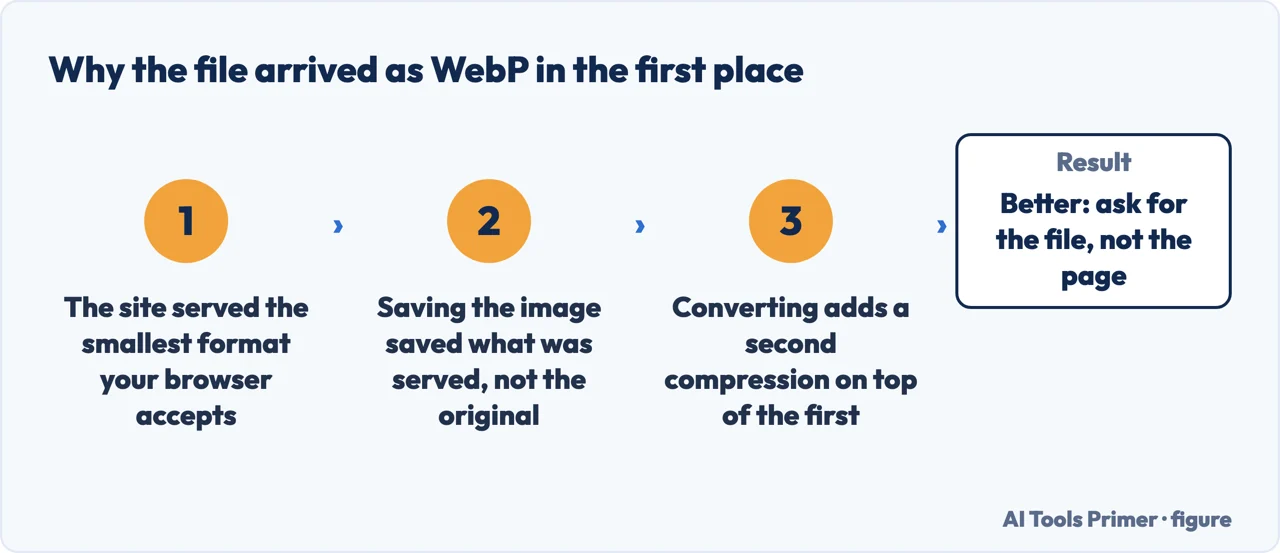
The format is not obscure and it is not a trick. It was made by Google, it is used by an enormous share of the web, and the reason is a straightforward trade that Google publishes itself.
Why the web moved to it
Google’s own published figures for the format it created, read 21 August 2026.
That is the whole reason you keep meeting this format: a website that switches to it sends roughly a quarter to a third less data, and the picture looks the same. Nobody chose WebP to annoy you — they chose it because pages load faster, and the annoyance lands on whoever right-clicks and saves.
The first answer to “convert this” is often that nothing needs converting, and the list of what already opens a WebP comes from the company that made the format: “WebP is natively supported in Google Chrome, Safari, Firefox, Edge, the Opera browser, and by many other tools and software libraries. Developers have also added support to a variety of image editing tools.” If the file is going onto a website or into a browser, it is already readable.
When something genuinely cannot read it, Google ships the converter itself rather than leaving it to upload sites: “WebP includes the lightweight encoding and decoding library libwebp and the command line tools cwebp and dwebp for converting images to and from the WebP format, as well as tools for viewing, muxing and animating WebP images.” The direction that matters here is the second one — dwebp decodes — and the binaries are published rather than compiled: Google offers “the precompiled cwebp conversion tool for Linux, Windows or macOS”, with full source on the download page.
One number is worth having before converting away from WebP for the sake of transparency, since that is the usual reason given: “lossless WebP supports transparency (also known as alpha channel) at a cost of just 22% additional bytes”, and in lossy mode transparency comes “typically providing 3× smaller file sizes compared to PNG”. Converting a transparent WebP to PNG to keep the transparency is trading size for a property the original already had.
The searches divide by destination and by mood. Webp to jpg is somebody who needs a photograph somewhere ordinary. Webp to png is somebody who needs transparency — a logo, a cut-out, a screenshot going into a slide. Convert webp to jpg and webp converter come from people who have already decided to find a tool. What is webp is the calmer question underneath all of them, and save as jpg not webp is the one asked by somebody who has hit this three times this week and wants it to stop.
The question nobody asks first
Do you actually need to convert it?
Ten converter services will offer to do it before anybody asks what the picture is for. Sometimes the answer is that nothing needs converting, and it is worth thirty seconds to check.
- Putting it on a website, or in an email people read in a browser? Mozilla’s developer documentation lists WebP support as “All versions of Chrome, Edge, Firefox, Opera, and Safari”. Converting it makes the file bigger for no gain.
- Just want to look at it, or send it to someone? Every current browser opens it. Dragging the file onto a browser window is faster than any conversion.
- A form, a print shop, an older program, a document that rejects it? Then convert — this is the real case, and the guides below do it without uploading anything.
One thing to check before you convert. WebP can hold things JPEG cannot. Mozilla documents WebP animation — a lossy WebP “may contain multiple frames”, and lossless WebP carries chunks that describe an animation sequence, with looping supported. It also carries transparency. Turn either of those into a JPG and you get one opaque frame, with the animation gone and the transparent background filled in. If the picture moves, or has nothing behind it, convert to PNG or GIF instead — not JPG.
So the format is doing its job. The problem is entirely at the other end — the moment a picture leaves the browser and lands in a document, a form, a print shop or an older program that never learned to read it.
Where to start
Five ways in. The last one prevents the problem instead of fixing it.
- “I saved a picture and it will not open.”
- Start at opening and converting
- “I need a JPG for a form or a document.”
- That is opening and converting
Opening and converting
What to do with the file you already have. Free, offline routes first — this is a conversion every modern system can do without a website.
Not covered here. It will not tell you WebP is a nuisance. It makes the web measurably faster, the figures are published, and the format is doing exactly what it was designed to do.
It will not rank the converter sites. Every current operating system converts this format locally, which makes an upload the least necessary route rather than the first one.
And it will not pretend this problem is over. Support has improved enormously, but the places that still refuse WebP tend to be the ones that matter — an application form, a print service, a piece of software a workplace has not updated in six years.
A last note on where this guide sends you first, because it differs from every result above it in the search. The converter sites rank for this term because the problem feels urgent and they are quick. But both major operating systems now open WebP and export it in two steps, with no upload, no account and no waiting — and the picture in question is often a screenshot of something private, a document, or a photograph of a person. The offline route is not merely equivalent here; it is better on every axis except familiarity. What holds instead is simple: every compression figure on this guide is published by Google, the company that created the format.
More on photographs
Other guides on photographs and their formats, in no particular order.
- The same job, in the other places it comes up
- PNG to JPG: what the conversion costs you
- How to convert HEIC to JPG, and how to stop needing to
- How to remove metadata from photos — and what stays behind
- How to resize a photo on iPhone, without an app
- How to recover deleted photos from iPhone, and the clock
Sources
- Google’s own WebP documentation — the lossless and lossy compression figures, transparency, and the format’s purpose — developers.google.com, read 21 August 2026.
- MDN Web Docs — Image file type and format guide, on WebP browser support, animation and transparency — developer.mozilla.org, read 21 August 2026.
Written by Alberto Gulotta
Founder and editor of AI Tools Primer, writing from Palermo, Italy. Thirty-five years of taking computers apart, starting with a Commodore 64 — the long version is on the about page.
Something wrong on this page? Write to aitoolsprimer@gmail.com and it gets fixed.
Written on 21 August 2026 · last checked 4 September 2026.
Independence and limits
No affiliate links and no paid placements anywhere on this site. Nobody pays to appear here, and no company has seen this page before you did.
This is general information, not professional advice. Where a page touches money, health, safety or the law, it names its source and the date it was read — and your situation may still differ. See the privacy page and the cookie policy.