
Docs · guide
How to convert PowerPoint to PDF, and why you should anyway
By Alberto Gulotta · Updated · 8 min read
If somebody has asked you for a PDF, how to convert powerpoint to pdf is the next question. It is worth doing even when nobody asks, and the reason has nothing to do with file formats and everything to do with what happens to a presentation on a machine that is not yours.
A presentation is a set of instructions, not a picture
A slide file does not contain your slides. It contains a description of them — this text, in this typeface, at this size, here — and the machine it opens on carries out those instructions with whatever it happens to have. If it lacks the typeface, it substitutes one, and everything moves.
Microsoft states the remedy and the reason together: embed the fonts and “the fonts, layout, and styling of the document won’t change” on somebody else’s machine. Without that, the file is a set of instructions handed to a stranger’s computer.
This is why a deck looks perfect on your laptop and wrong on the projector. Nothing corrupted. The room simply had different fonts.
Embedding the fonts
Microsoft’s own route, read 21 August 2026.
It sits under a heading that says what it is for: “Preserve fidelity when sharing this presentation.”
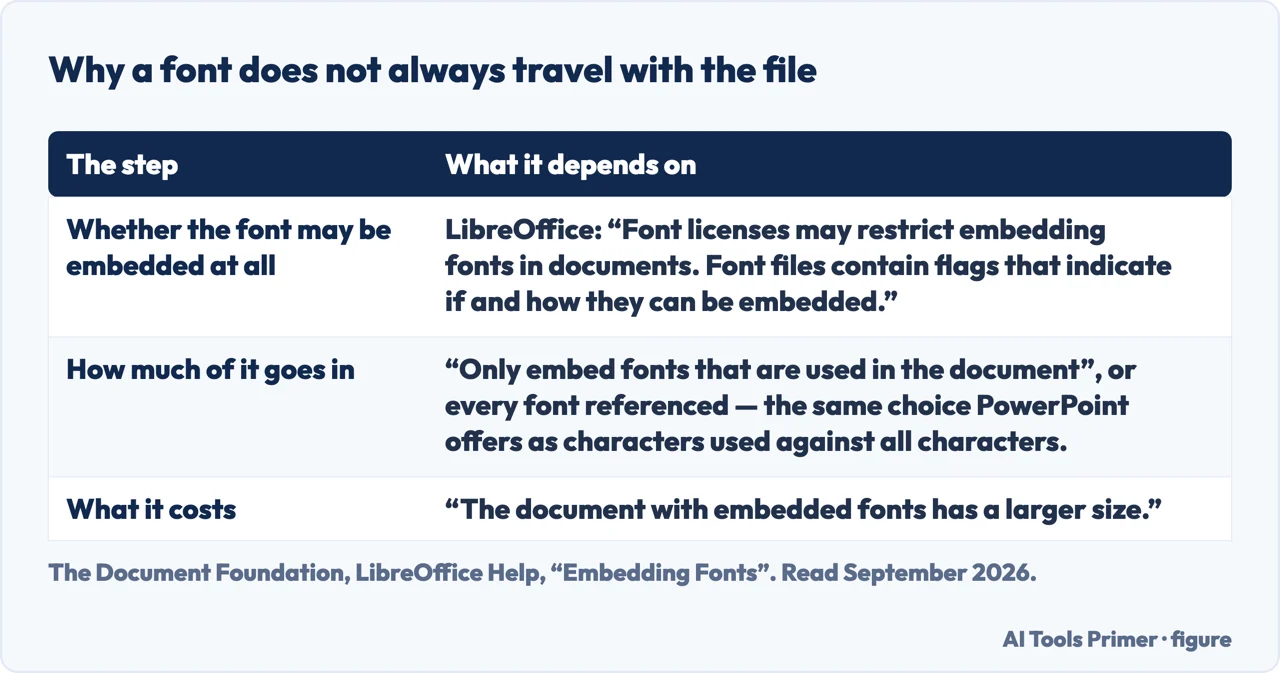
There are two versions of it, and the choice matters. Embedding only the characters used keeps the file small but limits what the recipient can edit. Embedding all characters lets them edit freely and makes the file larger. If you are presenting, the first is enough; if somebody else has to change a slide, choose the second.
And a limit worth knowing before you rely on it: “Not all TrueType fonts can be embedded.” Microsoft explains that the font’s creator decides — the permitted settings run from “Non-embeddable” through “Preview/Print” and “Editable” to “Installable”. A downloaded display font is the likeliest one to refuse.
The conversion itself is unremarkable and free — it is in the same File menu as saving, and Microsoft’s export dialogue lets you choose “an option under Page range” if you only want some slides. The same warning applies as to any Office export: if a font cannot be embedded, “the PDF uses bitmap images of the text so that the PDF looks the same as the original document”. Identical on screen, no longer selectable or searchable.
The five minutes before you send or present
In order of how often each one saves the day.
- Export a PDF as well.The insurance policy. A PDF carries its own fonts and layout and opens on anything. If the deck misbehaves in the room, you present the PDF and the room sees the same slides.
- Embed the fonts.Four clicks, above. Fixes the commonest failure at source.
- Check the aspect ratio.A 4:3 deck on a 16:9 screen has black bars; a 16:9 deck on an old projector is cropped. Ask, or export both.
- Carry the file, not only the link.Cloud presentations need a network the room may not give you. A copy on a stick costs nothing.
- Open it on a second machine.The only real test. Thirty seconds, and it catches everything the four steps above missed.
The first item on that list is the whole argument of this guide. A PDF of your deck is not a downgrade, it is a spare tyre. It weighs almost nothing, it opens on every device in the building, it cannot rearrange itself, and the five seconds it takes to make one is the cheapest insurance in professional life. The people who present calmly are, almost without exception, the people who have one.
The other direction is searched more, and it is a harder problem. How to convert pdf to powerpoint asks for something the format was never designed to give back: a PDF is finished pages, and reconstructing editable slides from them is guesswork of the same kind as turning a PDF back into a Word document. Expect approximations, and expect to rebuild anything complicated.
One last thing, and it shows up at the worst moment. A presentation that plays a video or a sound does not necessarily carry it. Depending on how the media was added, the file may hold only a pointer to something on your own disk — which works perfectly in rehearsal and shows a black rectangle in the room. If your deck has media in it, the two-machine test above is not optional.
The wording varies and the job does not. How to turn a powerpoint into a pdf is the same request in plainer English; ppt to pdf and convert ppt to pdf are the same thing typed by somebody who knows the file extension. All of them are the File menu, and none of them needs a website — which matters more than usual here, because a deck is often the most confidential thing anybody emails.
Where to start
Four ways in.
- “Somebody asked for a PDF.”
- It is above. Then before you present
- “It looks wrong on their screen.”
- Read why decks shift
- “I need to edit a PDF as slides.”
- That is the other direction
- “I am presenting tomorrow.”
- Go to before you present
Why decks shift
The causes, in order of frequency. All of them are about the difference between your machine and the next one.
Before you present
The short list that turns a nervous morning into an ordinary one. None of it takes longer than five minutes.
The other direction
PDF back into slides. Searched more, delivered worse, and for the same structural reason as PDF to Word.
Sending it
A deck is usually the largest file anybody emails. Getting it there is its own small problem.
Not covered here. It will not treat the PDF as a second-best copy. It is the version that opens everywhere, and making one takes five seconds.
It will not promise that a PDF can become editable slides again. That is reconstruction, and this guide says so rather than selling a converter.
And it will not skip the two-machine test. Every other check on this page can pass and the deck can still fail in the room. What holds instead is simple: the font settings and warnings quoted here come from Microsoft’s own documentation.
Turning a file into the format they asked for
The same job in six directions. Which one you need depends on what arrived.
- The same job, in the other places it comes up
- How to turn a picture into a PDF, without uploading it
- How to convert a PDF to JPG, and when not to
- How to convert PDF to Word, free, without uploading it
- Word to PDF: the route that is already in Word
- PDF to Excel: why it is the hardest one
Sources
- Microsoft Support — Benefits of embedding custom fonts, including the statement that not all TrueType fonts can be embedded — support.microsoft.com, read 6 September 2026.
- Microsoft Support — Save or convert to PDF or XPS in Office desktop apps, including the page range option and the font warning — support.microsoft.com, read 21 August 2026.
- The Document Foundation — LibreOffice Help, Embedding Fonts, for the licence flags that decide whether a font may be embedded at all, the choice between embedding every font and only the ones used, and what embedding costs in file size — help.libreoffice.org, read 5 September 2026.
Written by Alberto Gulotta
Founder and editor of AI Tools Primer, writing from Palermo, Italy. Thirty-five years of taking computers apart, starting with a Commodore 64 — the long version is on the about page.
Something wrong on this page? Write to aitoolsprimer@gmail.com and it gets fixed.
Written on 21 August 2026 · last checked 5 September 2026.
Independence and limits
No affiliate links and no paid placements anywhere on this site. Nobody pays to appear here, and no company has seen this page before you did.
This is general information, not professional advice. Where a page touches money, health, safety or the law, it names its source and the date it was read — and your situation may still differ. See the privacy page and the cookie policy.