
Docs · guide
Word to PDF: the route that is already in Word
By Alberto Gulotta · Updated · 8 min read
The search for word to pdf is one of the largest on the internet, and one of the least necessary. Word has done this itself for years, in four clicks, and the result is usually better than what a conversion site returns.
It is already in the File menu
Microsoft’s own route, for the Word that is already on the machine.
That is the whole of it — “Save As” instead of “Save a Copy” if the document has never been saved. No upload, no account, no watermark. And in the same dialogue there is something the conversion sites cannot offer you at all: you can choose “an option under Page range” and make a PDF of part of the document rather than all of it.
So the interesting question is not how. It is what happens to the document on the way — because something does, and Microsoft documents it in one sentence.
“If fonts can’t be embedded into the document, the PDF uses bitmap images of the text so that the PDF looks the same as the original document.”
Microsoft, in the same article. Read slowly, that sentence describes something significant happening to your file: the words stop being words and become a picture of words. The page looks perfect. It is no longer selectable, no longer searchable, and no longer readable by a screen reader.
It is also the single most common explanation for a PDF that behaves strangely later — the CV that an application system cannot read, the report nobody can search, the contract that will not copy. Microsoft names the alternative too: without embedding, “the PDF reader might substitute another font”, so the document arrives looking wrong instead. Neither outcome is announced when you press Save.
The first undoes the commonest reason for converting at all: “Many programs, including Microsoft Word, have the ability to open and edit PDF files. Simply sharing something as a PDF is not sufficient to guarantee the recipient can’t edit the file.” Sending a PDF is a statement about layout, not a lock. If the point is that nobody alters the figures, the PDF on its own does not do it.
The second is a choice buried in the same dialogue, and Microsoft gives the rule for both sides rather than a default: “if the document requires high print quality, select Standard (publishing online and printing). If file size is more important than print quality, select Minimum size (publishing online).” A file that is going to a printer and a file that is going to an inbox want opposite settings, and the dialogue asks once and never again.
The third only shows up afterwards, when a link does not work: “when you convert your spreadsheet to a PDF, the internal links within the spreadsheet will get lost during the conversion so the links will need to be verified. External links to other sources however will be fine.” A table of contents pointing inside the document is the thing to check first after exporting; a link pointing at a website will still work. And in the same dialogue, Options is where you “choose whether markup should be printed” — the setting that decides whether tracked changes travel into the PDF with everything else.
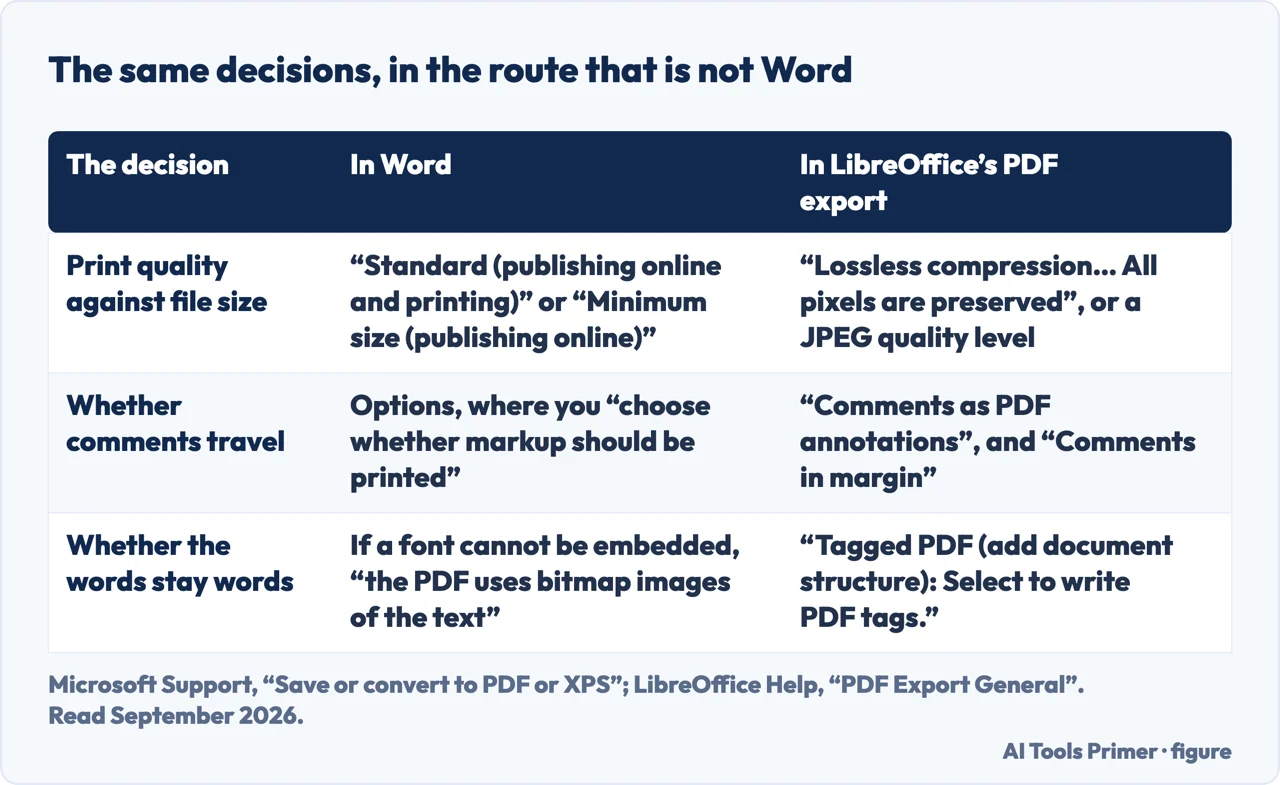
This is why the same document can come out of two routes looking identical and behaving completely differently. It is also the reason to convert from the original file rather than from a PDF somebody sent you: every extra round trip is another chance for the text to be flattened.
The other half of this cluster runs the opposite way, and it is much larger. How to convert pdf to word is one of the biggest single questions in this whole subject, and it is a genuinely harder problem: going from Word to PDF is a translation the format was designed for, while going back is a reconstruction. That direction has a guide of its own, and it is honest about how often the reconstruction fails.
The way people phrase this shows what they are holding. Convert pdf to word and pdf to word converter are people looking for a tool. How to save a word document as a pdf is somebody with the document open in front of them, four clicks away from finishing. Word to pdf converter is the same person who has not yet been told that. And convert pdf is the broadest of all — usually someone who has been asked for a file in a format they do not have.
Every guide below starts from what is already installed, says what the conversion does to the file, and only then discusses whether anything else is needed.
Where to start
Four ways in.
- “I do not have Word.”
- Go to without word
- “The PDF came out wrong.”
- Read when it goes wrong
- “I need to go the other way.”
- That is pdf back to word
Without Word
Converting a document without a Microsoft subscription. All of these routes are free, and none of them upload the file.
When it goes wrong
The specific failures, each with a specific cause. Almost none of them are fixed by trying a different converter.
PDF back to Word
The opposite direction, which is a much harder problem than it looks and is searched far more often.
Not covered here. It will not send you to a converter site for a job the File menu already does.
It will not describe the conversion as lossless. Microsoft documents what happens to fonts, and this guide quotes it rather than glossing over it.
And it will not rank the online converters yet. That needs the same document — with unusual fonts, tracked changes, images and a table of contents — through each of them, with the output inspected rather than glanced at. What holds instead is simple: the steps and the font warning on this page are quoted from Microsoft’s own support documentation.
Turning a file into the format they asked for
The same job in six directions. Which one you need depends on what arrived.
- The same job, in the other places it comes up
- How to turn a picture into a PDF, without uploading it
- How to convert a PDF to JPG, and when not to
- How to convert PDF to Word, free, without uploading it
- How to convert PowerPoint to PDF, and why you should anyway
- PDF to Excel: why it is the hardest one
Sources
- Microsoft Support — Save or convert to PDF or XPS in Office desktop apps, including the page range option and the font embedding warning — support.microsoft.com, read 21 August 2026.
- The Document Foundation — LibreOffice Help, PDF Export General, for the export options in the route that does not need Word: lossless against JPEG compression, comments as annotations, tagged PDF, and exporting headings as bookmarks — help.libreoffice.org, read 5 September 2026.
Written by Alberto Gulotta
Founder and editor of AI Tools Primer, writing from Palermo, Italy. Thirty-five years of taking computers apart, starting with a Commodore 64 — the long version is on the about page.
Something wrong on this page? Write to aitoolsprimer@gmail.com and it gets fixed.
Written on 21 August 2026 · last checked 5 September 2026.
Independence and limits
No affiliate links and no paid placements anywhere on this site. Nobody pays to appear here, and no company has seen this page before you did.
This is general information, not professional advice. Where a page touches money, health, safety or the law, it names its source and the date it was read — and your situation may still differ. See the privacy page and the cookie policy.