
Docs · guide
How to convert a PDF to JPG, and when not to
By Alberto Gulotta · Updated · 9 min read
How to convert a pdf to jpg is almost always answered with an upload site, and none of them raises the question worth asking first: whether you want a picture of your document at all. It is a short question with a permanent answer.
What this conversion costs, before you do it
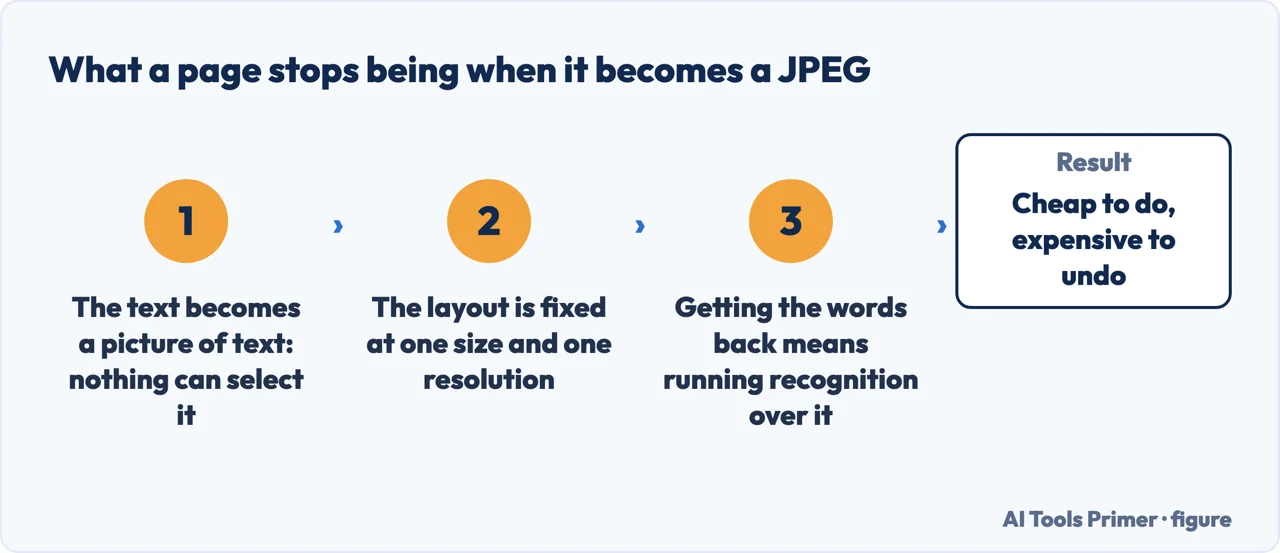
A PDF made from a document contains real text: selectable, searchable, copyable, readable by a screen reader. A JPG contains none of those things. It is a picture of a page, and every word in it becomes a shape.
That is not a reason never to do it. It is a reason to know why you are doing it, because the change is one-way: nothing turns those shapes back into text except character recognition, and recognition makes mistakes that the original document did not contain.
When it is the right answer, and when it is not
- A form or site that accepts images and refuses PDFs
- A single page you want to put in a slide or a message
- A preview or thumbnail of a document
- Somewhere that will not display a PDF at all
- “To make it smaller” — usually it gets larger, not smaller
- “So nobody can edit it” — a picture of text is not protection
- To send a long document as a stack of images
- To archive something you will need to search
Two of the entries in the right-hand column deserve a sentence each, because they are the commonest reasons given and both are wrong in a way that is easy to check. Making it smaller: a text PDF is mostly instructions and weighs very little; the same page as a JPG is a grid of pixels and frequently weighs more. Convert a ten-page document and you will often finish with a larger total than you started with, in ten files instead of one. Stopping people editing it: anyone can open a JPG in any editor, and anyone can run recognition over it. What a picture actually prevents is you searching it later.
The routes that need no website
Choosing JPEG is not the last decision. Apple: “depending on the file format you choose, additional options may appear. If you choose JPEG or JPEG-2000, you can adjust the image’s quality.” That slider is the difference between a page you can read and a page whose text has gone soft — and it defaults rather than asking, which is why a first attempt often looks worse than expected.
If the format you need is not in the list, it is not missing so much as hidden: “if you don’t see the file type you want, press and hold the Option key and click the Format pop-up menu to see specialized or older formats.” Worth knowing before concluding that Preview cannot produce what some old system is demanding.
And going the other way — keeping it as a PDF rather than turning it into a picture — the same dialogue carries two options that are the reason people convert in the first place: “if you choose PDF, you can choose a Quartz filter to apply to the image, and you can encrypt the image so that only those with the password can view it.” If the goal was a smaller file or a protected one, neither of those needs a JPG.
The related searches sit on both sides of the same wall. How to convert pdf to jpg and how can i convert a pdf to jpg are people who have decided. How to save pdf as jpg is the same request in the language of the Save dialogue. And the reverse direction — how to convert jpg to pdf — is a far larger search and a much more common need, because sending pictures as a single document is usually what somebody is actually asking for. That has a guide of its own, and it is worth checking whether you are in the wrong one.
What a JPEG has stopped being, and what it costs to get back. Once a page is an image, the text is a picture of text: to make it selectable again somebody has to run recognition over it. Google documents that as a separate operation with its own conditions — a conversion of “PDF and photo files to text”, with limits on size and format and no promise about layout. That is the whole of the “when not to”: converting to JPEG is cheap and reversing it is not.
One last practical note, since almost every converter on offer is a website. Converting a PDF on somebody else’s server means sending them the document. For a leaflet that is nothing. For a contract, a payslip or anything with a name and an address on it, the routes above do the same job without the file leaving the machine — and they are already installed.
Where to start
Four ways in.
- “I need one page as an image.”
- It is above. Then doing it offline
- “The whole document.”
- Read many pages
- “Actually I need the opposite.”
- That is the other direction
- “I need to keep the text searchable.”
- Go to keeping the text
Doing it offline
Every route here keeps the document on your own machine, which matters more than speed for most of what people convert.
Many pages
A document is not one image, and a folder of numbered files is not a document. This wing is about not creating a mess.
The other direction
Far more people need this than the one above, and a good share of them arrive here by mistake.
Keeping the text
If searchable text matters, a picture is the wrong destination. These guides cover what to do instead.
Not covered here. It will not send you to an upload site as the first answer. Two of the three routes above are already installed, and the third is a screenshot.
It will not describe the conversion as neutral. Text becomes a picture, and this guide says so before it says how.
And it will not rank the converter sites yet. That needs the same documents — a text page, a scan, a page of tables — through each of them, with the file sizes and the results shown side by side. What holds instead is simple: the export formats quoted on this page come from Apple’s own documentation.
Turning a file into the format they asked for
The same job in six directions. Which one you need depends on what arrived.
- The same job, in the other places it comes up
- How to turn a picture into a PDF, without uploading it
- How to convert PDF to Word, free, without uploading it
- Word to PDF: the route that is already in Word
- How to convert PowerPoint to PDF, and why you should anyway
- PDF to Excel: why it is the hardest one
Sources
- Apple on converting image file types using Preview on Mac — the File > Export route and the Format menu offering HEIC, JPEG, JPEG-2000, OpenEXR, PDF, PNG and TIFF; that holding the Option key reveals specialized or older formats; that choosing JPEG or JPEG-2000 lets you adjust the image quality; and that choosing PDF offers a Quartz filter and password encryption — support.apple.com, read 16 September 2026.
- Apple, Preview User Guide for Mac, macOS 27 — the front page of the guide. Reread on 16 September 2026 it carries no list of the formats Preview converts to: that list is now only in the Convert image file types article above — support.apple.com, read 16 September 2026.
- Apple Support — Export or compress PDFs and images in Preview on iPhone — support.apple.com, read 21 August 2026.
- Google Drive Help — Convert PDF and photo files to text: turning a picture of text back into text as a separate operation, with its own limits — support.google.com, read 4 September 2026.
Written by Alberto Gulotta
Founder and editor of AI Tools Primer, writing from Palermo, Italy. Thirty-five years of taking computers apart, starting with a Commodore 64 — the long version is on the about page.
Something wrong on this page? Write to aitoolsprimer@gmail.com and it gets fixed.
Written on 21 August 2026 · last checked 16 September 2026.
Independence and limits
No affiliate links and no paid placements anywhere on this site. Nobody pays to appear here, and no company has seen this page before you did.
This is general information, not professional advice. Where a page touches money, health, safety or the law, it names its source and the date it was read — and your situation may still differ. See the privacy page and the cookie policy.