
Identity · guide
Facebook hacked: the signs, and the route when you are locked out
By Alberto Gulotta · Updated · 18 min read
Facebook hacked: Facebook says to visit facebook.com/hacked from a device you have used to log in before. Its list of signs differs from those of Meta, the FTC and Infosec Institute. A second Facebook page covers people whose email and number are no longer theirs. We tested nothing on an account.
| Question | Answer | Where it comes from |
|---|---|---|
| Where do I start? | At facebook.com/hacked, on a device you have used to log into Facebook before | Facebook Help Center |
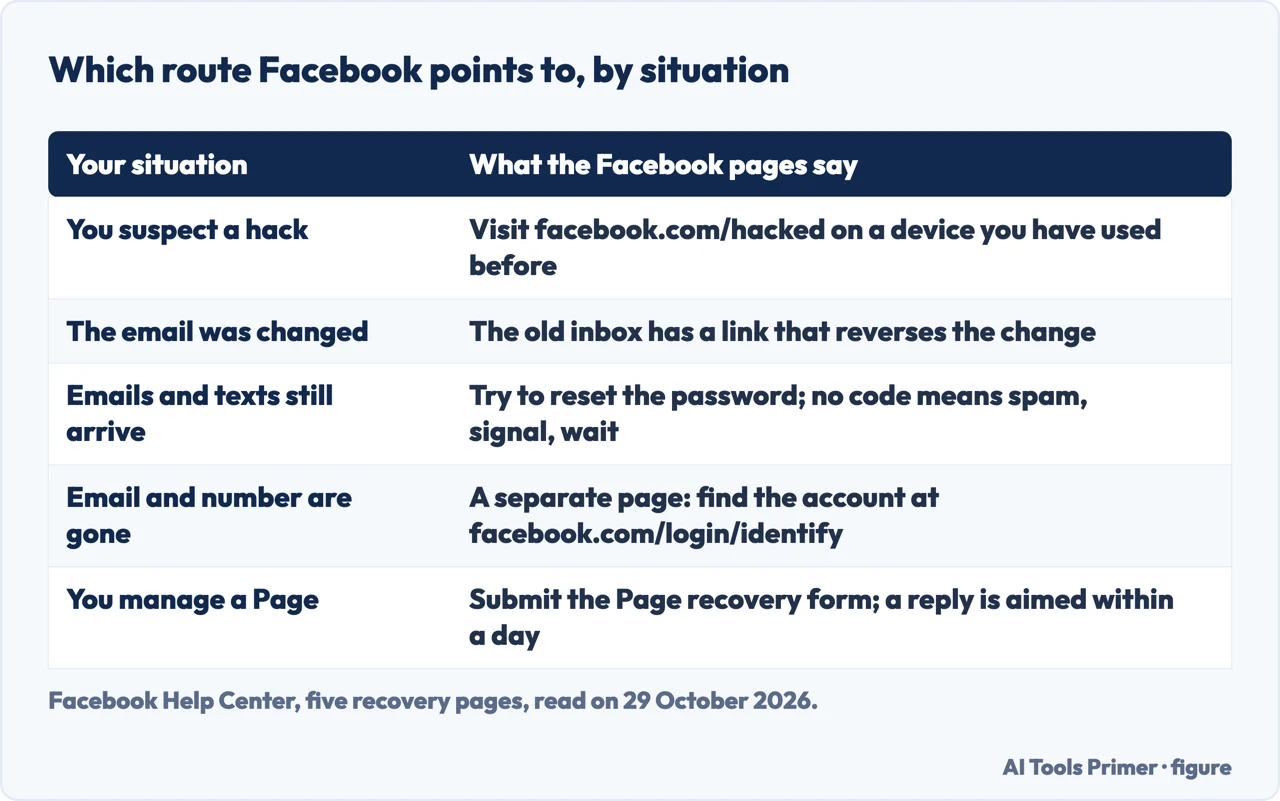
| Can a changed email be undone? | Yes: Facebook sends a link to the previous email address that reverses the change | Facebook Help Center, Meta Help Centre |
| What if the email and number are gone? | A separate Facebook page: find the account at facebook.com/login/identify and give a new contact | Facebook Help Center |
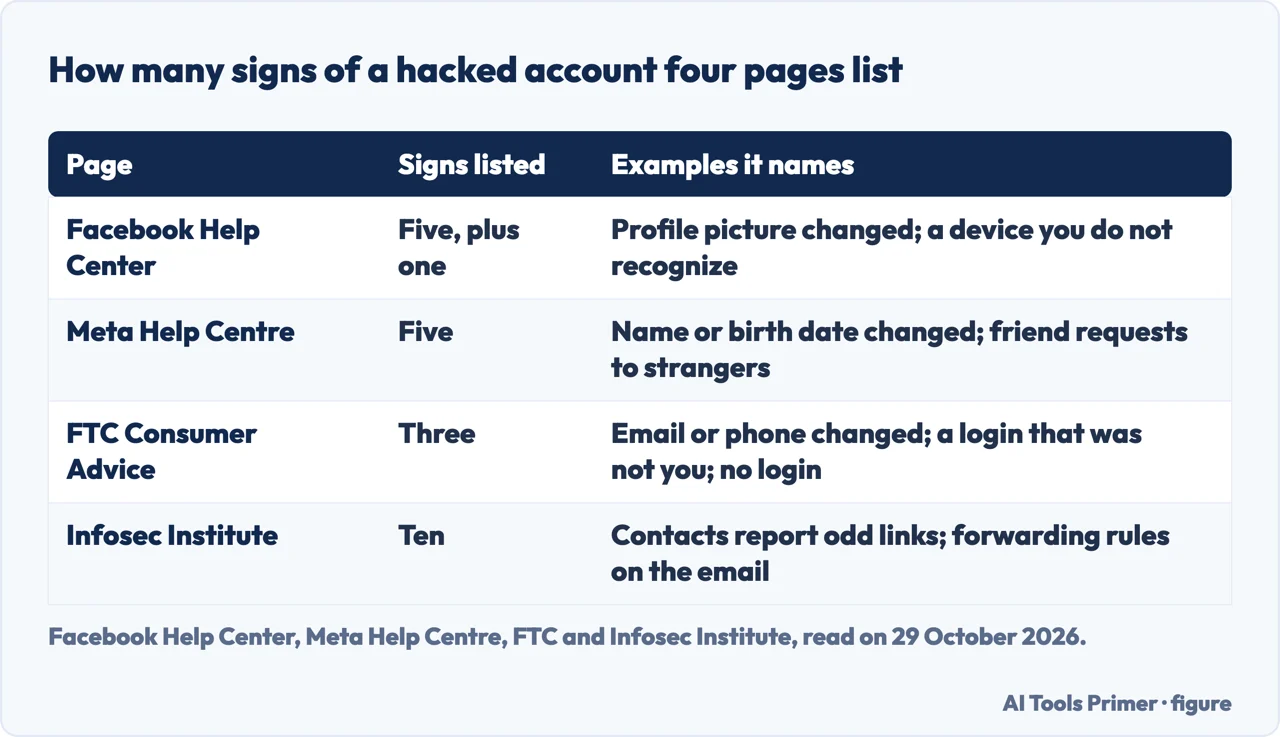
| Do the pages agree on the signs? | Facebook lists five, Meta five that only partly overlap with them, the FTC three and Infosec Institute ten | All four |
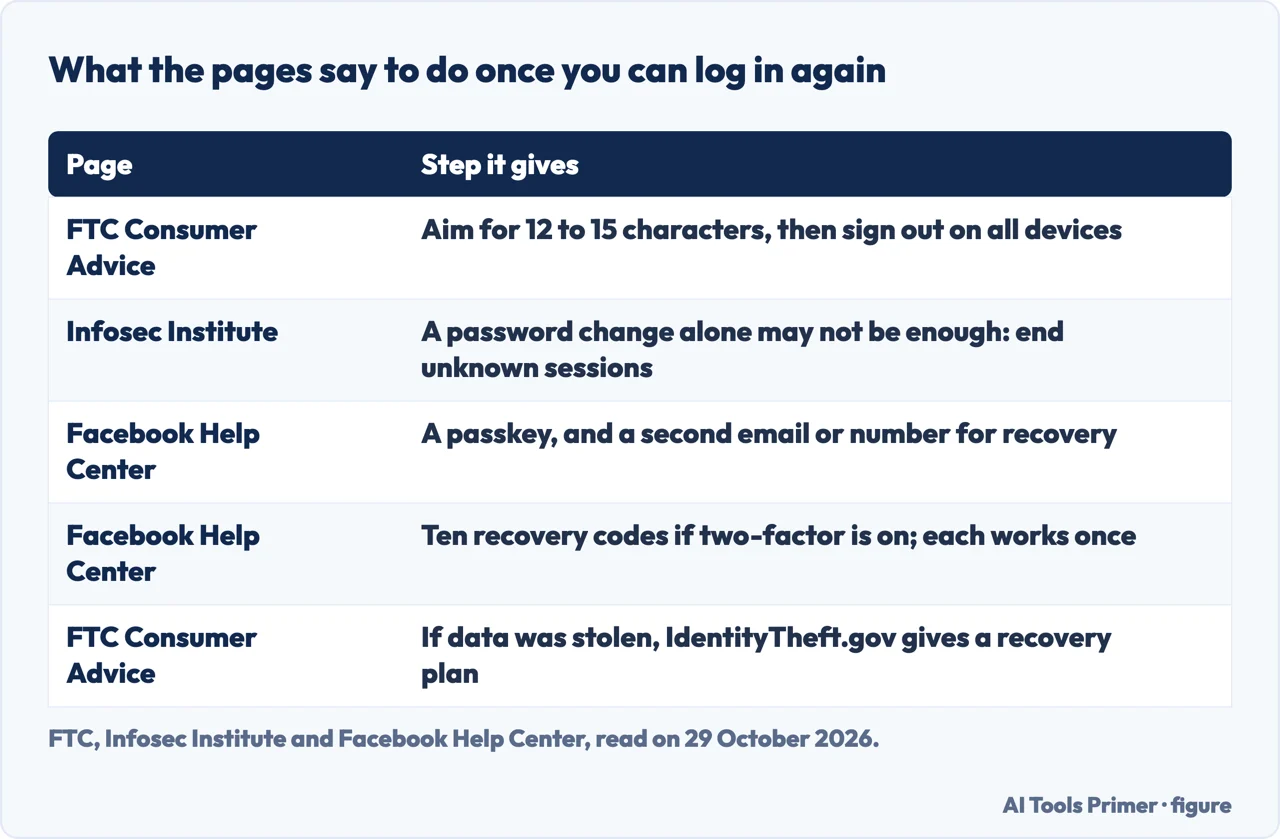
| Is a new password enough? | The FTC adds signing out on all devices; Infosec Institute says a password change alone may not be enough | FTC, Infosec Institute |
Start where Facebook says to start
Facebook’s help page for a hacked account says to visit facebook.com/hacked and, if you can, to use a device you have used to log into Facebook before. The page at that address repeats the idea in its own words: Facebook will walk you through some security steps to recover the account, and the steps are best begun on the device you usually use for Facebook. The same recommendation appears on three more Facebook pages we read, among them the index of recovery pages, the page for people who cannot log in and the page for people who no longer have their email address or mobile number.
The page for the case with no email or number goes a step further. It says you may be able to recover the account by visiting facebook.com/hacked even if you are not sure whether the account was compromised. So the address is not reserved for people who are certain of a hack. A device you have used before is described on that page as your own phone or computer, an old phone or a family member’s laptop.
If you are helping a friend or a family member, Facebook says the person should try the steps on a device they have used to log into Facebook before. Its page on helping someone else says to help the person visit the Account Recovery page, where the right solution is found, and to use the device they usually use to log in. That page also has two routes we do not cover: removal or deactivation of the account of a friend who is medically incapacitated, and memorialization for a friend who has died.
Facebook’s own page for people who cannot log in splits on one question, whether you can still get emails and text messages at the address or number on the account, and this page follows that split in the sections on the old inbox and an account whose email and number are gone. For the linked Instagram account, our page on a hacked Instagram account covers that route.
The signs, and where four lists differ
Facebook’s page lists five signs. The profile picture has been changed. There are posts, comments or messages you did not write. You have trouble logging in, or your two-factor method, such as an authentication app, is not working. A message or notification from Facebook says someone is trying to log in or has already logged in, and it was not you. An email from Facebook says an email address or mobile number was added or removed, or that your password was changed, and it was not you. The page adds one more place to look: the Where you’re logged in section of Settings, where a device or location you do not recognize can be selected and logged out.
Meta’s Help Centre page lists five signs too, and they are not the same five. They are a changed email address or password, a changed name or date of birth, friend requests sent to people you do not know, messages you did not write, and posts or ads you did not create. The name and date of birth, the friend requests and the ads appear on Meta’s list and not on Facebook’s. The profile picture, the two-factor method that fails and the unknown device appear on Facebook’s list and not on Meta’s. The Meta page is written in British English, and it is marked as updated 46 weeks ago, without a date we could read.
The FTC’s consumer advice, by a consumer education specialist and dated 29 October 2024, gives three. A notification that your email address or phone number changed, or that your password was reset, when you made none of those changes; a message that someone tried to log in, or did log in, and it was not you; and being unable to log in. For the last case the FTC says to follow the provider’s account recovery instructions, and its page lists links for Facebook along with Google, Instagram, LinkedIn, Microsoft, Pinterest, Reddit, Snapchat, TikTok, WhatsApp, X, Yahoo and YouTube.
Infosec Institute, a security training company whose page carries invitations to its courses, gives the longest list: a self-audit table of ten signals. They are profile changes, unknown activity, login alerts, changed recovery details, unfamiliar sessions, access problems, reports from contacts, changes among connected apps, warnings on the recovery email account and warnings on the device. It adds that one sign may have an innocent explanation, while several signs together should be treated as an incident. We used this page for facts only.
The email was changed, or the email and number still work
Facebook and Meta give the same instruction for a changed email, with one word different. When the email address on the account is changed, Facebook sends a message to the previous email account with a special link, and clicking the link reverses the change and secures the account. Facebook’s page says “email”; Meta’s says “email address”. Both are pages about a hacked account, and neither describes what the link looks like. Facebook’s page also says that if you receive an email from Facebook you can check that it is really from Facebook, through a link on that page that we did not open.
Infosec Institute treats the inbox as part of the recovery. Its list of steps after a takeover puts securing the email account associated with Facebook near the start, with a check for forwarding rules or recovery changes, and elsewhere it says the recovery email is often as important as the Facebook password. The FTC also tells you to check the email account for auto-forwarding rules you did not set up.
If emails and text messages from Facebook still reach you, Facebook’s page for people who cannot log in says to try to reset your password. When no code arrives, it suggests checking that the code did not go into a spam or junk folder, checking your connection, since you need a signal to receive the code, and waiting a few minutes before requesting a new one. The same page says that if you suspect a hack you should visit facebook.com/hacked on a device you have used before. The ordinary reset has its own page on this site: changing a Facebook password.
When the email and number are no longer yours
Facebook has a separate page for this case. It is for people who are having problems logging in because they no longer have access to the email address or mobile phone number on the account, maybe because of a hack and a changed password, or because they lost or forgot them. The first step on it is the same address, facebook.com/hacked. If that does not work, the page gives three things to try before anything else: a different mobile number or email address that you might have forgotten is associated with the account; a second look at how you typed the number or email at login, including the country code for a number, with +1 given as the United States example; and a message to your email provider, to see if it can help you recover the email account. If that works, Facebook says to follow the steps to reset your password.
Next comes finding the account on a familiar device. On a device you have logged in from before, type facebook.com/login/identify into your usual browser and enter an email address or mobile number. It can be the one you usually log in with or any other you think could be registered to the account. If that does not work, enter your account name or username. If you do not know the username, the page says a friend can go to your profile and send you the username shown in its URL.
After the account is found, the page gives four steps. Select No longer have access to these?, or Forgot account? or Recover if that wording is the one you see. Follow the prompts, which may ask for new contact information; the page says the contact you provide must not have been used for your Facebook account before. Follow the prompts to confirm that the account belongs to you. Once you pass the security checks, follow the instructions to reset the password, which the page suggests should be easy for you to remember and hard for other people to guess.
The pages we read do not say how long this takes, what happens if the steps fail, or how many times you can try them. The only reply time on any of the Facebook pages we read belongs to the Page recovery form, described below.
After you are back in
The FTC writes its steps for someone who gets a notification about activity they do not recognize and can still log in. Change the password to something unique and strong, aiming for 12 to 15 characters, or use a passphrase, a series of words separated by spaces. Then sign out of the account on all devices, so that anyone logged in on another device is kicked out. Turn on two-factor authentication if the account offers it, check that the email address and phone number listed for recovery are correct, and look for signs of access: messages or posts the hacker sent, new friends you do not recognize and, in the email account, forwarding rules you did not set up. If you believe your personal information was stolen, the FTC points to IdentityTheft.gov for a personalized recovery plan.
Infosec Institute lists seven steps in a different order. On the password step it says not to rely on a password change alone, and elsewhere that changing a password alone may not be enough after an incident. It says to go to Facebook’s recovery page from a familiar device, secure the email account, reset the password and revoke unfamiliar sessions, then remove unknown apps, browser extensions, Page access, payment methods and business integrations. It continues with a passkey or two-factor authentication and saved recovery codes, a check of recent posts, messages, ads and transactions with a notice to affected contacts, and, if money, advertising spend, identity documents or workplace systems were involved, keeping evidence and following the relevant fraud process. Its reasoning is that an attacker who obtains a valid session may be able to act as the user until the session is revoked or expires, and that is why it says changing a password alone may not be enough.
Facebook’s pages that we read, in the sections on recovery, give neither the 12-to-15 figure nor a step to sign out everywhere. They do say, in the signs list, that a device you do not recognize in Where you’re logged in can be selected and logged out. Where Facebook is specific is in what to set up so that losing access is less likely to happen again.
Its page on avoiding the loss of access names four things. Keep an up-to-date contact that only you can reach, so that a confirmation code can be sent. Create a passkey, which Facebook says is more secure than a password because it is uniquely generated for every account and is less vulnerable to phishing. Add another email or mobile number in case the original contact method is compromised, making sure you are the only person with access to those emails and that the email password differs from the Facebook password. And use your authentic name and date of birth, so that Facebook can find the profile if you ever lose access to it.
The page on recovery codes adds a fifth. With two-factor authentication turned on, you can get 10 recovery login codes for the times you cannot use your phone, and a code takes the place of the authenticator code when you log in. Each works once, and new ones come from Get new codes. The path it gives is the profile picture, Settings & privacy, Settings, Accounts Center, Password and security, then Two-factor authentication. Facebook warns that it is gradually updating people to Meta Accounts, so you may see either Accounts Center or Meta Account settings. For the profile itself, our page on locking a Facebook profile covers what Facebook names; the wider picture is on our identity theft hub page.
If it was a Page, and what the pages do not say
A hacked account that managed a Facebook Page has a recovery route of its own. Facebook’s page describes two ways it can happen: a hacker may have stolen a password, logged into the personal account, added themselves to the Page and removed your access; or a scammer may have tricked you into handing over control, possibly in Meta Business Suite. Facebook says the best thing to do is submit the Page recovery form. It says it will look and update you by email, and aims to reply within a day, though some reviews may take longer. It still recommends the form if you have Meta Verified or other support, and it says it can only act if it can confirm that the Page was compromised.
The form can be submitted only if you are logged in and recently lost access to a Page. If you cannot log in, Facebook sends you to facebook.com/hacked on a device used before. If the form does not let you select a Page, Facebook explains that it does not see a recent loss of access. After you regain the Page, it says to follow the prompts if the account was locked for security, to look through the Page and business portfolio and undo changes you do not recognize, and to turn on Advanced Protection or take other steps to secure the account.
Some questions are left open by what we read. The pages we read do not say how long recovery takes after the security checks. They do not say what happens after a failed attempt at facebook.com/hacked or how many attempts are allowed, and they do not give figures for how often accounts are hacked. The answers on this page come only from the Facebook, Meta, FTC and Infosec Institute pages listed under Sources.
We left out a site at ftc.net, which is not the Federal Trade Commission’s ftc.gov, and did not read it. We tested nothing on a Facebook account.
Where to start
Four ways in.
- “What do I do first?”
- Start where Facebook says to start — start
- “Is my account hacked?”
- The signs, and where four lists differ — signs
- “I have no access to the email or number.”
- When the email and number are no longer yours — locked
- “I am back in. Now what?”
- After you are back in — after
The accounts around this one
The same family, the password reset and the profile settings.
The rest of the damage
The email account that recovery runs through, and the phone number behind it.
Questions people also ask
Can you still access the email or phone number tied to the account?
If emails and texts from Facebook still arrive, Facebook says to try to reset the password, and to check spam, signal and wait a few minutes if a code does not come. If they do not, it has a separate page that starts at facebook.com/hacked and goes on to facebook.com/login/identify from a device used before.
What do you do if you get hacked into Facebook?
Facebook says to visit facebook.com/hacked, on a device you have used to log in before. Once you are in, the FTC adds a strong new password and signing out on all devices, and Infosec Institute says a password change alone may not be enough.
How do I see if my Facebook is hacked?
Facebook lists five signs, among them a changed profile picture and an unknown device in Where you’re logged in. Meta lists five that only partly overlap with them, the FTC three and Infosec Institute ten, and Infosec adds that several signs together should be treated as an incident.
What do hackers do when they hack your Facebook account?
Facebook’s signs mention posts, comments and messages you did not write, and its Page page says a hacker may add themselves to a Page and remove your access. Infosec Institute says a compromised account is often used to reach contacts, with links sent from Messenger and requests for money.
Not covered here. We tested nothing on a Facebook account. The statements come from eight pages of the Facebook Help Center, the facebook.com/hacked page, a Meta Help Centre page, an FTC consumer advice article dated 29 October 2024 and an Infosec Institute guide, all read on 29 October 2026.
The search volume and difficulty behind this page come from a Semrush reading of 29 August 2026, older than the 60 days the site normally allows.
Sources
- Facebook — What to do if your account has been hacked — www.facebook.com, read 29 October 2026.
- Facebook Help Center — Recover your Facebook account if you were hacked — www.facebook.com, read 29 October 2026.
- Facebook Help Center — Recover a Hacked Account — www.facebook.com, read 29 October 2026.
- Facebook Help Center — Recover your Facebook account if you can’t access your account email address or mobile phone number — www.facebook.com, read 29 October 2026.
- Facebook Help Center — Recover your Facebook account if you can’t log in — www.facebook.com, read 29 October 2026.
- Facebook Help Center — Help someone else recover their account — www.facebook.com, read 29 October 2026.
- Facebook Help Center — Recover a hacked Facebook Page you manage — www.facebook.com, read 29 October 2026.
- Facebook Help Center — Avoid losing access to your Facebook account — www.facebook.com, read 29 October 2026.
- Facebook Help Center — Set up Facebook login recovery codes — www.facebook.com, read 29 October 2026.
- Meta Help Centre — If your account was hacked or someone is using it without your permission — www.meta.com, read 29 October 2026.
- FTC Consumer Advice — Email or social media hacked? Here’s what to do (29 October 2024) — consumer.ftc.gov, read 29 October 2026.
- Infosec Institute — How Facebook accounts get hacked in 2026 — www.infosecinstitute.com, read 29 October 2026.
Written by Alberto Gulotta
Founder and editor of AI Tools Primer, writing from Palermo, Italy. Thirty-five years of taking computers apart, starting with a Commodore 64 — the long version is on the about page.
Something wrong on this page? Write to aitoolsprimer@gmail.com and it gets fixed.
Written on 29 October 2026.
Independence and limits
No affiliate links and no paid placements anywhere on this site. Nobody pays to appear here, and no company has seen this page before you did.
This is general information, not professional advice. Where a page touches money, health, safety or the law, it names its source and the date it was read — and your situation may still differ. See the privacy page and the cookie policy.