
Malware · guide
Is Windows Defender Enough for Your PC?
By Alberto Gulotta · Updated · 16 min read
Windows Defender is enough for most everyday browsing, downloads and email on Windows 10 and 11: AV-TEST scores it 6 out of 6 for protection, and AV-Comparatives places it in the top online-protection cluster. It falls short offline, and against the brand-new ransomware and zero-days Microsoft itself names as blind spots.
| Fact | Source |
|---|---|
| Protection Score: 6.0 out of 6.0 | AV-TEST, Jul–Aug 2026 report |
| Online protection rate: 99.93%, 3 false alarms | AV-Comparatives, March 2026 test |
| Zero false detections across 1,010,195 clean samples | AV-TEST, Jul–Aug 2026 report |
| Offline detection: 89.2%, against 98.6% for the best | AV-Comparatives, March 2026 test |
| A second antivirus switches Defender to Disabled mode automatically | Microsoft’s documentation for the business editions |
What Windows Security Actually Includes
Microsoft’s support page describes the Windows Security app as “a comprehensive security solution integrated into Windows” — and that is why asking whether Windows Defender is enough is really three questions wearing one name. It bundles three pieces: “Microsoft Defender Antivirus, Windows Firewall, and Smart App Control, which work together to provide real-time protection against viruses, malware, and other security threats”.
Defender Antivirus is the scanner: automatic scanning, cloud intelligence, website and download warnings, and ransomware protection through controlled folder access, per Microsoft’s Windows Learning Center page. Windows Firewall is a separate layer that, per the support page, watches network traffic in both directions and blocks anything that looks suspicious, independent of whatever the antivirus finds. Smart App Control is newer and works differently again: per the Windows Learning Center page, it uses AI and cloud intelligence to check apps before they run, blocking anything that is not trusted, verified or widely recognised as safe. It comes with limits Microsoft states outright in a footnote: only on the latest version of Windows 11, only after a fresh system or a full reset, and “Available in North America and Europe only”.
A confusingly similar name belongs to a paid product: Microsoft’s support page notes that Microsoft 365 Family and Personal subscribers get a product named Microsoft Defender, a separate subscription covering Windows, Mac, iOS and Android — not the free antivirus this page is about. Put plainly: does Windows 11 need antivirus beyond what is already in this bundle? For ordinary browsing and email, Defender Antivirus is already running, so the honest answer is usually that nothing extra is missing, not that something needs buying.
What the Lab Numbers Actually Say
Two independent labs publish numbers on Defender every year, and both 2026 reports are public. AV-TEST’s July–August 2026 report #261414 tested 15 home-user products on Windows 11 Professional. Against 297 samples in its 0-day real-world test, and a reference set of 12,543 widespread-malware samples from the preceding four weeks, Defender scored 100% in both categories, in both months — a Protection Score of 6.0 out of 6.0.
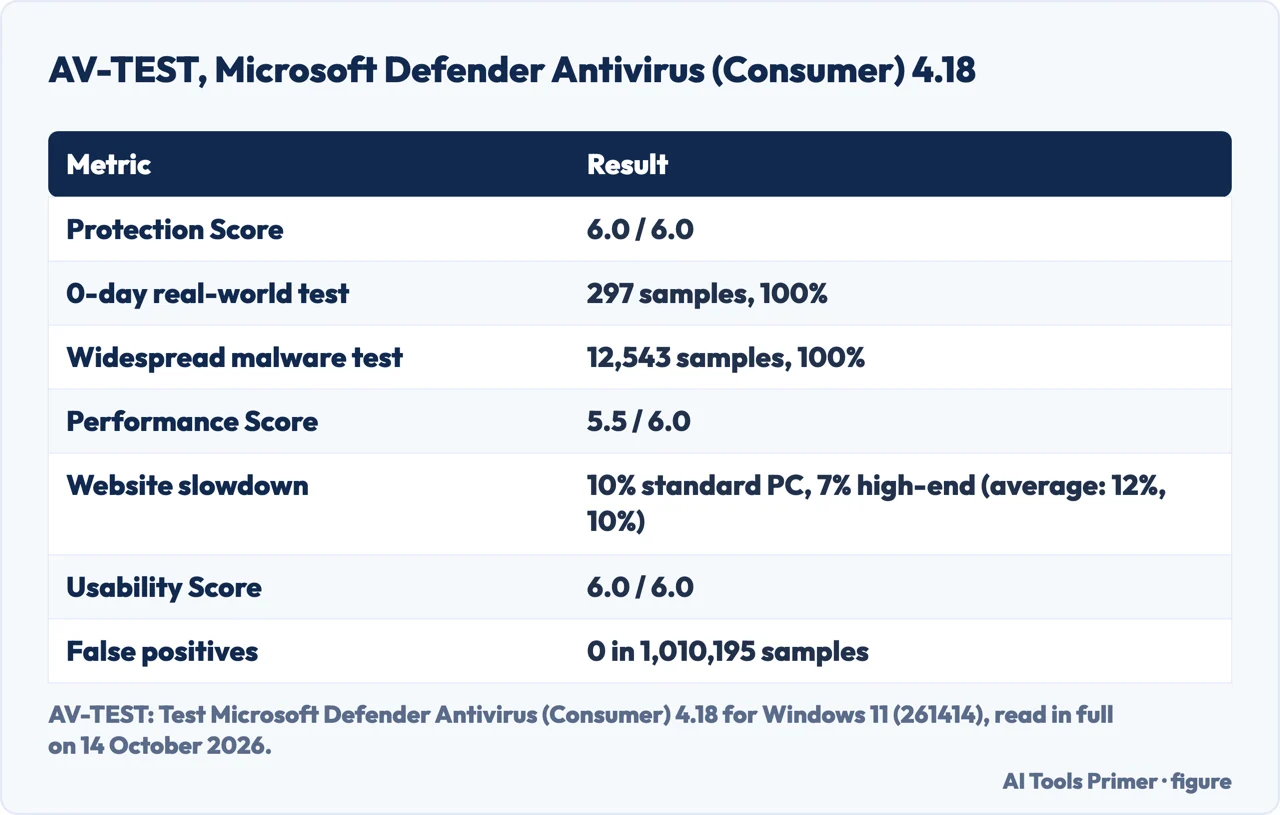
Performance was close behind at 5.5 out of 6.0: AV-TEST measured a 10% slowdown launching popular websites on a standard PC and 7% on a high-end one, against industry averages of 12% and 10%. Usability reached the full 6.0, built on zero false warnings across 500 tested websites and zero false detections of legitimate software across 1,010,195 clean samples.
AV-Comparatives’ March 2026 Malware Protection Test, released on 15 April 2026, tested a separate set of 10,030 malware samples “collected in the last few weeks”, and Microsoft came out of it with an offline detection rate of 89.2%, an online detection rate of 98.1%, and an online protection rate of 99.93% — a result that, per the report’s own clustering, put Microsoft in the same top group as ESET. It also recorded the second-fewest false alarms of any tested product that month, 3, behind only Kaspersky’s 2.
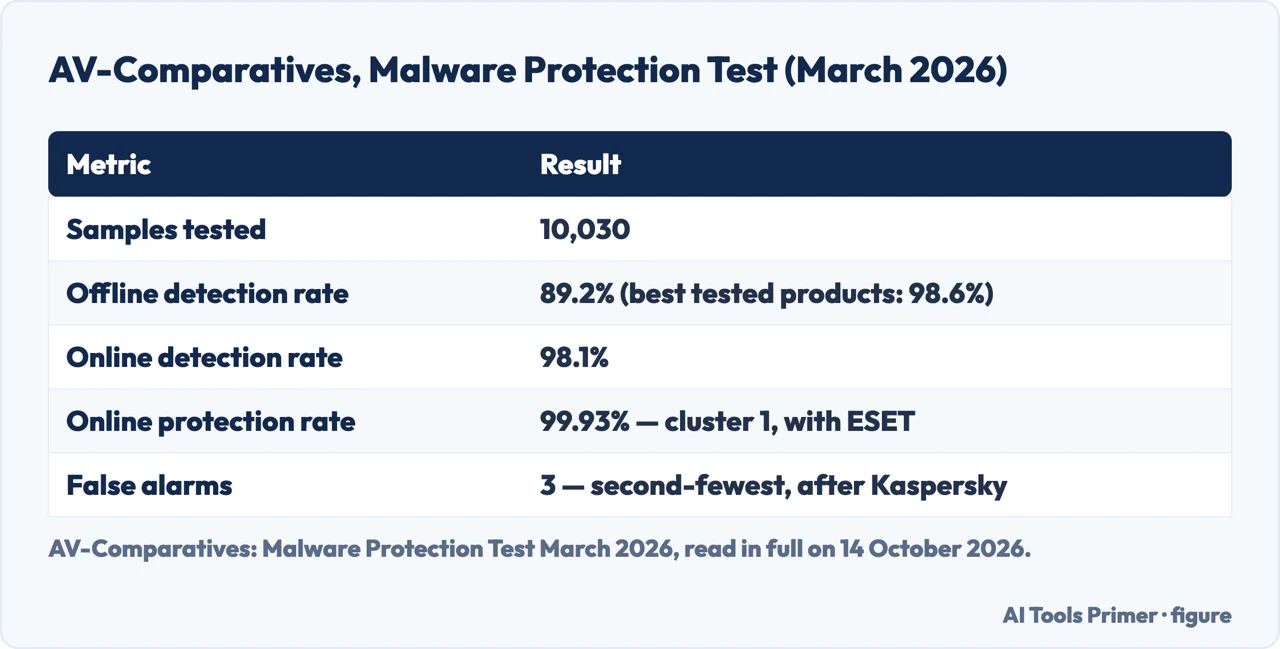
The weak spot in the same report is offline detection. 89.2% is well behind the 98.6% the best offline performers reached in March 2026, a gap AV-Comparatives’ own 26 May commentary restates directly, saying Defender’s “offline detection rate is 89.2 percent, while several other tested products reach 98.6 percent offline”. A machine disconnected from the internet — no cloud lookups, no live signature updates — is measurably the condition Defender handles worst of the two.
What Microsoft Actually Said, and When
Usually sufficient is real, but it is not what Microsoft’s live page says. Microsoft’s own Windows Learning Center page, published 13 January 2026 and still online, says “Windows 11 security comes with Microsoft Defender Antivirus, so you’re already protected from the start”, and sums it up as “For many users, this level of protection is plenty.” No usually sufficient there, and AV-Comparatives’ 26 May 2026 commentary independently quotes that same January line, confirming it.
A second Microsoft article, and why it is gone
The same commentary goes on to note “A sharper formulation of the same idea in April on the same website”, summarised in the media as Windows 11 no longer needing a third-party antivirus. That is the article PCMag reported on, on 21 April 2026, quoting Microsoft saying “Windows antivirus protection is usually sufficient when Windows 11 runs with default protections enabled, updates are installed regularly, and software downloads are deliberate.” PCMag also quoted Microsoft on when to add more: “The choice to add third‑party antivirus depends on how you use your PC and which features you value,” and on the cost of doing so, “Each added tool increases background activity and complexity, so choose tools that match real needs”, per Microsoft’s own since-removed wording.
AV-Comparatives says that April article appears to have been taken down since, and calls that a constructive step — independent confirmation of the retraction. So usually sufficient belongs to PCMag quoting a since-removed April 2026 article, never to the live January page, which never used it.
PCMag’s own review adds a separate editorial verdict, not a Microsoft statement: in the reviewer’s assessment, Windows Defender is decent but falls short of the best antivirus compared with some free and paid third-party products.
What Happens When You Install Another Antivirus
Microsoft’s documentation for the business editions — written for Defender for Endpoint, but its compatibility table starts with plain Windows 10 and 11 rows — is specific about what a second antivirus does. Defender alone is Active mode: the primary app, scanning, remediating and reporting. Add a non-Microsoft antivirus as the primary solution, and the same table says Defender goes into “Disabled mode (happens automatically)” — not a second layer, a replacement.
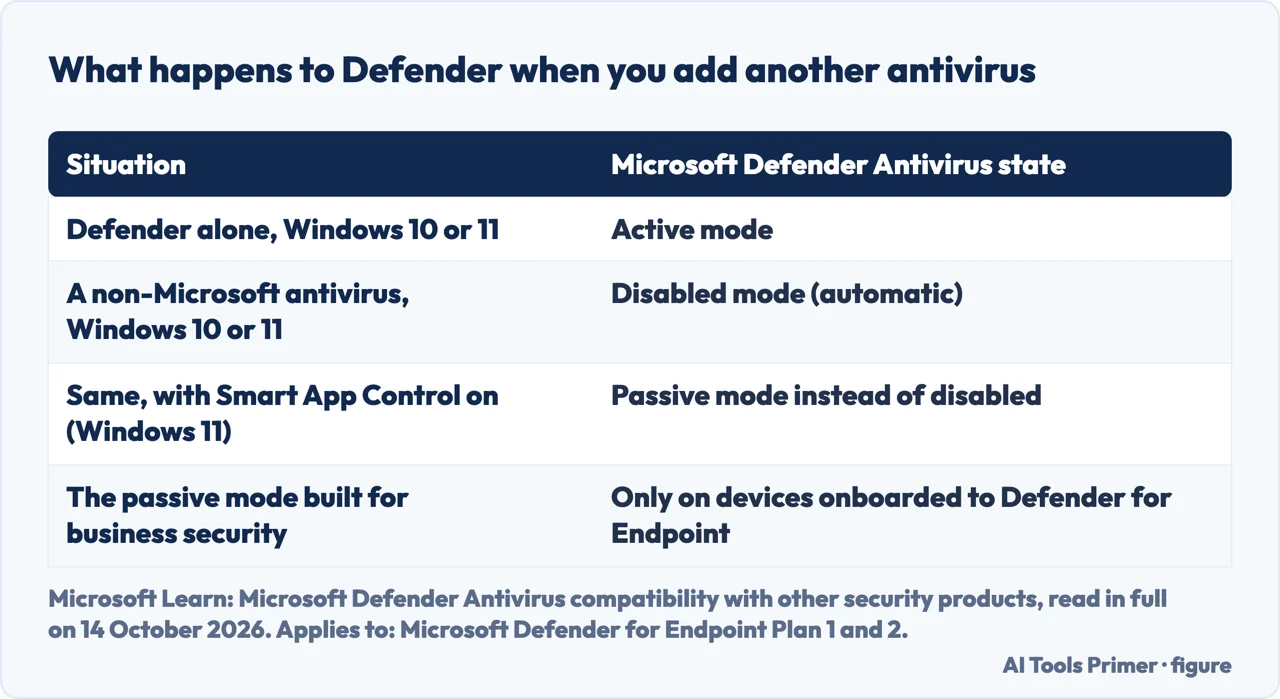
There is one exception Microsoft notes for Windows 11: “in Windows 11, if SmartAppControl is enabled, you may observe that Microsoft Defender Antivirus goes into passive mode instead of remaining in disabled mode”, again per Microsoft’s documentation for the business editions. But the same page is careful to separate the two: Defender entering passive mode because of Smart App Control is not the same as passive mode on devices onboarded to Microsoft Defender for Endpoint.
True passive mode — scanning and reporting threats without remediating them, while another product takes the lead — is, by Microsoft’s own documentation for the business editions, available “only on endpoints that are onboarded to Microsoft Defender for Endpoint”: an organisation’s managed fleet, not an ordinary home PC. McAfee, AVG or any other consumer antivirus does not switch Defender to that kind of passive mode on a home machine; it switches it off.
Checking That Protection Is Actually On
Rather than guess, Microsoft documents a one-minute check, on screen and in PowerShell, and the same steps also show whether a second antivirus has already switched Defender off.
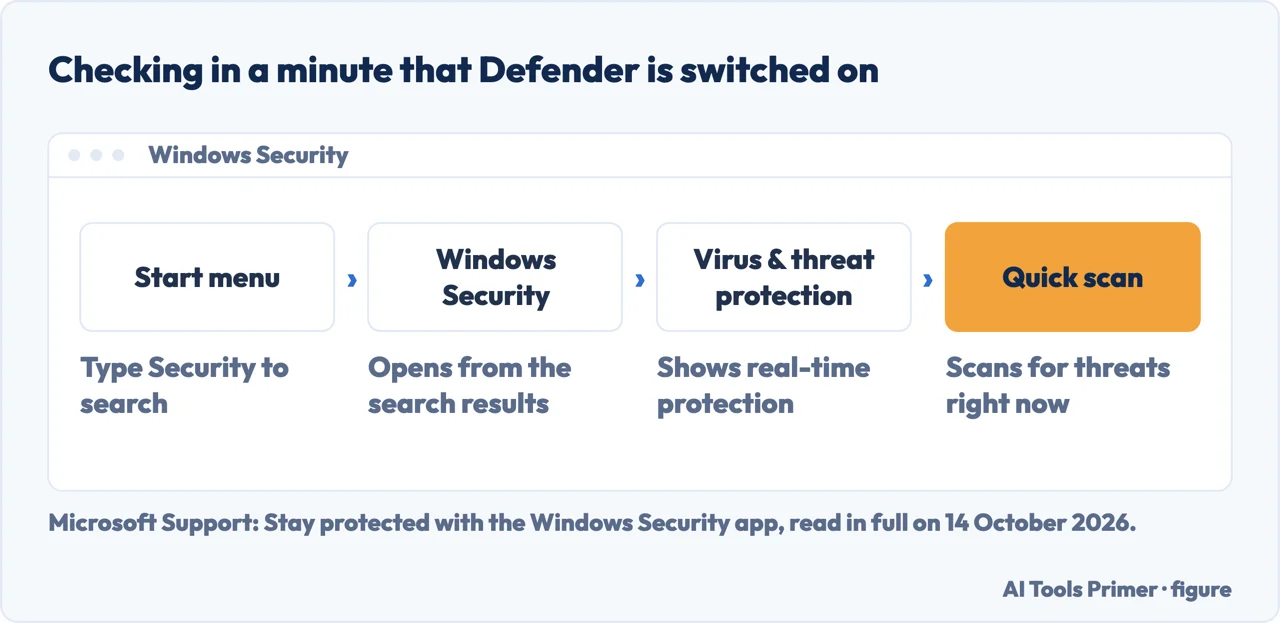
- Open the Windows Security app. Microsoft’s support page for the app — written for Windows 11 and 10 consumer devices — and, separately, Microsoft’s documentation for the business editions both describe the same opening step: select the Start menu, begin typing Security, and open the Windows Security app in the results.
- Go to Virus & threat protection, then Quick scan. Microsoft’s support page names this route exactly: open Virus & threat protection and choose Quick scan. A completed scan with nothing found is the first sign the antivirus piece is both installed and running.
- Check Manage providers, under Who’s protecting me? That same business-edition documentation walks through this same page to confirm which antivirus is active: select Virus & threat protection, then under “Who’s protecting me?” select Manage providers, where Microsoft Defender Antivirus should show as turned on — or, if a second antivirus has taken over, show as off instead.
- Or ask PowerShell directly. The enterprise docs again give a PowerShell route: run
Get-MpComputerStatusand read theAMRunningModerow, which reports Normal, Passive or EDR Block Mode.
What Defender Does Not Cover
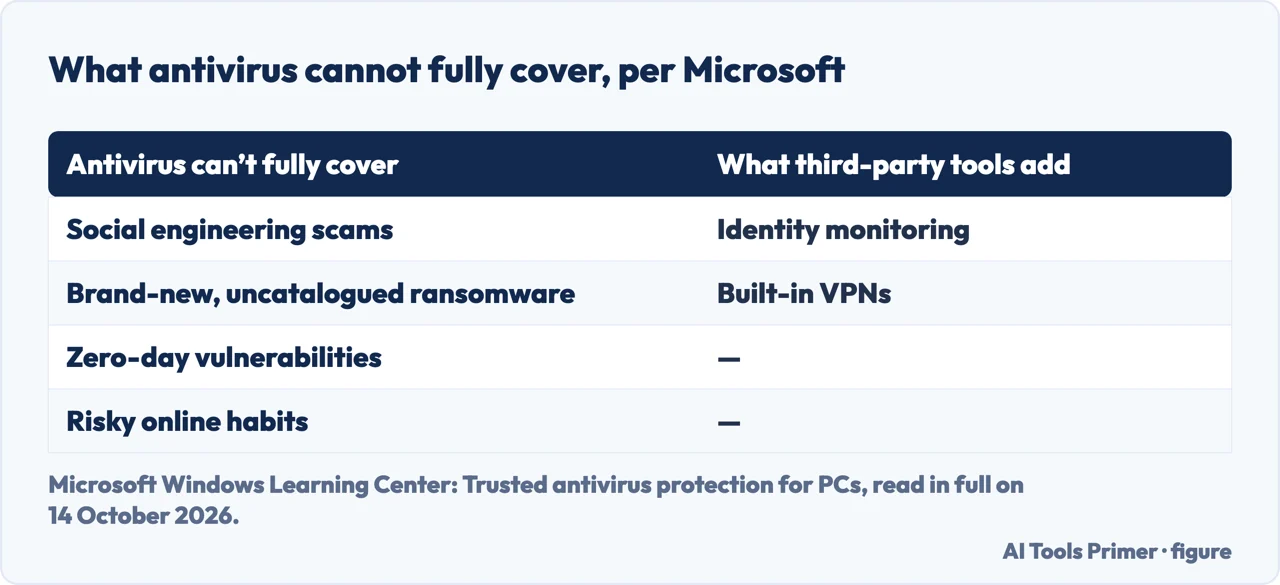
Microsoft’s own Windows Learning Center page names four things no antivirus, Defender included, fully stops: social-engineering scams that talk someone into handing over information themselves, brand-new ransomware that has not yet been identified or catalogued, zero-day vulnerabilities attackers find before a patch exists, and risky habits such as downloading unverified apps or clicking past a browser warning. The same page is equally direct about what paid tools add instead: extras such as identity monitoring or a built-in VPN, while Defender itself covers the essentials.
AV-Comparatives’ 26 May commentary adds a narrower gap: its phishing and web-filtering protection, built around SmartScreen, “might very likely see different real-world phishing and URL coverage than someone working exclusively in Edge and Outlook with all telemetry enabled” — a different browser or mail client is a real loss of coverage, not a theoretical one. Even so, it says that many home users with straightforward habits get a meaningful baseline from Defender as installed.
Malwarebytes, which sells a competing product, makes a related case: it says Defender “has blind spots for ransomware and zero-day exploits” and that Controlled Folder Access is “disabled by default and requires manual configuration” most people never do. Even so, its own advice is “Keep Defender active as your baseline” — not to switch it off — which agrees with the mechanical fact above: Defender only leaves that baseline when something else becomes the primary antivirus.
If what brought you here is removing something already on the machine rather than deciding what to add, that is a different page: removing malware from a computer, or, for one specific product people ask about by name, is MBAM safe. And if the starting question is what an antivirus is for at all, what antivirus software is, and whether you need one is the page underneath this one.
Where to start
Six ways in.
- “What’s actually in Windows Security?”
- Three pieces, one name — what windows security actually includes
- “What do the labs actually say?”
- Straight to the scores — what the lab numbers actually say
- “Did Microsoft really say that?”
- Follow the quote — what microsoft actually said and when
- “About to install McAfee or AVG?”
- See what changes — what happens when you install another antivirus
- “Is it actually switched on?”
- Check it in a minute — checking that protection is actually on
- “What won’t it catch?”
- Read the gaps — what defender does not cover
The questions underneath this one
Whether the built-in antivirus is enough is usually downstream of a question about the machine itself.
The same question on a phone
A phone is not a small PC, and neither half of this page carries over.
Questions people also ask
Do you really need antivirus or is Windows Defender enough?
Enough for most everyday users with safe habits and current updates: AV-TEST gives it a Protection Score of 6.0 out of 6.0, and AV-Comparatives places it in the top cluster for online protection. It is weaker offline — 89.2% against 98.6% for the best — and Microsoft says antivirus cannot fully cover social-engineering scams, brand-new ransomware or zero-days.
Do I need McAfee antivirus if I have Windows Defender?
On a Windows 10 or 11 PC, Microsoft’s documentation for the business editions says installing McAfee, like any non-Microsoft antivirus, as the primary antivirus switches Defender into Disabled mode automatically: a replacement, not a second layer. The real question is whether McAfee adds extras Defender lacks, such as identity monitoring or a VPN, per Microsoft’s own list.
Do I need AVG antivirus if I have Windows Defender?
Same mechanism as with McAfee: Defender switches to Disabled mode automatically once AVG becomes the primary antivirus. The real question is the same too — does AVG add extras Defender lacks, such as identity monitoring or a VPN?
Is Windows Defender still a good antivirus?
By the 2026 lab reports, yes. Microsoft’s documentation for the business editions says Defender moved in 2015 from a static signature engine to predictive technologies such as machine learning; AV-TEST gives it full marks for usability, with zero false positives across 1,010,195 clean files, and AV-Comparatives counted 3 false alarms in March 2026, the second-fewest of the products tested.
Is Windows Defender free?
Yes: Defender Antivirus and the Windows Security app are built into Windows 10 and 11 at no extra cost, per Microsoft’s support page. Microsoft 365 Family or Personal subscribers additionally get a separate, paid product called Microsoft Defender, with coverage across Windows, Mac, iOS and Android.
Not covered here. It does not describe core isolation, memory integrity or Protection History, because no source read for this page documents them, and a list of Windows Security features is not the place to guess. Nor does it turn into a procedure for Windows Server or for Defender for Endpoint’s own features — onboarding, EDR in block mode — which belong to an organisation’s managed fleet, not a home PC, even though two of the sources above are written for exactly that audience; and it does not cover macOS, Android or iPhone, where how to remove virus from Android and can iPhones get viruses answer the equivalent questions on their own terms. What holds instead is simple: the lab numbers above are the two labs’ own 2026 reports, and every Microsoft sentence is dated and traced to the article that actually contains it, not assumed from a headline.
Sources
- Microsoft Support — Stay protected with the Windows Security app: what the app bundles (Defender Antivirus, Windows Firewall, Smart App Control), the free vs paid Microsoft Defender distinction, and the Virus & threat protection > Quick scan route — support.microsoft.com, read 14 October 2026.
- Microsoft Windows Learning Center — Trusted antivirus protection for PCs, 13 January 2026: the live line on how much built-in protection counts as plenty, what third-party tools add, what antivirus cannot fully cover, and Smart App Control’s North America/Europe limit — www.microsoft.com, read 14 October 2026.
- Microsoft Learn — Microsoft Defender Antivirus in Windows overview: the Start-menu and PowerShell checks and the general description of active, passive and disabled mode. Applies to: Microsoft Defender for Business, Microsoft Defender Antivirus — documentation for the business editions, used here for the consumer checks it also describes, with that scope stated — learn.microsoft.com, read 14 October 2026.
- Microsoft Learn — Microsoft Defender Antivirus compatibility with other security products: the active/disabled/passive table for a second antivirus on Windows 10 and 11, and the Smart App Control exception. Applies to: Microsoft Defender for Endpoint Plan 1, Plan 2 — documentation for the business editions, used here for the consumer-facing rows it also describes, with that scope stated — learn.microsoft.com, read 14 October 2026.
- AV-TEST — Test Microsoft Defender Antivirus (Consumer) 4.18 for Windows 11 (#261414), Jul–Aug 2026: the Protection, Performance and Usability scores, and the sample counts behind each — www.av-test.org, read 14 October 2026.
- AV-Comparatives — Malware Protection Test March 2026: the offline, online and protection rates, the false-alarm count, and the 10,030-sample test set — av-comparatives.org, read 14 October 2026.
- AV-Comparatives — Is Microsoft Defender Enough? An Independent View, 26 May 2026: confirmation of the January Microsoft line, the retracted April article, the SmartScreen/Edge coverage gap, and the overall verdict — av-comparatives.org, read 14 October 2026.
- PCMag — Microsoft: Built-In Windows 11 Antivirus Is Enough Protection for Most Users, 21 April 2026: the quotes from the since-removed April Microsoft article, and PCMag’s own review verdict — www.pcmag.com, read 14 October 2026.
- Malwarebytes — When Defender is not enough, declared here as a competing product’s own page: its stated view of Defender’s blind spots and Controlled Folder Access, and its advice to keep Defender on rather than disable it — www.malwarebytes.com, read 14 October 2026.
Written by Alberto Gulotta
Founder and editor of AI Tools Primer, writing from Palermo, Italy. Thirty-five years of taking computers apart, starting with a Commodore 64 — the long version is on the about page.
Something wrong on this page? Write to aitoolsprimer@gmail.com and it gets fixed.
Written on 14 October 2026.
Independence and limits
No affiliate links and no paid placements anywhere on this site. Nobody pays to appear here, and no company has seen this page before you did.
This is general information, not professional advice. Where a page touches money, health, safety or the law, it names its source and the date it was read — and your situation may still differ. See the privacy page and the cookie policy.