How to remove malware from computer is a question with a crowded first page and a missing answer. The crowded part is which scanner to run. The missing part is the one people actually come back for: the scan finished, it found nothing, and the machine is still wrong.
Microsoft publishes four separate reasons that happens. Each has a fix, and none of them is running the scan again.
It is on the allowed list
cause 1
“The Allowed threats page shows a list of items that Windows Security has identified as
threats, but that you have chosen to allow. Windows Security won’t take any actions
against threats you’ve allowed.”
Something was allowed once, and the scan has been honouring that ever since.
It sits in an exclusion
cause 2
“Exclusions only apply to real-time scanning with Microsoft Defender Antivirus.
Any scheduled scans with Microsoft Defender Antivirus, or third-party antimalware products,
might still scan these files or processes.”
Microsoft’s own advice on writing one: “use the full path and file name to exclude a specific process. This makes it less likely that malware could use the same filename as a trusted and excluded process and evade detection.”
There is no room to remove it
cause 3
“Microsoft Defender Antivirus requires disk space to remove and quarantine
malware files. It might be prevented from completely removing a threat if there isn’t
enough available space on your PC.”
A full disk is not a detection problem. It is a removal problem, and it is published.
Something reinstalls it
cause 4
“In some cases, redetection of the same malware is due to an undetected malware
component constantly, quietly, reinstalling the detected malware. The malware is
typically reinstalled, and redetected, right after you restart your PC.”
The tell is the timing: it comes back at the restart, every time.
None of those four is a failure of detection, and that is why repeating the scan does not help. Two of them are settings you or something else changed, one is a disk that is too full to quarantine anything, and one is a second piece of malware the scanner never saw. Checking the allowed list and the exclusion list takes two minutes and rules out half the possibilities before you spend an hour on anything else.
The fourth has a signature you can recognise without any tool: if the same thing is found again immediately after every restart, Microsoft’s published explanation is a component that is still there and still reinstalling it. That is the point at which an offline scan stops being optional.
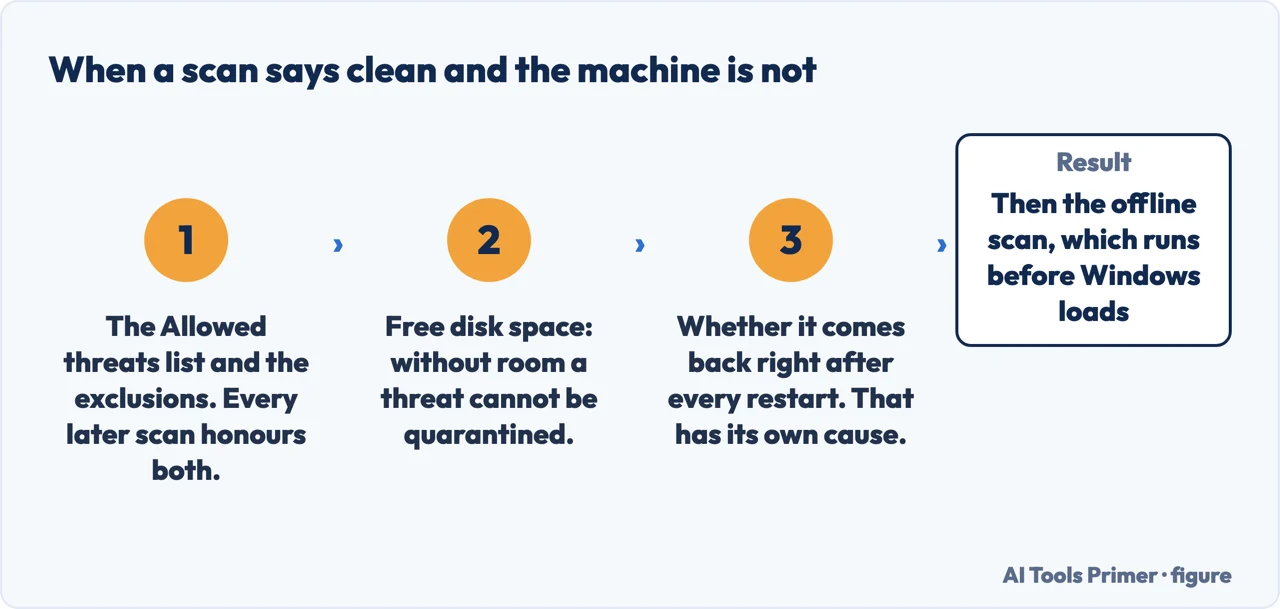
The order the documentation gives, rather than the order a product suggests. Each check is quoted from Microsoft above; the figure puts them in sequence. Figure drawn by AI Tools Primer.Microsoft ranks its own tools, and the first page shows the weaker one
On the scanning page: “For the most complete scan, run Microsoft Defender
Offline.” What it does: “Microsoft Defender Offline will load and perform a quick
scan of your PC in the Windows Recovery Environment” — and, from the Windows Security
page, “this happens after a restart, without loading Windows”.
On the Malicious Software Removal Tool, the other Microsoft page for this:
“It is strictly a post-infection removal tool.”
“The tool removes only specific prevalent malicious software. Specific
prevalent malicious software is a small subset of all the malicious software that exists
today.”
“It does not remove spyware.”
“This scan can take several hours to complete because it will scan all fixed and removable drives. However, mapped network drives are not
scanned.”
“If the tool is more than 215 days (7 months) out of date, the tool displays a
dialog box that recommends that you download the latest version.”
Read those together and the practical instruction writes itself. The tool Google shows you
is the one Microsoft describes as narrow; the one Microsoft calls most complete is already on
the machine and is not on that first page at all. Its path is Windows Security → Virus
& threat protection → Scan options → Microsoft Defender Offline scan. It runs
before Windows loads, which is the point: nothing that hides inside a running Windows gets to
hide from it.
It is worth being exact about why that ranking matters here rather than treating it as trivia. The Malicious Software Removal Tool is genuinely useful and Microsoft genuinely publishes it — but Microsoft also writes, in its own words, that it handles “a small subset” of what exists, that it “does not remove spyware”, and that it is “strictly a post-infection removal tool”. A reader who arrives from that page and runs it can come away believing the machine has been cleared by the manufacturer, when the manufacturer has described the tool’s limits three times on the page they were reading.
The Mac side of this question has a shorter answer, and the shortness is itself the finding.
On a Mac the action Apple describes is automatic, and its trigger is opening the app:
“If macOS detects known malware, your Mac notifies you that the app can’t be opened
and moves it to the Trash.”
Two things follow from that sentence, and both matter. First, the trigger is an attempt to
open something, not a scan you can start — there is no user-run sweep being described
here. Second, moved to the Trash is still on the disk until the Trash is emptied. Apple
also documents the neighbouring case, where the verdict is harsher: “If macOS detects that
software has malicious content or its authorization has been revoked for any reason, your Mac
notifies you that the app will damage your computer.” Separately, Apple does publish
a removal tool a person can download — but it targets one 2012 malware family and states
its requirement as “OS X Lion without Java installed”, which is not an answer
for a Mac in 2026.
Two more published details worth knowing before you change anything. Adding another antivirus is
not adding a second layer: “If you install a compatible non-Microsoft antivirus program
Microsoft Defender antivirus will automatically turn itself off.” It is a swap, not a
reinforcement. And if you go looking for the switches and cannot move them, that is by design:
“If tamper protection is turned on, you’ll need to turn it off before you can
turn Real-time protection off.” On recovering what was damaged, Microsoft’s
instruction is restoration rather than repair: “whenever possible, restore your files
from backups generated before the infection and stored in an external location” —
and about the removal tool itself, “some data loss is possible during this process”.
So the order that follows from the documentation, rather than from any product: check the allowed list, check the exclusions, check free disk space, and note whether the thing returns at restart. Then run the offline scan — the one Microsoft calls most complete, from the security app already installed. Then, if files were damaged, restore rather than repair.
A note on where this question gets answered. The first page of results is three antivirus companies, a community thread, a federal consumer agency, a university security office, and one Microsoft page — the one Microsoft itself describes as narrow. None of the guides read for this page contains the four published reasons a clean scan can be wrong, which is the question that brings people back a second time.
What this page will not do is tell you whether your machine is infected. Everything above is a set of published checks and their sources; the verdict is what the checks return, not something a page can assert from here.
It will not rank the antivirus products, including the free ones. That takes controlled testing against live samples, this site has not done it, and the organisations that do it publish their method.
And it will not tell you a reinstall is always the answer. Microsoft documents removal, quarantine and restoration from backup, and none of its pages read here treats wiping the machine as the first move.
Where to start
Three ways in. If a scan has already come back clean, take the first.
An allowed threat, an exclusion, a disk with no room to quarantine, and an undetected component that reinstalls. All four are published, all four survive a repeated scan.
What Apple describes is automatic, triggered by opening an app, and ends in the Trash rather than in a wipe. There is no user-run sweep in these pages.
Not covered here. It will not rank antivirus products. That needs controlled testing against live samples, and this site has not done it.
It will not tell you to install a second scanner alongside Windows Security. Microsoft states that installing another one turns its own off, so that is a swap and should be a decision.
It will not treat wiping the machine as step one. Microsoft documents removal, quarantine and restoration from backup, in that order, and skipping to a reinstall loses data the documentation does not ask you to lose.
And it carries no affiliate links, which in the security category means declining the highest commissions on this site. What holds instead is simple: the four causes and the tool ranking above are quoted from Microsoft or Apple directly, and no product here has been tested by anyone at this site.
Sources
Microsoft, Virus and threat protection in the Windows Security app — Microsoft Support (that the Allowed threats page lists items Windows Security has identified as threats but which you have chosen to allow, and that Windows Security will not take any action against them; that a threat allowed by mistake can be removed from the list with Don’t allow; what exclusions apply to; that Microsoft Defender Offline loads and performs a quick scan of the PC in the Windows Recovery Environment; and that installing a compatible non-Microsoft antivirus program makes Microsoft Defender antivirus turn itself off) — support.microsoft.com, read 6 September 2026.
Microsoft, How to start a scan for viruses or malware in Microsoft Defender — Microsoft Support (that for the most complete scan you should run Microsoft Defender Offline) — support.microsoft.com, read 24 August 2026.
Apple Support — Safely open apps on your Mac (that if macOS detects known malware, the Mac notifies you that the app cannot be opened and moves it to the Trash) — support.apple.com, read 24 August 2026.
Microsoft, Remove specific prevalent malware with Windows Malicious Software Removal Tool (KB890830) — Microsoft Support (that the tool is strictly a post-infection removal tool; that it removes only specific prevalent malicious software, a small subset of all the malicious software that exists; that a full scan can take several hours while mapped network drives are not scanned; that if the tool is more than 215 days out of date it displays a dialog recommending the latest version; and the note that some data loss is possible during the removal process) — support.microsoft.com, read 6 September 2026.
Microsoft, Troubleshoot problems with detecting and removing malware — Microsoft Support (that Microsoft Defender Antivirus requires disk space to remove and quarantine malware files and might be prevented from completely removing a threat if there is not enough available space, particularly on the system drive; that in some cases redetection of the same malware is due to an undetected component quietly reinstalling it, typically right after a restart; and the instruction, wherever possible, to restore files from backups generated before the infection and stored in an external location, with the warning that backups held on the PC during an infection might already have been modified) — support.microsoft.com, read 26 August 2026.
AG
Written by Alberto Gulotta
Founder and editor of AI Tools Primer, writing from Palermo, Italy. Thirty-five years of
taking computers apart, starting with a Commodore 64 — the long version is on the
about page.
Written on 23 August 2026 · last checked 23 September 2026.
§
Independence and limits
No affiliate links and no paid placements anywhere on this site. Nobody pays to appear here,
and no company has seen this page before you did.
This is general information, not professional advice. Where a page touches money, health,
safety or the law, it names its source and the date it was read — and your situation may
still differ. See the privacy page and the
cookie policy.