Microsoft’s own shortcut list gives this one four words: “Open Task Manager.”
Straight there, from wherever you are.

Software · guide
By Alberto Gulotta · Updated · 7 min read
How to open task manager has a short answer on Windows and no answer at all on a Mac, and both halves of that are worth having. On Windows there are two routes and the famous one is the slower of the two.
Microsoft’s own shortcut list gives this one four words: “Open Task Manager.”
Straight there, from wherever you are.
The famous one, and it does something else. Microsoft: “Switch to the security screen where you can lock the desktop, switch user, sign out, change a password, or open Task Manager.”
So it is a menu that contains Task Manager, not the thing itself — one screen and one extra click further away than the shortcut above.
Read the second card again, because the two are not the same door. Ctrl + Alt + Del does not open Task Manager. In Microsoft’s own description it opens a security screen — lock, switch user, sign out, change password — from which Task Manager is one of the options. The three-finger salute is a door to a corridor. Ctrl + Shift + Esc is a door to the room.
“You can use Activity Monitor to quit a process, even if it’s in a loop or not responding.”
Apple, in its own Activity Monitor guide. Note the name — and note that the other tool Apple documents for stopping something is called Force Quit. Neither is called a task manager, because that is Windows vocabulary. What macOS documents is two separate tools, split by why you are looking: one to close something that has stopped responding, one to find out what the machine is doing.
The two halves, on a Mac
Option + Command + Esc, or the Apple menu. Use it when
something is stuck and you want it gone. It lists your open apps and does one thing to them.The Activity Monitor line is the one to hold on to, because it answers a doubt people have when an app has really locked up: whether a tool that shows a list can do anything about a program that has stopped listening. Apple states it plainly — it can quit a process “even if it’s in a loop or not responding”. That is the sentence that makes Activity Monitor a repair tool rather than a dashboard.
Which of the two you want is decided by the question you arrived with. “This app has frozen” is Force Quit — a short list and one button. “Why is this thing so slow” is Activity Monitor, and it is a different kind of tool: several tabs of measurements rather than a list of windows.
On a Mac that split is visible from the outside: two names, two places, two purposes. Picking the right one before you start is most of the work.
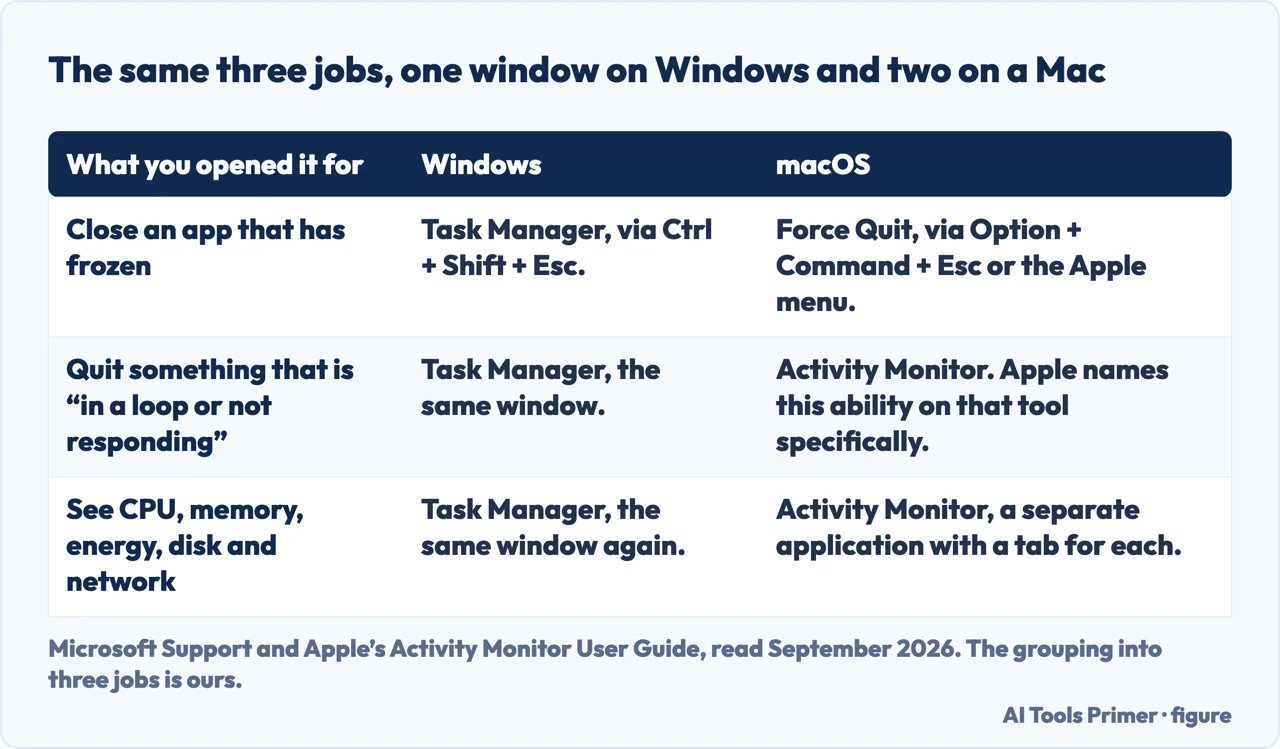
One practical note for anybody who has just moved from Windows and is looking for the list of running programs. Force Quit shows apps — the things with windows, the things you opened. Activity Monitor shows processes — Apple’s own word — which is a longer list and not a list of your windows. Neither is wrong; they are answers to different questions, and the longer one is not a sign that something is wrong with the machine.
And the authentication note is worth taking as guidance rather than as an obstacle. If macOS asks for a password before letting you stop something, that is the system telling you the process is not one of yours. Stopping it is possible; deciding to is a different matter, and the prompt is the moment to ask what the thing actually is.
The guides below take it four ways: the Windows shortcuts, the Mac equivalent that closes things, the Mac equivalent that measures things, and the question of which one you actually wanted.
Four ways in.
Two routes, and Microsoft’s own descriptions show that the famous one is a menu rather than the destination.
The Mac half that does what Task Manager is opened for: making one stuck program go away, with a list short enough to read.
The other half, and the one people actually want when the question is why the machine feels slow rather than which window is stuck.
Windows puts both jobs in one window; macOS separates them. Knowing which you came for turns a search into two clicks.
Not covered here. It will not tell you Ctrl + Alt + Del opens Task Manager. Microsoft’s own description says it opens a security screen containing it, and the direct shortcut is one key different.
It will not name one Mac equivalent. There are two, they do different jobs, and giving the wrong one is why this question keeps being asked.
And it will not treat a long list of processes as a problem. Most of what Activity Monitor shows belongs to macOS, and its length is not a diagnosis. What holds instead is simple: both Windows shortcuts and their descriptions, and what Activity Monitor can do to a process that is not responding, are quoted from Microsoft’s and Apple’s own documentation, listed below.
Written by Alberto Gulotta
Founder and editor of AI Tools Primer, writing from Palermo, Italy. Thirty-five years of taking computers apart, starting with a Commodore 64 — the long version is on the about page.
Something wrong on this page? Write to aitoolsprimer@gmail.com and it gets fixed.
Written on 22 August 2026 · last checked 6 September 2026.
Independence and limits
No affiliate links and no paid placements anywhere on this site. Nobody pays to appear here, and no company has seen this page before you did.
This is general information, not professional advice. Where a page touches money, health, safety or the law, it names its source and the date it was read — and your situation may still differ. See the privacy page and the cookie policy.