
Software · guide
Why is my computer so slow? Find out before you fix
By Alberto Gulotta · Updated · 9 min read
Why is my computer so slow is one of the most asked questions on the internet and one of the worst served, for a reason worth noticing before you read anybody’s answer. Look at who ranks for it: alongside the forums sit a processor manufacturer, a computer manufacturer and a computer retailer. Three of the most visible answers to “why is my computer slow” come from companies that sell computers.
That does not make them wrong. It does mean the question “is it time for a new one?” arrives earlier in their answers than in this one.
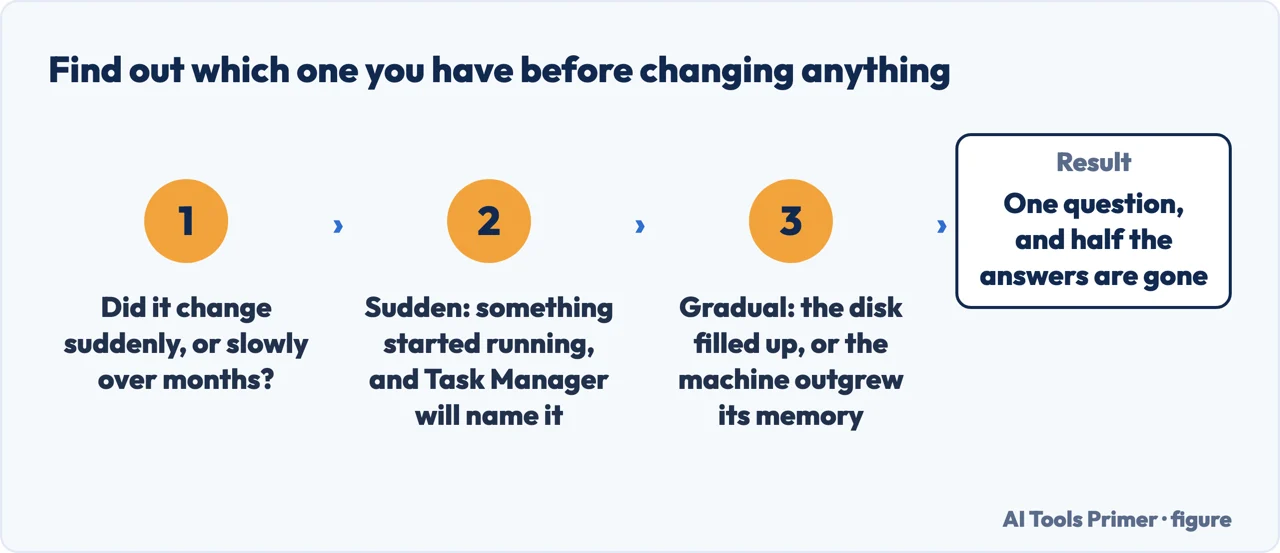
Two questions before any fix
Answer these and you have already excluded most of the causes.
The tool that answers it, already installed
That opens Task Manager. Microsoft’s advice is to use it to “review CPU, memory, and disk usage” — and the point is not the numbers but which line is at the top. Something is using the machine, and the list tells you what.
The second tab worth a minute is Startup apps. Microsoft: “Apps that run at startup can slow boot time and increase background usage. Disable apps you do not need to start automatically.” This is the single change that most often makes an older machine feel new, and it costs nothing but attention.
The other causes Microsoft names, in its own words, are unglamorous and largely free to fix: “Low disk space can reduce system performance”; “Malware can consume CPU and disk resources”; “Windows Updates often include fixes and performance improvements”; and, last on its list and first in real life, “Close any apps or tabs you don’t need. If performance does not improve, restart your PC.”
The order to work through, cheapest first
Nothing here needs a download, and each step either fixes it or narrows it.
- Restart it.Genuinely. Uptime measured in weeks explains a startling proportion of these complaints, and it takes two minutes to eliminate.
- Open Task Manager and look at the top line.If one process is using most of the machine, you have your answer and the rest of this list is irrelevant.
- Check free disk space.A nearly full drive slows a computer in ways that feel like a failing machine. Microsoft names this explicitly.
- Turn off startup apps you do not need.The change with the largest effect per minute spent, and it is reversible.
- Run a malware scan.Not because it is likely, but because it is cheap to rule out and expensive to miss.
- Then, and only then, consider hardware.Memory, or a mechanical drive that should be an SSD. Real causes — but the ones that cost money, which is why they belong last.
The category this guide is deliberately quiet about is the one that advertises hardest to people with a slow computer: cleaner and optimiser software. Look back at the list above — restart, look at what is running, free some space, trim startup apps, scan for malware. Every one of those is a thing you can do yourself in a few minutes with software already on the machine, and every one is a thing an optimiser offers to do for you for a subscription. A section guide of its own takes that category apart properly; here it is enough to say that the diagnosis is free.
The way the question is asked tells you which guide to open. Why is my computer so slow all of a sudden is the version with the best chance of a quick fix, because something changed and changes can be found. Why is my computer running so slow, in the present continuous, is usually somebody watching a spinning cursor right now. And why is my computer so slow mac is the same question on a system where the tools have different names and the order is identical — Activity Monitor rather than Task Manager, the same first look at the top line.
The other manufacturer lists the same causes in the same order. Apple’s guidance for a Mac running slowly starts with disk space — “your computer’s startup disk may not have enough free disk space” — then memory: “an app you’re using may require more memory than your Mac has easily available. You can use Activity Monitor to see how much memory your Mac and apps are using.” Two operating systems, the same first two suspects and the same instruction: measure with the tool that is already installed before buying anything or reinstalling anything.
One last thing worth saying plainly, because nobody selling anything will say it. Some computers are simply old, and no amount of tidying makes a machine faster than it was when it was new. If everything on this guide has been done and the machine is still slow at ordinary work, that is a real answer rather than a failure — and it is a much better position to buy from than the one you were in before, because you now know what you need instead of what you are told.
Where to start
Four ways in.
- “It got slow suddenly.”
- Start at something changed
- “It has been getting worse for years.”
- Go to gradual slowdown
- “Only one program is slow.”
- That is one thing not everything
Something changed
The best case, because a change can be found and undone. Work backwards from when it started rather than forwards from a list of tips.
Gradual slowdown
Accumulation rather than an event. Every item here is free, reversible and does more than any cleaner would.
One thing, not everything
If the machine is fine until you open a particular program, the machine is not the problem and none of the general advice applies.
Not covered here. It will not sell you a cleaner. Every step that works here is free and already installed, and the diagnosis costs nothing but ten minutes.
It will not open with “buy more memory”. That may end up being the answer, and it belongs at the end of a diagnosis rather than at the start of one.
And it will not pretend every slow computer can be saved. Where the honest answer is that the machine is old, the guide says so — and says what you have learned that makes the next purchase a better one. What holds instead is simple: the causes and tools named on this page are quoted from Microsoft’s own performance guidance.
When you start wondering if the machine is dying
Heat, slowness, a battery that empties, a laptop that will not start. Four symptoms people describe in the same sentence, and the checks that tell them apart.
- The same job, in the other places it comes up
- Laptop overheating, and why the slowdown is the fix
- Why is my battery draining so fast, in published numbers
- Why won't my Lenovo laptop turn on, and which hole is which
- How to check the health of iPhone battery, and what it means
Sources
- Microsoft Support — Tips to improve PC performance in Windows, the source of the causes and tools quoted here — support.microsoft.com, read 6 September 2026.
- Apple Support — If your Mac runs slowly: the same first two causes, disk space and memory, and the built-in tool to measure them, on the other operating system — support.apple.com, read 4 September 2026.
Written by Alberto Gulotta
Founder and editor of AI Tools Primer, writing from Palermo, Italy. Thirty-five years of taking computers apart, starting with a Commodore 64 — the long version is on the about page.
Something wrong on this page? Write to aitoolsprimer@gmail.com and it gets fixed.
Written on 21 August 2026 · last checked 4 September 2026.
Independence and limits
No affiliate links and no paid placements anywhere on this site. Nobody pays to appear here, and no company has seen this page before you did.
This is general information, not professional advice. Where a page touches money, health, safety or the law, it names its source and the date it was read — and your situation may still differ. See the privacy page and the cookie policy.