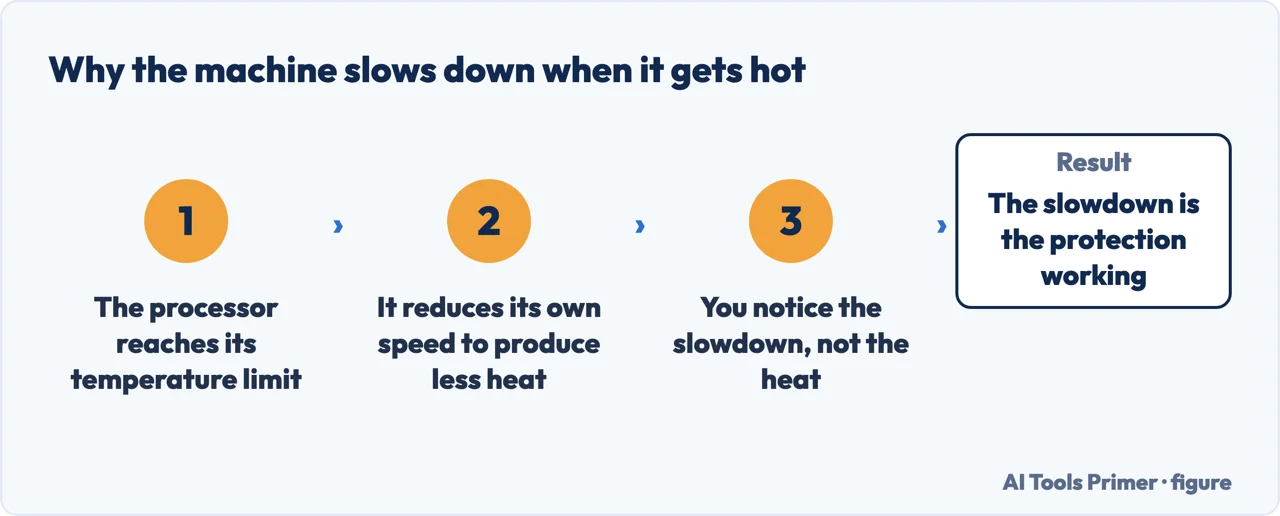
Laptop overheating comes with a second complaint attached: the machine gets hot and gets slow. The manufacturers answer the second half directly, and their answer is the opposite of what it feels like.
The slowdown is not the problem
HP, on its gaming laptops: “To protect the CPU, GPU, and surrounding components
from overheating, the computer reduces CPU utilization to maximize cooling when it reaches
a predefined maximum temperature. The reduction in utilization and increased fan speed
indicates that the computer is functioning properly. Performance Mode returns to 100%
utilization when the computer cools.”
That sentence reframes the whole question. A laptop that gets hot and then goes slow is not
failing; it is doing the thing that stops it from failing. The slowdown and the fan noise are
the protection, not the symptom of a fault — and the manufacturer says so in the same
paragraph where it names the mechanism. Dell describes the identical behaviour: “Excessive
heat can also cause a significant decrease in performance as most processors automatically
reduce the speed of the processor to help compensate for heat-related problems.”
The slowdown is not the fault. It is the fix. Figure drawn by AI Tools Primer.
That leaves the question of how hot is too hot, and here the documentation is thinner than the internet suggests. Of the five manufacturers read for this page, exactly one publishes a temperature at which the machine acts — and it publishes it for its gaming range only.
HP, the chip
the only published figure
Under the heading “Maximum CPU temperature that initiates the cooling
process”: Intel 97 °C, AMD R4000 series 105 °C,
AMD R5000 series 95 °C.
Published for the OMEN and Victus gaming lines. Three chips, three different points at which
cooling starts.
Apple, the room
10 to 35 °C
“Use your Mac laptop where the ambient temperature is between 50° and 95° F
(10° and 35° C).”
Not the processor: the air around the machine.
Microsoft, the room
0 to 35 °C
“It complies with temperature limits defined by the International Standards for Safety
and is rated for operation at +32°F (+0°C) to +95°F (+35°C).”
Same ceiling as Apple, and a guide ten degrees lower.
Notice that the three cards are not measuring the same thing. HP’s numbers are the processor; Apple’s and Microsoft’s are the room. A figure like 95 degrees and a figure like 35 degrees are not two opinions about the same threshold, and an article that puts them in one list is comparing a chip to a kitchen.
Where Apple and Microsoft do measure the same thing, they agree on the ceiling and differ underneath it: both stop at 35 °C, and the guide is 10 °C for Apple and 0 °C for Microsoft. If you work somewhere cold, that ten-degree gap is the only published guidance you have, and it depends on whose machine you own.
Now the advice everybody gives, which turned out not to be controversial at all.
Compressed air: nobody forbids it, and the differences are elsewhere
Three manufacturers prescribe it in writing:
HP: “Use canned air to remove the dust from the vents to improve
airflow.” And, in a note above it: “It is not necessary to open the computer
to clean the vents.”
Dell, under “Cleaning the air vents on your Dell computer”: “Use a can of compressed air to blow the dust or debris away from the computer.”
Lenovo: “Clear lint, dust, or debris from vents with compressed air when the PC
is off.”
What differs is the preparation, and it differs inside one manufacturer. Lenovo’s article
on a fan running fast asks for more than the other: “Remove the AC adapter and
battery (do not remove the battery if the battery is not detachable, check the PC
manual)”, where its other article asks only that the machine be off. Neither contradicts
the other — the second is simply stricter — but a reader following one has taken
fewer precautions than a reader following the other, on the same job and the same brand.
The one real prohibition on this page is about the tool, not the act. Dell: “It is
recommended to use a can of compressed air only. Do not use vacuum cleaners, blowers, or blow
air from your mouth.”
That is worth stating plainly because the opposite is often assumed. This page went looking for a manufacturer that forbids compressed air in writing and did not find one among the five read. Three prescribe it; Apple and Microsoft, on the pages read here, do not document vent cleaning at all. The disagreement is elsewhere: it concerns what to unplug first, is there concerns what to unplug first, and it sits between two articles from the same company.
Four manufacturers give the same instruction about soft surfaces and name four
different stakes:
Apple: “If you use your device on a soft surface like a couch, pillow, bed, or your
lap, its fans might run more.”
Lenovo: “Try placing the laptop on a flat, hard surface. Uneven or soft surfaces
may block the ventilation areas.”
HP, in a CAUTION box: “Placing the computer on a cloth surface, such as your lap, a
bed, or a couch cushion, can restrict or completely block the airflow. Prolonged air
restriction causes overheating and potential damage.”
Dell: “You must never place the laptop on the bed, blanket, or any other soft
surface while working.”
Read together they escalate: more fan noise, blocked vents, possible damage, never do it. Same
advice, four different levels of alarm — and the strongest of the four is the one printed
in a caution box.
Three smaller published numbers, all easy to act on. HP asks for room around the machine:
“Provide at least 15.25 cm (6 in) of clearance around each vent.” It also flags
altitude: “If the computer is being used at high altitudes, above 1500 m (5000 ft),
take extra care to keep the computer cool.” And Microsoft names the room temperature at
which the fan starts working harder: “If used in an environment warmer than 25° C /
77° F, the fan may need to come on more often or spin more quickly.”
One warning from Apple deserves its own line, because it concerns the tool this question leads to next: “If you use third-party apps that measure the temperature of your laptop computer, it’s important to understand that they don’t measure the external case temperature.” A number from a monitoring app is not the number in HP’s table, and it is not the temperature of the surface against your leg either.
A note on where this question gets answered, read on 23 August 2026 with search results visible. One manufacturer support document appeared on the first page — an HP page, served from a non-US locale — alongside a community thread, a projects site, a video carousel, a remote-access company, a marketing glossary page and a question forum. Dell, Apple and Microsoft did not appear at all, and every number quoted above comes from a page that was not there.
What this page will not do is give you a safe temperature for your laptop. Only one of the five manufacturers publishes a figure for the processor, and it applies to two of its own product lines.
It will not recommend a cooling pad, thermal paste or a monitoring app. None has been tested here, and the manufacturer whose documentation is clearest on the subject warns that those apps are not measuring the case temperature.
And it will not tell you to open the laptop. HP states in writing that opening it is not necessary to clean the vents, and no manufacturer page read here asks a customer to.
Where to start
Three ways in. If it is hot and slow, the first one is the one that changes how you read the rest.
Two manufacturers describe the same mechanism: the processor slows itself to cool down, and one of them says plainly that this means the machine is working correctly.
One manufacturer publishes processor temperatures, two publish room temperatures, and the numbers are not comparable. Same ceiling, guides ten degrees apart.
Prescribed by three manufacturers, forbidden by none of the five read. What differs is the preparation, and the one real prohibition is about vacuums and mouths.
Not covered here. It will not give you a safe temperature. One manufacturer of five publishes a processor figure, and only for two of its own ranges.
It will not recommend a cooling pad, thermal paste or a temperature app. Nothing here has been tested, and Apple publishes a warning about what those apps actually measure.
It will not tell you to open the machine. HP writes that opening it is not necessary to clean the vents.
And it carries no affiliate links, including for cooling pads and compressed air, the products a guide on this subject usually exists to sell. What holds instead is simple: every temperature is the manufacturer’s own, labelled chip or room, and the HP pages quoted above are not listed below because their addresses could not be confirmed from here.
When you start wondering if the machine is dying
Five guides: a laptop that overheats, a slow computer, a battery that drains fast, a Lenovo laptop that will not turn on, and iPhone battery health.
Apple Support — Keep your Mac laptop within acceptable operating temperatures (that you should use a Mac laptop where the ambient temperature is between 50 and 95 degrees Fahrenheit, 10 to 35 degrees Celsius) — support.apple.com, read 24 August 2026.
Apple Support — About fans and fan noise in your Apple product (that using the device on a soft surface such as a couch, pillow, bed or your lap may make its fans run more, and that a hard, flat surface such as a table or desk gives better temperature control) — support.apple.com, read 24 August 2026.
Lenovo, What to check if the PC seems warm — Lenovo Support (that you clear lint, dust or debris from the vents with compressed air when the PC is off, and that you try placing the laptop on a flat, hard surface because uneven or soft surfaces may block the ventilation areas) — support.lenovo.com, read 26 August 2026.
Lenovo, Fan runs at a higher than expected speed — Windows — ThinkPad, ThinkCentre, ideapad, ideacentre — Lenovo Support (that before cleaning the vents you turn off the computer and remove the AC adapter and battery, not removing the battery if it is not detachable but checking the PC manual, then use a compressed air can to blow the dust out of the vents and replace the battery) — support.lenovo.com, read 26 August 2026.
Microsoft, What to try if your Surface feels too warm — Microsoft Support (that the device may feel warm during normal use, that it complies with temperature limits defined by the International Standards for Safety and is rated for operation at +32°F, 0°C, to +95°F, 35°C, and that if the Surface exceeds the maximum operational temperature it shuts down immediately and a thermometer icon appears on the screen) — support.microsoft.com, read 6 September 2026.
Dell, How to Stop Computer and Laptop Overheating and Shut Down Issues — Dell Support (that excessive heat can also cause a significant decrease in performance as most processors automatically reduce the speed of the processor to help compensate for heat-related problems; the CAUTION that it is recommended to use a can of compressed air only and not to use vacuum cleaners, blowers, or blow air from your mouth, because vacuum cleaners and blowers create static and may damage the components inside the computer; and that you must never place the laptop on the bed, blanket, or any other soft surface while working) — www.dell.com, read 26 August 2026.
HP, HP Notebook PCs — Reduce heat inside the laptop to prevent overheating in Windows (the NOTE that it is not necessary to open the computer to clean the vents; the instruction to use canned air to remove the dust from the vents to improve airflow; the CAUTION that placing the computer on a cloth surface such as your lap, a bed or a couch cushion can restrict or completely block the airflow and that prolonged air restriction causes overheating and potential damage; and the ventilation guidelines of keeping the computer upright on a sturdy level surface, providing at least 15.25 cm (6 in) of clearance around each vent, and taking extra care above 1500 m (5000 ft)) — support.hp.com, read 27 August 2026.
HP, HP OMEN and HP Victus PCs — Balancing temperature and performance in HP gaming PCs (that to protect the CPU, GPU and surrounding components from overheating the computer reduces CPU utilization to maximize cooling when it reaches a predefined maximum temperature, that the reduction in utilization and increased fan speed indicates the computer is functioning properly, and that Performance Mode returns to 100% utilization when the computer cools; and the table headed Maximum CPU temperature that initiates the cooling process, giving Intel 97°C, AMD R4000 series 105°C and AMD R5000 series 95°C) — support.hp.com, read 27 August 2026.
Microsoft, Fan behavior and fan noise in a Surface device — Microsoft Support (that if used in an environment warmer than 25 degrees Celsius, 77 degrees Fahrenheit, the fan may need to come on more often or spin more quickly to keep the device cool depending on workload; and that additional cooling may be needed until the device is fully charged) — support.microsoft.com, read 6 September 2026.
AG
Written by Alberto Gulotta
Founder and editor of AI Tools Primer, writing from Palermo, Italy. Thirty-five years of
taking computers apart, starting with a Commodore 64 — the long version is on the
about page.
Written on 23 August 2026 · last checked 23 September 2026.
§
Independence and limits
No affiliate links and no paid placements anywhere on this site. Nobody pays to appear here,
and no company has seen this page before you did.
This is general information, not professional advice. Where a page touches money, health,
safety or the law, it names its source and the date it was read — and your situation may
still differ. See the privacy page and the
cookie policy.