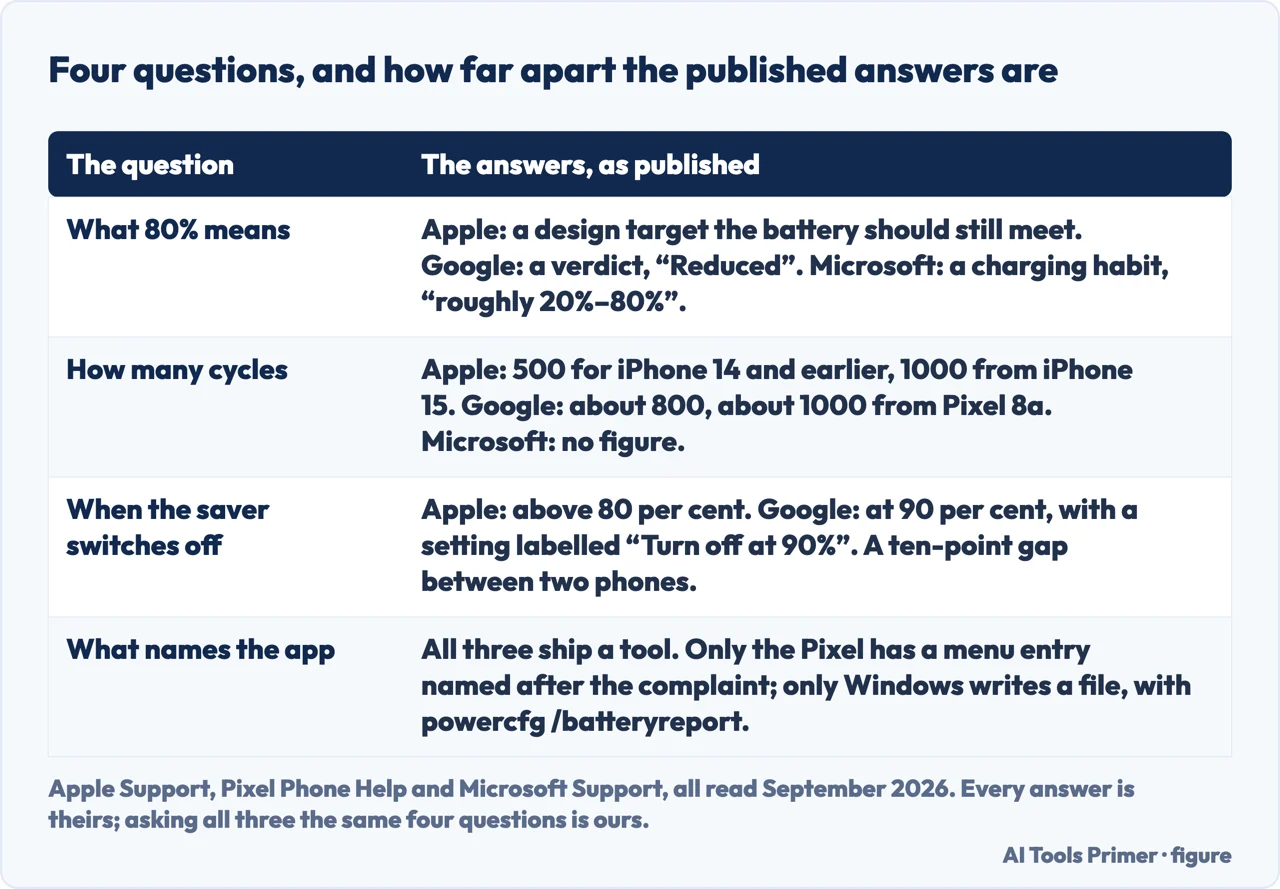
Why is my battery draining so fast is usually answered with advice — dim the screen, close the apps, turn off location. The manufacturers answer it with numbers: percentages at which the device changes its own behaviour, cycle counts they commit to, and a tool already installed that names the app responsible.
Start with the figure that appears in all three documentations and means something different in each.
Apple: 80% is a design target
a promise
“Batteries of iPhone 14 models and earlier are designed to retain 80 percent of
their original capacity at 500 complete charge cycles under ideal conditions.”
It describes what the battery should still be able to do, not a moment to act. For
replacement Apple gives no percentage at all: “If you see Service next to Battery
Health, consider replacing your battery”.
Google: 80% is the trigger
a verdict
“Reduced: Battery reached capacity is below 80%.” And on the same page:
“Should retain up to 80% capacity for about 800 charge cycles, after which battery
replacement is recommended.”
Here the same number is the line at which the manufacturer tells you to replace it.
Microsoft: 80% is a ceiling
a habit
“it’s best to avoid frequent deep discharges and instead keep the battery
within a moderate charge range (roughly 20%–80%) whenever possible.”
Not a promise and not a verdict: the top of a band you are advised to stay inside while
charging.
That is the trap in one picture. Eighty per cent is a promise on one page, an instruction to replace the battery on another, and a charging habit on the third — and a reader who has seen the number in one context carries the wrong meaning into the next. Seeing 82% on an iPhone is not the same news as seeing “Reduced” on a Pixel, even though both are about the same threshold.
The second number is the one people quote at each other most confidently, and it is not one number.
How many cycles, published, and how far apart the answers are
Apple: “500 complete charge cycles” for iPhone 14 and earlier;
“1000 complete charge cycles” for iPhone 15 models and later.
Google: “about 800 charge cycles” from Pixel 3 through Pixel 8 Pro and
Pixel Fold; “about 1000 charge cycles” for Pixel 8a and later.
Microsoft, on Windows PCs, publishes no number: “The capacity of lithium-ion
cells is reduced after a certain number of times the battery is charged and then
discharged.”
So the same promise — eighty per cent of capacity — is attached to 500, 800 or
1000 cycles depending on which device you are holding, and on a Windows laptop to no figure
at all. A phone two years old is not automatically “past it”: whether it is depends
on a number its own manufacturer published and its competitor did not match.
One documented exception is worth knowing because it inverts the usual direction. On Pixel 6a
devices affected by Google’s battery programme — announced in July 2025 and closed on 8 July 2026 — a mandatory update “will enable
important battery management features that will reduce battery capacity and charging
performance on Impacted Devices after the battery reaches 400 charge cycles.”
Four hundred, not eight hundred, and the reduction is deliberate rather than wear.
Then the setting that is supposed to help, which does not behave the same way on the two phones.
The battery-saving mode switches itself off at a different percentage on each
platform — and on one of them, two pages of the same manufacturer word it differently:
Apple: “Low Power Mode automatically turns off when you have charged your device to
above 80 percent.” — and elsewhere: “When you charge the device to
80% or higher, Low Power Mode turns off.”
Google: “Battery Saver can turn off automatically when your phone’s battery
reaches 90%”, with a setting labelled “Turn off at 90%”.
The ten-point gap is the useful part: a Pixel keeps saving power for longer after you plug
it in than an iPhone does. The Apple wording is a smaller thing but a real one — at
exactly eighty per cent, “above 80” and “80 or higher” do not describe
the same state, and both sentences are Apple’s.
The rest of this question is not a matter of opinion at all, because every one of these systems ships something that answers it directly.
iPhone
a ranking, with reasons
Settings → Battery. “Below the chart, App and System Activity Usage shows the
three apps that have used the most battery today.”
And it labels why: “Background Activity”, “No Mobile
Coverage and Low Signal: Your device was searching for a Wi-Fi or cellular signal
… which affected battery life.”
Pixel
a named diagnostic
“Important: Available on Pixel 6 and later. Open your phone’s Settings
app. Tap Battery → Battery diagnostics → Battery draining too quickly.”
A menu entry named after the question itself — and, by Google’s own statement, not
present below a Pixel 6.
Windows
a list and a report
Settings → System → Power & battery → Battery usage: “Under
Battery usage per app, see which apps might be using more battery in the
background.”
Plus the only written report of the three: “At the command prompt, type
powercfg /batteryreport, then press Enter.”
Every answer is the maker’s own. Asking all three the same four questions is ours. Figure drawn by AI Tools Primer.
It is worth saying plainly what those three have in common and where they differ. All three will name the app. Only the iPhone tells you why that app spent the battery, with labels like background activity or poor signal. Only the Pixel has a menu entry named after the complaint, and Google states it does not exist below a Pixel 6. Only Windows produces a file you can keep, through a command, which is also the only one of the three that requires typing anything.
One of those labels deserves its own line because it points away from software entirely. Apple lists “No Mobile Coverage and Low Signal” as a usage type: a phone hunting for a signal spends battery on the radio, and no app is at fault. Because Apple publishes it as a usage type, the phone names that cause itself — it appears in the same list as the apps, so there is nothing left to deduce.
A note on other guides, with its limit stated. Google did not return readable search results while this page was written, so this page makes no claim about what is on Google’s first page for this question.
What this page will not do is tell you your battery needs replacing. Two manufacturers publish a way to check — the word Service on an iPhone, the word Reduced on a Pixel — and those are readings from your own device rather than a judgement from here.
It will not recommend a battery app or an optimiser. All three systems ship the measurement, and a third-party app that promises more is selling something the manufacturer already gave you.
And it will not repeat the advice to close background apps as a rule. Google publishes the opposite on its own Android page, and the tools above will tell you whether any app is actually the problem on your device.
Where to start
Three ways in. If you want to know which app is doing it, take the third.
Five hundred, eight hundred or a thousand — and on Windows laptops no published figure at all. Plus one programme where the limit is deliberately four hundred.
Not covered here. It will not tell you your battery is finished. Your own device publishes that word — Service, or Reduced — and it is a reading rather than an opinion.
It will not recommend a battery-saving app. Every system above ships the measurement; an app that promises more is selling you what you already own.
It will not give one cycle count. Three manufacturers publish figures between 500 and 1000, and one publishes none at all.
And it carries no affiliate links, including for power banks and replacement batteries, exactly the products a guide on this subject usually exists to sell. What holds instead is simple: every percentage, cycle count and menu path above is quoted from the manufacturer that published it, and where a manufacturer publishes no number this page says so instead of borrowing one; the six manufacturer pages are listed below.
When you start wondering if the machine is dying
Five guides: a laptop that overheats, a slow computer, a battery that drains fast, a Lenovo laptop that will not turn on, and iPhone battery health.
Apple Support — About the battery and performance of iPhone 11 and later (that batteries of iPhone 14 models and earlier are designed to retain 80 percent of their original capacity at 500 complete charge cycles under ideal conditions, and that batteries of iPhone 15 models and later are designed to retain 80 percent at 1000 complete charge cycles; and the definition of a complete charge cycle as having used an amount representing 100 percent of the battery’s capacity) — support.apple.com, read 24 August 2026.
Apple Support — If the battery in your iPhone or iPad drains too quickly (that if you see Service next to Battery Health you should consider replacing the battery, with no percentage given; that Low Power Mode automatically turns off when you have charged your device to above 80 percent; and that below the chart in Settings, Battery, App and System Activity Usage shows the three apps that have used the most battery today, labelled with reasons such as Background Activity and No Mobile Coverage and Low Signal) — support.apple.com, read 24 August 2026.
Apple Support — Use Low Power Mode to save battery life on your iPhone or iPad (the wording that when you charge the device to 80% or higher, Low Power Mode turns off — the same behaviour stated differently from the page above) — support.apple.com, read 24 August 2026.
Google, Understand your Pixel battery — Pixel Phone Help (that Pixel 3 through Pixel 8 Pro and Pixel Fold are designed to retain up to 80% capacity for about 800 charge cycles, and that Pixel 8a and later are designed to retain up to 80% for about 1000 charge cycles; and the note that Pixel 6a, Pixel 7, Pixel 7 Pro, Pixel 7a, Pixel 8 and Pixel 8 Pro do not indicate battery health status) — support.google.com, read 24 August 2026.
Google, Fix battery drain problem — Pixel Phone Help (the Important note that the feature is available on Pixel 6 and later devices, and the routes through Settings and Battery to view battery usage by app and by system) — support.google.com, read 24 August 2026.
Google, Use Battery Saver on a Pixel phone — Pixel Phone Help (that Battery Saver can turn off automatically when the phone’s battery reaches 90%, with the setting labelled “Turn off at 90%” under Settings, Battery, Battery Saver, Schedule and reminders) — support.google.com, read 27 August 2026.
Google, Pixel 6a Battery Performance Program — Pixel Phone Help (that the mandatory update will enable important battery management features that will reduce battery capacity and charging performance on Impacted Devices after the battery reaches 400 charge cycles, and that the programme ended on 8 July 2026) — support.google.com, read 27 August 2026.
Microsoft, Battery saving tips for Windows — Microsoft Support (that under Battery usage per app you see which apps might be using more battery in the background, reached through Start, Settings, System, Power & battery, Battery usage) — support.microsoft.com, read 6 September 2026.
Microsoft, Caring for your battery in Windows — Microsoft Support (that the capacity of lithium-ion cells is reduced after a certain number of times the battery is charged and then discharged, meaning the battery needs charging more often and overall capacity may be lower — stated without any cycle count) — support.microsoft.com, read 24 August 2026.
AG
Written by Alberto Gulotta
Founder and editor of AI Tools Primer, writing from Palermo, Italy. Thirty-five years of
taking computers apart, starting with a Commodore 64 — the long version is on the
about page.
Written on 23 August 2026 · last checked 6 September 2026.
§
Independence and limits
No affiliate links and no paid placements anywhere on this site. Nobody pays to appear here,
and no company has seen this page before you did.
This is general information, not professional advice. Where a page touches money, health,
safety or the law, it names its source and the date it was read — and your situation may
still differ. See the privacy page and the
cookie policy.