
iPhone · guide
How to check the health of iPhone battery, and what it means
By Alberto Gulotta · Updated · 11 min read
Two minutes on how to check the health of iPhone battery, and then the longer half: what the percentage on that screen is actually measuring, which Apple defines precisely and briefly.
With the screen open there are two figures on it, and they answer different questions. Apple gives each a separate definition.
Apple: “the measure of battery capacity relative to when it was new.” Not a measure of how long the phone lasts today — a comparison with the phone it used to be.
A separate thing: the battery’s ability to deliver “maximum instantaneous performance, or ‘peak power,’”. Apple ties it to impedance, which “can increase if a battery has a higher chemical age”.
The distinction is worth holding on to. Maximum capacity is about endurance — how much charge the battery can hold compared with the day it was made. Peak performance capability is about power — whether it can deliver a large amount of it at once, which is what the phone needs at the moment it does something demanding. A battery can be adequate on one and struggling on the other.
“Depending upon the length of time between when the iPhone was made and when it’s activated, your battery capacity might show as slightly less than 100 percent.”
Apple’s own sentence, and it answers a worry that would otherwise be reasonable. A phone that reads slightly under a hundred out of the box is not second-hand and not faulty: Apple attributes it to “the length of time between when the iPhone was made and when it’s activated”. The clock starts at manufacture, not at purchase.
What the number is supposed to do over time, and it changed with the model. Apple: batteries of iPhone 14 models and earlier “are designed to retain 80 percent of their original capacity at 500 complete charge cycles under ideal conditions.” Batteries of iPhone 15 models “are designed to retain 80 percent of their original capacity at 1000 complete charge cycles under ideal conditions.”
Two qualifications travel with those figures and both matter. Under ideal conditions — and Apple adds that “with all models, the exact capacity percentage depends on how the devices are regularly used and charged”. So the design target is not a promise about your phone. It is the yardstick against which your phone is doing better or worse, which is a more useful thing to have than a promise.
Read those two design figures next to each other and the change is the interesting part: for the same 80 per cent, Apple doubled the number of cycles between the iPhone 14 and the iPhone 15. Which means a capacity percentage is not comparable across models in the way it looks. The same number on two phones can represent very different amounts of use.
Performance management “is enabled only after an unexpected shutdown first occurs on a device with a battery that has diminished ability to deliver maximum instantaneous power” — and “you can choose to turn it off”.
This is the feature at the centre of every argument about phones being slowed down, and Apple’s description is narrower than the argument. It does not switch on because a battery is old. It switches on after the phone has actually shut down unexpectedly, and the Battery Health screen tells you whether it is on. It is also, by Apple’s own account, optional.
Apple is explicit that this applies to devices that have already had an unexpected shutdown, and that on iPhone 8 and later “the effects of performance management might be less noticeable” because of a design that “provides a more accurate estimation of both power needs and the battery’s power capability”. None of that is a claim that phones are not slowed down. It is a description of when, why, and where the switch is.
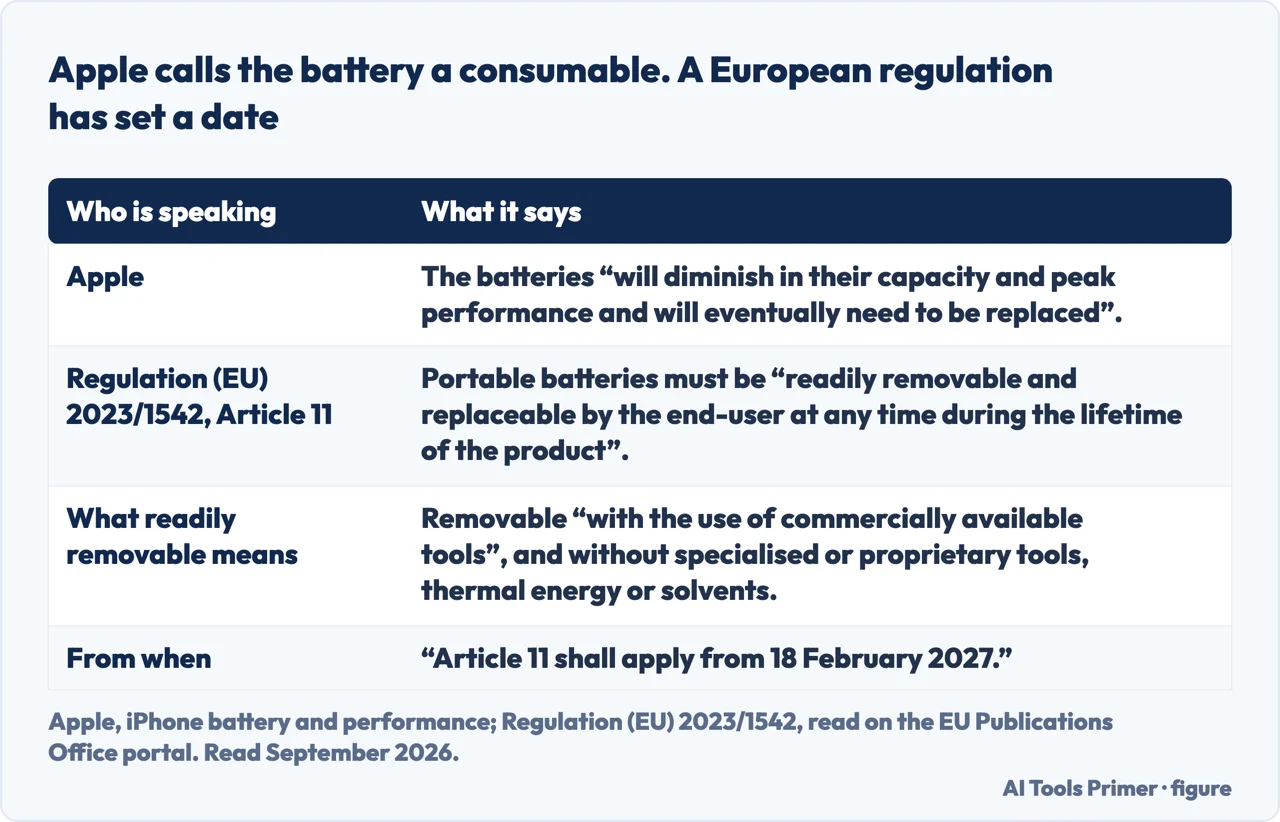
One thing the guide is blunt about, and it is the honest end of the subject: “Over time, the rechargeable batteries in all iPhone models will diminish in their capacity and peak performance and will eventually need to be replaced.” A battery is described by Apple as a consumable component. The percentage is not a fault report; it is a wear indicator on a part that wears.
Two pieces of care Apple actually publishes, as opposed to the folklore. “Keep your iPhone half charged when it’s stored for the long term.” And: “Avoid charging or leaving your iPhone in hot environments, including direct sun exposure, for extended periods of time.” On the money side, Apple states that the one-year warranty — two years in Türkiye — “includes service coverage for a defective battery in addition to rights provided under local consumer laws”, and that out of warranty it offers battery service for a charge.
That word — consumable — has lately acquired a legal consequence in one part of the world. Regulation (EU) 2023/1542 requires that portable batteries be “readily removable and replaceable by the end-user at any time during the lifetime of the product”, and defines the phrase rather than leaving it to interpretation: removable “with the use of commercially available tools”, and not by way of “specialised tools, unless provided free of charge with the product, proprietary tools, thermal energy, or solvents”. It sets its own date for that article — “Article 11 shall apply from 18 February 2027” — and it binds whoever places the product on the European market, which is a different question from what a percentage on a settings screen says about the battery you have.
The guides below take it three ways: the screen and its two names, what the numbers mean, and the settings around battery life that people are usually looking for when they arrive here.
Where to start
Three ways in.
- “Where is the battery health screen?”
- Start at finding the screen
- “Is 87 per cent bad?”
- Go to what the numbers mean
- “Has my phone been slowed down?”
- That is performance management
Finding the screen
Two names for the same place, split at the iPhone 15 — which is why an otherwise correct guide can send you somewhere your phone does not have.
What the numbers mean
Capacity is a comparison with the phone when new; peak performance is about delivering power at once. And a brand-new phone can read under a hundred.
Performance management
Apple says it turns on only after an unexpected shutdown, tells you on the same screen whether it is on, and lets you turn it off. All three parts are worth knowing together.
Not covered here. It will not tell you a percentage at which to replace the battery. Apple publishes design targets and says the exact figure depends on how the phone is used and charged.
It will not recommend a battery calibration app. Every number on this guide comes from a screen the phone already has, and Apple documents where it is.
And it will not treat the slowdown question as settled either way. Apple describes exactly when performance management switches on and says it can be turned off, and that description is quoted rather than argued with. What holds instead is simple: the definitions of maximum capacity and peak performance capability are Apple’s own, along with the 500 and 1000 cycle design targets.
When you start wondering if the machine is dying
Heat, slowness, a battery that empties, a laptop that will not start. Four symptoms people describe in the same sentence, and the checks that tell them apart.
- The same job, in the other places it comes up
- Laptop overheating, and why the slowdown is the fix
- Why is my computer so slow? Find out before you fix
- Why is my battery draining so fast, in published numbers
- Why won't my Lenovo laptop turn on, and which hole is which
Sources
- Apple, iPhone User Guide — Understand iPhone battery usage and health (that iPhone displays information about the battery’s capacity, with iPhone 15 models or later also showing battery health, cycle count, manufacture date and first use date; the route Settings → Battery, then Battery Health & Charging on iPhone 14 or earlier and Battery Health on iPhone 15 or later; that battery life and charge cycles vary with use and settings; that iPhone shows when the battery was last fully charged and displays estimated times to reach 80% and 100% while charging; that background activity, low cellular signal and notifications are reasons for higher battery use; and that the battery should be serviced or recycled by Apple or an Apple Authorized Service Provider) — support.apple.com, read 22 August 2026.
- Apple, iPhone battery and performance (that rechargeable batteries are consumable components that become less effective as they chemically age; the definition of maximum capacity as the measure of battery capacity relative to when it was new; the description of peak performance capability as the ability to deliver maximum instantaneous power, and the role of impedance which can increase with chemical age; that because of the time between manufacture and activation a battery may show slightly less than 100 per cent; that batteries of iPhone 14 models and earlier are designed to retain 80 per cent of original capacity at 500 complete charge cycles under ideal conditions and iPhone 15 models at 1000; that the exact percentage depends on how devices are used and charged; that performance management is enabled only after an unexpected shutdown first occurs on a device whose battery has diminished ability to deliver maximum instantaneous power, that the Battery Health screen shows whether it is on, and that it can be turned off; that on iPhone 8 and later its effects might be less noticeable; that batteries will eventually need to be replaced; the advice to keep an iPhone half charged for long-term storage and to avoid hot environments including direct sun; and the one-year warranty, two years in Türkiye, covering a defective battery in addition to rights under local consumer laws, with paid battery service out of warranty) — support.apple.com, read 22 August 2026.
- European Union — Regulation (EU) 2023/1542 concerning batteries and waste batteries, Article 11 and Article 96, read on the portal of the Publications Office of the European Union, for the duty that portable batteries in products placed on the market be readily removable and replaceable by the end-user at any time during the lifetime of the product, for the definition of readily removable as removable with commercially available tools and without specialised or proprietary tools, thermal energy or solvents, for the duty to publish removal and replacement instructions permanently online, and for the date from which Article 11 applies. The Regulation applies in the European Union — publications.europa.eu, read 6 September 2026.
Written by Alberto Gulotta
Founder and editor of AI Tools Primer, writing from Palermo, Italy. Thirty-five years of taking computers apart, starting with a Commodore 64 — the long version is on the about page.
Something wrong on this page? Write to aitoolsprimer@gmail.com and it gets fixed.
Written on 22 August 2026 · last checked 23 September 2026.
Independence and limits
No affiliate links and no paid placements anywhere on this site. Nobody pays to appear here, and no company has seen this page before you did.
This is general information, not professional advice. Where a page touches money, health, safety or the law, it names its source and the date it was read — and your situation may still differ. See the privacy page and the cookie policy.