
iPhone · guide
iPhone device management, and what an employer cannot see
By Alberto Gulotta · Updated · 10 min read
Two questions bring people to iPhone device management, and Apple answers both in a page written for the person holding the phone rather than for the administrator. The first is what the organisation can change. The second is whether it can see where they are, and Apple’s answer to that one is a single conditional sentence.
“The only time your administrator can view the location of your Apple device is if they put your device into Managed Lost Mode… Your organization can’t track the location of the device without locking it and showing a notification.”
That is Apple, and it converts a vague worry into a testable condition. Apple’s answer is not “no”, and it is not “sometimes”: the administrator can see where the device is only in a mode that locks the screen and displays a message on it. Not a setting you would have to go hunting for — a locked phone with a notice on the front. If that has not happened, that has not happened.
It is worth being careful about what that sentence covers and what it does not. It is about location. Apple’s page also notes you “might see a message in your settings that your organization can monitor your internet traffic and locate your device” — and then narrows the second half of that message to Managed Lost Mode. The first half is not narrowed, and this guide is not going to pretend otherwise: what a managed network can see of traffic is a separate question with a separate answer.
“By default, your Apple device isn’t supervised. Supervision can only be turned on when you set up a new device. If your Apple device isn’t supervised now, your administrator needs to completely erase your device to set up supervision.”
The second useful thing, and it closes the other common worry: supervision cannot be switched on quietly on a phone you are already using. It is decided at setup. A device that is not supervised today cannot become supervised tomorrow without being wiped first — which is not something that happens without you noticing.
Two ways to find out, both on the device
Apple gives one glance and one screen. Neither requires asking anybody.
- The glance
- “The Supervision message is found at the top of the main Settings page.” Apple says supervision is off by default and puts the message at the top of that page, so its absence is the ordinary state rather than a hidden one.
- The detail
- Settings → General → VPN & Device Management. “If there is a profile installed, tap on it to see what type of changes are made.”
- And one thing that is not proof either way
- Apple notes that an organisation “has the option to display a custom ownership message on the Lock Screen” using a configuration profile. A message on the lock screen is a choice the organisation made, not a measure of what it can do.
The distinction between those two checks matters. The message at the top of Settings answers whether; the profile under VPN & Device Management answers what. Apple treats them as two separate lookups rather than one, and only the second tells you which features have been changed from their defaults — which is the part you would actually want in an argument about what the phone is doing.
What supervision lets an administrator do, in Apple’s examples
- Apply extra restrictions — Apple’s examples are turning off AirDrop and preventing access to the App Store.
- Silently updating apps — changes to the software on the device without a prompt.
- Filtering web usage.
- And, in the words Apple uses for the general case, install “a profile to control what features your device has access to”.
Read that list for what it is: examples, not an inventory. Apple is describing a capability, and the specific policy your organisation has written is not published anywhere you can read it. Which leads to the instruction Apple gives at the end of its own steps.
The step Apple names, which has no button attached to it. After looking at the profile, the guide says: “To learn more about the features changed for your specific organization, ask your administrator whether these settings are enforced.” That is not a brush-off. The profile screen shows the categories a profile touches; only the organisation can tell you how its policy is actually configured — and asking creates a record of having asked, which is worth having if the answer later turns out to be different.
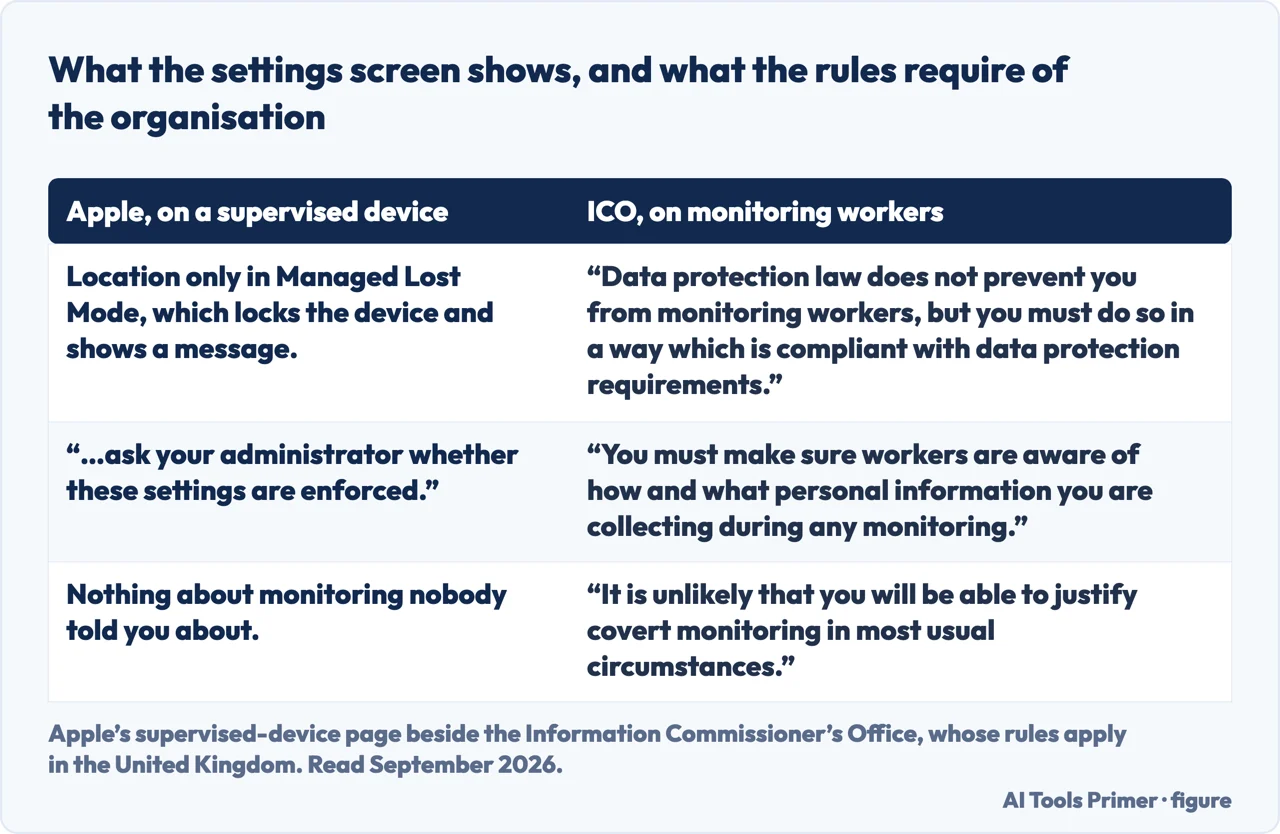
Apple’s page describes what the software is able to do. What the organisation is allowed to do with it is a separate question, and in the United Kingdom the Information Commissioner’s Office answers it: “Data protection law does not prevent you from monitoring workers, but you must do so in a way which is compliant with data protection requirements.” Two of its rules are worth carrying into the conversation Apple tells you to have. The first is transparency: “You must make sure workers are aware of how and what personal information you are collecting during any monitoring”. The second is that the alternative is close to ruled out — “It is unlikely that you will be able to justify covert monitoring in most usual circumstances.” And to find out what was actually collected rather than what could be, the ICO points at a subject access request, which reaches the information monitoring produced unless an exemption applies.
A word about what this guide will not do, since a large part of the searching in this area is for a way out. A supervised device belongs to the organisation that issued it — that is the premise of the whole arrangement, and Apple’s page is addressed to “customers who use a supervised device from their employer or school”. Removing management from a device somebody else owns is not a settings problem, and there is nothing here about how to do it. If the device is genuinely yours and the profile is a leftover from a previous arrangement, that is a conversation with whoever installed it rather than a workaround.
The guides below take it three ways: what supervision is and how to check, what an administrator can change, and the neighbouring settings on a phone somebody else has a say in.
Where to start
Three ways in.
- “Can they see where I am?”
- Start at what they can see
- “Is this phone supervised at all?”
- Go to how to check
- “What have they changed?”
- That is what they can change
What they can see
Apple names one condition for location, and attaches a locked screen and a visible notice to it. The traffic question is separate and this wing says so.
How to check
A message at the top of Settings, and a profile screen underneath General. One tells you whether, the other tells you what.
What they can change
AirDrop, the App Store, silent app updates, web filtering — Apple’s examples rather than a complete list, which is why the last step is to ask.
Not covered here. It will not tell you an employer is watching you continuously. Apple states one condition for location visibility and attaches a locked screen and a notice to it.
It will not tell you an employer sees nothing either. Apple narrows the location half of that settings message and not the traffic half, and this guide reports both.
And it will not explain how to remove management from a device an organisation owns. That is the premise of the arrangement rather than a fault in it. What holds instead is simple: the statement that an administrator can see a device’s location only in Managed Lost Mode is Apple’s own, quoted with the two ways to check supervision.
Sources
- Apple, If you have a supervised iPhone, iPad, Mac, or Apple Vision Pro (that supervision gives schools and businesses greater control over devices they own, with examples including turning off AirDrop, preventing access to the App Store, silently updating apps and filtering web usage; that by default a device is not supervised, that supervision can only be turned on when a new device is set up, and that an administrator would need to completely erase a device to set it up afterwards; that the supervision message appears at the top of the main Settings page; that an organisation may display a custom ownership message on the Lock Screen via a configuration profile payload; the route Settings → General → VPN & Device Management to see an installed profile; the instruction to ask your administrator whether settings are enforced; and that the only time an administrator can view the device’s location is in Managed Lost Mode, which locks the device and shows a message on the Lock Screen, so the organisation cannot track its location without locking it and showing a notification) — support.apple.com, read 22 August 2026.
- Information Commissioner’s Office — Employment practices and data protection: data protection and monitoring workers, for the statement that data protection law does not prevent monitoring but requires it to be lawful, fair and transparent, for the duty to make workers aware of how and what personal information is being collected, for the position that covert monitoring is unlikely to be justifiable in most usual circumstances and the conditions attached where it is, and for the rule that information obtained by monitoring must be made available to a worker who makes a subject access request unless an exemption applies. The guidance applies in the United Kingdom — ico.org.uk, read 6 September 2026.
Written by Alberto Gulotta
Founder and editor of AI Tools Primer, writing from Palermo, Italy. Thirty-five years of taking computers apart, starting with a Commodore 64 — the long version is on the about page.
Something wrong on this page? Write to aitoolsprimer@gmail.com and it gets fixed.
Written on 22 August 2026 · last checked 23 September 2026.
Independence and limits
No affiliate links and no paid placements anywhere on this site. Nobody pays to appear here, and no company has seen this page before you did.
This is general information, not professional advice. Where a page touches money, health, safety or the law, it names its source and the date it was read — and your situation may still differ. See the privacy page and the cookie policy.