
Web · guide
What is private DNS, and what it cannot protect you from
By Alberto Gulotta · Updated · 9 min read
The question what is private DNS has two honest answers, because the phrase names two different things that have nothing to do with each other. Worth settling which one you want before reading further.
A switch in Android’s network settings, added in Android 9, that sends your device’s DNS lookups over an encrypted connection instead of a plain one. This is the one this guide is about, and everything below concerns it.
A DNS service that answers only for names inside a private network — internal servers with addresses that mean nothing on the public internet. Same two words, unrelated subject. If you arrived here from a cloud console rather than from a phone, this is not your guide.
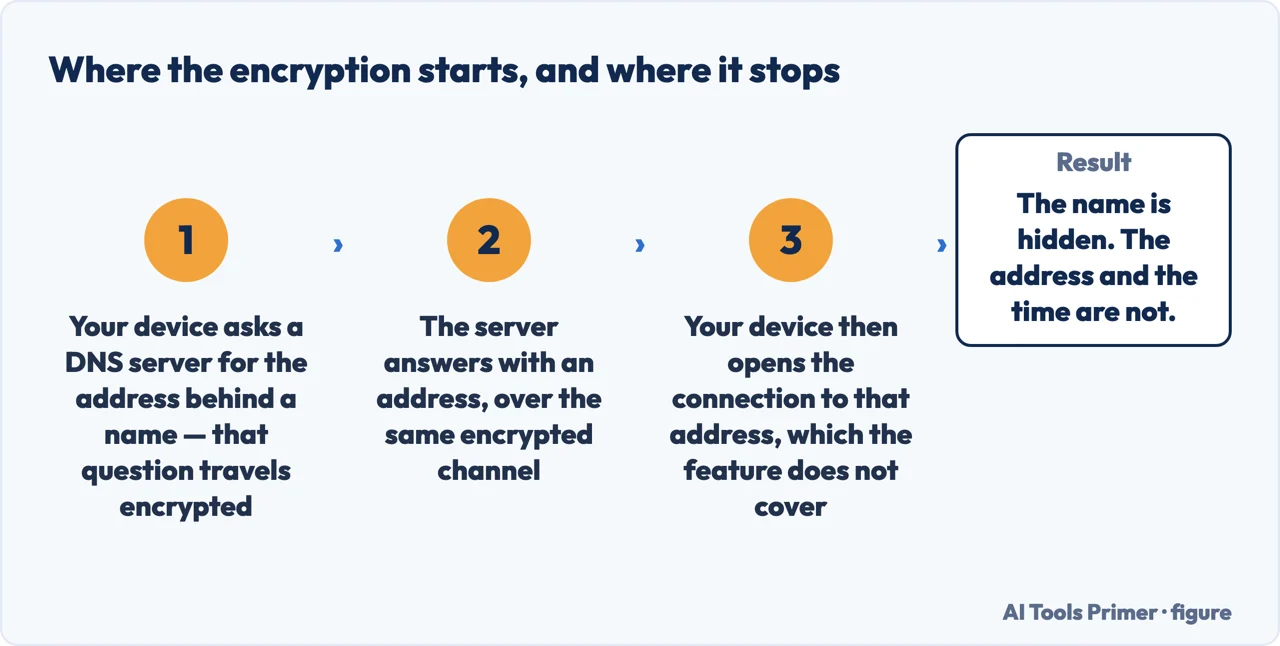
Start with what DNS is doing at all, because the setting only makes sense once that is clear. Google’s description is as plain as it gets: “The first step of almost every connection on the internet is a DNS query.” Your device asks a server to turn a name like www.google.com into an address, and then connects to that address. By default that question travels unencrypted — which means the name you asked about is visible to whoever is carrying it.
Private DNS changes the question, not the answer. It is Android’s implementation of a protocol called DNS over TLS, standardised by the Internet Engineering Task Force as RFC 7858, and Google compares it to HTTPS: the same kind of secure channel, applied to the lookup.
“Once the secure channel is established, DNS queries and responses can’t be read or modified by anyone else who might be monitoring the connection. (The secure channel only applies to DNS, so it can’t protect users from other kinds of security and privacy violations.)”
That is Google, announcing the feature, and the sentence in brackets is the one to keep. What gets encrypted is the question, not the visit. Your device stops broadcasting which names it is looking up; it does not stop the connection that follows, which still goes to an address somebody can see. Private DNS closes one specific leak, and Google says so in the same paragraph where it announces the feature.
It is worth sitting with that limit for a moment, because it draws the boundary of the whole feature. After turning private DNS on, the network still sees that your device connected to a particular address at a particular time. What it stops seeing is the name you asked for on the way there. That is a real improvement and a narrow one, and the two facts belong in the same sentence.
The two modes, in Google’s own terms
Google describes three states: off, an automatic upgrade where the network’s server supports it, and a hostname you enter yourself. The last two are what Google Public DNS documents as two different privacy profiles — and they defend against different things.
- Opportunistic — the automatic upgrade
- The server may come from the network itself. The device tries an encrypted connection on port 853; if it succeeds, Google says this “provides privacy for the user’s queries from passive observers on the path.” And then the limit, stated plainly: “Since the client does not verify the authenticity of the server it is not protected from an active attacker.” This is the default. It is better than nothing and it is not the strong version.
- Strict — a hostname you enter yourself
- You name the server, and the device must reach it over an authenticated TLS connection. Google: “Failure to establish a secure connection is a hard error and will result in no DNS service for the client.” Which is the whole trade: you gain a verified server, and you lose the fallback.
The distinction between those two modes is the most useful thing on this guide, and it is not the one the settings screen suggests. Leaving it alone and typing in a hostname look like two levels of the same thing. What actually separates them is whether the server is verified, and Google’s wording is unambiguous: without that verification, the protection is against passive observation only.
The complaint this explains. A phone that says “No internet access” after private DNS is switched on is not broken and is not a coincidence. Google describes exactly this behaviour: Android “sends all DNS queries over a secure channel to this server or marks the network as ‘No internet access’ if it can’t reach the server.”
So the message is the feature working as designed. It means the device could not reach the server you named over a secure connection on that network, and — by design — refused to ask the question any other way. The fix is not to retype the hostname: it is to decide whether you want the hard error, which is what naming a server buys, or the fallback, which is what the automatic setting leaves you with.
One more limit, and it belongs to apps rather than networks. Google notes that DNS over TLS “automatically secures the DNS queries from all apps on the system”, but adds that “apps that perform their own DNS queries, instead of using the system’s APIs, must ensure that they do not send insecure DNS queries when the system has a secure connection.” In other words the setting covers the system’s resolver, and an app that goes around the system is outside it. That is not a reason to leave the setting off; it is a reason not to treat it as a guarantee about every byte the phone sends.
The requirement is modest: Google documents configuration on Android 9 or higher, and the control lives in the network settings rather than anywhere labelled privacy or security — Google’s own announcement places it there. If it is not where you expect, the search box inside Settings finds it by name.
The guides below take it three ways: what the lookup is and why it leaks, the two modes and what each one actually defends against, and the neighbouring settings people are usually looking for when they arrive at this one.
Where to start
Three ways in.
- “What is actually being hidden?”
- Start at what the lookup reveals
- “Automatic, or a hostname?”
- Go to the two modes
- “My phone says no internet access.”
- That is when it breaks
What the lookup reveals
The first step of almost every connection is a question sent in the clear. This wing is about what that question exposes, and what encrypting it does and does not remove.
The two modes
Opportunistic and strict, in Google’s vocabulary. One protects against someone watching; the other against someone interfering. Android’s labels do not say which is which.
When it breaks
A hard error is the design, not a fault. This wing is about the networks where strict mode cannot work, and what to change when the phone says there is no internet.
Not covered here. It will not tell you private DNS makes you anonymous. Google’s own announcement says the secure channel applies to DNS and nothing else, and that sentence is quoted here rather than skipped.
It will not recommend a DNS provider. Choosing one is choosing who sees every name you look up, and that is a judgement this guide is not going to make on your behalf from a distance.
And it will not treat Automatic and a provider hostname as two flavours of the same protection. Google documents them as different privacy profiles defending against different attackers. What holds instead is simple: the note that the secure channel applies only to DNS is Google’s own, quoted with the opportunistic and strict profiles and the Android 9 requirement.
Sources
- Google, Android Developers Blog — DNS over TLS support in Android P Developer Preview, 13 April 2018 (that the first step of almost every connection is a DNS query; that DNS over TLS is standardised as RFC 7858 and uses TLS like HTTPS; that once the channel is established queries and responses cannot be read or modified by anyone monitoring the connection, and the parenthetical note that the secure channel only applies to DNS and cannot protect users from other kinds of security and privacy violations; that devices by default upgrade automatically where the network’s server supports it; that entering a hostname makes Android send all queries to that server or mark the network as “No internet access” if it cannot reach it; and that apps performing their own DNS queries must avoid sending insecure ones) — android-developers.googleblog.com, read 22 August 2026.
- Google Public DNS documentation — DNS-over-TLS (that traditional DNS is sent without encryption and is vulnerable to eavesdropping and spoofing; the definition of the strict privacy profile, in which failure to establish a secure connection on port 853 is a hard error resulting in no DNS service; the definition of the opportunistic profile, which provides privacy from passive observers but, because the client does not verify the authenticity of the server, is not protected from an active attacker; and that configuration is documented for Android 9 or higher) — developers.google.com, read 22 August 2026.
Written by Alberto Gulotta
Founder and editor of AI Tools Primer, writing from Palermo, Italy. Thirty-five years of taking computers apart, starting with a Commodore 64 — the long version is on the about page.
Something wrong on this page? Write to aitoolsprimer@gmail.com and it gets fixed.
Written on 22 August 2026 · last checked 23 September 2026.
Independence and limits
No affiliate links and no paid placements anywhere on this site. Nobody pays to appear here, and no company has seen this page before you did.
This is general information, not professional advice. Where a page touches money, health, safety or the law, it names its source and the date it was read — and your situation may still differ. See the privacy page and the cookie policy.