
Tor · guide
Tor bridges, and the question of who is blocking you
By Alberto Gulotta · Updated · 20 min read
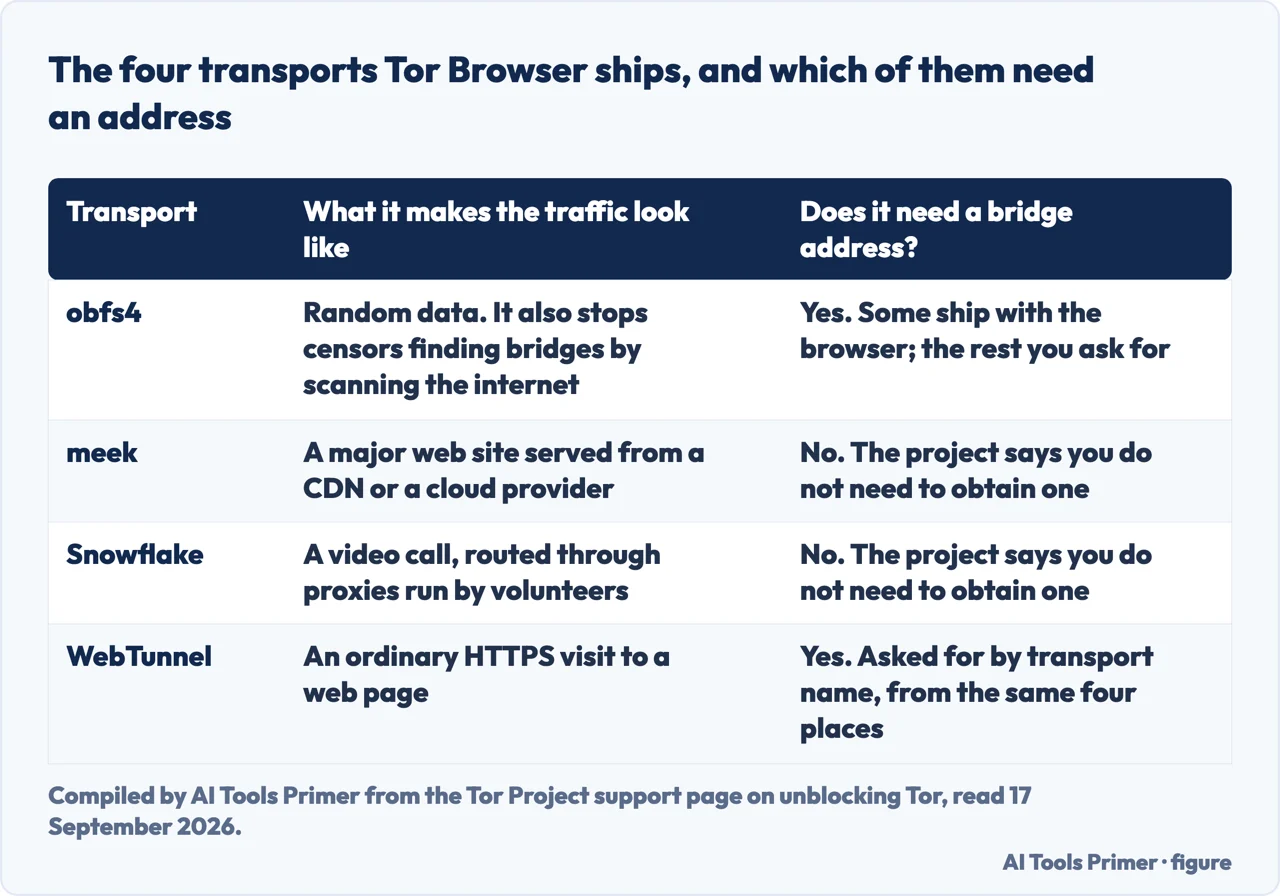
A Tor bridge is a way into the network that the public directory does not list, and it exists for one situation: something between you and Tor is blocking the ordinary way in. Tor Browser ships four transports for that, and two of them need no bridge address at all.
“Bridge relays are Tor relays that are not listed in the public Tor directory.”
That is the whole definition, and it comes from the Tor Project’s own FAQ for people who run relays. The consequence is the sentence after it — “That means that ISPs or governments trying to block access to the Tor network can’t simply block all bridges” — and the deflating part is the sentence after that: “A bridge is just a normal relay with a slightly different configuration.” A bridge is not stronger, not faster and not more private than any other way in. It is an ordinary way in whose address is missing from the list a censor would work from.
Do you need a bridge at all?
Half of the transports need no address at all, and the project’s page on unblocking Tor says so in one line: meek and Snowflake “use different anti-censorship techniques that do not rely on finding bridge addresses”, and “You do not need to obtain bridge addresses in order to use these transports.” They are already in the browser, under the built-in list, and switching one on is the entire procedure.
The four transports, in the project’s own words
Two of them are a menu item. Two of them are a menu item plus an address you have to ask for.
- obfs4 — random noise. “obfs4 makes Tor traffic look random, and also prevents censors from finding bridges by Internet scanning.” Needs a bridge. Some ship inside the browser; for the rest you ask.
- meek — a big web site. “meek transports make it look like you are browsing a major web site instead of using Tor.” The project adds the cost in the same breath: “because it has a bandwidth limitation, this option will be quite slow.” Needs no address.
- Snowflake — a video call. “Snowflake routes your connection through volunteer-operated proxies to make it look like you’re placing a video call instead of using Tor.” Needs no address.
- WebTunnel — an ordinary page load. “WebTunnel masks your Tor connection, making it appear as if you’re accessing a website via HTTPS.” Needs a bridge, asked for by the name of the transport.
Which of the four is best is a question the Tor Project declines to answer, and the refusal is worth reading rather than skipping: each one “works in a different way, and their effectiveness depends on your individual circumstances”. What it offers instead is an order for a first attempt — obfs4, webtunnel, snowflake, or meek — with the request for an address left until the end. None of the five results read for this page on 17 September 2026 gives that order, and it is the project’s own.
Where a bridge comes from
When you do need an address there are four places it can come from, and the project names all four in a sentence: “moat (inside Tor Browser), the Tor Project website, our Telegram bot, or email”. The reason there is no fifth is in the line above it — “Because bridge addresses are not public, you will need to request them yourself” — and the reason that matters is arithmetic rather than principle: an address sitting on a page anybody can read has already stopped being the thing the definition describes. It is why this page names the four channels and links none of them.
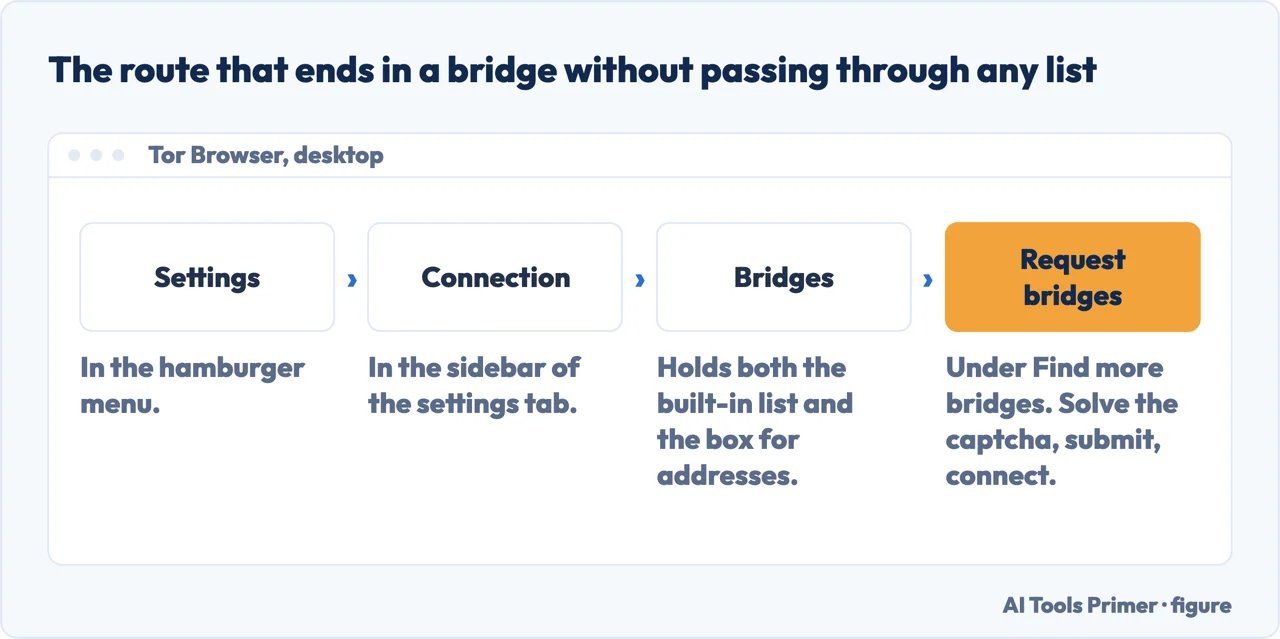
- Try the transports before you go looking for an address. Open Settings, then Connection, and in the Bridges section choose “Select a Built-In Bridge”. The project’s own order for a first attempt is obfs4, webtunnel, snowflake, or meek — and only “If you try all of these options, and none of them gets you online, you will need to request a bridge or manually enter bridge addresses.”
- Ask the browser, not a search engine. In the same Bridges section there is “Find more bridges” and a “Request bridges” button: complete the captcha, submit, connect. The address arrives inside the program that is going to use it, which is the route the project calls moat.
- If the browser cannot reach the network at all, use one of the other three channels.
The project names them together: “moat (inside Tor Browser), the Tor Project website,
our Telegram bot, or email”. The bot answers
/obfs4and/webtunnel; the mailbox wants a message sent from a Gmail or Riseup address; the website has a “Just give me bridges!” button and an advanced option for choosing the transport. None of the four is named on this page with a link, and the reason is in the last section. - Paste one address per line. Under “Enter bridge addresses you already know” there is “Add new bridges”, and the instruction is to “enter each bridge address on a separate line”.
- Use the emoji to check, and do not try to type them. Each address is shown as a string of what the project calls Bridge-mojis, and they exist to confirm that the bridge you meant to add is the one that went in. They “do not represent the quality of connection to the Tor network or the state of the bridge”, and “The string of emoji characters cannot be used as input”.
- If nothing connects, suspect the bridges before you suspect yourself. “If the connection fails, the bridges you received may be down.” They are run by volunteers and they come and go; asking for more is the same button as before. A page that will not load is the same failure as a site that cannot be reached, and the two have different answers.
When a bridge stops working, and why
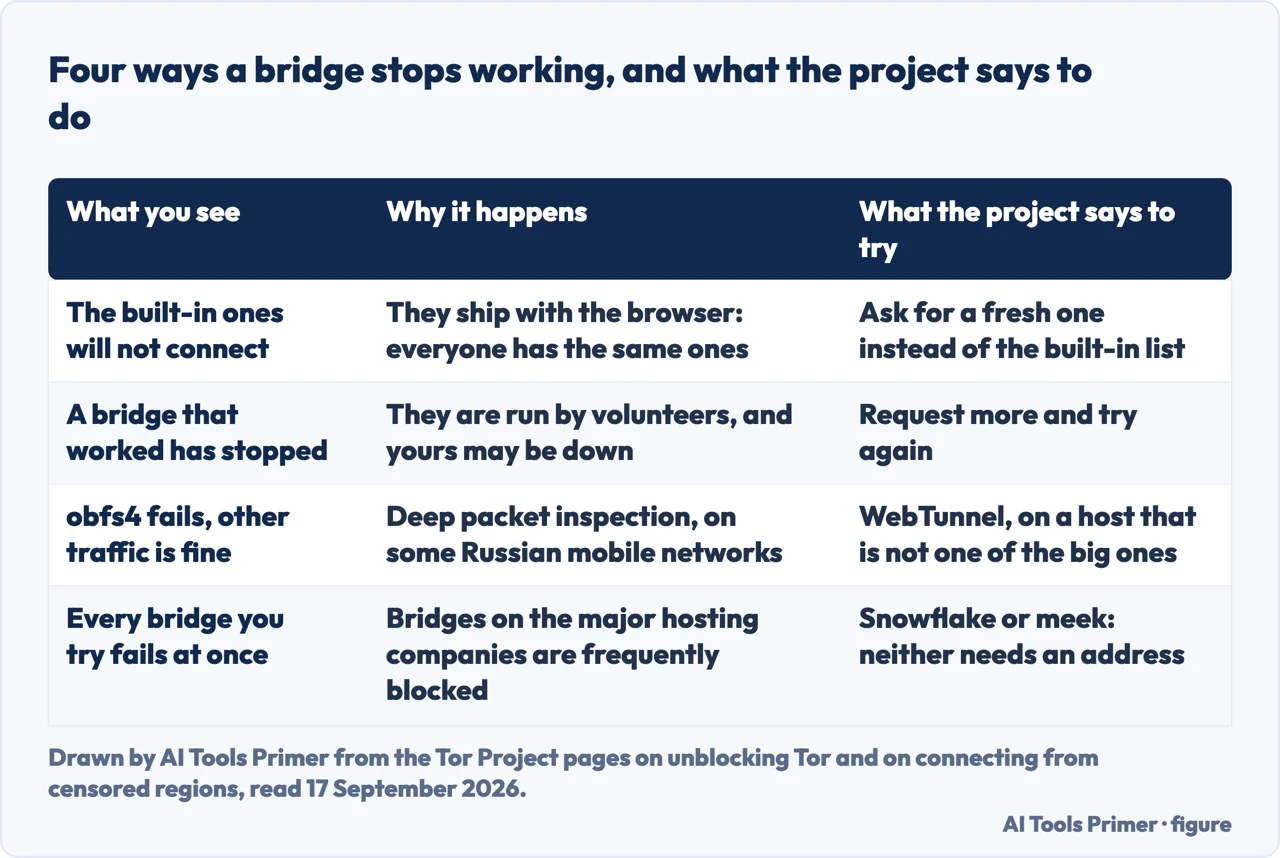
The built-in list is the first thing to fail, and the reason is structural rather than bad luck: built-in bridges ship inside the browser, so every copy of the browser has the same ones. How public that makes them was shown in 2019 by a researcher at Fortinet’s threat-research lab, who took Tor Browser apart to find them. He starts from the same premise everyone else does — “the bridge relay nodes are not listed in the main Tor directory, which means that connections to them can’t be easily blocked by censors” — and then lists them anyway: for the version he had in front of him, 27 obfs4 bridges, four obfs3, one meek-azure and four fte. That analysis is of Tor Browser 8.0 and was published on 5 December 2019, so those counts are not today’s; what has not aged is the method. One thing he held back on purpose, and it is the most useful sentence in the piece: “For security reasons, I have hidden the file name that contains the entire set of bridge information definitions for all bridge types.”
The second way a bridge fails is that the censor has learned to recognise it, and the project’s country guidance says how, country by country. In Russia, where “Since December 2021, many Internet providers in Russia have been blocking direct connections to the Tor network”, obfs4 is still the most used type, but “some mobile ISPs have begun blocking it through Deep Packet Inspection (DPI)”, and the suggested move is WebTunnel on a host that is not a famous one — “rather than major hosts like OVH, Hetzner, Linode, or DigitalOcean”. Turkmenistan gets the same warning from the other end: bridges there need to be “hosted on less-well-known providers rather than major hosting companies, since they are frequently blocked”. Belarus is the useful counter-example, because the advice there begins with trying a plain connection: “we aren’t aware of any specific bridge blocking mechanism in Belarus”.
And the third thing is not a failure at all, but it is the part that is missing from every answer read for this page: a bridge is slower. “Using bridges in combination with pluggable transports helps circumvent blocks against Tor, but may slow down the connection compared to using ordinary Tor relays.” Tor is already slow by design, for reasons that belong to what the network is for in the first place rather than to this page. On a network that is not blocking anything, a bridge is a cost with nothing bought.
Is it your country, or the network you are on?
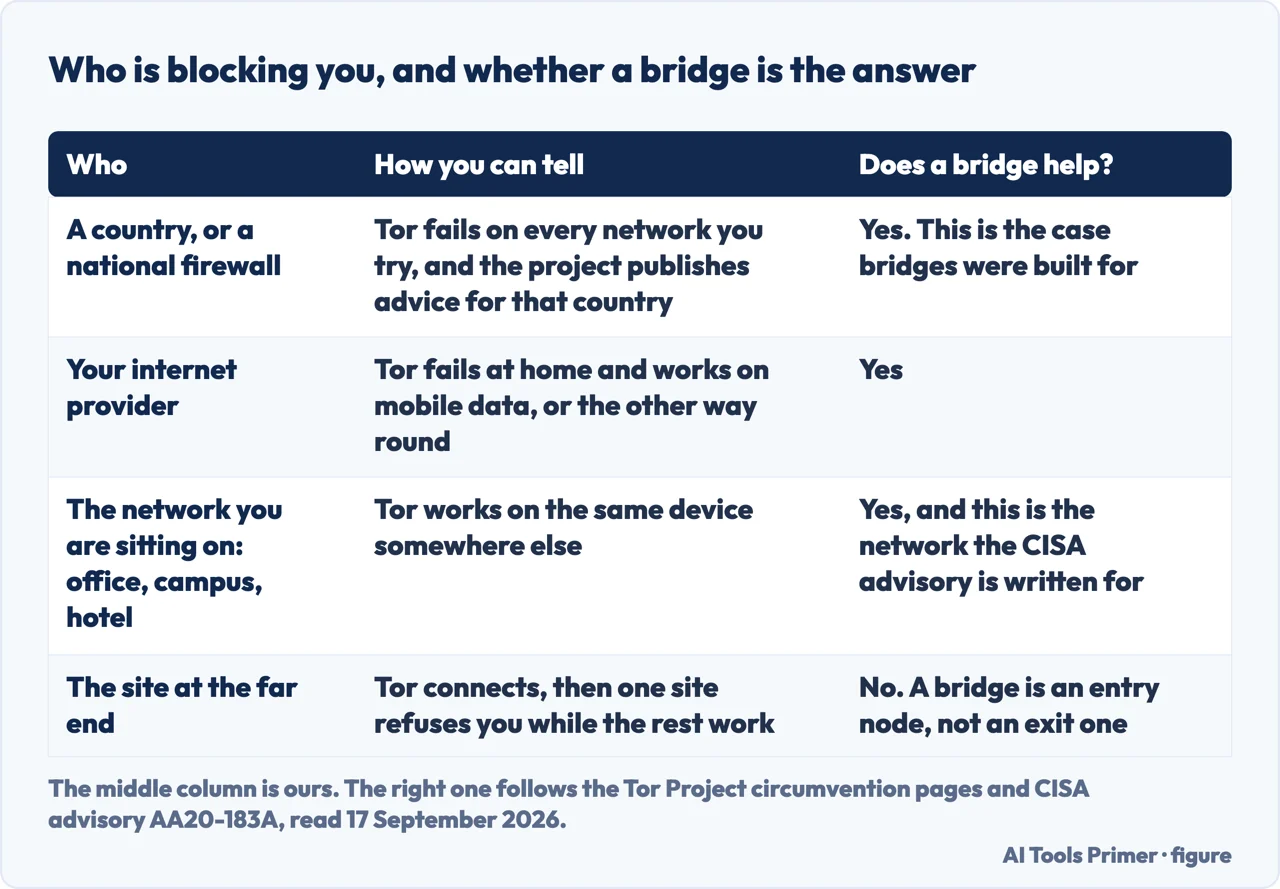
The fourth question Google attaches to this one is whether Tor is blocked in the USA, and it has a sharper answer than any of the five results read for this page gives, because none of the five mentions the document that holds it. Start with the Tor Project, which publishes country-by-country instructions for connecting where Tor is blocked, and names four: China, Russia, Turkmenistan and Belarus. The United States is not one of the four. That is a fact about that page, not about the world — but the page exists precisely to say what to do where Tor is blocked, and it is the project’s own list.
What the United States does have is an advisory. CISA, the federal cyber-defence agency, published AA20-183A with contributions from the FBI, and it tells organisations to “block or closely monitor inbound and outbound traffic from known Tor nodes”, with the most restrictive option being to “Block all web traffic to and from public Tor entry and exit nodes.” That is guidance to companies, universities and agencies about their own networks, not a national block: if Tor will not connect for you in the United States, what is in the way is far more likely to be the network you are sitting on than the country you are sitting in. The advisory was last revised on 2 August 2021 and its own page carries an archived-content banner, which is why the date is here.
The same document is also where a bridge enters the picture, from the defenders’ side. Its own admission about its own advice is this: “blocking known Tor nodes does not completely eliminate the threat of malicious actors using Tor for anonymity, as additional Tor network access points, or bridges, are not all listed publicly.” The property that gets a journalist onto the network from a censored country is the same property the people writing network defences are thinking about, and they are not unaware of it. A reading of that, and it is ours rather than the advisory’s: on a network that is watching rather than blocking, a bridge does not make your traffic invisible, it makes it unrecognised — and those are not the same thing. What the network can see about you at all, bridge or no bridge, is the third of the four questions inside the word safe.
The short version of all of this. If something is blocking the ordinary way in, a bridge is the thing that gets you past it, and the project’s own instruction is to try the four built-in transports first and ask for an address only if all four fail. If nothing is blocking you, a bridge costs you speed and buys you nothing. And either way the address does not come from a search result: it comes from the program, the form, the bot or the mailbox — because an address anybody can look up is one a censor has already looked up.
Where to start
Three ways in, depending on what is actually in your way.
- “Is anything really blocking me?”
- Work that out first — before you go looking for a bridge
- “Would a VPN do this instead?”
- A different promise, and a different tool — the tools this gets confused with
- “What does my network already know?”
- Before any of this — what a network already knows
Before you go looking for a bridge
A bridge answers one kind of failure and none of the others. These four pages cover the failures it does not answer, and reading the right one saves you an evening of pasting addresses that were never the problem.
The tools this gets confused with
Three tools that sound like they do the same job and answer different questions. None of them is a substitute for a bridge, and a bridge is not a substitute for any of them.
What a network already knows
Every page here is about what is visible before any of the software on this page is switched on. It is the hour that changes the most, and almost nobody spends it.
Questions people also ask
Should you use bridges on Tor?
Only if something is blocking the ordinary way in. The Tor Project’s own framing is that bridges are “useful for Tor users connecting from censored networks or under oppressive regimes”, and that using one “may slow down the connection compared to using ordinary Tor relays”. On a network that is not blocking Tor, that is a cost with nothing bought.
Which bridge is best for Tor?
The project declines to name one, and the refusal is the answer: each transport “works in a different way, and their effectiveness depends on your individual circumstances”. Its advice for a first attempt is to try obfs4, webtunnel, snowflake, or meek in turn, and to request an address only if none of them gets you online.
What is a Tor bridge?
“Bridge relays are Tor relays that are not listed in the public Tor directory.” That is the whole of it, in the project’s words. It is an ordinary relay — “just a normal relay with a slightly different configuration” — whose address is missing from the list an ISP or a government would block from.
Is Tor blocked in the USA?
The Tor Project’s page of country-specific instructions for connecting where Tor is blocked covers China, Russia, Turkmenistan and Belarus, and the United States is not among those four. What the United States has is an advisory from CISA, written with the FBI, telling organisations to “block or closely monitor inbound and outbound traffic from known Tor nodes” — which is about individual networks, not about the country.
Not covered here. There is no bridge address on this page: not a real one, not a shortened one, not one as an illustration, and no link to the form that hands them out. The four channels are named in the text, and naming them is the whole of the help this page can honestly give — two of the five results read for this page on 17 September 2026 are lists of addresses rather than explanations, and that half of the question is deliberately unserved.
It does not rank the transports. The project says their effectiveness depends on your circumstances, and turning that into a league table would be inventing a finding it declines to make.
It does not give a current count of built-in bridges. The only count read for this page comes from an analysis of Tor Browser 8.0 published in December 2019, and it appears with that date attached rather than as a figure for today.
And it does not explain how to run a bridge. The project documents that separately, for people with a spare residential connection, and it is not the question this page opens on. What holds instead is simple: every sentence in quotation marks here comes from the Tor Project’s own support pages, from CISA advisory AA20-183A or from the Fortinet analysis listed below, each with the date it was read.
Sources
- Tor Project, Unblocking Tor — what to do if access to Tor is blocked (the four pluggable transports and the description of what each makes the traffic look like; the statement that bridges are run by volunteers and are not listed publicly so an adversary cannot identify them easily; the warning that bridges with pluggable transports may slow down the connection compared to ordinary relays; the note that meek and Snowflake do not rely on finding bridge addresses; and the advice to try obfs4, webtunnel, snowflake or meek before requesting anything) — support.torproject.org, read 17 September 2026.
- Tor Project, Getting bridges — where to find Tor bridges (the reason a bridge has to be requested rather than looked up, and the four channels that hand one out: moat inside the browser, the project website, the Telegram bot and the email address) — support.torproject.org, read 17 September 2026.
- Tor Project, Using bridges — configuring Tor Browser to use bridges (the menu path on desktop and Android; the instruction to enter each address on a separate line; the Bridge-moji, what it is for and the fact that the emoji cannot be used as input; and the advice that a failed connection may mean the bridges received are down) — support.torproject.org, read 17 September 2026.
- Tor Project, Connecting to Tor from censored regions — country-by-country guidance (the four countries covered: China, Russia, Turkmenistan and Belarus; the blocking of direct connections in Russia since December 2021 and the deep packet inspection of obfs4 by some mobile providers; the recommendation of hosts other than the major ones; the state of bridge blocking in Turkmenistan and Belarus; and the bandwidth limitation of meek) — support.torproject.org, read 17 September 2026.
- Tor Project, Relays FAQ — what is a bridge (the definition of a bridge relay as a relay that is not in the public directory, the consequence for an ISP or a government trying to block the network, and the line that a bridge is just a normal relay with a slightly different configuration) — support.torproject.org, read 17 September 2026.
- CISA, Defending Against Malicious Cyber Activity Originating from Tor — advisory AA20-183A, written with contributions from the FBI, last revised 2 August 2021 and marked as archived content on its own page (the recommendation that organisations block or closely monitor traffic from known Tor nodes, the most restrictive option of blocking all web traffic to and from public entry and exit nodes, and the admission that blocking known nodes does not completely eliminate the threat because bridges are not all listed publicly) — www.cisa.gov, read 17 September 2026.
- Fortinet, FortiGuard Labs — How Tor Browser Works and Where to Find Built-in Tor Bridges, by Xiaopeng Zhang, published 5 December 2019 (read as the second source independent of the Tor Project, and cited for one thing only: that the built-in bridge list ships inside the browser and can be read out of it. The counts quoted are for Tor Browser 8.0, the version analysed, and are given here with that date rather than as current figures) — www.fortinet.com, read 17 September 2026.
Written by Alberto Gulotta
Founder and editor of AI Tools Primer, writing from Palermo, Italy. Thirty-five years of taking computers apart, starting with a Commodore 64 — the long version is on the about page.
Something wrong on this page? Write to aitoolsprimer@gmail.com and it gets fixed.
Written on 17 September 2026.
Independence and limits
No affiliate links and no paid placements anywhere on this site. Nobody pays to appear here, and no company has seen this page before you did.
This is general information, not professional advice. Where a page touches money, health, safety or the law, it names its source and the date it was read — and your situation may still differ. See the privacy page and the cookie policy.