
Software · guide
Your connection is not private: the site, the network, or you
By Alberto Gulotta · Updated · 13 min read
Your connection is not private fills the whole window, usually with a code underneath it, and it leaves you with two questions: is this dangerous, and is it my fault. Google answers the second one in a single sentence.
“If you get a full-page error message saying "Your connection is not private," then there’s a problem with the site, the network, or your device.”
Google’s own answer, in one line, to the question everybody actually has. Three possible culprits, and only one of them is the website. Which is why the useful first move is not a fix at all — it is a test that tells you which of the three you are dealing with.
The test that tells you whose problem it is
Mozilla splits its troubleshooting page in two by exactly this question. Quoted as published. Read 23 August 2026.
| What you see | What Mozilla says it means |
|---|---|
| On several sites | “This usually means something on your device or network is intercepting secure connections and replacing website certificates.” The causes it lists are antivirus software scanning encrypted connections, corporate network monitoring tools, and malware. |
| On one site only | Mozilla’s likely causes are server misconfiguration, a missing intermediate certificate, and a self-signed certificate. |
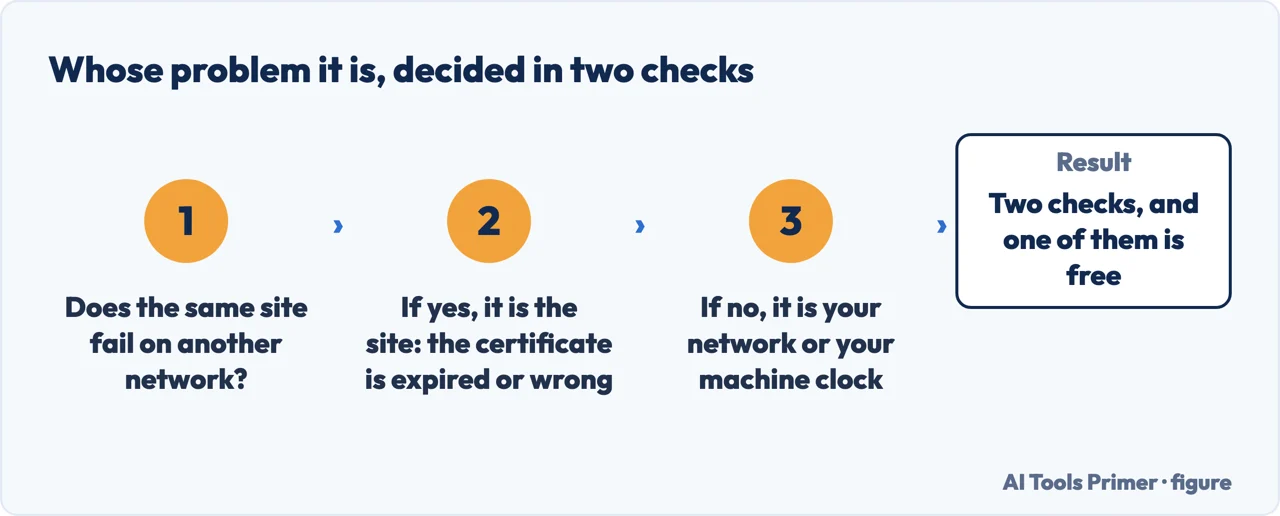
Open two or three other secure sites — a bank, a news site, anything with a padlock. If they load, the problem is the site you were on. If they fail the same way, the problem is on your side of the wire, and nothing you do to that one website will help.
The codes, and who actually defines them
Chrome names several codes under this error; Firefox is the one that publishes what they mean. Quoted as published. Read 23 August 2026.
| Code | Published meaning |
|---|---|
| SEC_ERROR_UNKNOWN_ISSUER | Mozilla: “An untrusted authority issued the certificate.” The Chrome equivalent is NET::ERR_CERT_AUTHORITY_INVALID. |
| MOZILLA_PKIX_ERROR_MITM_DETECTED | Mozilla: “a special case of the SEC_ERROR_UNKNOWN_ISSUER error code when a man-in-the-middle attack is detected.” |
| SSL_ERROR_BAD_CERT_DOMAIN | Mozilla: “Firefox does not trust this site because it uses a certificate that is not valid for that particular site.” Chrome’s equivalent is ERR_CERT_COMMON_NAME_INVALID, for which Google publishes no definition. |
| ERROR_SELF_SIGNED_CERT | Mozilla: “The site uses a self-signed certificate.” |
| NET::ERR_CERT_DATE_INVALID | Google: “You can get this error if your computer or mobile device’s date and time are inaccurate.” |
| SEC_ERROR_OCSP_INVALID_SIGNING_CERT | Mozilla: “The issue is with the website, and there is nothing you can do to resolve it.” |
Worth stating plainly, because it shapes what any guide can honestly tell you: Google names several of these codes in a heading and then defines almost none of them. Where a meaning appears above, it comes from whichever of the two browser makers actually publishes one.
Of the causes on your own side, one is common enough and harmless enough to check before anything else.
The cause that surprises people, and the easiest to fix. Google: “You can get this error if your computer or mobile device’s date and time are inaccurate. To fix this error, open your device’s clock. Make sure the time and date are correct.”
Mozilla adds the part Google leaves out — the time zone counts too: “If your computer’s date, time or time zone is incorrect, Firefox may show a security warning instead of loading the page.” A certificate is valid between two dates; a machine that thinks it is next year sees every certificate on the internet as expired.
Three cases where the site is innocent
All three quoted from Google’s error-message page. Read 23 August 2026.
| Situation | What Google publishes |
|---|---|
| Café or airport Wi-Fi | “You need to sign in to Wi-Fi networks at places like cafes or airports. To check the sign-in page, go to a page that uses "http://."” |
| Your antivirus | “You can get this error if you have an antivirus software that provides "HTTPS protection" or "HTTPS scanning." The antivirus prevents Chrome from providing security.” |
| A work computer | “If you’re on a work computer with proxy configuration that performs HTTPS interceptions, like ZScaler, Palo Alto Networks, or Fortinet, you’ll encounter a "NET::ERR_CERT_AUTHORITY_INVALID" error.” |
The second one deserves reading twice, because it inverts what security software is normally assumed to be doing. Google does not say the antivirus is mistaken — it says the antivirus is the thing standing between the browser and the site, and that this prevents Chrome from providing security.
Which leaves the question the Advanced button raises the moment you notice it: what happens if you use it?
“This will add a security exception for the website certificate.”
“Legitimate public sites will not ask you to add an exception for their certificate – in this case an invalid certificate can be an indication of a web page that will defraud you or steal your identity.”
Mozilla, and this is the pair that answers can I just click through? The first says what the button does: it does not fix anything, it records that you chose to ignore the check. The second is the rule to decide by — on a public website, needing an exception is itself the warning.
When the browser will not let you through at all
Mozilla’s published list of cases where the warning cannot be bypassed. Read 23 August 2026.
| Case | As published |
|---|---|
| HSTS | “The site uses HTTP Strict Transport Security (HSTS).” |
| Serious certificate faults | “The certificate has certain critical errors.” |
| A managed browser | “Your Firefox is managed by an enterprise policy that disables bypasses.” |
| Banks and email | “For major sites (such as banks and email providers), bypassing is never allowed, as it could indicate your connection is compromised.” |
The managed-browser case explains something that otherwise looks like a bug on a work laptop. Both Google and Microsoft publish the same setting for their browsers — Microsoft’s description of it reads: “If you disable this policy, users are blocked from clicking through any warning page.” The button is missing because somebody removed it.
Whatever you decide about continuing, one line is not negotiable. Apple: “Never enter your password or credit card number on sites with this warning.” And on its own service: “Users should never enter their Apple ID or password into a website that presents a certificate warning.”
Google says the same for a page marked as not secure: “Do not enter any personal information on this page. If possible, do not use the site.” Reading a page behind a broken certificate is one decision. Typing something into it is a different one.
One popular “fix” that the browser maker advises against. Google: “It isn’t recommended that you install a certificate on your own, as it’s usually a security risk. If you still get an error, contact the website owner.”
Mozilla points in the same direction for the site’s own problems — “Contact the website owner and ask them to correct their certificate.” — and for the work-network case names who should act: “If you’re on a work network, your IT department may need to add the interception certificate to Firefox’s trust store.”
The one case where a source says it is reasonable to continue. Mozilla, on self-signed certificates: “Self-signed certificates make your data safe from eavesdroppers, but say nothing about who the recipient of the data is. This is common for intranet websites that aren’t available publicly, and you may bypass the warning for such sites.”
An internal address you already know, on a network you already trust. Everywhere else, the same page’s wider rule applies: “You should only bypass the warning if you’re confident in both the identity of the website and the integrity of your connection – even if you trust the site, someone could be tampering with your connection.”
Two things this page cannot tell you, and why. Google publishes no explanation anywhere of what happens technically when you click through its warning; the description above is Mozilla’s, about Firefox. And Chrome’s help pages no longer mention the code some guides still quote for distrusted Symantec-era certificates — that case is documented today only by Mozilla.
Neither gap is guessed at here. Where only one browser maker publishes something, this page says which one.
Where to start
Three ways in.
- “Is it dangerous?”
- Start at whose problem it is
- “Can I just click through?”
- Go to clicking through
- “Every site does this.”
- That is whose problem it is
Whose problem it is
The browser makers publish a way to tell the site apart from your own machine, and a set of codes that name the fault.
Clicking through
What the Advanced button actually does, when it is missing, and the one situation a browser maker says it is reasonable to use it.
Not covered here. Every code, rule and instruction on this page is quoted from the browser maker or platform that publishes it — Google, Mozilla, Apple and Microsoft — and every source is listed below What holds instead is simple: the warning is a report that a check failed rather than a verdict on the website, and the check can fail at three different places.
Step 5 of 6 in putting a site online
Six guides in one order, from transferring a domain to the browser errors a site can show.
- Before this
- What is an SSL certificate chain, and why one link goes missing
- After this
- This site can’t be reached: is it the site, or is it you?
Sources
- Google Chrome Help — Check if a site’s connection is secure (that a full-page "Your connection is not private" error means there is a problem with the site, the network, or your device; and the instruction not to enter personal information on a page marked not secure and to avoid using the site if possible) — support.google.com, read 23 August 2026.
- Google Chrome Help — Get help with common error messages in Chrome (the heading grouping "Your connection is not private" with NET::ERR_CERT_AUTHORITY_INVALID, ERR_CERT_COMMON_NAME_INVALID, NET::ERR_CERT_WEAK_SIGNATURE_ALGORITHM, ERR_CERTIFICATE_TRANSPARENCY_REQUIRED and SSL certificate error; the sign-in step for café and airport Wi-Fi; that antivirus software providing HTTPS protection or HTTPS scanning prevents Chrome from providing security; that a work proxy performing HTTPS interception such as ZScaler, Palo Alto Networks or Fortinet produces NET::ERR_CERT_AUTHORITY_INVALID; that installing a certificate yourself is not recommended and is usually a security risk; and that an inaccurate device date and time produce NET::ERR_CERT_DATE_INVALID) — support.google.com, read 23 August 2026.
- Mozilla Support — Troubleshoot security error codes on secure websites (that an error on several sites points to something on your device or network is intercepting secure connections and replacing website certificates, with antivirus scanning, corporate monitoring tools and malware named as causes; the likely causes when the error occurs on one site only; the definitions of SEC_ERROR_UNKNOWN_ISSUER, MOZILLA_PKIX_ERROR_MITM_DETECTED and ERROR_SELF_SIGNED_CERT; the four cases in which the warning cannot be bypassed; that Firefox does not allow permanent certificate exceptions for most sites; and that on a work network the IT department may need to add the interception certificate to the trust store) — support.mozilla.org, read 23 August 2026.
- Mozilla Support — What do the security warning codes mean? (that proceeding adds a security exception for the website certificate; that legitimate public sites will not ask you to add an exception and that an invalid certificate can indicate a page that will defraud you or steal your identity; that you should only bypass the warning if confident in both the identity of the website and the integrity of the connection; that some security warnings cannot be bypassed; the instruction to contact the website owner; the definitions of SSL_ERROR_BAD_CERT_DOMAIN, SEC_ERROR_OCSP_INVALID_SIGNING_CERT and MOZILLA_PKIX_ERROR_MITM_DETECTED; and the explanation of self-signed certificates on intranet sites) — support.mozilla.org, read 23 August 2026.
- Mozilla Support — Troubleshoot time-related errors on secure websites (that an incorrect computer date, time or time zone can make Firefox show a security warning instead of loading the page; that Firefox’s security checks are automated rather than reputation-based; and that blocks for expired certificates generally cannot be bypassed) — support.mozilla.org, read 23 August 2026.
- Apple Support — If you see a "Not Secure" warning while browsing with Safari (that Safari warns when a site is not secure, that you should never enter a password or credit card number on a site with this warning, and the causes listed including an expired or illegitimate certificate) — support.apple.com, read 23 August 2026.
- Apple Support — Apple update on iCloud.com security (that users should never enter their Apple ID or password into a website that presents a certificate warning, and the description of the Chrome message with the instruction not to proceed or attempt to sign in) — support.apple.com, read 23 August 2026.
- Microsoft Learn — Microsoft Edge policy SSLErrorOverrideAllowed (that Edge shows a warning page for sites with SSL errors, that users can click through by default, and that disabling the policy blocks users from clicking through any warning page) — learn.microsoft.com, read 23 August 2026.
- Chrome Enterprise policy list — SSLErrorOverrideAllowed (that leaving the policy unset lets users click through Chrome’s SSL warning pages and that disabling it prevents them from doing so) — chromeenterprise.google, read 23 August 2026.
Written by Alberto Gulotta
Founder and editor of AI Tools Primer, writing from Palermo, Italy. Thirty-five years of taking computers apart, starting with a Commodore 64 — the long version is on the about page.
Something wrong on this page? Write to aitoolsprimer@gmail.com and it gets fixed.
Written on 23 August 2026 · last checked 23 September 2026.
Independence and limits
No affiliate links and no paid placements anywhere on this site. Nobody pays to appear here, and no company has seen this page before you did.
This is general information, not professional advice. Where a page touches money, health, safety or the law, it names its source and the date it was read — and your situation may still differ. See the privacy page and the cookie policy.