
Web · guide
What is an SSL certificate chain, and why one link goes missing
By Alberto Gulotta · Updated · 9 min read
Two symptoms send people to the phrase what is an SSL certificate chain: a site that works in one browser and throws a security warning in another, and a checker that calls the certificate valid and the chain incomplete. They are the same fault seen from two angles, and both certificate authorities quoted below point at the same link.
The chain, in a certificate authority’s own words
DigiCert defines it as “an ordered list of certificates … that enables the receiver to verify that the sender and all CA’s are trustworthy”. Three links, in order.
- Your certificate. The one issued for your domain, and where the path begins. Each certificate in the chain, DigiCert says, “is signed by the entity identified by the next certificate in the chain.”
- The intermediate. “Any certificate that sits between the SSL/TLS Certificate and the Root Certificate.” It signed yours, and the root signed it. This is the link that goes missing.
- The root. “The chain terminates with a Root CA Certificate.” It “is always signed by the CA itself.” It is not sent by your server at all — it is already in the device, or it is not.
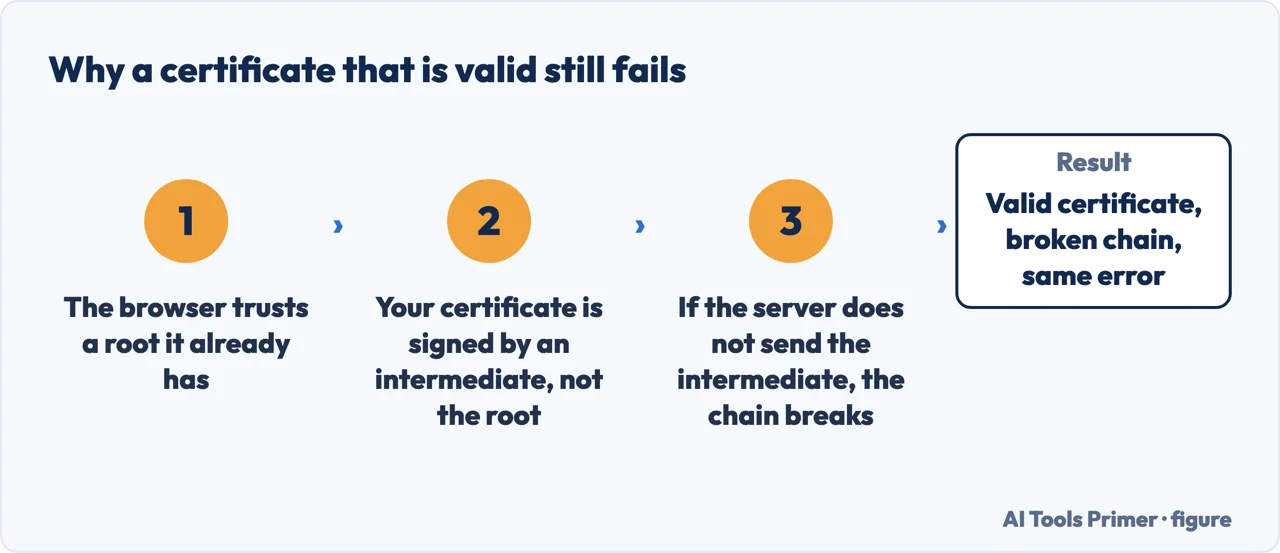
The ordering is the part worth holding on to, because it explains the whole mechanism in one move. Nothing in the chain vouches for itself. Your certificate is trusted because the intermediate signed it, the intermediate is trusted because the root signed it, and the root is trusted because it is already sitting in the device — put there by whoever made the browser or the operating system. Trust is not transmitted by your server; it is met halfway.
“Our root key material is kept safely offline. We issue end-entity certificates to subscribers from the intermediates described in the next section.”
That is Let’s Encrypt, and it answers a question the definitions leave open: why is there a middle link at all? The root key is kept off the network, which means it cannot also be the key signing certificates for subscribers all day. So the intermediate does that signing, and Let’s Encrypt says so in as many words. There is a consequence worth drawing out, because it follows from where each certificate lives rather than from anything either source claims: an intermediate is sent by your server, while a root already sits inside every device — so changing one of them is a configuration change and changing the other is not.
Once that is clear, the failure mode stops being mysterious. Your server sends what it was given. If it sends only your certificate, the device at the other end is left holding a signature from an intermediate it may never have seen, and a root it does have — with nothing connecting the two.
Why it works for you and fails for somebody else. DigiCert states the failure directly: “If the Intermediate Certificate is not installed on the server … it may prevent some browsers, mobile devices, applications, etc. from trusting the SSL/TLS certificate.” Note the word some. A missing intermediate does not produce a clean, universal error. It produces an inconsistent one.
DigiCert does not say which clients forgive it and which do not, and this guide is not going to supply a list it cannot source. What the wording does establish is the shape of the problem: the same server can satisfy one client and fail another, so testing in your own browser proves nothing about anybody else’s. DigiCert’s conclusion is a requirement rather than a suggestion: “In order to make the SSL/TLS certificate compatible with all clients, it is necessary that the Intermediate Certificate be installed.”
Which makes the practical instruction narrower than most troubleshooting advice. The fix is not a new certificate at all. It is the file your server is configured to send. The intermediate is published by the certificate authority — Let’s Encrypt lists its own on the page quoted here, in downloadable form — and the job is to make sure your server presents it alongside your certificate. A certificate that was never invalid does not become more valid by being reissued.
“A CA is most correctly thought of as a key and a name: any given CA may be represented by multiple certificates which all contain the same Subject and Public Key Information.”
Let’s Encrypt, and this is the sentence that rescues anybody staring at a chain that appears to contain the same authority twice. It is not duplication and it is not an error. One authority can hold several certificates — self-signed, and cross-signed by somebody else — and which of them your server should send depends on what the devices at the other end already trust.
The published record shows how those extra certificates arise. Let’s Encrypt lists its first root, ISRG Root X1, with a certificate “cross-signed by DST Root CA X3” that is now marked retired; its newer roots appear as cross-signed too, and are described as “not yet included in Root Program Trust Stores”. Put those two facts side by side — a root that trust stores have not yet accepted, and a signature on it from one they have — and the purpose of a cross-signature is fairly clear, though it is a reading of the record rather than a sentence Let’s Encrypt writes on that page.
So a chain can be longer than it strictly needs to be, on purpose, for the benefit of devices you cannot see. That is the real answer to why two servers with certificates from the same authority can present chains of different lengths, and why the shorter one is not automatically the better choice.
And one thing that is not like the rest of the certificate world. Roots do not expire the way your certificate expires. Let’s Encrypt: although a root’s self-signed certificates “do contain a notAfter date, Root Programs and Trust Stores may decide to trust a Root CA beyond that date, or terminate trust in it before that date.” So the lifetime of the thing at the top of your chain is decided by browser and operating-system vendors rather than by the date printed inside it — which is why a chain can stop working on a device that has stopped receiving updates, without anything on your server changing at all.
The guides below take it three ways: the three links and what each one is for, the missing intermediate and how to tell that is what you have, and the trust stores that decide the whole question from the far end.
Where to start
Three ways in.
- “Why is the same CA listed twice?”
- That is roots and trust stores
Roots and trust stores
The end of the chain is not on your server. It is in the device — and browser and operating-system vendors decide what is in there and for how long.
Not covered here. It will not tell you to buy a certificate to fix a chain. A missing intermediate is a server configuration problem, and the intermediate was supplied with the certificate you already have.
It will not tell you the shortest chain is the best one. Cross-signing makes chains longer on purpose, so that devices which will never be updated can still reach a root they trust.
And it will not rank certificate authorities. That would need paid accounts and real renewals across a year, and this guide is about how the chain works rather than whose to buy. What holds instead is simple: the definition of a certificate chain is DigiCert’s, while the reason intermediates exist and the note on root expiry come from Let’s Encrypt.
Step 4 of 6 in putting a site online
The order these jobs come up in for somebody who runs a website.
- Before this
- HTTP vs HTTPS: what the padlock does not say
- After this
- Your connection is not private: the site, the network, or you
Sources
- DigiCert Knowledge Base — How Certificate Chains Work (the definition of a certificate chain as an ordered list of certificates enabling the receiver to verify that the sender and all CAs are trustworthy; that the path begins with the SSL/TLS certificate and each certificate is signed by the entity identified by the next; the definition of an intermediate certificate as any certificate sitting between the SSL/TLS certificate and the root; that an intermediate not installed on the server may prevent some browsers, mobile devices and applications from trusting the certificate, and that installing it is necessary for compatibility with all clients; and that the chain terminates with a root CA certificate always signed by the CA itself) — knowledge.digicert.com, read 22 August 2026.
- Let’s Encrypt — Chains of Trust, last updated 8 July 2026 (that root key material is kept safely offline and end-entity certificates are issued from intermediates; that a CA is most correctly thought of as a key and a name, and may be represented by multiple certificates sharing the same Subject and Public Key Information; that root certificates contain a notAfter date but Root Programs and Trust Stores may trust a root beyond it or terminate trust before it; and the published record of cross-signing, including ISRG Root X1’s retired cross-signature and newer roots listed as not yet included in Root Program Trust Stores) — letsencrypt.org, read 22 August 2026.
Written by Alberto Gulotta
Founder and editor of AI Tools Primer, writing from Palermo, Italy. Thirty-five years of taking computers apart, starting with a Commodore 64 — the long version is on the about page.
Something wrong on this page? Write to aitoolsprimer@gmail.com and it gets fixed.
Written on 22 August 2026 · last checked 23 September 2026.
Independence and limits
No affiliate links and no paid placements anywhere on this site. Nobody pays to appear here, and no company has seen this page before you did.
This is general information, not professional advice. Where a page touches money, health, safety or the law, it names its source and the date it was read — and your situation may still differ. See the privacy page and the cookie policy.