
Software · guide
Microsoft security alert scam: the test that settles it
By Alberto Gulotta · Updated · 15 min read
A Microsoft security alert scam looks like a warning from Windows, sounds urgent, and gives you a number to call. Before anything else, there is a single published test that answers the question you actually have — and it comes from Microsoft.
“Microsoft error and warning messages never include phone numbers.”
Microsoft states it in a box at the top of its own page on these scams, and it settles the question on its own. A genuine Windows or Microsoft warning does not give you a number to call. If there is a number on the screen, whatever else the message says and however closely it copies the look of Windows, it did not come from Microsoft.
That one line is enough on its own, and it works on any fake virus warning, whoever it claims to be from. It is also not only Microsoft saying it: two public authorities publish the same rule, and one of them states it far more widely.
Three organisations, written separately, saying the same thing
Microsoft, the US Federal Trade Commission and the FBI’s Internet Crime Complaint Centre. Read 23 August 2026.
| Source | What they publish |
|---|---|
| Microsoft | “If a pop-up or error message appears with a phone number, don’t call the number. Error and warning messages from Microsoft never include a phone number.” |
| Microsoft | “Any communication with Microsoft has to be initiated by you.” |
| FTC | “Real security pop-up warnings and messages will never ask you to call a phone number.” |
| FTC | “Legitimate tech companies won’t contact you by phone, email, or text message to tell you there’s a problem with your computer.” |
| FBI (IC3) | “Do not contact the telephone number provided in a pop-up, text, or email.” |
Note how wide the FTC’s version is. It is not a rule about Microsoft — it covers Apple, Norton, McAfee, a bank, a courier, anyone. An unrequested message telling you something is wrong with your computer is the thing itself, regardless of whose logo is on it.
If the screen is filled with it right now. Microsoft publishes exactly one practical instruction, and this is it: “If your screen suddenly fills with scary pop-ups you should immediately close your browser (try pressing ALT+F4 if you can’t do it with your mouse). If you can’t close your browser try restarting your computer.”
Apple says the same for its side: “Don’t call the number or follow the links to claim the prize or fix the problem. Ignore the message and simply navigate away from the page or close the entire window or tab.”
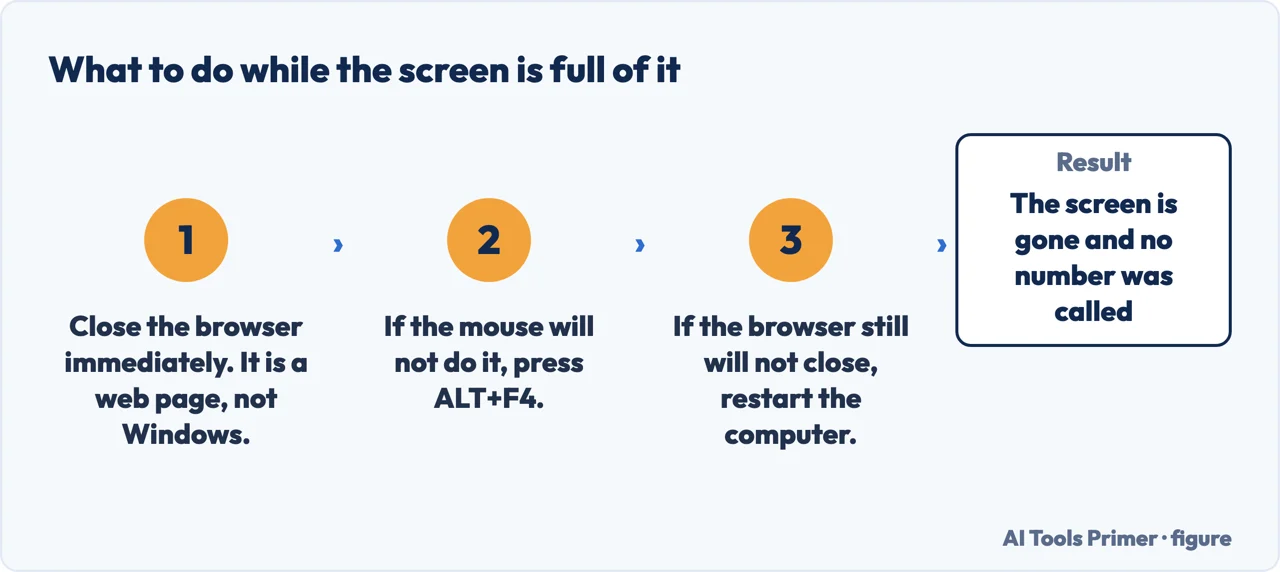
Why it will not close, and why that is not a symptom
The techniques Microsoft lists on its own page, quoted in full. Read 23 August 2026.
| # | Technique, in Microsoft’s words |
|---|---|
| 1 | “Put the image or your browser on full screen, making the error appear as though it’s coming from Windows instead of the webpage” |
| 2 | “Disable Task Manager” |
| 3 | “Continuously display pop-up windows” |
| 4 | “Play audio messages” |
This is the part worth understanding, because the feeling of being trapped is what makes people call. Microsoft describes the same experience: “These pop-ups may appear to block access to your machine so that you can’t close them and may even use alarming sounds or recorded voices to make them seem even scarier.” It is a web page behaving badly, not a computer that has been taken over — and Microsoft adds the distinguishing rule: “In contrast, the real error messages in Windows never ask you to call a tech support number.”
There is a second technique working on you alongside the screen itself, and the FBI names it plainly.
“Resist the pressure to act quickly. Criminals will urge the victim to act fast to protect their device. The criminals create a sense of urgency to produce fear and lure the victim into immediate action.”
The FBI naming the mechanism, and it is the most useful sentence in the first thirty seconds. Urgency is not evidence that something is wrong; it is the technique. Nothing on a genuinely compromised computer gets worse because you spent ten minutes checking.
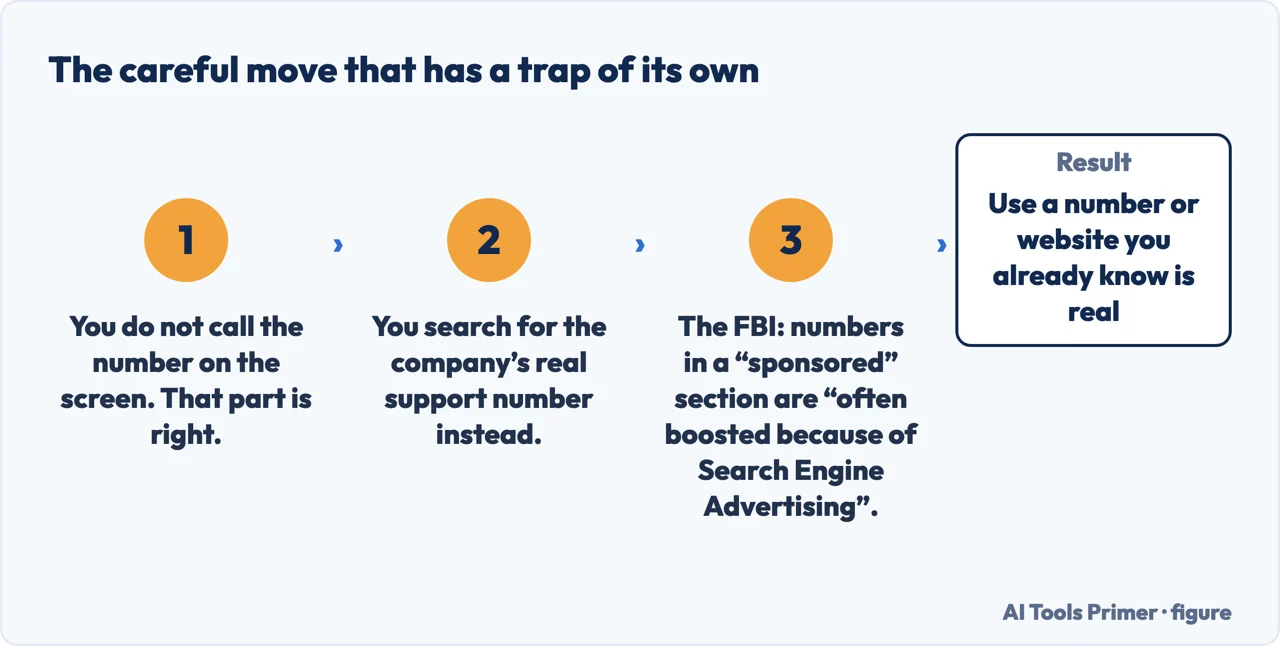
An extra trap that neither Microsoft nor the FTC mentions. The FBI does: “Be cautious of customer support numbers obtained via open source searching. Phone numbers listed in a "sponsored" results section are often boosted because of Search Engine Advertising.”
So the careful-seeming move — ignore the pop-up, search for the real support number instead — has its own version of the same trap at the top of the results. The FTC’s instruction closes it: “Hang up the phone and call the company or agency directly using a phone number or website you know is real.”
It is also worth knowing that this is not a fringe problem, because the pressure to dismiss it as somebody else’s mistake is part of what keeps people quiet about it.
The scale, as the FBI reports it
Complaints and reported losses in the Tech/Customer Support category, from the FBI Internet Crime Complaint Centre annual reports. Read 23 August 2026.
| Year | Complaints | Reported losses |
|---|---|---|
| 2025 | 47,794 | $2,134,675,818 |
| 2024 | 36,002 | $1,464,755,976 |
| 2023 | 37,560 | $924,512,658 |
In the same report, that category sits third by reported losses across every kind of internet crime the FBI records, behind investment fraud and business email compromise. Among complainants aged 60 and over it is second by both count and loss, with 21,333 complaints and $1,040,730,043 reported.
The pop-up is rarely the whole scam. The FTC describes what follows: “Often, they tag team you: maybe starting with a pop-up security alert impersonating Microsoft and then transferring you to someone pretending to be from the FTC for "help" with a fake identity theft problem.”
And the line that ends that conversation, from the same page: “Because someone who works for the government will never say you must transfer your money to "protect it."” The same shape turns up around a real problem rather than an invented one: the FBI has an alert about companies charging to help people who are being blackmailed or who are trying to get an account back, and it says law enforcement and non-profits do the same work for nothing.
How they ask to be paid is itself the answer
Microsoft and the FTC on payment methods. Read 23 August 2026.
| Source | What they publish |
|---|---|
| Microsoft | “Microsoft will never ask that you pay for support in the form of cryptocurrency like Bitcoin, or gift cards.” |
| FTC | “They often insist that you pay with gift cards, a wire transfer, a bank transfer, cryptocurrency, or a payment app. They want you to pay in one of these ways because it’s like using cash — once you pay, it’s hard to get your money back.” |
| Microsoft | “Tech support agents will never need to ask you for your social security number or other unrelated personal information.” |
The FTC gives the reason rather than just the rule, and the reason is the useful part: those methods are chosen because they are hard to reverse. A request that steers you towards one of them has already told you what it is.
If you already called, paid, or let them in
Microsoft’s steps and the FTC’s, quoted as published.
- Remove what they installed. Microsoft: “Uninstall any applications that scammers have asked you to install.”
- Run your security software. FTC: “Update your security software to make sure you have the latest protections.”
- Change passwords, and add the second step. FTC: “Change your passwords and turn on two-factor authentication to protect your accounts.”
- Deal with the money. Microsoft: “Call your credit card provider to contest the charges if you’ve already paid. Let them know what happened; they’ll probably want to cancel and replace your affected cards to prevent the scammers from using them again.” Microsoft’s technical documentation puts it more broadly: “Contact your bank or other financial institutions if you paid them.”
- If they had remote control of the machine. Microsoft: “If you have given scammers access to your device, consider resetting it.”
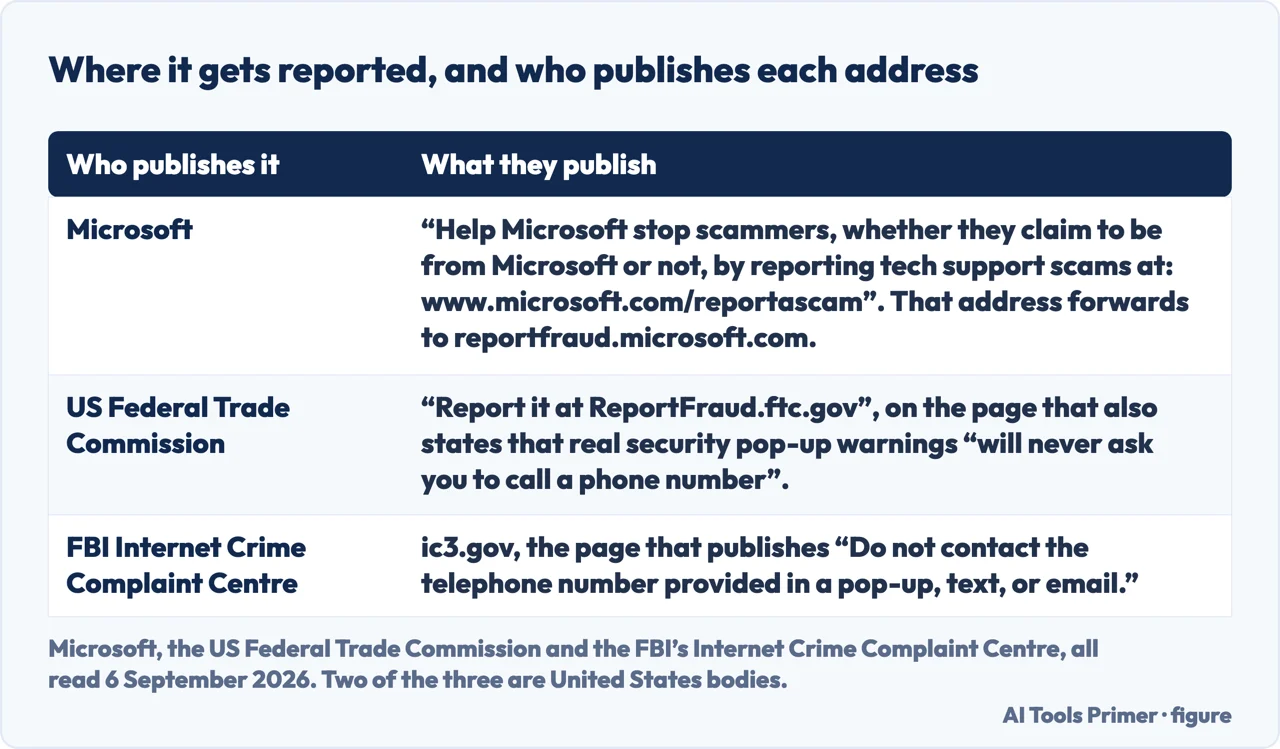
Where it gets reported. Microsoft: “Help Microsoft stop scammers, whether they claim to be from Microsoft or not, by reporting tech support scams at:” — its own reporting form. The form itself warns off a common mistake, in a line at the top: “This technical support scam reporting tool is not a Microsoft technical support request tool.” It is a report, not a support request.
The FTC’s channel is ReportFraud.ftc.gov and the FBI’s is IC3; both are United States bodies. For a suspicious email that imitates Apple, Apple asks that it be forwarded to its own phishing address. The three places a phishing email gets reported are separate from that, and none of them is a substitute for the others. A code arriving by text with no message attached is a different signal again, and it has its own reading.
One question none of these sources answers, and we are not going to answer it for them. Microsoft publishes at length what it never does — no unsolicited calls, no phone numbers in error messages, no payment in gift cards. It does not publish a checklist for the opposite case: how to tell a genuine Microsoft account security email from an imitation of one.
That gap matters, because unusual-sign-in notices are real and do arrive. The safe move is the one all three organisations converge on: do not use any address or number in the message. Go to the account yourself, the way you normally would, and see whether the same warning is waiting there.
Where to start
Three ways in.
- “There is a number on my screen right now.”
- Start at when the screen lies to you
- “I already called them.”
- Go to after something got in
- “The pop-ups come back after restarting.”
- That is Why is my computer so slow? Find out first
When the screen lies to you
Alerts, warnings and messages that imitate the system they appear on — and the published rules for telling them apart.
After something got in
What to check, what to change, and what the manufacturers say about starting over.
Not covered here. Every rule, instruction and figure on this page is quoted from the organisation that publishes it — Microsoft, Apple, the US Federal Trade Commission and the FBI’s Internet Crime Complaint Centre — and every source is listed below What holds instead is simple: a phone number in a security warning is the answer by itself, and the rest of this page is what to do once you already know.
Sources
- Microsoft Support — Protect yourself from tech support scams (that Microsoft error and warning messages never include phone numbers; that Microsoft does not send unsolicited email or make unsolicited calls to request personal or financial information or to provide technical support; the instruction not to call a number appearing in a pop-up or error message; that Microsoft will never ask for payment in cryptocurrency or gift cards; the instruction to hang up on an unsolicited call claiming to be Microsoft Support; the description of fake blue-screen and fake Windows activation dialogs; the four techniques used to make the page seem to come from Windows; that real Windows error messages never ask you to call a tech support number; the steps for someone whose information has already been given, including uninstalling applications, contesting card charges and considering a device reset; and the reporting instruction) — support.microsoft.com, read 23 August 2026.
- Microsoft Support — Protect yourself from online scams and attacks (that the pop-ups may appear to block access to the machine and may use alarming sounds or recorded voices; the instruction to close the browser immediately, pressing ALT+F4 if the mouse will not do it, and to restart the computer if the browser will not close; and that tech support agents will never need to ask for a social security number or other unrelated personal information) — support.microsoft.com, read 6 September 2026.
- Microsoft Learn — Tech Support Scams, Microsoft Defender for Endpoint (that any communication with Microsoft has to be initiated by you; and the instruction to contact your bank or other financial institutions if you paid them) — learn.microsoft.com, read 23 August 2026.
- Microsoft — Report Fraud (that the technical support scam reporting tool is not a Microsoft technical support request tool) — reportfraud.microsoft.com, read 23 August 2026.
- US Federal Trade Commission — How To Spot, Avoid, and Report Tech Support Scams (that real security pop-up warnings and messages will never ask you to call a phone number; that legitimate tech companies will not contact you by phone, email or text to say there is a problem with your computer; the description of how the scam starts with a bogus warning urging you to call; the list of payment methods insisted on and the reason they are chosen; the fake invoice and subscription renewal variant and the check of whether a transaction actually exists; that someone who works for the government will never say you must transfer your money to protect it; the suggestion to talk to someone you trust; and the reporting address) — consumer.ftc.gov, read 23 August 2026.
- US Federal Trade Commission — What To Do if You Were Scammed (the steps for someone who gave a scammer access to their computer, including updating security software and changing passwords and turning on two-factor authentication) — consumer.ftc.gov, read 23 August 2026.
- US Federal Trade Commission — Data Spotlight, False alarm, real scam (that the lie often starts with a fake on-screen security alert that looks like it is from Microsoft or Apple with a number to call; the description of victims being handed on to someone impersonating the FTC; and the instruction to hang up and call the company or agency directly using a number or website known to be real) — www.ftc.gov, read 23 August 2026.
- FBI Internet Crime Complaint Centre — Tech/Customer Support and Government Impersonation (the instruction to resist the pressure to act quickly and the description of manufactured urgency; the instruction not to contact a telephone number provided in a pop-up, text or email; and the warning that support numbers found by searching, particularly those in a sponsored results section, may be boosted by advertising) — www.ic3.gov, read 23 August 2026.
- FBI Internet Crime Complaint Centre — 2025 Internet Crime Report (the Tech/Customer Support complaint counts and reported losses for 2025, 2024 and 2023; the category’s position by reported losses among all crime types; and the complaint count and reported losses for complainants aged 60 and over) — www.ic3.gov, read 23 August 2026.
- Apple Support — Recognize and avoid social engineering schemes (that a pop-up or alert offering a prize or warning about security problems or viruses should not be believed; the instruction not to call the number or follow the links but to navigate away or close the window or tab; the instruction to hang up on an unsolicited call claiming to be from Apple or Apple Support; that Apple never asks for an Apple Account password or verification codes to provide support; and the address for forwarding a suspicious email) — support.apple.com, read 23 August 2026.
Written by Alberto Gulotta
Founder and editor of AI Tools Primer, writing from Palermo, Italy. Thirty-five years of taking computers apart, starting with a Commodore 64 — the long version is on the about page.
Something wrong on this page? Write to aitoolsprimer@gmail.com and it gets fixed.
Written on 23 August 2026 · last checked 23 September 2026.
Independence and limits
No affiliate links and no paid placements anywhere on this site. Nobody pays to appear here, and no company has seen this page before you did.
This is general information, not professional advice. Where a page touches money, health, safety or the law, it names its source and the date it was read — and your situation may still differ. See the privacy page and the cookie policy.