The stop code
the name, not the number“To help determine the cause of the problem, a stop code, such as PAGE_FAULT_IN_NONPAGED_AREA or MEMORY_MANAGEMENT will appear” on the screen.
It is the one thing worth writing down before restarting.

Software · guide
By Alberto Gulotta · Updated · 13 min read
Blue screen error is a name Microsoft itself has stopped relying on. On current Windows 11 the screen is black, the company documents the change and the version it arrived in, and the same page that answers this question lists three different names and two different colours for the same event.
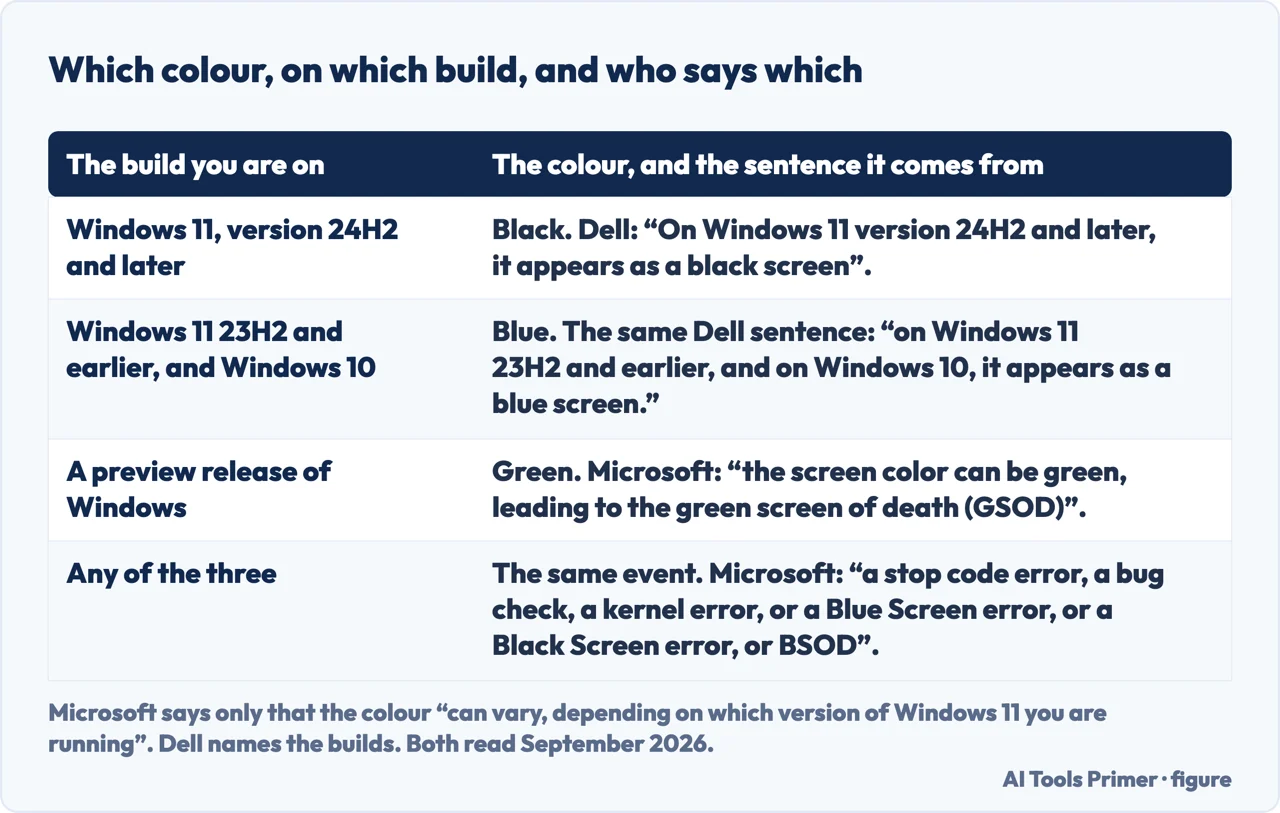
The support page for this error lists the names it goes by: “This is also known as a stop code error, a bug check, a kernel error, or a Blue Screen error, or a Black Screen error, or BSOD.” And it says so plainly: “The screen color and messaging for a stop code error can vary, depending on which version of Windows 11 you are running.”
The change is documented and dated. Announcing the new design, Microsoft called it “a more streamlined user interface for unexpected restarts that’s more than just a color change”, and described what changed: “It removes the frowny face and QR code, and instead presents a short, readable message with the stop code and faulty driver information.” It applies to Windows 11, version 24H2.
Two consequences for anyone searching. A black crash screen is not a different, worse problem than a blue one — it is the same thing renamed and repainted. And there is a third colour with a meaning: “On preview releases of Windows, the screen color can be green, leading to the green screen of death (GSOD).” Green means you are on a preview build.
Microsoft says the colour “can vary”; it does not say which version gives which. A manufacturer does, in one sentence: “On Windows 11 version 24H2 and later, it appears as a black screen; on Windows 11 23H2 and earlier, and on Windows 10, it appears as a blue screen.” That is Dell, and it turns a vague reassurance into something you can check against your own machine — which matters, because somebody searching for a black crash screen who finds only pages about blue ones will reasonably conclude they have a different problem. Dell also adds a cause that has nothing to do with software: “Overheating can cause a stop code error even on a computer with no other hardware faults.”
With the name settled, the useful question is what to do — and on that Microsoft publishes a figure, which is rarer than a list of causes.
Microsoft, on what causes these errors: “70% are caused by third-party driver code.”
That figure is worth more than any list of stop codes, because it settles the first question: where to spend your attention. Not the operating system, not a virus, not the disk — something installed alongside Windows that talks to hardware. It also explains why the remedies that feel most thorough, like reinstalling Windows, so often fix the symptom while the same driver waits to be installed again.
Everything else on the screen is there to narrow it down, and it is worth knowing what each part is before the machine restarts itself.
The stop code
the name, not the number“To help determine the cause of the problem, a stop code, such as PAGE_FAULT_IN_NONPAGED_AREA or MEMORY_MANAGEMENT will appear” on the screen.
It is the one thing worth writing down before restarting.
The module name
when it is known“The bug check screen displays the stop code error, such as CRITICAL_PROCESS_DIED. When the module name of the currently executing code is available” it is shown too.
Given the 70% figure, that name is the shortest route to the cause.
The percentage
it is saving evidence“If the system can generate a dump file, you see a display showing the percent complete as the system writes the dump file.”
That counter is not the repair. It is the machine writing down what happened — and a reason to let it finish.
The third card deserves a moment. The percentage counter means the machine is saving the evidence, and interrupting it — by cutting the power because the screen looks stuck — is how a crash becomes unexplainable. On Windows 11 24H2 that wait is much shorter than it used to be: Microsoft says 24H2 “reduced the time users spend on the screen from 40 seconds to just 2 seconds for most consumer devices” — consumer devices, not every machine: the same post says enterprises keep collecting kernel dumps by default and must opt in to the shorter wait.
And if the seventy per cent figure points at drivers, Windows already ships the tool for testing them.
“The driver verifier manager is built into Windows and is available on all Windows PCs. To start the driver verifier manager, enter Verifier” at a command prompt.
Given that Microsoft attributes seventy per cent of these errors to third-party drivers, a tool that stress-tests drivers and is already installed on every Windows machine is the most direct thing on this page. It is also a tool that deliberately provokes crashes, so it belongs on a machine you can afford to restart repeatedly — and Microsoft’s pages on it are written for driver developers, which is worth knowing before starting it.
So the order that follows from the documentation. Write down the stop code and, if one appears, the module name — those two strings are the whole diagnosis in compressed form. Let the percentage finish so the dump gets written. Then look at drivers first, because that is where Microsoft puts seven of every ten of these errors, and the machine keeps a record of what happened that is linked from the guide on random freezes.
A note on what this page deliberately does not do. It does not list stop codes with causes beside them. Microsoft publishes a reference of them, it runs to hundreds, and reproducing a fraction of it here would be worse than pointing at the whole thing.
A note on other guides. Google did not return readable search results while this page was written, so this page makes no claim about what is on Google’s first page for this question.
What this page will not do is tell you which driver is at fault. The module name on the screen and the dump file are the evidence; reading them is a separate job with its own tools.
It will not tell you to reinstall Windows. If the cause is a driver, the reinstall removes the symptom and leaves the driver waiting to be installed again.
And it will not recommend a driver-updater product. The verifier is already on the machine, and the tools that promise to fix drivers automatically are the least tested category in this entire section.
Three ways in. If the screen was black rather than blue, take the first.
Microsoft names the error three ways, states that colour and wording vary by version, and documents the black screen arriving in Windows 11 24H2.
Microsoft attributes seven of every ten of these errors to third-party driver code, which decides where to look before any list of codes does.
A stop code, sometimes a module name, and a percentage that means the machine is writing the evidence rather than hanging.
Not covered here. It will not list stop codes with causes beside them. Microsoft publishes a reference running to hundreds; quoting a handful would be worse than pointing at all of it.
It will not name your faulty driver. The module name and the dump file are the evidence, and reading them is a separate job.
It will not tell you to reinstall Windows. Where a driver is the cause, that removes the symptom and keeps the cause.
And it carries no affiliate links, including for driver-updater products, the products a guide on this subject usually exists to sell. What holds instead is simple: the colour change and the seventy per cent are quoted from Microsoft’s own support pages and announcements, named where they are used.
Written by Alberto Gulotta
Founder and editor of AI Tools Primer, writing from Palermo, Italy. Thirty-five years of taking computers apart, starting with a Commodore 64 — the long version is on the about page.
Something wrong on this page? Write to aitoolsprimer@gmail.com and it gets fixed.
Written on 23 August 2026 · last checked 23 September 2026.
Independence and limits
No affiliate links and no paid placements anywhere on this site. Nobody pays to appear here, and no company has seen this page before you did.
This is general information, not professional advice. Where a page touches money, health, safety or the law, it names its source and the date it was read — and your situation may still differ. See the privacy page and the cookie policy.