
Software · guide
Critical process died: the program is usually the messenger
By Alberto Gulotta · Updated · 11 min read
Critical process died is a blue screen carrying stop code critical process died 0xEF, and the name is doing a lot of work. Something did stop — but Microsoft’s own documentation points away from the obvious suspect.
What the words mean. Microsoft: “This check indicates that a critical system process terminated.” Not an app you were using — a process Windows cannot run without. The same page names them: “Built-in Windows critical system services include csrss.exe, wininit.exe, logonui.exe, smss.exe, services.exe, conhost.exe, and winlogon.exe.”
That is the complete published list of what critical process died 0xEF can involve, seven names. Anything else offered as “the process that died” is somebody’s guess rather than Microsoft’s.
“The root cause of stop errors is rarely a user-mode process. While a user-mode process (such as Notepad or Slack) may trigger a stop error, it’s usually exposing the underlying issue in a driver, hardware, or operating system.”
Microsoft, and it inverts what the message seems to say. The name points at a process, and a process is something you can go and look for. Instead, Microsoft’s position is that the program is usually the messenger. One caveat this page will not hide: that sentence is written about stop errors in general, on a page that never names this particular code — about 5,000 words, read again on 11 September 2026, and the code is in none of them.
Where Microsoft says crashes come from
Microsoft’s published breakdown, introduced with the words “Our analysis of the root causes of crashes indicates that”. These figures cover stop errors as a whole, not this code specifically. Read 23 August 2026.
| Share | Cause |
|---|---|
| 70% | “are caused by third-party driver code.” |
| 10% | “are caused by hardware issues.” |
| 5% | “are caused by Microsoft code.” |
| 15% | “have unknown causes, because the memory is too corrupted to analyze.” |
Microsoft introduces those numbers with “There’s no simple explanation for the cause of stop errors. Many different factors can be involved”, and the caution is part of the figure. Still, seven in ten pointing at driver code sits oddly beside the advice that circulates most widely, which is to reinstall an application.
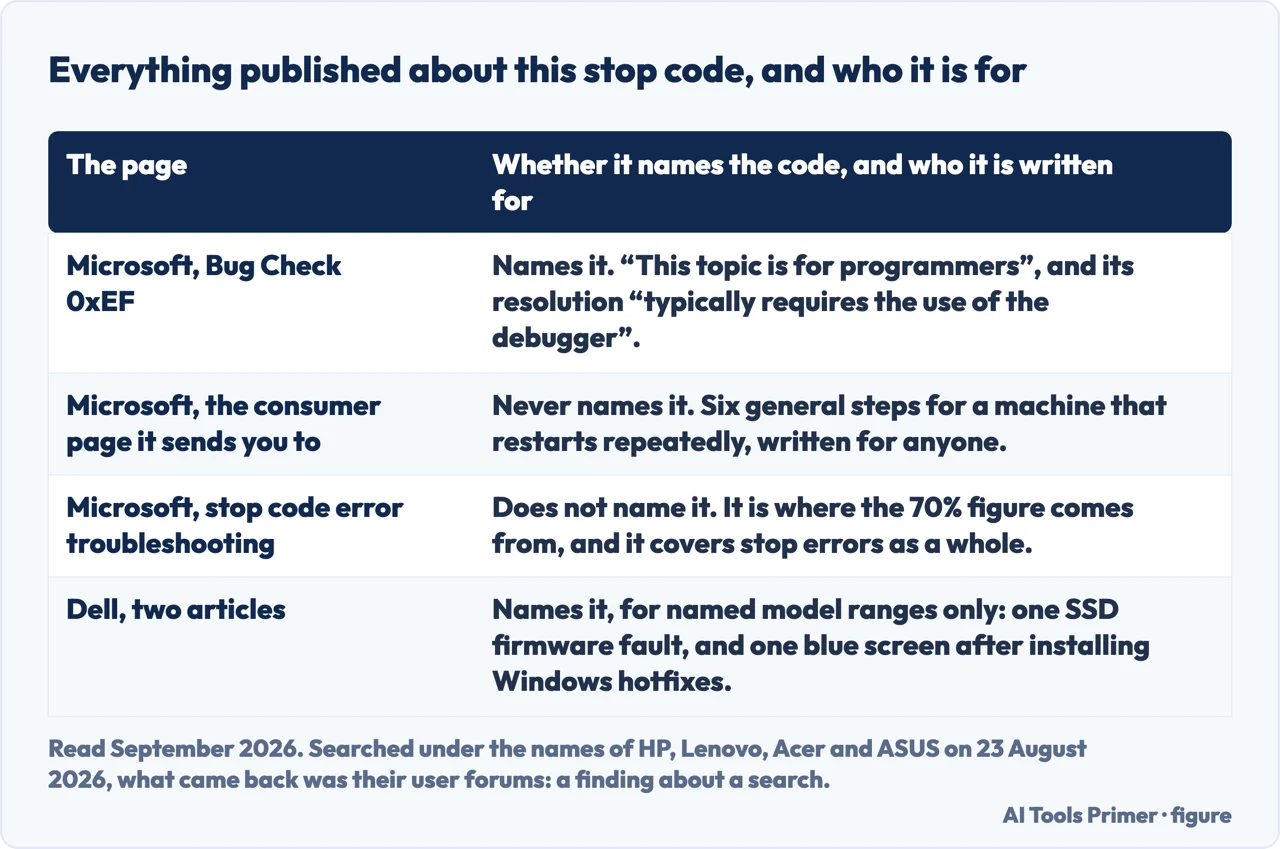
Microsoft’s only page about this code says it is not for you. In a box near the top: “This topic is for programmers. If you’re a customer who has received a blue screen error code while using your computer, see Troubleshoot blue screen errors.” Its published resolution is in the same register: “Determining the cause of this issue typically requires the use of the debugger to gather additional information.”
And the page it sends people to does not mention this stop code anywhere — nor does any other consumer page Microsoft publishes. For the person actually reading the blue screen, Microsoft has written nothing about this error by name. What follows is therefore assembled from what Microsoft does publish, with each piece attributed to where it came from.
“In most cases when Windows 11 restarts unexpectedly, the problem is resolved by the restart and no further action is needed.”
Microsoft’s consumer page opens with that, and it is the first thing worth knowing before typing any command. A single blue screen is not a diagnosis. The same page qualifies when to act: “However, if Windows 11 restarts frequently due to the same stop code error, try these basic troubleshooting steps to resolve the issue”.
The consumer steps, in Microsoft’s order
From Microsoft’s page for people rather than administrators. Read 23 August 2026.
| Step | As published |
|---|---|
| 1 | “Remove any new hardware. If you added new hardware to your PC before the error, shut down your PC, remove the hardware, and try restarting.” |
| 2 | “Start your PC in safe mode.” |
| 3 | “Check to see if any devices are marked with the exclamation point (!). Right-click the device and select Update driver.” |
| 4 | “Check for sufficient free space on the hard drive.” Microsoft adds that “it’s a good idea to have 10% to 15% of free space available.” |
| 5 | “Install the latest Windows 11 Updates.” |
| 6 | “Restore Windows 11” using a system restore point. |
Those steps are what Microsoft offers anyone looking up critical process died Windows 11, and step five runs against common advice. The reflex after a blue screen is to remove the last update; Microsoft’s published order says install the latest ones — and there is a documented case below where that is exactly right.
The one command Microsoft names on the page about this code is the System File Checker, described as a utility that “allows users to scan for corruptions in Windows system files and restore corrupted files”. On its own dedicated page Microsoft is more precise about what it does: “The sfc /scannow command will scan all protected system files and replace corrupted files with a cached copy.”
Two details from that page are easy to get backwards. The order — “You should run DISM prior
to running the System File Checker”, with DISM.exe /Online /Cleanup-image
/Restorehealth first and sfc /scannow second. And the instruction while it
runs: “Do not close this Command Prompt window until the verification is 100% complete.”
“Don’t try to verify all the drivers at one time. This action can degrade performance and make the system unusable. It also limits the effectiveness of the tool.”
“Driver Verifier consumes lots of CPU and can slow down the computer significantly. You may also experience additional crashes.”
Driver Verifier is widely recommended for blue screens, and Microsoft’s own documentation attaches two warnings to it. The tool is designed to provoke crashes so that a faulty driver reveals itself — which is useful to someone reading dumps, and unhelpful to someone who simply wants the machine to work.
The only manufacturer that has published anything
Dell has two articles naming this stop code, both limited to specific models. HP, Lenovo, Acer and ASUS publish none. Read 23 August 2026.
| Case | What Dell publishes |
|---|---|
| An SSD’s firmware | Owners of certain machines “may encounter the following intermittent error: Windows critical error code: CRITICAL_PROCESS_DIED”, which Dell attributes to a firmware error in a specific drive model |
| A Windows hotfix | “An Alienware or Dell G Series computer may experience a blue screen error of SECURE_KERNEL_ERROR or CRITICAL_PROCESS_DIED. This occurs after installing Windows hotfixes.” |
The second case is worth holding onto, because its remedy is not the obvious one. Dell’s published resolution is to update further, not to roll back — which matches the order on Microsoft’s consumer page and contradicts the reflex to remove the last update. Both Dell articles apply to named model ranges, and neither is a general explanation of the code.
On whether your files are at risk, none of the seven documents read for this page says anything. That is stated here as a finding rather than glossed over: five Microsoft pages and two Dell articles, and not one of them puts a sentence about user files next to this stop code.
The closest published statement is about the shutdown itself, and it is reassuring in a narrow way: “If your computer stops working and displays a stop code error, the computer shuts down abruptly to protect itself from data loss.” The blue screen is a machine stopping on purpose. Any promise beyond that would be ours rather than anybody’s documentation, so this page does not make one.
Three absences worth knowing about. Microsoft’s page on this code has not been updated since December 2022. Its troubleshooting page for stop errors — about 5,000 words, read again on 11 September 2026 — carries a section headed “Common Windows stop errors”, and this code is not in it, nor anywhere else in the page. And no general explanation of the code exists outside Microsoft as far as we could find: the only maker documentation this page turned up is Dell’s, two articles that each apply to a named model range rather than to the code.
One practical warning about the trail itself: on Microsoft’s consumer page, the link onward to the advanced guide points at an internal preview address that asks for a company login. It is broken for everybody. The public version of the same document exists, and is the one cited below.
Where to start
Three ways in.
- “It happened once.”
- Start at what the words mean
- “It keeps happening.”
- Go to what microsoft publishes
- “The screen says a different code.”
- That is Blue screen error
What the words mean
Seven named processes, and a published position on why the program you were using is usually not the cause.
What Microsoft publishes
The consumer steps in order, the one command named on the page about this code, and the tool whose own documentation warns it causes more crashes.
Not covered here. Every definition, figure, step and warning on this page is quoted from Microsoft or Dell, the only companies that publish on this stop code, and every source is listed below What holds instead is simple: a critical process stopped and Windows stopped with it on purpose, which is why Microsoft points at drivers and hardware rather than at what was on screen.
Sources
- Microsoft Learn — Bug Check 0xEF CRITICAL_PROCESS_DIED (the definition that a critical system process terminated; the list of built-in Windows critical system services; the statement that the topic is for programmers and that customers should see the blue screen troubleshooting page; that determining the cause typically requires the debugger; the description of the System File Checker; and the general troubleshooting tips. Note: this is programmer documentation, as the page states, and it was last updated in December 2022) — learn.microsoft.com, read 23 August 2026.
- Microsoft Learn — Stop code error or bug check troubleshooting (that the root cause of stop errors is rarely a user-mode process and that such a process is usually exposing an underlying issue in a driver, hardware or the operating system; the statement that there is no simple explanation for the cause of stop errors; the published breakdown of root causes quoted in the table on this page; and the two warnings attached to Driver Verifier. Note: this page does not name CRITICAL_PROCESS_DIED) — learn.microsoft.com, read 23 August 2026.
- Microsoft Learn — Bug Checks, Stop Code Errors (that a computer displaying a stop code error shuts down abruptly to protect itself from data loss, and that a hardware device, its driver or related software might cause the error) — learn.microsoft.com, read 23 August 2026.
- Microsoft Support — Troubleshooting Windows unexpected restarts and stop code errors (that in most cases the problem is resolved by the restart and no further action is needed, that the steps apply when the same stop code recurs, and the six basic troubleshooting steps in order. Note: this page does not name CRITICAL_PROCESS_DIED) — support.microsoft.com, read 6 September 2026.
- Microsoft Support — Use the System File Checker tool to repair missing or corrupted system files (that DISM should be run before the System File Checker, the exact commands for both, that sfc /scannow scans protected system files and replaces corrupted files with a cached copy, and the instruction not to close the Command Prompt window until verification is complete) — support.microsoft.com, read 6 September 2026.
- Dell — Intermittent Critical Error Reported on Computers Using an SSSTC CA6 SSD (that owners of the listed machines may encounter the error Windows critical error code: CRITICAL_PROCESS_DIED, attributed by Dell to a drive firmware error) — www.dell.com, read 23 August 2026.
- Dell — SECURE_KERNEL_ERROR or CRITICAL_PROCESS_DIED Blue Screen After Hotfix Installed on Alienware or Dell G Series (that the named machines may show either blue screen after installing Windows hotfixes, and that Dell’s published resolution is to update the operating system further rather than to roll back) — www.dell.com, read 23 August 2026.
Written by Alberto Gulotta
Founder and editor of AI Tools Primer, writing from Palermo, Italy. Thirty-five years of taking computers apart, starting with a Commodore 64 — the long version is on the about page.
Something wrong on this page? Write to aitoolsprimer@gmail.com and it gets fixed.
Written on 23 August 2026 · last checked 23 September 2026.
Independence and limits
No affiliate links and no paid placements anywhere on this site. Nobody pays to appear here, and no company has seen this page before you did.
This is general information, not professional advice. Where a page touches money, health, safety or the law, it names its source and the date it was read — and your situation may still differ. See the privacy page and the cookie policy.