
Software · guide
How to check hard drive health, minus one dead command
By Alberto Gulotta · Updated · 11 min read
There are two answers to how to check hard drive health, one per platform — and on Windows, if you have been told to type a wmic command, Microsoft has now removed WMIC from supported versions of Windows 11.
“The WMIC utility is deprecated in Windows 10, version 21H1 and the 21H1 General Availability Channel release of Windows Server. This utility is superseded by Windows PowerShell for WMI.”
“WMIC is removed and is no longer available as a Feature on Demand (FoD) on Windows 11, version 24H2 and above.”
Microsoft publishes both sentences in its list of deprecated Windows features, the second as an update dated August 2026, and its support article on the removal puts it this way: “The WMIC utility has now been removed from currently supported versions of Windows 11 and is no longer available as a Feature on Demand (FoD).” One qualification belongs with them, because it is easy to overstate this: the deprecation “applies to only the command-line management utility. WMI itself isn’t affected.” The plumbing stays; the command you were told to type into it is what has gone from supported versions of Windows 11.
So the first practical instruction on this page is subtractive. If a guide tells you to open Command Prompt and run a wmic line, it is quoting a command Microsoft deprecated in Windows 10 in 2021 and has since removed from supported versions of Windows 11. Where it still runs, Microsoft’s advice is to “migrate away from the WMIC utility and use supported alternatives”.
What Microsoft points at instead
PowerShell. For drive health, this page uses Get-PhysicalDisk, a cmdlet that lists physical disks with a HealthStatus column.
Get-PhysicalDisk
The HealthStatus column is the answer. Microsoft documents four values it can take; the short readings beside them are ours:
- Healthynothing to act on
- Warningworking, but reporting something
- Unhealthythe one that means today
- Unknownno answer, not a good answer
That cmdlet is worth a moment because of its two status columns. Microsoft’s own example output shows two columns side by side: OperationalStatus, which was OK, and HealthStatus, which was Healthy. A drive can be operating and still be reporting a problem. The second column is the one this page is about.
The value to take seriously is not only Unhealthy. Warning is the interesting one — the drive is doing its job and telling you something at the same time — and Unknown is worth chasing rather than shrugging at, because a health question that came back with no answer has not been answered.
On a Mac: First Aid, and what Apple says it is
Read the description before the instructions — it is narrower than the name suggests.
- It “can check for and fix errors related to the formatting and directory structure” of a storage device.
- It can fix certain disk problems, and Apple’s examples are “multiple apps quit unexpectedly, a file is corrupted, an external device doesn’t work properly, or your computer won’t start up”.
- And then the sentence that sets the limit: “Disk Utility can’t detect or repair all problems that a disk may have.”
- The order matters. “Run First Aid on each volume and container on the storage device in turn, then run it on the storage device itself.”
- Checking the startup disk means restarting “in macOS Recovery” first.
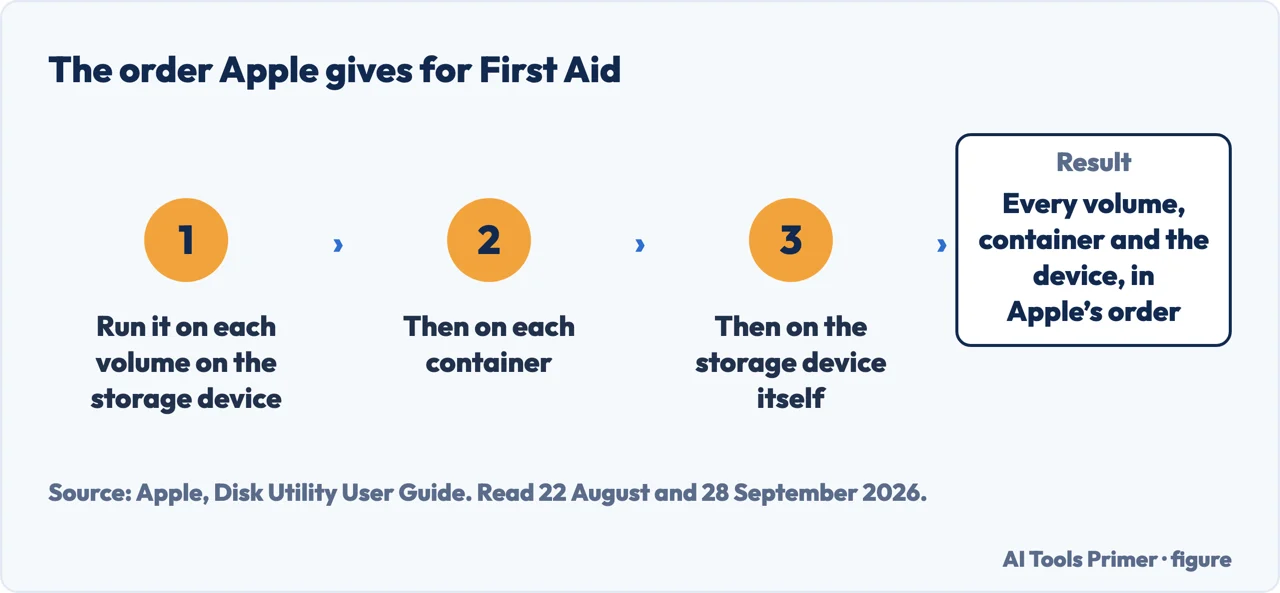
The Mac side needs that framing because the tool’s name oversells it. Apple describes First Aid in terms of formatting and directory structure, gives examples of the problems it can fix, and states plainly that Disk Utility cannot detect every problem a disk may have. A clean result tells you the filing system checked out — worth knowing, and not the same as the drive being well.
Apple’s order is worth following exactly. Volumes first, then containers, then the device itself, each in turn. And if the disk you want to check is the one macOS is currently running from, that has to happen from macOS Recovery rather than from the desktop. Apple adds one more: “If you check your startup volume (Macintosh HD), make sure you also check your data volume (Macintosh HD - Data).”
“If Disk Utility tells you the disk is about to fail, back up your data and replace the disk — you can’t repair it.”
Apple puts that near the top of the page, before the steps.
One thing this page deliberately does not do is send you to a third-party utility. Several exist, some are free, and some may well be good — but naming one here would mean recommending software this site has not run against a failing drive.
The other thing it will not do is turn a status into a timetable. Neither Microsoft’s pages nor Apple’s page cited here gives a figure for how long a drive lasts after its first Warning, and any number offered in place of that is somebody’s guess wearing a decimal point.
One public dataset comes closer than either vendor, and it should be read with its own interest in view: Backblaze runs the drives it writes about and sells cloud storage and cloud backup, so it is not a disinterested party — but it publishes the method and the raw numbers, which the Microsoft and Apple pages cited here do not. Writing in October 2016 about the drives it was running then, it named the five SMART stats it used “as a means of helping determine if a drive is going to fail”: “SMART 5 Reallocated Sectors Count”, “SMART 187 Reported Uncorrectable Errors”, “SMART 188 Command Timeout”, “SMART 197 Current Pending Sector Count” and “SMART 198 Uncorrectable Sector Count”.
And then the sentence that should change what you do with a clean result. Among the drives that had already failed, “Failed drives with one or more of our five SMART stats greater than zero: 76.7%” — which the same page states from the other side: “that means that 23.3% of failed drives showed no warning from the SMART stats we record”. And in the other direction, “Operational drives with one or more of our five SMART stats greater than zero: 4.2%”. So a clean SMART report is not a clean bill of health, and one flagged attribute is not a sentence.
Apple’s answer to a disk about to fail is a backup and a replacement, not a repair; the Microsoft pages cited here do not address it. The last group of guides below covers the backup.
Where to start
Three ways in. If the answer already came back bad, take the third.
- “Which command, on Windows?”
- PowerShell, not the old one — the cmdlet this page uses
- “What does First Aid actually check?”
- Narrower than the name — what it checks
- “It says the drive is failing.”
- Back up, then replace — the quoted advice
Keeping a computer running
Speed, resets and the end of Windows 10 support, on a Mac and on Windows.
More on the Mac
Backups, force quitting and caches.
When the answer is bad
Apple’s instruction for a disk about to fail is a backup and a replacement. These guides cover the backup, and getting deleted files back.
Not covered here. It will not recommend a third-party disk utility. That would mean vouching for software this site has never watched handle a drive that was actually failing.
It will not tell you how long a drive has left after a warning. Neither the Microsoft pages nor the Apple page cited here gives such a figure, and inventing one would be the least defensible thing on this page.
And it will not repeat the wmic instruction. Microsoft has removed WMIC from supported versions of Windows 11, and passing it on is how an answer stays wrong for years. What holds instead is simple: the dead command is dead because Microsoft says so, and the numbers that come from a company selling cloud storage and cloud backup are labelled that way.
Sources
- Microsoft, Deprecated features for Windows client — Microsoft Learn (that the WMIC utility is deprecated in Windows 10 version 21H1 and the 21H1 General Availability Channel release of Windows Server; that it is superseded by Windows PowerShell for WMI; the August 2026 update that WMIC is removed and no longer available as a Feature on Demand on Windows 11, version 24H2 and above; and the note that the deprecation applies only to the command-line management utility and that WMI itself is not affected) — learn.microsoft.com, read 22 August and 28 September 2026.
- Microsoft, Windows Management Instrumentation Command-line (WMIC) removal from Windows — Microsoft Support (that WMIC has been removed from currently supported versions of Windows 11 and is no longer available as a Feature on Demand; that WMI itself remains supported; and the advice to migrate away from WMIC to supported alternatives) — support.microsoft.com, read 28 September 2026.
- Microsoft, Get-PhysicalDisk (Storage) — Microsoft Learn (that the cmdlet gets a list of PhysicalDisk objects; the four accepted HealthStatus values Healthy, Warning, Unhealthy and Unknown; and the example output showing OperationalStatus and HealthStatus as separate columns) — learn.microsoft.com, read 22 August 2026.
- Microsoft, MSFT_PhysicalDisk class — Microsoft Learn (that the HealthStatus property is “A high-level indication of device health”, with the values Healthy, Warning, Unhealthy and Unknown) — learn.microsoft.com, read 28 September 2026.
- Apple, Repair a storage device in Disk Utility on Mac — Disk Utility User Guide (that Disk Utility can check for and fix errors related to the formatting and directory structure of a storage device; the examples of problems it can fix: multiple apps quitting unexpectedly, a corrupted file, an external device not working properly, or the computer not starting up; the statement that Disk Utility cannot detect or repair all problems that a disk may have; the instruction to run First Aid on each volume and container in turn and then on the storage device itself; the instruction to check the data volume as well as the startup volume; the instruction to restart in macOS Recovery when checking the startup disk; and the instruction that if Disk Utility says the disk is about to fail the data should be backed up and the disk replaced because it cannot be repaired) — support.apple.com, read 22 August and 28 September 2026.
- Backblaze, What SMART Stats Tell Us About Hard Drives, October 2016 — a company that runs the drives it writes about and sells cloud storage and cloud backup, so not a disinterested source, and the only source here that publishes the method and the raw numbers (the five SMART stats it used as a means of helping determine if a drive is going to fail: 5, 187, 188, 197 and 198; that 76.7% of failed drives had at least one of the five above zero, so 23.3% of failed drives showed no warning from the SMART stats it recorded; and that 4.2% of still operational drives also had at least one of the five above zero) — www.backblaze.com, read 25 August and 28 September 2026.
Written by Alberto Gulotta
Founder and editor of AI Tools Primer, writing from Palermo, Italy. Thirty-five years of taking computers apart, starting with a Commodore 64 — the long version is on the about page.
Something wrong on this page? Write to aitoolsprimer@gmail.com and it gets fixed.
Written on 22 August 2026 · last checked 30 September 2026.
Independence and limits
No affiliate links and no paid placements anywhere on this site. Nobody pays to appear here, and no company has seen this page before you did.
This is general information, not professional advice. Where a page touches money, health, safety or the law, it names its source and the date it was read — and your situation may still differ. See the privacy page and the cookie policy.