
Software · guide
Windows 10 end of life, and the three doors out of it
By Alberto Gulotta · Updated · 10 min read
The date is settled and published: Windows 10 end of life — the day support ended — was 14 October 2025. The useful question is narrower than the headline — what stopped, what did not, and what the options are for a machine that is still perfectly good. Microsoft answers all three, and the first answer is the one worth reading first.
“Will my Windows 10 computer stop working? No.”
Microsoft asks itself the question and answers it in one word. The machine keeps starting, the programs keep running, the files stay where they are. Whatever else is true about this date, nothing switches off on it, and everything below is about a machine that still works rather than one that has stopped.
What ended is a list rather than a switch, and Microsoft publishes it plainly.
What Microsoft stopped providing on 14 October 2025
- Technical support of any issue
- Software updates
- Security updates or fixes
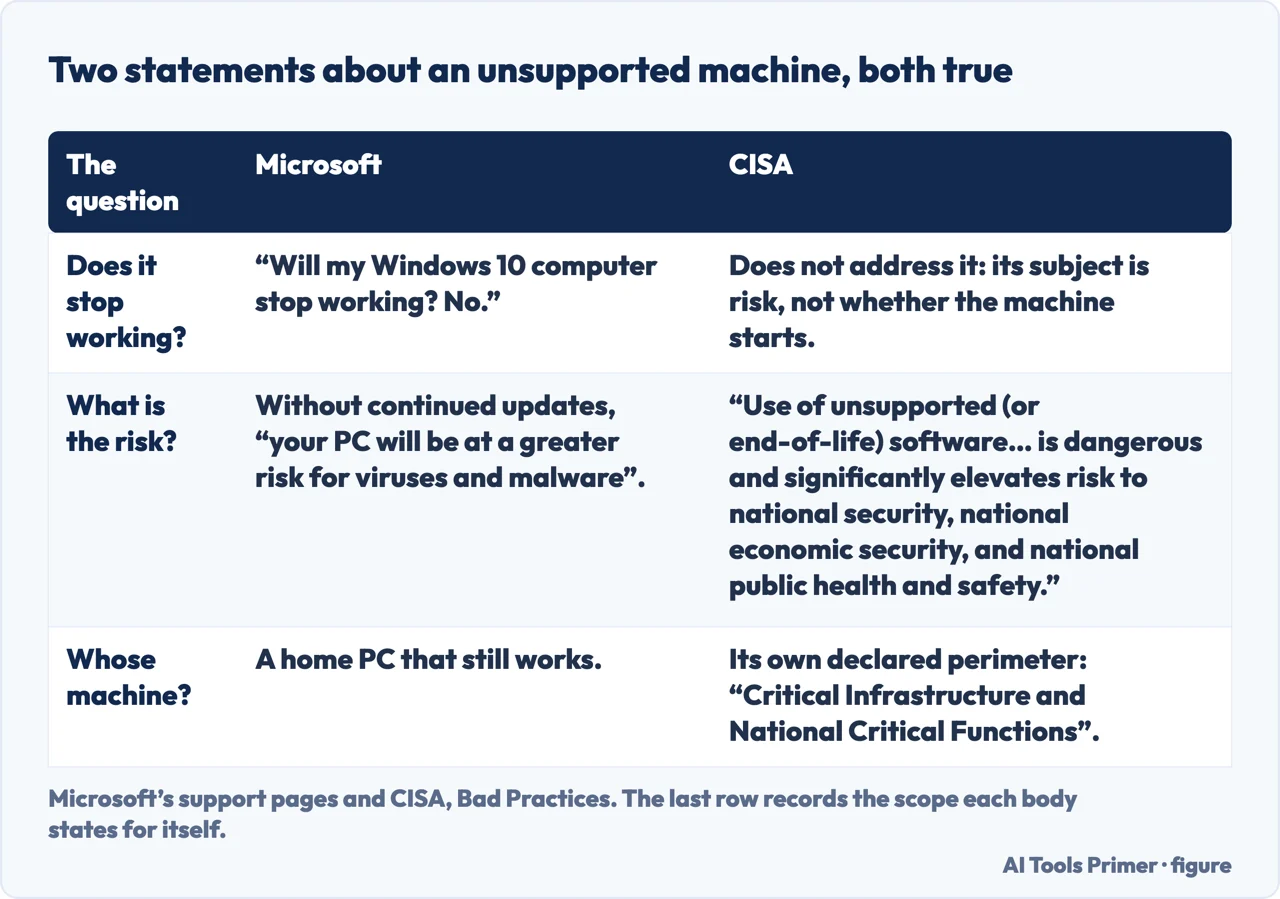
Those three are the whole of it. Nothing about the operating system was disabled and nothing expires; what changed is that the flow of updates stopped. Microsoft states the consequence in the same measured way: without continued software and security updates, “your PC will be at a greater risk for viruses and malware”. Greater risk, over time — not a fault that appears on a particular morning.
Microsoft’s wording is measured, and it is worth reading beside somebody who is not selling the upgrade. CISA, the United States cyber-security agency, keeps a list it calls Bad Practices, and unsupported software is on it: “Use of unsupported (or end-of-life) software in service of Critical Infrastructure and National Critical Functions is dangerous and significantly elevates risk to national security, national economic security, and national public health and safety.” Read the perimeter as well as the sentence. CISA is describing critical infrastructure rather than the laptop on a kitchen table, and says so in the same line — so this is a second voice on the same direction of travel, not a louder version of Microsoft. What the two share is that neither treats the date as the moment something breaks.
Three routes Microsoft names, in its own order
Which one applies depends on whether the machine can run Windows 11 — and that is a question the machine can answer.
- Upgrade this PC
- If it meets the requirements, the upgrade is free and offered through Windows Update. To check: Start → Settings → Update & Security → Windows Update → Check for updates. Microsoft also names its PC Health Check tool.
- A different PC
- Microsoft’s recommendation if the machine is not eligible. The one with a price attached, and the one it lists second rather than first.
- Extended Security Updates
- Microsoft: the consumer ESU programme “can protect your Windows 10 device till October 12, 2027”. The route for a machine that cannot upgrade and is not being replaced yet.
The order Microsoft puts those in is worth noticing. It recommends upgrading first, replacing second, and extending third — but for anybody whose machine cannot take Windows 11 and who is not buying a new one, the third route is the only one that changes anything. Microsoft publishes what it costs, and the figures are worth reading before assuming.
Three ways in, and one of them costs nothing: Microsoft’s own first option is syncing your PC settings. That is a documented free route to security updates until October 2027, published by the company itself — which makes “pay or take the risk” a false pair of options.
“ESU enrollment does not provide other types of fixes, feature improvements, or product enhancements. It also does not come with technical support.”
The limits, in Microsoft’s words, and they matter before paying anything. ESU delivers “critical and important security updates as defined by the Microsoft Security Response Center” — a specific category, decided by Microsoft, not everything that would once have arrived. It is a security extension and nothing else, and Microsoft is direct about what is excluded.
Two conditions before enrolling. Microsoft: devices “need to be running Windows 10, version 22H2 Home, Professional, Pro Education, or Workstations edition”, and “need to have the latest Windows update installed”. So a machine that has been left un-updated for a long time has one job to do before it can be protected — and Microsoft adds that enrolment is possible “any time until the program ends on October 12, 2027”, with the note that “devices will be more vulnerable and susceptible to viruses and malware before enrollment”.
One more distinction that decides which page you should be reading. Everything above is the consumer programme. Microsoft maintains a separate route for organisations, and notes that if a device is being used as a commercial device, consumer ESU enrolment “will be suspended until it is no longer being used as a Commercial device”. A work laptop is not covered by the arrangement described here.
The guides below take it three ways: what actually changed on the date, the routes out and what each costs, and the practical question of what to do with a machine that is still working.
Where to start
Three ways in.
- “Has my computer stopped working?”
- Start at what changed
- “Can this machine run Windows 11?”
- Go to the three routes
- “I want to stay on Windows 10.”
- That is extended security updates
What changed
Three things stopped and nothing switched off. Microsoft answers the alarming version of the question with one word, and it is worth quoting rather than paraphrasing.
The three routes
Upgrade, replace, or extend. Microsoft lists them in that order, and the machine itself can answer which of the first two is available.
Extended Security Updates
Two more years of security fixes only, by three routes — one of them free. And a plain statement of everything the programme does not include.
Not covered here. It will not tell you the computer has stopped working. Microsoft asks that exact question on its own page and answers no, and that answer belongs at the top rather than at the end.
It will not tell you the only options are buying a PC or taking a risk. Microsoft publishes a free route into the security updates, and leaving it out would be doing somebody a disservice.
And it will not present ESU as continued support. Microsoft says it excludes other fixes, feature improvements, product enhancements and technical support — which is a narrower thing than the word protection suggests. What holds instead is simple: the end-of-support date and the ESU end date of 12 October 2027 are Microsoft’s own, quoted with the three routes out of it.
Sources
- Microsoft Support — Windows 10 support has ended on October 14, 2025 (that technical assistance, feature updates and security updates are no longer provided; the recommendation to upgrade to Windows 11 or, where the device is not eligible, to enrol in consumer ESU or replace the device; the route Start → Settings → Update & Security → Windows Update → Check for updates to test eligibility, and the PC Health Check tool; that the consumer ESU programme can protect a Windows 10 device until 12 October 2027; the answer “No” to whether a Windows 10 computer will stop working; the list of what Microsoft no longer provides — technical support of any issue, software updates, and security updates or fixes; and the statement that without continued updates the PC will be at greater risk for viruses and malware) — support.microsoft.com, read 22 August 2026.
- Microsoft — Windows 10 Extended Security Updates (that ESU provides critical and important security updates as defined by the Microsoft Security Response Center for devices running Windows 10, version 22H2; that enrolment does not provide other types of fixes, feature improvements or product enhancements and does not come with technical support; the three enrolment options — at no additional cost when syncing PC settings, redeeming 1,000 Microsoft Rewards points, or a one-time purchase of $30 USD or local equivalent plus tax — all providing updates through 12 October 2027; that enrolment is possible at any time until the programme ends, with devices more vulnerable before enrolment; the prerequisites of Windows 10 version 22H2 in Home, Professional, Pro Education or Workstations edition with the latest Windows update installed; and that consumer ESU is suspended on a device being used as a commercial device) — www.microsoft.com, read 22 August 2026.
- CISA — Bad Practices (that the use of unsupported or end-of-life software in service of Critical Infrastructure and National Critical Functions is dangerous and significantly elevates risk to national security, national economic security, and national public health and safety; and the declared perimeter of that statement, which is critical infrastructure rather than personal computing). The agency has nothing to sell on this question — www.cisa.gov, read 6 September 2026.
Written by Alberto Gulotta
Founder and editor of AI Tools Primer, writing from Palermo, Italy. Thirty-five years of taking computers apart, starting with a Commodore 64 — the long version is on the about page.
Something wrong on this page? Write to aitoolsprimer@gmail.com and it gets fixed.
Written on 22 August 2026 · last checked 23 September 2026.
Independence and limits
No affiliate links and no paid placements anywhere on this site. Nobody pays to appear here, and no company has seen this page before you did.
This is general information, not professional advice. Where a page touches money, health, safety or the law, it names its source and the date it was read — and your situation may still differ. See the privacy page and the cookie policy.