
Software · guide
Can my PC run Windows 11, and what can still be switched on
By Alberto Gulotta · Updated · 9 min read
The short answer to can my PC run Windows 11 comes from a tool: Microsoft’s PC Health Check, or Windows Update itself, which offers the upgrade to machines that qualify. The longer and more useful answer is what to do when the answer is no — because the reasons fall into two piles, and only one of them is final.
Microsoft’s minimum list
Five things, and they do not all behave the same way when one of them fails.
- Processor
- “1 Ghz or faster with 2 or more cores and appearing on our list of approved CPUs.” Microsoft: the clock speed and core count “are inherent to the processor design as it was manufactured and are not considered upgradable components”.
- Memory
- 4 GB. Microsoft notes there are “sometimes options for upgrading”.
- Storage
- 64 GB or larger. Same note: sometimes upgradable.
- Firmware
- UEFI and Secure Boot capable. Microsoft adds a constraint worth knowing: “Secure Boot can only be enabled with UEFI.”
- TPM
- TPM 2.0 — “required to run Windows 11, as an important building block for security-related features”.
Memory and storage, which Microsoft describes as “sometimes” upgradable. And TPM and Secure Boot, which Microsoft says are often present on a machine while being switched off.
The processor. Microsoft’s wording is unambiguous: clock speed and core count are “inherent to the processor design as it was manufactured”. A CPU that is not on the approved list is the end of the conversation for that machine.
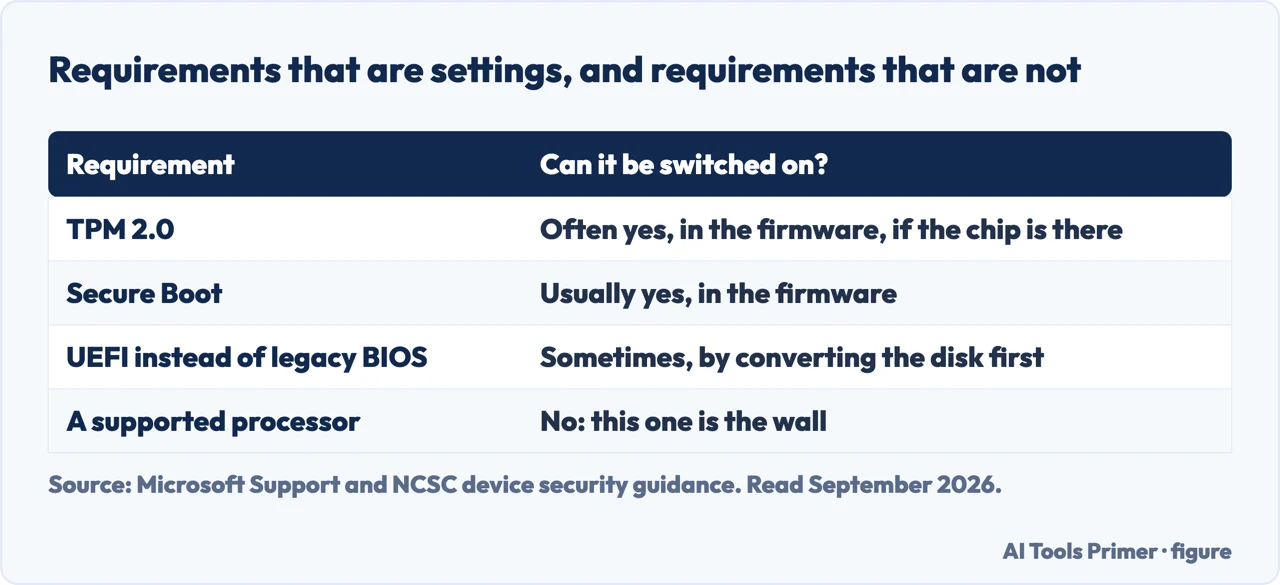
That division is the whole of the practical advice. A machine rejected for memory or storage may be fixable; a machine rejected for its processor is not, and Microsoft says so in language that leaves no room — those characteristics are inherent to the chip as manufactured. Before spending anything, the question worth answering is which pile the rejection came from.
“Most retail PC motherboards used by people building their own PC, for example, ship with TPM turned off by default even though it is almost always available to be enabled.”
Microsoft’s own sentence, and it is the reason to check before concluding anything. A failed compatibility test that names TPM is not necessarily a verdict about the hardware — it can be a verdict about a setting. Microsoft adds the broader figure alongside it: “Most PCs shipped in the last 5 years are capable of running Trusted Platform Module version 2.0.”
That sentence changes what a failed check means. Microsoft is describing a common configuration rather than an unusual one — a machine that has the capability and is not using it. That is worth establishing before anything else, because it is the one line on the list that can move without buying anything.
Checking TPM yourself, in Microsoft’s steps
Two routes. The second is faster if you are comfortable typing a command.
- Windows Security: Settings → Update & Security → Windows Security → Device Security. “If you do not see a Security processor section on this screen your PC may have a TPM that is disabled.”
- If it is there: select Security processor details and “verify that your Specification version is 2.0”. Microsoft: “If it is less than 2.0, your device does not meet the Windows 11 requirements.”
- The command: press Windows key + R, type tpm.msc and choose OK. A message saying “Compatible TPM cannot be found” means the same thing — “your PC may have a TPM that is disabled.”
Note what the second step establishes and the first does not. Seeing a security processor does not mean it is the right version — Microsoft asks you to open the details and read the specification number, and gives the threshold: less than 2.0 does not meet the requirements. A partial check here produces a confident wrong answer.
Microsoft’s own caution about going further. On the page explaining how to enable TPM, it writes: “If you are unfamiliar with this level of technical detail, we recommend that you consult your PC manufacturer’s support information for more instructions specific to your device.” Enabling TPM and Secure Boot happens in firmware settings that differ by manufacturer, and Microsoft points at the manufacturer rather than publishing one set of steps. This guide does the same, for the same reason: there is no single route, and inventing one would be worse than saying so.
One thing worth adding for a machine that fails on the processor, since that is the pile with no way out. It does not follow that the computer is finished. Microsoft’s own position on the operating system it is running is that the machine keeps working, and there is a documented route to two more years of security updates — including a free one — which is a different guide and a better next question than replacing the hardware.
Why a security agency wants the same chip Microsoft is asking for. The NCSC’s Windows platform guidance recommends “enabling Full Disk Encryption using a Trusted Platform Module (TPM) with a PIN”, alongside secure authentication and automatic updates. That is the argument behind the requirement, stated by somebody with no operating system to sell: the TPM is not a licensing check, it is where the disk encryption key is kept so that removing the drive does not hand over the data.
The guides below take it three ways: the requirements themselves, what can still be enabled, and what to do with a machine that genuinely cannot upgrade.
Where to start
Three ways in.
- “What does Windows 11 actually need?”
- Start at the requirements
- “It failed on TPM or Secure Boot.”
- Go to what can be switched on
- “It failed on the processor.”
- That is when it cannot upgrade
The requirements
Five items on Microsoft’s minimum list, and its own note about which of them are inherent to the hardware rather than upgradable.
What can be switched on
Microsoft says most retail motherboards ship with TPM turned off although it is almost always available. A failed check can be a setting rather than a verdict.
When it cannot upgrade
A processor off the approved list is final. What is not final is the machine — and Microsoft documents what happens to a Windows 10 PC that stays where it is.
Not covered here. It will not tell you how to bypass the requirements. Microsoft publishes a minimum list and a route for machines that cannot meet it, and that is the ground this guide stands on.
It will not give one set of firmware steps for enabling TPM. Microsoft points at the PC manufacturer because the screens differ, and inventing a single route would be worse than saying that.
And it will not treat a failed check as the end of a computer. One of the five items is final; the others are not, and the difference is worth establishing before spending money. What holds instead is simple: the five minimum requirements and the 2.0 TPM threshold are Microsoft’s own, quoted with its statement that most retail motherboards ship with TPM turned off.
Sources
- Microsoft Support — Windows 11 System Requirements (the minimum requirements: a processor of 1 Ghz or faster with 2 or more cores appearing on the list of approved CPUs, with the note that clock speed and core count are inherent to the processor design as manufactured and are not considered upgradable components; 4 GB of RAM and a 64 GB or larger storage device, both sometimes upgradable; and UEFI, Secure Boot capable system firmware, with the note that Secure Boot can only be enabled with UEFI) — support.microsoft.com, read 22 August 2026.
- Microsoft Support — Enable TPM 2.0 on your PC (that most PCs shipped in the last 5 years are capable of running TPM 2.0; that TPM 2.0 is required to run Windows 11 as a building block for security-related features including Windows Hello and BitLocker; that most retail PC motherboards ship with TPM turned off by default even though it is almost always available to be enabled; the Windows Security route via Settings, Update & Security, Windows Security and Device Security, the meaning of a missing Security processor section, and the instruction to check that the Specification version is 2.0, with less than 2.0 not meeting the Windows 11 requirements; the tpm.msc route and the meaning of a “Compatible TPM cannot be found” message; and the recommendation to consult your PC manufacturer’s support information if unfamiliar with this level of technical detail) — support.microsoft.com, read 22 August 2026.
- National Cyber Security Centre — Device security guidance, Windows: the recommendation to use full disk encryption with a TPM, from an agency with no operating system to sell — www.ncsc.gov.uk, read 4 September 2026.
Written by Alberto Gulotta
Founder and editor of AI Tools Primer, writing from Palermo, Italy. Thirty-five years of taking computers apart, starting with a Commodore 64 — the long version is on the about page.
Something wrong on this page? Write to aitoolsprimer@gmail.com and it gets fixed.
Written on 22 August 2026 · last checked 23 September 2026.
Independence and limits
No affiliate links and no paid placements anywhere on this site. Nobody pays to appear here, and no company has seen this page before you did.
This is general information, not professional advice. Where a page touches money, health, safety or the law, it names its source and the date it was read — and your situation may still differ. See the privacy page and the cookie policy.