
Software · guide
Windows 11 media creation tool, and the key you may have
By Alberto Gulotta · Updated · 11 min read
Microsoft describes what this makes in one line, and it is worth reading before deciding you need it: installation media “can be used to install a new copy of Windows, perform a clean installation of Windows, or reinstall Windows”.
Getting the tool, in Microsoft’s steps
There is no separate installer to hunt for: the download is the tool.
- Go to the Download Windows 11 site.
- Under Create Windows 11 Installation Media, select Download Now. “The MediaCreationTool.exe tool is downloaded.”
- Run MediaCreationTool.exe. “The media creation tool walks through creating installation media.”
That is genuinely all there is to obtaining it. The tool is the download — there is no separate program to install first, and Microsoft’s own description of what happens next is simply that it “walks through” the job. The interesting part is not the steps but what has to be ready before them.
The three things Microsoft says you need
Listed as requirements, and the third is the one worth reading before hunting for anything.
- A reliable internet connection
- “The download time varies depending on the internet connection.” The tool fetches Windows itself; the drive is only where it lands.
- A blank USB flash drive, at least 8 GB
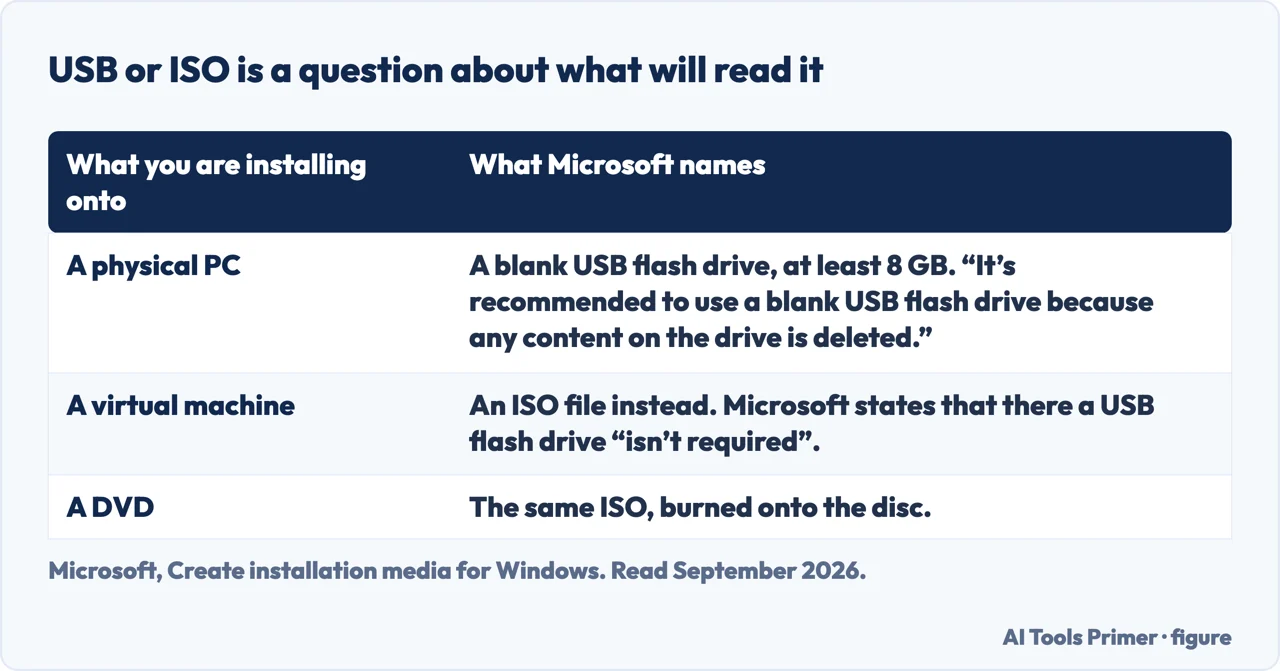
- “It’s recommended to use a blank USB flash drive because any content on the drive is deleted.” For a virtual machine no drive is needed at all — an ISO can be made instead, and an ISO can also be used to put the media on a DVD.
- A product key — perhaps
- “A 25-character product key might be needed (not required for digital licenses).”
The second requirement carries the first warning of the page, and Microsoft puts it inside a recommendation rather than in a box of its own.
“Any content on the drive is deleted.”
“Back up your files before you install or reinstall Windows on your PC.”
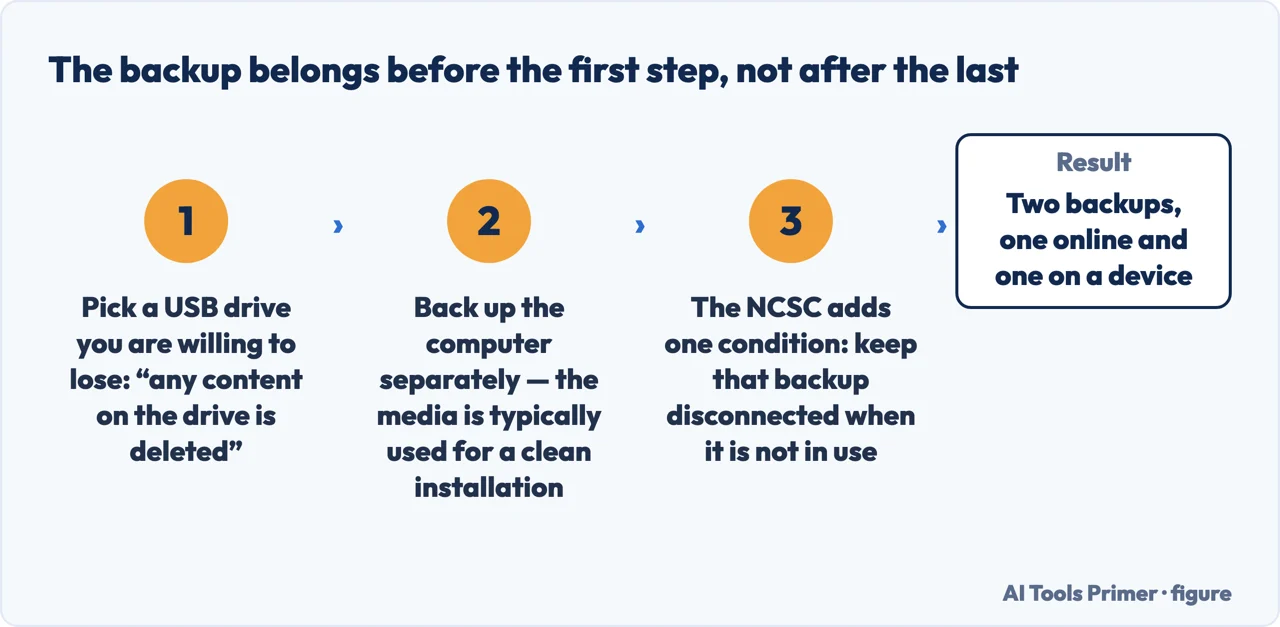
Two erasures, and they are not the same one. The first is the USB drive, which is wiped to hold the installer — so the stick has to be one you are willing to lose the contents of. The second is the computer, and Microsoft raises it separately because installation media is typically used for “a clean installation” or a reinstall. Making the media is safe; using it may not be, and the backup belongs before the first step rather than after the last.
Microsoft says to back up and does not say how, which leaves the most consequential instruction on this page as a single line. The National Cyber Security Centre fills it in, and one of its conditions matters here in particular: a backup device “should not stay connected to your device when not in use, as some viruses will also affect devices that are connected to an infected computer”. The stick you are about to wipe is plugged in; the backup should not be. The NCSC also asks for two rather than one — “consider using online and a storage device to create two backups, in case one of them is lost or stolen, or if the storage device fails” — which is the difference between a backup and a second copy of the same risk.
The third requirement is the one that sends people looking for things they may not need — and Microsoft answers it in a sentence that is not widely repeated.
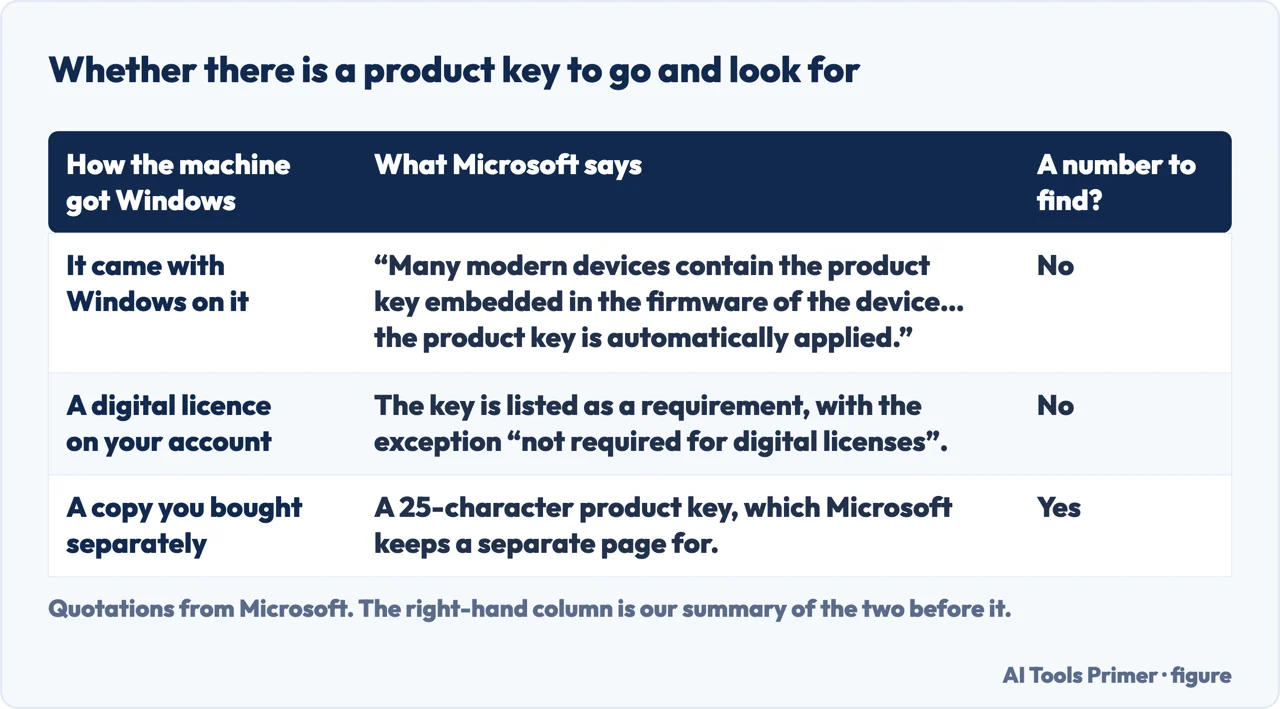
“Many modern devices contain the product key embedded in the firmware of the device. If the product key is embedded in the firmware of the device, the product key doesn’t need to be entered in manually. Instead, if the product key in the firmware matches the version and edition of Windows being installed, the product key is automatically applied.”
This is the sentence to read before turning the house upside down looking for a sticker or an old email. On a machine that came with Windows, the key may already be inside it — not written on anything, not stored in an account, but held in the firmware and handed over during installation without being asked for. Microsoft attaches one condition: it has to match the version and edition being installed. So the key that is already there is the key for the Windows that machine came with.
Between that and the exception in the requirement itself — “not required for digital licenses” — the practical position is that a great deal of the anxiety about product keys is misplaced on a machine that came with Windows already on it. The key is either in the firmware or attached to the account, and in neither case is there a number to find. Microsoft keeps a separate page for the cases where there is.
The same tool for Windows 10, with one small difference. Microsoft publishes the identical route on the Download Windows 10 site — and notes something worth knowing if the downloaded file looks unfamiliar: “The .exe may have the version appended, such as MediaCreationTool_22H2.exe.” It also states the position plainly on the same page: support for Windows 10 “has ended on October 14, 2025”, after which there are no free updates, technical assistance or security fixes — “your PC will still work, but we recommend moving to Windows 11”.
One more distinction is worth making because it decides whether you need a USB stick at all. An ISO is the same installer as a file rather than on a drive. Microsoft names two uses for it: inside virtual machines, where “a USB flash drive isn’t required”, and for burning the media onto a DVD. So the choice between USB and ISO is a question about what will read it, not about which is better.
What this page will not do is walk you through installing Windows. That is the step after this one, it varies with what you are installing over, and Microsoft keeps its own recovery and installation pages for it. What this guide covers is the preparation — which is where the erasable drive and the possibly-unnecessary key both live.
Nor will it tell you whether your machine can run Windows 11. That is a separate published list of requirements, and it is the thing to check before making media for an upgrade rather than after.
The guides below take it three ways: making the media, what a reinstall costs you, and the question of whether the machine qualifies in the first place.
Where to start
Three ways in. If you are about to erase something, take the second.
- “I just need the installer.”
- Three steps, at the top — getting the tool
- “What am I about to erase?”
- Two different things — what gets erased
- “Where is my product key?”
- Possibly nowhere you can see — the key question
Getting the tool
A download that is itself the tool, and three requirements. The same route works for Windows 10, with a version number sometimes stuck on the filename.
What gets erased
The USB drive is wiped to hold the installer. The computer is a separate question, and Microsoft raises the backup before the first step.
The key question
A key may be in the firmware, attached to a digital licence, or genuinely needed. Microsoft says which cases are which, and two of the three need nothing found.
Not covered here. It will not tell you to find a product key before starting. Microsoft says many modern devices hold it in firmware and apply it automatically, and that digital licences need none.
It will not treat the USB drive as reusable storage during the process. Microsoft says any content on it is deleted, and that is the whole of the warning.
And it will not walk you through the installation itself. That is a separate job with separate documentation, and what this guide covers is everything before it. What holds instead is simple: the key you may already have is Microsoft’s own explanation of firmware licences, and the end of Windows 10 support is Microsoft’s own date.
Sources
- Microsoft, Create installation media for Windows (that installation media such as a USB flash drive can be used to install a new copy of Windows, perform a clean installation, or reinstall Windows; the steps of going to the Download Windows 11 site, selecting Download Now under Create Windows 11 Installation Media so that MediaCreationTool.exe is downloaded, and running it, after which the tool walks through creating installation media, with the same route on the Download Windows 10 site where the executable may have the version appended such as MediaCreationTool_22H2.exe; the instruction to back up files before installing or reinstalling Windows; the three requirements of a PC with a reliable internet connection, with download time varying by connection, a blank USB flash drive with at least 8 GB of space since any content on the drive is deleted — with an ISO usable instead for virtual machines or for burning the media onto a DVD — and a 25-character product key which might be needed but is not required for digital licences; the note that many modern devices contain the product key embedded in the firmware and that where the firmware key matches the version and edition being installed it is applied automatically; and the statement that support for Windows 10 ended on 14 October 2025, after which Microsoft no longer provides free software updates from Windows Update, technical assistance or security fixes, although the PC will still work) — support.microsoft.com, read 22 August 2026.
- National Cyber Security Centre — Small Organisations Guide to Cyber Security, 1. Backing up your data (that a backup device should not stay connected to the computer when not in use, because some viruses also affect devices connected to an infected computer; and the recommendation to use online storage and a storage device to create two backups, in case one is lost or stolen or the storage device fails). The NCSC is a public body, with nothing to sell on this question — www.ncsc.gov.uk, read 6 September 2026.
Written by Alberto Gulotta
Founder and editor of AI Tools Primer, writing from Palermo, Italy. Thirty-five years of taking computers apart, starting with a Commodore 64 — the long version is on the about page.
Something wrong on this page? Write to aitoolsprimer@gmail.com and it gets fixed.
Written on 22 August 2026 · last checked 23 September 2026.
Independence and limits
No affiliate links and no paid placements anywhere on this site. Nobody pays to appear here, and no company has seen this page before you did.
This is general information, not professional advice. Where a page touches money, health, safety or the law, it names its source and the date it was read — and your situation may still differ. See the privacy page and the cookie policy.