
Software · guide
How to update graphics drivers, and the generic one to look for
By Alberto Gulotta · Updated · 9 min read
The question how to update graphics drivers has a different answer from the same question about every other driver on the machine, and the difference is not folklore. Microsoft gives one instruction for drivers in general and a different one for display adapters, on two of its own pages.
“To get the best experience from a Windows device, it’s best to install a driver from the display adapter manufacturer.”
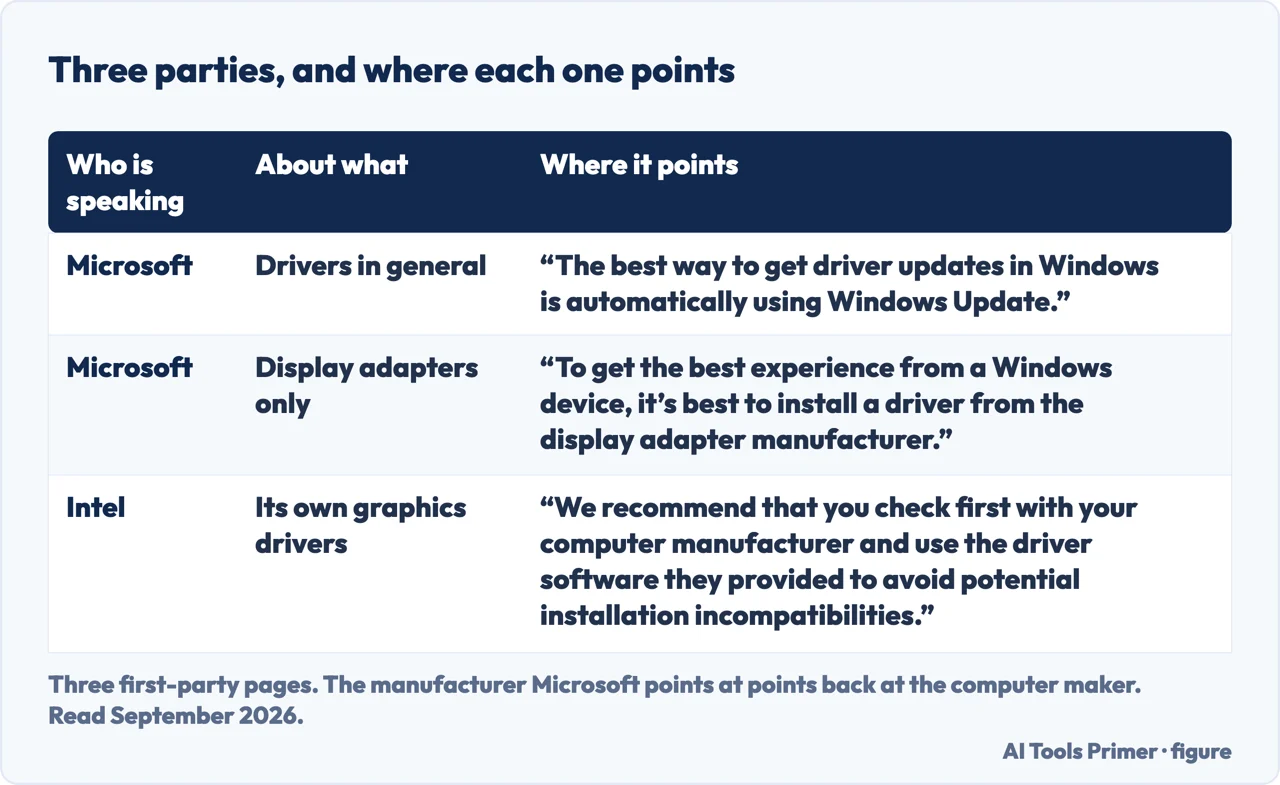
That is Microsoft, about graphics specifically — and it is the opposite of what Microsoft says about drivers in general, where its own advice is that “the best way to get driver updates in Windows is automatically using Windows Update”. Both sentences are Microsoft’s and both are current. Graphics is where Microsoft itself points outward. For drivers as a whole it presents Windows Update as the best route and its drivers as normally recent; for a display adapter it names the manufacturer’s driver as the one that gives the best experience. That is a difference in emphasis from the same company, on the same subject, and it is the reason this guide exists separately from the one on drivers in general.
There is a third voice in this, and it closes the loop in a way worth knowing before you go looking for a download. Microsoft points at the display adapter manufacturer. Intel, which is that manufacturer on a great many laptops, points back: “We recommend that you check first with your computer manufacturer and use the driver software they provided to avoid potential installation incompatibilities.” Its reason is specific rather than defensive — Intel supplies “generic versions of Graphics Drivers for general purposes”, while computer manufacturers “might have changed the features, incorporated customizations, or changed the graphics driver software or packaging”. So on a laptop the chain runs Microsoft, then the chip maker, then the machine maker, and it is the last of the three that has the driver written for the hardware you own.
Before doing anything about it, there is a check that decides whether there is a problem at all — and it is two clicks.
How to tell whether you are on the generic driver
Microsoft’s Basic Display Adapter is “used when a driver made specifically for the display adapter by the manufacturer isn’t available or installed”. Finding it is the whole diagnosis.
- Right-click the Start menu, then select Device Manager.
- Select the arrow next to Display adapters to expand it.
- If Microsoft Basic Display Adapter is listed there, “then the generic Microsoft Basic Display Adapter driver is being used instead of a manufacturer specific driver.” Microsoft’s own conclusion: it “recommends updating to the manufacturer specific display adapter driver”.
The name is the tell. Microsoft Basic Display Adapter is not a brand of graphics hardware and it is not a fault: Microsoft describes it as “a generic display adapter driver that’s built into Windows that provides basic display and graphics capabilities”. It is what Windows uses when nothing better is present. Seeing it means the specific driver for your hardware is not installed. Seeing your manufacturer’s name instead means it is, and most of this guide does not apply to you.
What Microsoft says a manufacturer’s driver “often” adds
- Faster performance
- Smoother video playback
- Higher screen resolutions
- Improved battery life
- Support for multiple monitors
- Additional graphical features
- Better stability
Read that list with the word Microsoft attached to it — “often feature”, not always, and it is describing the difference between the generic driver and a manufacturer’s one rather than between an old manufacturer driver and a new one. Those are two different comparisons, and this guide is only sourced for the first.
Three items on that list are symptoms rather than benefits, read backwards. A second screen that will not work, a resolution that will not go higher, video that stutters: multiple monitors, higher screen resolutions and smoother video playback. If any of those is your complaint, Microsoft’s list points at the driver before it points at the monitor or the cable.
Three places a display driver can come from, and Microsoft names all three. “Many times, a display driver is available in Windows out of the box and installs via Windows Setup when Windows is first installed. Other times display adapter drivers, including updated display adapter drivers, are available from Windows Update. However, other times drivers might either not get installed right away or might only be available directly from the display adapter manufacturer’s website.”
That third clause is what makes graphics different from the rest of the list. It is not that Windows Update ignores display adapters — Microsoft says it delivers them too. It is that for this one category, Microsoft acknowledges the update may exist only somewhere Windows cannot reach.
If more than one thing is listed. Microsoft: “If multiple items are listed under the Display adapters node… it’s possible that the Windows device might have multiple display adapters. Each item represents a different display adapter.” Some of them may be using the manufacturer’s driver while the others use the generic Microsoft Basic Display Adapter driver. Common enough on laptops with both an integrated and a separate graphics chip — and it means the answer to “is my graphics driver installed” can be yes and no at the same time, which is worth checking before concluding either.
Microsoft documents a second way to check, the DirectX Diagnostic Tool, for anybody who would rather read a report than expand a tree in Device Manager. Either route answers the same question, which is the only question this guide is really about: is the driver in use the generic one, or the one written for the hardware you own?
The guides below take it three ways: the check itself, what a manufacturer’s driver adds, and the general rule this category is the exception to.
Where to start
Three ways in.
- “Is my graphics driver even installed?”
- Start at the check
- “A second monitor will not work.”
- Go to what the driver adds
- “What about all my other drivers?”
- That is the general rule
The check
One name in Device Manager decides everything else. Microsoft Basic Display Adapter is Windows’ generic driver, and finding it is the diagnosis.
What the driver adds
Microsoft’s own list of what a manufacturer’s driver often brings over the generic one — including multiple monitors, which is one of the symptoms that leads here.
The general rule
For everything that is not a display adapter, Microsoft’s advice runs the other way — let Windows Update do it. Knowing both sentences is the point.
Not covered here. It will not tell you that new graphics drivers make a computer faster. Microsoft’s list compares a manufacturer’s driver with the generic one, not one version with the next.
It will not name a graphics card manufacturer’s download page. Microsoft points at “the display adapter manufacturer’s website”, and which one that is depends on hardware this guide cannot see.
And it will not treat this as the rule for drivers generally. Microsoft says the opposite about drivers as a whole, and both sentences are quoted here. What holds instead is simple: the description of the Microsoft Basic Display Adapter and the three places a display driver can come from are Microsoft’s own wording.
Sources
- Microsoft Support — Microsoft Basic Display Adapter in Windows (that it is a generic display adapter driver built into Windows providing basic display and graphics capabilities, used when a manufacturer-specific driver is not available or installed; that to get the best experience it is best to install a driver from the display adapter manufacturer; the list of what manufacturer drivers often feature, including faster performance, smoother video playback, higher screen resolutions, improved battery life, support for multiple monitors, additional graphical features and better stability; that a display driver may arrive via Windows Setup, via Windows Update, or only from the manufacturer’s website; the Device Manager route to expand Display adapters and the meaning of finding Microsoft Basic Display Adapter listed there, with Microsoft’s recommendation to update to the manufacturer-specific driver; the note that multiple items indicate multiple display adapters which may use different drivers; and the DirectX Diagnostic Tool as a second method) — support.microsoft.com, read 22 August 2026.
- Microsoft Support — Update drivers through Device Manager in Windows (the tip that the best way to get driver updates in Windows is automatically using Windows Update, quoted here as the general rule that graphics is the exception to) — support.microsoft.com, read 22 August 2026.
- Intel — How do I Upgrade My Graphics Driver from Legacy to a Windows DCH Driver? (the recommendation to check first with the computer manufacturer and use the driver software they provided in order to avoid potential installation incompatibilities, with the reason given: that Intel supplies generic versions of graphics drivers for general purposes and computer manufacturers might have changed the features, incorporated customisations, or changed the graphics driver software or packaging). Quoted here as the third voice in the chain, and the one Microsoft points at — www.intel.com, read 6 September 2026.
Written by Alberto Gulotta
Founder and editor of AI Tools Primer, writing from Palermo, Italy. Thirty-five years of taking computers apart, starting with a Commodore 64 — the long version is on the about page.
Something wrong on this page? Write to aitoolsprimer@gmail.com and it gets fixed.
Written on 22 August 2026 · last checked 23 September 2026.
Independence and limits
No affiliate links and no paid placements anywhere on this site. Nobody pays to appear here, and no company has seen this page before you did.
This is general information, not professional advice. Where a page touches money, health, safety or the law, it names its source and the date it was read — and your situation may still differ. See the privacy page and the cookie policy.