Computer freezing randomly is hard to fix for one structural reason: by the time you can use the machine again, the evidence is gone. The useful move is not another list of causes but making the freeze leave something behind — and Windows may already have done that without being asked.
Start with what is already written, because it costs nothing to look.
Event ID 41
kernel-power · log system
“If your computer shuts down unexpectedly, Windows logs Event ID 41 the next time
that the computer starts.”
And it can carry more than the fact: “When a computer shuts down or restarts because
of a Stop error, Windows includes the Stop error data in Event ID 41”.
Event ID 1001
error reporting
The readable one. It names the bug check and where the evidence went. On screen it reads:
The computer has rebooted from a bugcheck… A dump was saved in: C:\Windows\MEMORY.DMP.
Event ID 6008
eventlog
The previous system shutdown at <Time> on <Date> was
unexpected.
The plainest marker of the three, and the easiest to search for by date.
All three live in the System log in Event Viewer, and the first is the one to search by date. Microsoft is careful about how much it proves: “By itself, Event ID 41 might not contain sufficient information to explicitly define what occurred.” It is a starting point, not a diagnosis.
Two details decide whether you read it correctly.
Two traps in reading them, both published
The number is in the wrong base: “Event ID 41 includes the bug check code in
decimal format. Most documentation that describes bug check codes refers to the codes as
hexadecimal” — with Microsoft’s own worked example: “In the case of the
example event data in this article, ‘159’ converts to 0x0000009f.”
And the absence is evidence too: “Event ID 41 isn’t recorded or the bug check
code is zero. This behavior might indicate a power supply problem.”
Take the second one seriously, because it inverts the usual reasoning. Finding nothing in
the log is not a dead end — Microsoft treats it as pointing away from software. A
machine that freezes and leaves no record behind is a different investigation from one that
freezes and writes a code. Microsoft also notes what a forced restart looks like from the log
side: pressing and holding the power button produces an Event ID 41 of its own.
Now the part that changes the next freeze from a mystery into a recording. It is a keyboard shortcut, and it is inert on most machines until something is switched on.
Making the next freeze write itself down — and the switch that is off
The gesture is two keys. It does nothing until a registry value exists.
USB keyboards: “you must enable the keyboard-initiated crash in the
registry. In the registry key
HKEY_LOCAL_MACHINE\System\CurrentControlSet\Services\kbdhid\Parameters, create a
value named CrashOnCtrlScroll set it equal to a REG_DWORD value of
0x01.”
PS/2 keyboards: the same value under
…\Services\i8042prt\Parameters.
“You must restart the system for these settings to take effect.”
Then: “Hold down the rightmost CTRL key, and press the SCROLL LOCK key
twice.” — and “The system then calls KeBugCheck and issues Bug check
0xE2: MANUALLY_INITIATED_CRASH.”
That precondition is the whole point, and it is the part that gets left out. Pressing those
keys on a machine where the value was never created does nothing at all — so an
instruction to “force a crash dump” without the registry step is an instruction that
fails silently, at the exact moment you most need it to work.
Microsoft adds a note for portable machines, tucked under the same heading: “Some laptops use
the PS/2 driver for the built-in keyboard and also support external HID keyboards. For these
systems, consider creating both the USB and PS/2 registry keys to allow the use of either
keyboard.”
It is worth being blunt about the order this implies. The setup has to happen while the machine works. Creating a registry value and restarting is not something you can do during a freeze, so this is preparation for the next one rather than a remedy for the current one — which is exactly why it is worth doing on a machine that freezes repeatedly.
And before relying on any of it, one setting decides whether anything is written down at all.
Whether anything is written at all is a setting with published values, under
HKEY_LOCAL_MACHINE\System\CurrentControlSet\Control\CrashControl:
“CrashDumpEnabled REG_DWORD 0x0 = None”, “0x1 = Complete memory
dump”, “0x2 = Kernel memory dump”, “0x3 = Small memory
dump”. Alongside them: “AutoReboot REG_DWORD 0x1” and
“DumpFile REG_EXPAND_SZ %SystemRoot%\Memory.dmp”.
Two consequences. A machine set to None records nothing no matter what you press
— which is worth checking before relying on any of this. And the complete dump has a
stated cost: “If you select the Complete memory dump option, you must have a paging file
on a local volume that is sufficient to hold all the physical RAM”. Microsoft closes
with the same instruction as the keyboard page: “You must restart Windows in order for
your changes to take effect.”
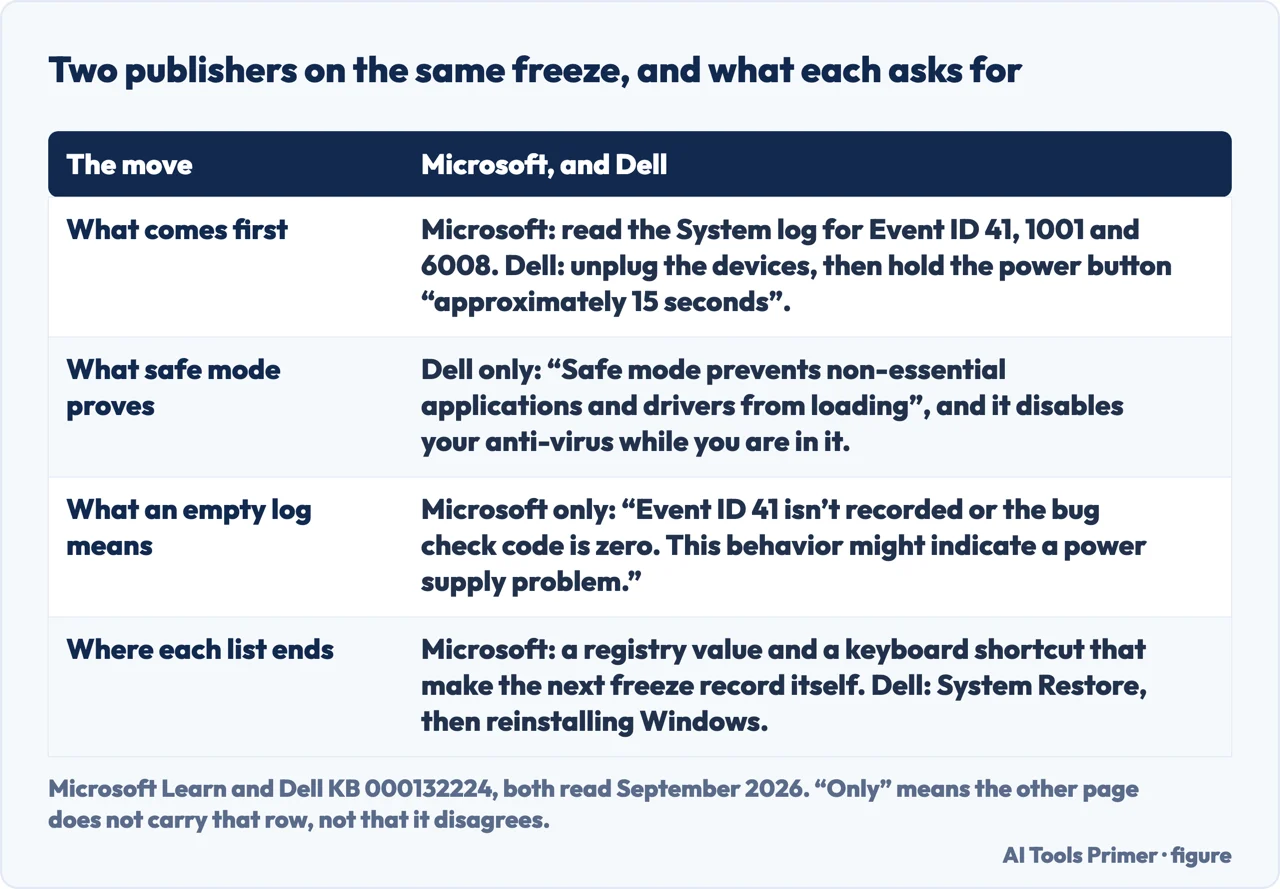
All of that is Microsoft, and Microsoft is not the only one who publishes for this symptom. The manufacturer’s version is a different kind of document. Dell’s article on a computer that “Locks Up, Stops Responding or an Error Occurs” is fourteen steps of elimination, and it starts where the machine is rather than where the evidence is: unplug the peripherals, then “unplug the computer from the wall, remove the laptop battery (if applicable) and hold the power button down for approximately 15 seconds”. Its sixth step is the one worth keeping — “Safe mode prevents non-essential applications and drivers from loading” — with a consequence stated in the same breath: “when you log in to Safe Mode, your anti-virus program is disabled”.
Two publishers, two halves of the same job. A row marked “only” means the other page does not carry it, not that it disagrees. Figure drawn by AI Tools Primer.
The two lists do different jobs, and the order between them follows from that. Dell’s fourteen steps narrow the cause by removing things; nothing on that list makes the next freeze leave a record. Microsoft’s pages make the recording possible but narrow nothing on their own. So the registry value and the restart come first, because they cost one evening and then run in the background — and the elimination is worth more afterwards, with a dump file already waiting to say which driver was executing.
If the freezing has reached the point where Windows will not start, the recovery environment
comes to you rather than the other way round, and the threshold is two, not three.
Microsoft: “WinRE starts automatically after detecting the following issues” —
“Two consecutive failed attempts to start Windows.”,
“Two consecutive unexpected shutdowns that occur within two minutes of boot
completion.”, “Two consecutive system reboots within two minutes of boot
completion.” And to get there deliberately: “From the login screen, click
Shutdown, then hold down the Shift key while selecting Restart.”
So the order that comes out of the documentation. First read what is already there: open Event Viewer, look in the System log for 41, 1001 and 6008 around the time it froze, and remember that 41 reports its code in decimal while every reference lists them in hexadecimal. If there is nothing at all, Microsoft treats that as pointing at power rather than software. Then prepare the next one: check that dumps are enabled, create the registry value for your keyboard type, restart, and you have a recording device armed for the next freeze.
A note on where this question gets answered, read on 23 August 2026 with results visible. The first page is a community thread with hundreds of replies, a block of questions, several community answers on a vendor forum, videos, a commercial blog, a security company and a cleaning-tool knowledge base. No manufacturer documentation appeared on it — and every path, value and event ID above comes from a page that was not there.
What this page will not do is tell you what is freezing your computer. It gives you the machine’s own record and the way to make it keep one; reading a dump is a separate job and Microsoft publishes tools for it.
It will not tell you to reinstall Windows or reset the machine. Nothing above requires it, and a reset destroys the logs that would have told you why.
And it will not recommend a cleaner, an optimiser or a driver updater. Every path on this page is already on the machine and costs nothing.
Where to start
Three ways in. If it has frozen more than once, the third one is the one that pays.
Not covered here. It will not name the cause of your freeze. It gives you the machine’s own record and the way to make it keep one; reading the dump is a separate job with its own tools.
It will not tell you to reset or reinstall. A reset destroys the logs that would have explained the problem.
It will not recommend an optimiser or a driver updater. Every path above is already installed and free.
And it carries no affiliate links, including for memory and power supplies, the products a guide on this subject usually exists to sell. What holds instead is simple: every event ID, registry path and value above is quoted from Microsoft documentation, and where Microsoft states a precondition this page puts it before the instruction rather than after it; the Microsoft Learn pages are listed below.
Sources
Microsoft, Event ID 41: The system has rebooted without cleanly shutting down first — Windows Client troubleshooting, Microsoft Learn (that if the computer shuts down unexpectedly Windows logs Event ID 41 the next time the computer starts, and that when a computer shuts down or restarts because of a Stop error Windows includes the Stop error data in Event ID 41) — learn.microsoft.com, read 24 August 2026.
Microsoft, Forcing a System Crash from the Keyboard — Windows drivers, Microsoft Learn (that for USB keyboards the keyboard-initiated crash must first be enabled in the registry, by creating a value named CrashOnCtrlScroll set to a REG_DWORD of 0x01 in the key HKEY_LOCAL_MACHINE\System\CurrentControlSet\Services\kbdhid\Parameters, with the equivalent key under hyperkbd for Hyper-V keyboards; and that the system must be restarted for the setting to take effect) — learn.microsoft.com, read 24 August 2026.
Microsoft, Memory dump file options — Windows Server, Microsoft Learn (the registry values under HKEY_LOCAL_MACHINE\System\CurrentControlSet\Control\CrashControl, including CrashDumpEnabled as a REG_DWORD where 0x0 is None, 0x1 a complete memory dump, 0x2 a kernel memory dump and 0x3 a small memory dump, together with AutoReboot as a REG_DWORD and DumpFile as a REG_EXPAND_SZ defaulting to %SystemRoot%\Memory.dmp) — learn.microsoft.com, read 24 August 2026.
Microsoft, Windows Recovery Environment (Windows RE) technical reference — Microsoft Learn (that WinRE starts automatically after detecting two consecutive failed attempts to start Windows, two consecutive unexpected shutdowns occurring within two minutes of boot completion, and two consecutive system reboots within two minutes of boot completion) — learn.microsoft.com, read 24 August 2026.
Dell — Computer Restarts or Shuts Down Intermittently, Locks Up, Stops Responding or an Error Occurs (the fourteen troubleshooting steps in Dell’s order, including unplugging devices from the computer and then unplugging it from the wall, removing the laptop battery if applicable and holding the power button down for approximately 15 seconds; the sixth step, that safe mode prevents non-essential applications and drivers from loading and that the anti-virus program is disabled while logged into Safe Mode; and the last two steps, System Restore and then a factory restore or reinstallation of Windows) — www.dell.com, read 6 September 2026.
AG
Written by Alberto Gulotta
Founder and editor of AI Tools Primer, writing from Palermo, Italy. Thirty-five years of
taking computers apart, starting with a Commodore 64 — the long version is on the
about page.
Written on 23 August 2026 · last checked 6 September 2026.
§
Independence and limits
No affiliate links and no paid placements anywhere on this site. Nobody pays to appear here,
and no company has seen this page before you did.
This is general information, not professional advice. Where a page touches money, health,
safety or the law, it names its source and the date it was read — and your situation may
still differ. See the privacy page and the
cookie policy.