How do I stop pop up ads is usually answered with one instruction: switch on the pop-up blocker. On most browsers it is already on, and the vendors say so. If windows are still arriving, the useful question is not how to block harder — it is which of three different things you are actually looking at. And if what you came for is the switch itself — off for every site, or an exception for one — that is on turning the pop-up blocker off, browser by browser.
A real browser pop-up
branch 1
A separate window the site opened. This is the only one the pop-up blocker is built for,
and it is on by default: Mozilla, “Pop-up blocking is turned on by default, so
you don’t have to worry about enabling it”.
How to tell: Firefox marks its own blocks — “Firefox displays an
information bar … as well as an icon in the address bar”.
A site notification
branch 2
Not a pop-up at all: a permission you granted. Apple: “If a website is designed to send
you notifications about new or updated site content, it asks for your permission to do so. If you click Allow when
prompted by the website, those notifications appear”.
The blocker does not touch these, and Google says so: “If you still get
communications from a site after disabling pop-ups, you may be subscribed to
notifications.”
An app you installed
branch 3
Apple: “If you see pop-ups on your Mac that just won’t go away, you might have
unintentionally downloaded and installed adware (advertising-supported software) or other unwanted software.”
Google’s Android procedure for “pop-up ads and new tabs that won’t go
away” opens with Safe mode, not with a browser setting. The browser is a
bystander here.
The three branches have three different controls, and the control for one does nothing for the other two. That is not an inference drawn here: every one of the four companies documents pop-up blocking and site notifications on separate pages, and three of them put a cross-reference at the top telling you the other page exists.
One symptom sorts the second branch faster than anything else, and it has a published answer.
Microsoft, on site notifications in Edge: “When notifications are turned on for
a website, they will still appear even if Microsoft Edge is closed.”
This is the most useful published sentence for anyone whose windows arrive with no browser
open, because it names a cause that is neither malware nor a broken blocker. Microsoft states it
for Edge; this page does not extend it to other browsers, because they document their
push connections differently and the honest scope is the one the sentence was written in. In the
other direction Microsoft is just as explicit, on the notifications page itself: “If you
are receiving unwanted pop-ups, which are not the same as website notifications, please
see Block pop-ups in Microsoft Edge.” Two features, two pages, two controls — and
each page sends you to the other.
So the first thing to check is not a setting at all — it is whether the browser is open. A window that arrives with everything closed is not something a pop-up blocker was ever going to catch. On Edge that is documented behaviour for a permission you granted; on any system it points away from branch one.
The second useful move is to look at the window itself, because Firefox marks its own work. When it blocks something, an icon appears in the address bar and an information bar offers “Allow/Block pop-ups for <website address>”, “Manage pop-up settings…” and “Show <pop-up web address>”. If windows are appearing and that marker never does, the blocker is not failing quietly — it is not being asked, which again points away from branch one.
Now the part that explains why a blocker that is working can look broken.
What the blocker is not for — in the vendors’ own words
Microsoft: “Website advertisements cannot be blocked by the Edge pop-up
blocker. Edge also does not prevent a pop-up from opening if you select a button or
link on a web page.”
Mozilla: “Sometimes ads are designed to look like windows, but really
aren’t. Firefox’s pop-up blocker can’t stop these ads.”
Mozilla again: “Certain events, such as clicking or pressing a key, can spawn
pop-ups regardless of if the pop-up blocker is on. This is intentional, so that Firefox
doesn’t block pop-ups that websites need to work.”
Two of the most common complaints are excluded by design and stated in the documentation:
an advertisement drawn inside the page, and a window that opened because something was
clicked. Neither is a failure of the blocker. Turning it on again, harder, cannot reach
either one.
There is a cost to the setting too, which Mozilla publishes rather than hides: “Blocking
pop-ups may interfere with some websites: Some websites, including some banking sites, use
pop-ups for important features. Blocking all pop-ups disables such features.”
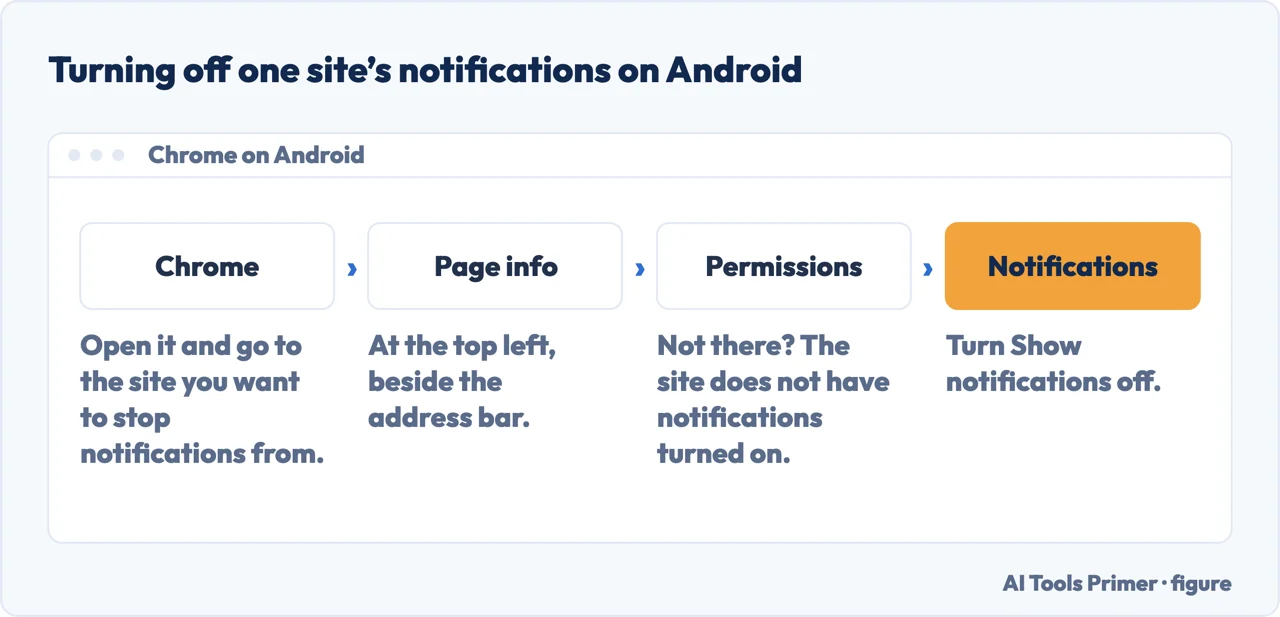
For branch two the fix is a list, not a switch, and it is per site. In Chrome the relevant sentence sits on the pop-up page itself and sends you elsewhere; in Edge the notifications page holds the permissions; on iPhone and iPad Apple keeps app notification permissions in Settings, and notes the case where the entry is missing at all: “Tap Notifications. If Notifications doesn’t appear, the app might not be able to send notifications.” On Android, Google’s route is Chrome → the site → Page info → Permissions → Notifications → off, and it publishes the same absence rule: “if you don’t find ‘Permissions,’ the site doesn’t have notifications turned on.”
The control for branch two, which is not the pop-up blocker and cannot be reached from it. Route and wording quoted from Google, read September 2026. Figure drawn by AI Tools Primer.
For branch three Google publishes a full procedure, and its order is the argument. Step one is not a browser setting: “Confirm you want to reboot your device in Safe mode”, then “one by one, remove recently downloaded apps”, and — the instruction that makes it work — “after each removal, restart your device normally. See whether removing that app solved the problem.” One at a time, checking after each. Step two is turning on Play Protect. Site notifications only appear at step three.
One warning before closing anything, from Apple, and it is the reason to read a pop-up before
clicking it: “Some pop-ups and ads have fake buttons that resemble a close button, so
use caution if you try to close a pop-up or ad. If you’re not sure, avoid interacting with
it and close the Safari window or tab.” Apple’s alternative to clicking the X
is to leave: “you can go to the Search field and enter a new URL or search term to browse to
a new site.”
A note on where this question gets answered. The first page of results here is better than for most questions: Google’s two pages and Apple’s Safari page all rank. Alongside them sit an ad-blocker vendor, a browser extension and a community thread. What none of the guides read for this page does is put the three branches side by side as a decision, or carry the sentence about notifications arriving with the browser closed, which is the one that ends the confusion fastest.
What this page will not do is tell you which branch yours is. It gives the tests the vendors publish — the address-bar marker, the browser-closed case, the Safe mode procedure — and those are checks you run, not a diagnosis anyone can make from here.
It will not tell you how many of these windows are notifications rather than pop-ups. The distinction is documented; the proportion is not published by anybody, and a number invented for the sake of a confident sentence would be worse than the absence.
And it will not recommend an ad blocker. Several ad blockers are sold for exactly this, some of them are good, and none has been tested here.
Where to start
Three ways in, matching the three branches. If they arrive with the browser shut, take the second.
A browser pop-up, a notification permission and an installed app produce the same complaint and have three unrelated controls. Every vendor separates them across pages.
Google publishes a procedure that starts in Safe mode and removes recently installed apps one at a time, checking after each. Notifications come third.
Not covered here. It will not recommend an ad blocker, although many are sold for exactly this. Nothing here has been tested, and this is a category that pays for recommendations.
It will not quantify how many of these windows are notifications. No vendor publishes that number, and inventing one to sound authoritative is the habit this site exists against.
It will not extend Microsoft’s sentence about closed browsers to other browsers. It was written about Edge, and the other vendors document their notification connections differently.
And it carries no affiliate links, including for the blockers and security suites that this exact question sells extremely well. What holds instead is simple: the three branches come from the four browser makers themselves, and where a number is unpublished this page says unpublished instead of estimating.
When an Android phone stops behaving
Four symptoms with overlapping causes, and the buttons that address all of them.
Microsoft, Block pop-ups in Microsoft Edge — Microsoft Support (that website advertisements cannot be blocked by the Edge pop-up blocker, and that Edge does not prevent a pop-up from opening if you select a button or link on a web page) — support.microsoft.com, read 24 August 2026.
Google, Block or allow pop-ups in Chrome — Google Chrome Help (that if you still get communications from a site after disabling pop-ups you may be subscribed to notifications, and the route to block them through View site information and the Notifications setting) — support.google.com, read 24 August 2026.
Apple Support — Block pop-up ads and windows in Safari (the warning that some pop-ups and ads have fake buttons resembling a close button, so caution is needed when closing one, and that if you are not sure you should avoid interacting with it and close the Safari window or tab; and that some pop-ups are third-party ads using phishing tactics such as warnings or prizes to appear to come from Apple or another trusted company) — support.apple.com, read 24 August 2026.
Mozilla, Pop-up blocker settings, exceptions and troubleshooting — Firefox Help (that pop-up blocking is turned on by default; that when blocking a pop-up Firefox displays an information bar, if it has not been previously dismissed, as well as an icon in the address bar; that blocking pop-ups may interfere with some websites, including some banking sites that use pop-ups for important features; that certain events such as clicking or pressing a key can spawn pop-ups regardless of whether the blocker is on, which is intentional so that Firefox does not block pop-ups that websites need to work; and that ads are sometimes designed to look like windows but are not, and the pop-up blocker cannot stop those) — support.mozilla.org, read 26 August 2026.
Microsoft, Manage website notifications in Microsoft Edge — Microsoft Support (that website notifications appear in the lower right corner of the screen and in the notification center; that when notifications are turned on for a website they will still appear even if Microsoft Edge is closed; and the note that unwanted pop-ups, which are not the same as website notifications, are covered by the separate Block pop-ups in Microsoft Edge page) — support.microsoft.com, read 26 August 2026.
Google, Remove unwanted ads, pop-ups & malware — Android — Google Chrome Help (the section on pop-up ads and new tabs that will not go away; the safe-mode route of holding the power button, holding Power off and confirming the reboot into Safe mode; and the instruction to remove recently downloaded apps one by one, restarting normally after each removal to see whether that app solved the problem) — support.google.com, read 26 August 2026.
Apple, Turn notifications on or off for a specific app on your iPhone — Apple Support (the route through the Settings app to Apps, the chosen app and Notifications, with the note that if Notifications does not appear the app might not be able to send notifications, and the Allow Notifications switch) — support.apple.com, read 26 August 2026.
AG
Written by Alberto Gulotta
Founder and editor of AI Tools Primer, writing from Palermo, Italy. Thirty-five years of
taking computers apart, starting with a Commodore 64 — the long version is on the
about page.
Written on 23 August 2026 · last checked 23 September 2026.
§
Independence and limits
No affiliate links and no paid placements anywhere on this site. Nobody pays to appear here,
and no company has seen this page before you did.
This is general information, not professional advice. Where a page touches money, health,
safety or the law, it names its source and the date it was read — and your situation may
still differ. See the privacy page and the
cookie policy.