
Software · guide
How to stop spam texts: three filters and three reports
By Alberto Gulotta · Updated · 12 min read
Block the number is the obvious answer to how to stop spam texts, and it is the narrowest of the moves available. Not useless — narrowest, and Apple says why in its own description of what blocking does. That description is worth reading before an evening spent tapping Block this Caller, because it sets out exactly how far one block reaches.
The FTC lists three ways to filter, and they work at three different distances
“There are many ways to filter unwanted text messages or stop them before they reach you” — two different outcomes, named in one sentence, before the three routes are listed.
- On the phone
- “Your phone may have an option to filter and block spam or messages from unknown senders.” A setting on the device in your hand, and the only one of the three you control entirely.
- Through the wireless provider
- “Your wireless provider might have a tool or service that lets you block calls and text messages.” The FTC points to ctia.org, which it describes as “a website from the wireless industry”, for what each provider offers. A layer above the phone — and one the FTC points outward to rather than describing itself.
- With a call-blocking app
- “Some call-blocking apps also let you block unwanted text messages.” The FTC’s advice on choosing one is deliberately plain: “Check out the features, user ratings, and expert reviews.”
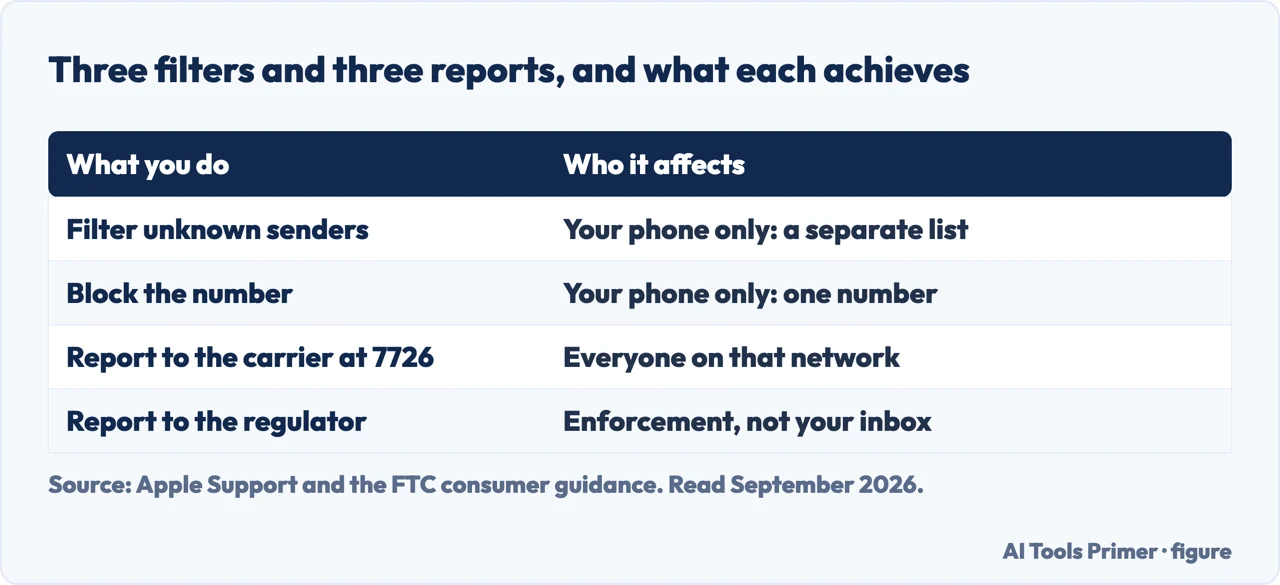
Notice the order the FTC puts them in: the device, then the network carrying the message, then a third party added on top. The two outcomes named in its opening sentence — filtering a message, and stopping it before it reaches you — are not the same result, and the FTC does not say which route delivers which. What the list does establish is that not all of this happens on your phone, which is the useful part once the phone setting has not been enough.
“When you block a phone number or contact, they can still leave a voicemail, but you won’t get a notification. Messages that are sent or received won’t be delivered. Also, the contact won’t get a notification that the call or message was blocked.”
That is Apple describing exactly what blocking does, and two of the three sentences are about what it does not do. Blocking is silent in both directions: the sender learns nothing, and a voicemail still lands. Read as a statement of scope rather than of strength it is exact — a block is a rule about one number, and it does nothing about any other.
The second sentence of that quotation is the one to keep: the contact will not get a notification that the call or message was blocked. Where the sender is somebody you know, that silence is protective. Where it is a stranger sending commercial messages, the same silence means the block produces no signal at all — nothing is informed, nothing is recorded anywhere but on your own device, and the only thing that changes is what you see.
So the question becomes what you can do that reaches further than your own screen. There are two answers, and the FTC gives both. One is the layer above the phone.
Three reports, and one of them leaves your phone. The FTC gives three routes: forward the message to 7726, report it inside the messaging app, and report the scam to the FTC. The first is the one with reach beyond you — the FTC says it “helps your wireless provider spot and block similar messages in the future”.
That word is the whole difference. Blocking a number stops that number. Forwarding to 7726 gives the provider a sample, and the thing it acts against is a pattern rather than a sender. Neither one touches the account behind the number, which is a separate lock and a separate page: the free carrier lock against a SIM swap. Which is why the two-second forward is worth doing even on a message you have already deleted from your own screen. And it is worth being clear about how much a number in circulation actually allows, because the honest answer is narrower than it sounds: what somebody can do with your phone number separates the part that needs only the number from the part that needs a good deal more.
The other is the part of this that is not a setting at all: knowing which messages are worth nothing before you interact with them. The FTC publishes what the bait looks like, and the list is short enough to read once.
What the message will say, from the FTC’s own list
- Free prizes, gift cards or coupons — “but they’re not real”
- A low or no interest credit card — “but there’s no deal and probably no card”
- Help paying off your student loans — “but they won’t”
- Suspicious activity noticed on your account — “but they haven’t”
- A problem with your payment information — “but there isn’t”
- A fake invoice, telling you to make contact if you did not authorise the purchase
- A package delivery notification — “but it’s fake”
Two things are worth saying about that list. It is not a checklist to run through under pressure — a message that matches none of the seven can still be a scam. And the FTC is explicit about what happens after the click: some links “take you to a spoofed website that looks real but isn’t”, and if you log in “the scammers then might steal your username and password”, while others “might install harmful malware on your phone that steals your personal or financial information without you realizing it.” The damage does not require you to type anything back to the sender. What that fake page is built to look like, and the one question that settles it without inspecting anything, is on a phishing email taken apart.
“Legitimate companies won’t ask for information about your account by text.”
One sentence from the FTC, and it does more work than the whole list above, because it does not require you to recognise anything. It is a rule about the channel rather than about the message, so it survives a scam you have never seen before. And the FTC pairs it with the move that costs you nothing when you are wrong: “If you think the message might be real, contact the company using a phone number or website you know is real. Not the information in the text message.”
Three shapes of message are common enough to have pages of their own, and each one turns on a fact rather than on a judgement. A text claiming a parcel is stuck asks you to decide whether it is genuine, and there is a two-part rule that settles it: a real delivery message is one you asked for, and has no link in it. A message that is only a code and a set of digits raises the question of who leases those digits, and what can be established about a bare short code, and what cannot. And the vocabulary people reach for when sorting all of this — smishing for a text, vishing for a call — earns its keep in exactly one place, which is that what you can do next differs by channel.
On the iPhone specifically, it is worth knowing where the boundaries of each tool are. Apple describes blocking as reaching across the apps — a number blocked in Phone, FaceTime, Messages or Mail is blocked as a contact, and Apple notes that email blocking “works across all your Apple devices”. Filtering unknown senders and reporting junk are described more narrowly: Apple presents them as things you can do with iMessages. Blocking and filtering are not the same feature with two names.
One practical note that follows from all of it. If your list of blocked numbers has become long enough to be a chore, that is a sign the effort is going into the wrong layer. Apple documents a single place to manage the list — Settings, then Privacy & Security, then Blocked Contacts, where numbers can be added and removed directly — which is more useful for tidying up than for keeping ahead of anything.
The guides below take it three ways: the filters and where each one sits, what blocking and reporting actually do, and the neighbouring problems people arrive here with.
Where to start
Three ways in.
- “How do I make them stop arriving?”
- Start at the three filters
- “Is blocking enough?”
- Go to what blocking does
- “Is this message real?”
- That is recognising the bait
The three filters
Phone, provider, app. The FTC lists them in an order that runs outwards from your hand, and only one of the three can stop a message before it reaches you.
What blocking does
Apple’s own description, in which two sentences out of three are about what blocking does not do. Silent in both directions, and aimed at one number at a time.
Recognising the bait
Seven things the message will claim, published by the FTC — and one rule about the channel that works on a scam you have never seen.
Not covered here. It will not tell you blocking solves this. Apple’s own description says a blocked sender gets no notification and can still leave a voicemail, and that is quoted here rather than skipped.
It will not recommend a blocking app. The FTC names the category and tells you to check the features and reviews yourself, which is the honest amount of guidance available without testing.
And it will not tell you to reply STOP to a message you did not expect. The FTC’s advice is not to interact with an unexpected message asking for information — the routes it gives are filtering and reporting, not replying. What holds instead is simple: the three filtering routes and the rule that legitimate companies do not ask for account information by text are the FTC’s own wording.
How the message actually gets sent
Which system carried it decides what it costs, who can read it and what you can undo.
- The same job, in the other places it comes up
- What is SMS, RCS and iMessage, and which one is private
- How to enable iMessage, and the three things it needs
- How to turn off read receipts, and the setting that overrides it
- How to unsend a message on iPhone, and what they see
Sources
- Federal Trade Commission, Consumer Advice — How to Recognize and Report Spam Text Messages (the three filtering routes: a phone option to filter and block spam or messages from unknown senders, a wireless provider tool with ctia.org named as the industry site listing them, and call-blocking apps with the advice to check features, user ratings and expert reviews; the list of what scam messages claim, including prizes, gift cards and coupons, a low or no interest credit card, student loan help, suspicious account activity, a payment problem, a fake invoice and a package delivery notification; that some links lead to spoofed websites that can capture a username and password and others install malware; the rule that legitimate companies will not ask for account information by text and the instruction to contact the company using a number or website you know is real; and the three reporting routes, including forwarding the message to 7726, which helps the wireless provider spot and block similar messages in future) — consumer.ftc.gov, read 22 August 2026.
- Apple, Block phone numbers, contacts, and emails on your iPhone or iPad (that you can filter iMessages from unknown senders and report iMessages that look like spam or junk; the routes to block from Phone, FaceTime, Messages and Mail; the Settings, Privacy & Security, Blocked Contacts screen for adding and removing blocked contacts; and that a blocked contact can still leave a voicemail without notifying you, that sent or received messages are not delivered, that the contact receives no notification that the call or message was blocked, and that email blocking works across all your Apple devices) — support.apple.com, read 6 September 2026.
Written by Alberto Gulotta
Founder and editor of AI Tools Primer, writing from Palermo, Italy. Thirty-five years of taking computers apart, starting with a Commodore 64 — the long version is on the about page.
Something wrong on this page? Write to aitoolsprimer@gmail.com and it gets fixed.
Written on 22 August 2026 · last checked 23 September 2026.
Independence and limits
No affiliate links and no paid placements anywhere on this site. Nobody pays to appear here, and no company has seen this page before you did.
This is general information, not professional advice. Where a page touches money, health, safety or the law, it names its source and the date it was read — and your situation may still differ. See the privacy page and the cookie policy.