
Software · guide
How to silence unknown callers on iPhone, and how to undo it
By Alberto Gulotta · Updated · 10 min read
This guide answers how to silence unknown callers and the question that follows it a week later, which is how to stop. They are the same three taps, and putting them together is deliberate: this is a setting worth knowing how to reverse before you turn it on.
The one screen, and all three answers on it
Settings → Apps → Phone. Turning the setting on, changing it, and turning it off are the same three taps in the same place.
- To silence them
- Scroll to Screen Unknown Callers and choose Silence. Apple: this “automatically silences these calls and sends them to voicemail.”
- To stop silencing them
- Same screen, choose Never — which “means calls from unsaved numbers ring like any other call.” There is no separate off switch and nothing to undo elsewhere.
- To keep the calls but not the interruption
- Choose Ask Reason for Calling: the caller “is asked why they’re calling before your phone even rings.” The middle setting, and the one that does not force a choice between silence and noise.
The reason the reversal deserves equal billing is in Apple’s own definition of what gets silenced. The setting applies to unsaved numbers — “phone numbers that aren’t saved in your contacts” — which is not the same population as nuisance callers, and Apple does not pretend otherwise.
“Add important numbers to your Contacts — family, friends, your child’s school, your doctor’s office, and so on. This way, you always see these calls.”
That is Apple’s own instruction, and it is the answer to the objection this setting deserves. The rule is about your address book rather than about spam: an unsaved number is treated as unknown whoever is behind it. So the work is not in the setting, it is in the ten minutes spent saving the numbers that matter — a contact list is what turns an indiscriminate filter into a usable one. Apple names the school and the doctor specifically, which suggests it knows exactly which calls people were sorry to have missed.
So the honest sequence is the opposite of the usual one. Save the numbers first, then turn the setting on. Done in that order it is a filter with a whitelist; done in the other order it is a wall, and the first thing to hit the wall tends to be something you wanted.
There is one more thing Apple builds in that no settings screen mentions, and it is worth knowing before deciding this feature is too blunt to live with.
“If you call emergency services, call screening turns off for 24 hours.”
Apple states this twice on the same page, which is a fair measure of how much it matters. The setting is built with the assumption that the day you most need an unknown number to reach you is the day after you called for help — an ambulance service ringing back, a hospital, a responder. You do not have to remember to undo anything; the phone suspends the screening on your behalf and restores it a day later.
Three conditions Apple attaches, and none of them is on the settings screen
- Emergency services. Calling them turns call screening off for 24 hours, automatically.
- Roaming. “If you’re roaming, phone calls are not screened, regardless of settings.” The setting is still on; it simply does not apply abroad.
- Older software. “On software versions earlier than iOS 17, Live Voicemail also needs to be turned on to use call screening.” Which explains a setting that appears to do nothing on an older phone.
The roaming exception is the one most likely to surprise, because it works the wrong way round. Abroad, where an unfamiliar number is most likely to be a hotel, an airline or a local number you have never seen, the screening does not run — Apple says calls “are not screened, regardless of settings”. So the setting is at its least active exactly where you would most want the calls to come through, which happens to be convenient, but is worth knowing rather than assuming.
It is also worth knowing that nothing is thrown away. A silenced call is “sent to voicemail”, and Apple documents where the record goes: turning on Unknown Callers under Call Filtering means “missed calls and voicemails from unknown numbers are moved to your Unknown Callers list”, which you reach with the Filter button — in the Recents tab in Classic view, or the Calls tab in Unified. The point of checking it is that the phone did not decide the call was worthless, only that it was unsaved.
Two apps, two settings. Apple documents this for the Phone app and for FaceTime separately, and the FaceTime version is simpler: “Tap to turn on Silence Unknown Callers. Calls from unknown numbers are silenced and sent to voicemail.” No three-way choice, no reason-asking. So a phone can be silent for telephone calls and still ring for FaceTime, or the reverse — and if unknown callers are still getting through after you changed the setting, the app you are being reached in is the first thing to check.
One distinction to carry away about this screen. Silencing unknown callers is a rule about your contacts. The separate Spam filter is a rule about your carrier’s judgement — Apple: calls “identified by your carrier as potential spam or fraud are silenced, sent to voicemail, and moved to the Spam list”. They can be on at the same time, they catch different calls, and only the second one is about spam as such.
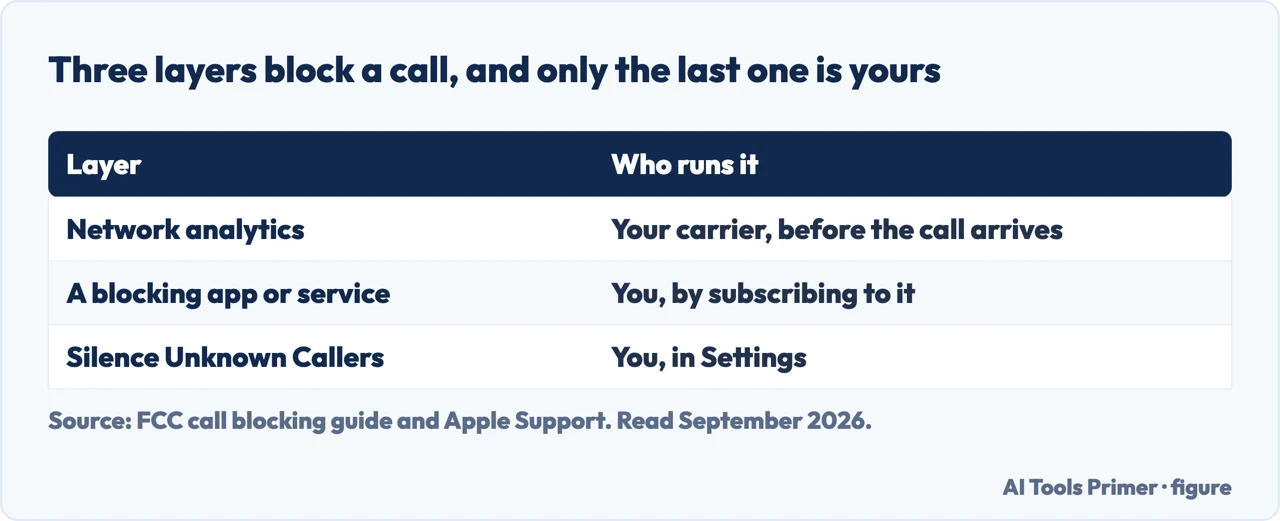
Why the phone has this switch at all, from the regulator rather than the manufacturer. The FCC describes call blocking as an industry-wide response rather than a phone feature: “call blocking is a tool used by phone companies to stop illegal and unwanted calls from reaching your phone. Billions of unwanted calls to American consumers are being blocked each year”, and phone companies “may proactively block calls connected to suspicious calling patterns”. Your switch is the last of three layers, not the only one — which is why turning it on sometimes changes very little, and why turning it off does not open the floodgates either.
The guides below take it three ways: the setting and its reversal, the conditions attached to it, and the other controls on the same screen that people confuse with this one.
Where to start
Three ways in.
- “I want the unknown numbers to stop.”
- Start at turning it on
- “I missed a call I needed.”
- Go to turning it off
- “What else is on this screen?”
- That is the other filters
Turning it on
Three taps on one screen, with a choice of three states rather than an on and an off. The middle one is the least known and the least blunt.
Turning it off
The same screen, the state called Never. Plus the conditions Apple attaches automatically — emergency services, roaming, and the software version.
The other filters
Unknown Callers and Spam sit on the same screen and are often mistaken for this one. One is a rule about your address book, the other about your carrier.
Not covered here. It will not tell you this setting silences spam. Apple’s wording is “unsaved numbers”, and the difference decides whether you will be happy with it in a fortnight.
It will not skip the reversal. A large part of the searching around this feature is people trying to undo it, and that answer belongs on the same page as the instruction.
And it will not treat the conditions as small print. Emergency services, roaming and the software version each change what the setting does, and none of them appears on the screen where you set it. What holds instead is simple: the three Screen Unknown Callers states and their exact wording are Apple’s own, quoted with the twenty-four-hour suspension after an emergency call.
How the phone tells you something happened
Four settings that decide whether it rings, buzzes, waits or says nothing at all.
- The same job, in the other places it comes up
- How to change ringtone on iPhone, including for one person
- How to turn off notifications on iPhone without losing them
- How to turn off do not disturb on iPhone when it keeps coming back
Sources
- Apple, Manage unknown callers on iPhone (that the setting applies to unsaved numbers, meaning phone numbers not saved in your contacts; the three Screen Unknown Callers states — Never, where calls ring like any other; Ask Reason for Calling, where the caller is asked why they are calling before the phone rings; and Silence, which sends the calls to voicemail; the instruction to add important numbers including a child’s school and a doctor’s office to Contacts so those calls always come through; that calling emergency services turns call screening off for 24 hours; that calls are not screened while roaming regardless of settings; that on software earlier than iOS 17 Live Voicemail must also be on; that standard calling and data rates may apply; the separate FaceTime Silence Unknown Callers switch; the Call Filtering switches for Unknown Callers and for carrier-identified Spam, and where each list appears) — support.apple.com, read 22 August 2026.
- Apple, iPhone User Guide — Screen and block calls on iPhone (the Settings → Apps → Phone route, the Call Blocking & Identification sources, the Call Filtering switches, and the Mark as Known and Mark as Unknown routes) — support.apple.com, read 16 September 2026.
- Federal Communications Commission — Call Blocking Tools and Resources: blocking as three layers, from the network to the handset, described by the regulator rather than by a phone maker. The page does not answer curl, which gets a 17-word Access Denied: it was read with Chrome — www.fcc.gov, read 16 September 2026.
Written by Alberto Gulotta
Founder and editor of AI Tools Primer, writing from Palermo, Italy. Thirty-five years of taking computers apart, starting with a Commodore 64 — the long version is on the about page.
Something wrong on this page? Write to aitoolsprimer@gmail.com and it gets fixed.
Written on 22 August 2026 · last checked 23 September 2026.
Independence and limits
No affiliate links and no paid placements anywhere on this site. Nobody pays to appear here, and no company has seen this page before you did.
This is general information, not professional advice. Where a page touches money, health, safety or the law, it names its source and the date it was read — and your situation may still differ. See the privacy page and the cookie policy.