
iPhone · guide
How to change ringtone on iPhone, including for one person
By Alberto Gulotta · Updated · 11 min read
The question how to change ringtone on iPhone has a two-tap answer and two more that are harder to find, because they live somewhere other than the sound settings.
Three different jobs behind one question
All three are documented by Apple, on three different screens.
- Change it for everybody
- Settings → Sounds & Haptics → tap Ringtone (or Text Tone, or another option) → choose a tone. Apple: “Tap a ringtone or alert tone to hear it and set it as the new sound.” Tapping is both the preview and the choice.
- Change it for one person
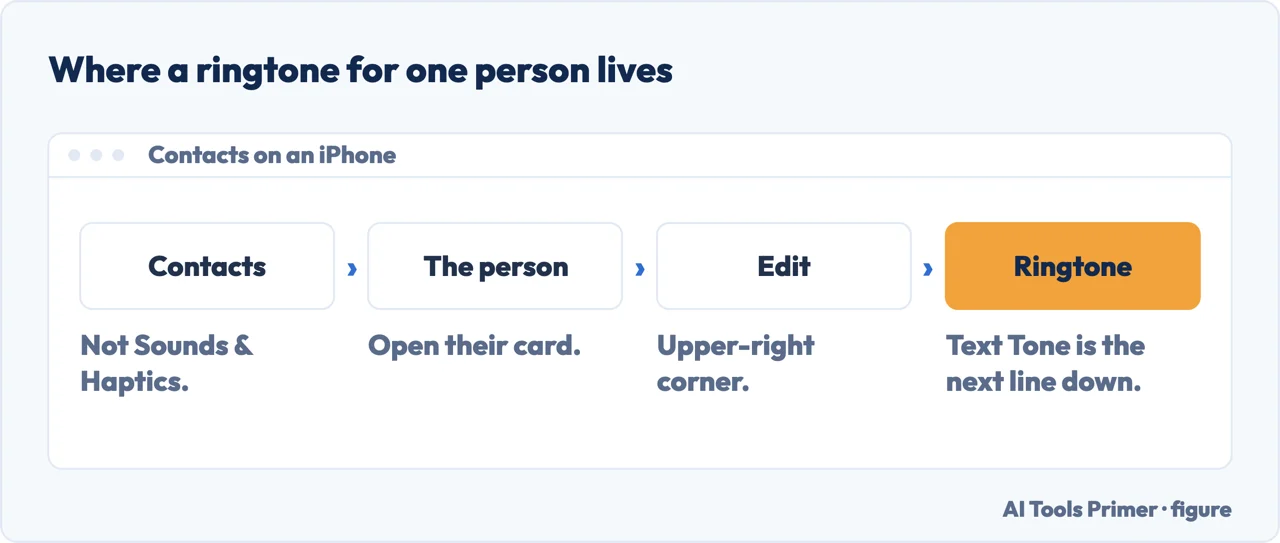
- Open Contacts, tap the person’s name, tap Edit in the upper-right corner, then tap Ringtone or Text Tone. Apple documents this route through Contacts, not through Sounds & Haptics.
- Use something that is not in the list
- Two documented routes: the Tone Store, reached from Settings → Sounds & Haptics → Ringtones, or making one yourself — Apple points at GarageBand for that.
The second of those is the useful one and the one hidden in plain sight. A ringtone for a specific person is a field on their contact card. Apple’s instruction starts in Contacts and ends there — so the route to making one person ring differently runs through the person, not through the sound settings.
It also means the setting travels with the contact rather than with the sound screen, and that the same screen offers a separate Text Tone — so a person can have their own ring and their own message alert, set independently.
“You might not be able to redownload some previously purchased tones.”
Apple’s own sentence about the Tone Store, and it is the one worth reading before spending anything. Purchases are tied to your Apple Account and the payment method on file, and on a new device there is a Download All Purchased Tones option to bring them back — but Apple attaches that qualification to it rather than a guarantee. A tone you bought years ago may not make the journey to your next phone, and the company that sold it to you says so in advance.
On the store itself Apple is plain about the arrangement: purchases “are associated with your Apple Account and payment method on file”, purchased tones “appear at the top of the list of sounds”, and store availability “might vary by country or region”. The redownload caveat sits among those ordinary terms, which is where it is easiest to read past — and it is the only one of them that can cost you something.
The volume under the ringtone is not only the ringtone’s
- Apple: “By default, alarms, timers, alerts, and system sounds match your ringtone volume.”
- And they can be separated: “You can set two volumes separately: one for alarms and timers, and one for alerts and system sounds.”
- The switch that does it: Settings → Sounds & Haptics, then “turn off Match Ringtone Volume under Alarms and Timers or Alerts and System Sounds”.
That is the control most likely to be blamed on the ringtone. The slider under Ringtone is the ringtone’s — Apple’s instruction for it is simply “Adjust ringer volume: Drag the volume slider” — but by default it drags four other things with it, and an alarm that is suddenly too quiet is usually this and not a fault.
The vibration is set on the same screen and is a pattern rather than a switch: “Tap Haptics, then choose a pattern or tap Create New Vibration to record your own.” That instruction is attached to each sound category separately, which is why a text tone and a ringtone can vibrate differently.
Where Apple sends you when nothing is ringing. The sound page does not troubleshoot; it points: “To silence your phone, see Silence iPhone.” And the page it points at names what the switch actually does — “When Silent mode is on, iPhone doesn’t ring or play alerts or other sound effects (but iPhone may still vibrate)” — then points on again, to Focus: “To temporarily silence calls and notifications on a schedule or to temporarily silence a specific activity, see Turn on or schedule a Focus.”
Worth following that chain before changing any tone. A ringtone that never plays is usually not a ringtone problem: it is Silent mode, or it is a Focus that is on when you did not expect it. Apple also warns that silence is not total — “Clock alarms, audio apps such as Music, and many games play sounds through the built-in speaker, even when Silent mode is on”.
And for anybody who wants a tone that does not exist yet, Apple’s documented route is to make one: it links GarageBand for creating a custom ringtone on the iPhone itself. That is the company’s own answer to “can I use my own song”, and it is a different answer from buying one.
The same design, documented independently on the other platform — and one route there that costs nothing. Google’s instructions for a Pixel put the per-contact ringtone in exactly the same place Apple does, and it writes them as steps: “Open your phone’s Contacts app.” “Tap a contact.” “Tap More” then “Set ringtone.” “Choose a ringtone.” “Tap Save.” Not on the sound screen there either, which suggests the arrangement is a considered one rather than an accident of either interface. Where the two part company is the shop. For a tone that is not in the list, Google documents copying a file: connect the phone to a computer, then “In the window that opens, find the ‘Ringtones’ folder.” and “Copy your music file (MP3) into the ‘Ringtones’ folder.” Google puts its own quotation marks round the folder name; they are rendered here as single ones because they sit inside a quotation. Nothing is bought, so nothing can fail to redownload later. That is Android’s arrangement and not iOS’s — but it is the comparison worth having in mind before spending anything in the Tone Store.
The guides below take it three ways: the default tone, the per-contact one, and what happens when the phone does not ring at all.
Where to start
Three ways in.
- “I want a different ring.”
- Start at the default tone
- “I want one person to sound different.”
- Go to per contact tones
- “It is not ringing at all.”
- That is when it does not ring
The default tone
Two taps in Sounds and Haptics, where tapping a tone previews it and sets it at the same time. Plus the store, and Apple’s caveat about what may not come back.
Per-contact tones
A field on somebody’s contact card rather than a setting on the phone, which is why it cannot be found from the sound screen. Ringtone and text tone are separate.
When it does not ring
The sound page does not troubleshoot — it points at Silent mode, and Silent mode points at Focus. A ringtone that never plays is often not a ringtone problem at all.
Not covered here. It will not send you to a ringtone download site. Apple documents two routes — its own store and making one in GarageBand — and both are on the phone.
It will not promise a purchased tone follows you to a new phone. Apple says some previously purchased tones might not be redownloadable, and that sentence belongs before the purchase.
And it will not treat a silent phone as a ringtone fault. Apple’s sound page sends you to Silent mode and Silent mode sends you to Focus, which is a chain worth following before changing a tone. What holds instead is simple: the routes for the default tone and for a contact card are Apple’s own, along with what the ringtone slider governs and the switch that separates it.
How the phone tells you something happened
Four settings that decide whether it rings, buzzes, waits or says nothing at all.
- The same job, in the other places it comes up
- How to turn off notifications on iPhone without losing them
- How to turn off do not disturb on iPhone when it keeps coming back
- How to silence unknown callers on iPhone, and how to undo it
Sources
- Apple, iPhone User Guide — Change iPhone sounds and vibrations (the Settings → Sounds & Haptics route; the instruction to drag the volume slider to adjust ringer volume; that by default alarms, timers, alerts and system sounds match the ringtone volume, that two volumes can be set separately, and the Match Ringtone Volume switch that does it; the instruction to tap Haptics and choose a pattern or create a new vibration; setting a ringtone and text tone for a person through Contacts, Edit; and the pointer to Silence iPhone. Note: this article was rewritten for iOS 27; the four haptics options and the Control Centre check it used to document are no longer in it, and what this page quoted from them was removed on 16 September 2026) — support.apple.com, read 16 September 2026.
- Apple, iPhone User Guide — Silence iPhone (that with Silent mode on iPhone doesn’t ring or play alerts or other sound effects though it may still vibrate; that clock alarms, audio apps such as Music and many games play through the built-in speaker even when Silent mode is on; and the pointer to Focus for silencing on a schedule) — support.apple.com, read 16 September 2026.
- Apple, Use tones and ringtones with your iPhone or iPad (that tapping a ringtone or alert tone both plays it and sets it; the Contacts route to set a ringtone or text tone for one person; the Tone Store route via Settings → Sounds & Haptics → Ringtones; that purchases are associated with your Apple Account and payment method on file and appear at the top of the list of sounds; the Download All Purchased Tones option and the note that you might not be able to redownload some previously purchased tones; that store availability and features might vary by country or region; and the link to creating a custom ringtone with GarageBand) — support.apple.com, read 22 August 2026.
- Google, Pixel Phone Help — Change volume, sound and vibrate settings on your Pixel phone or Pixel Tablet (ON ANDROID: that a ringtone is assigned to a person by opening the Contacts app, tapping a contact, tapping More and then Set ringtone, choosing a ringtone and tapping Save; that the default ringtone is changed under Settings, Sound and vibration, Ringtone; and that a tone can be added by connecting the phone to a computer and copying an MP3 file into the “Ringtones” folder) — support.google.com, read 16 September 2026.
Written by Alberto Gulotta
Founder and editor of AI Tools Primer, writing from Palermo, Italy. Thirty-five years of taking computers apart, starting with a Commodore 64 — the long version is on the about page.
Something wrong on this page? Write to aitoolsprimer@gmail.com and it gets fixed.
Written on 22 August 2026 · last checked 23 September 2026.
Independence and limits
No affiliate links and no paid placements anywhere on this site. Nobody pays to appear here, and no company has seen this page before you did.
This is general information, not professional advice. Where a page touches money, health, safety or the law, it names its source and the date it was read — and your situation may still differ. See the privacy page and the cookie policy.