
iPhone · guide
How to set up voicemail on iPhone, and the three kinds
By Alberto Gulotta · Updated · 12 min read
How to set up voicemail on iPhone: open the Phone app and tap Voicemail. There is no voicemail section in Settings, and that is not an oversight — Apple documents the setup as something that happens once, in one tap, the first time you go looking for it.
| Kind | Who runs it | How it is set up | Source |
|---|---|---|---|
| Carrier voicemail | Your network, outside the phone | The first time you tap Voicemail — or from the carrier’s own code, such as Verizon’s *86 | Apple · Verizon |
| Visual Voicemail | Your carrier, shown as a list in the Phone app | Nothing on the phone, but the carrier may have its own activation step | Verizon |
| Live Voicemail | The iPhone itself | Settings › Apps › Phone › Live Voicemail | Apple |
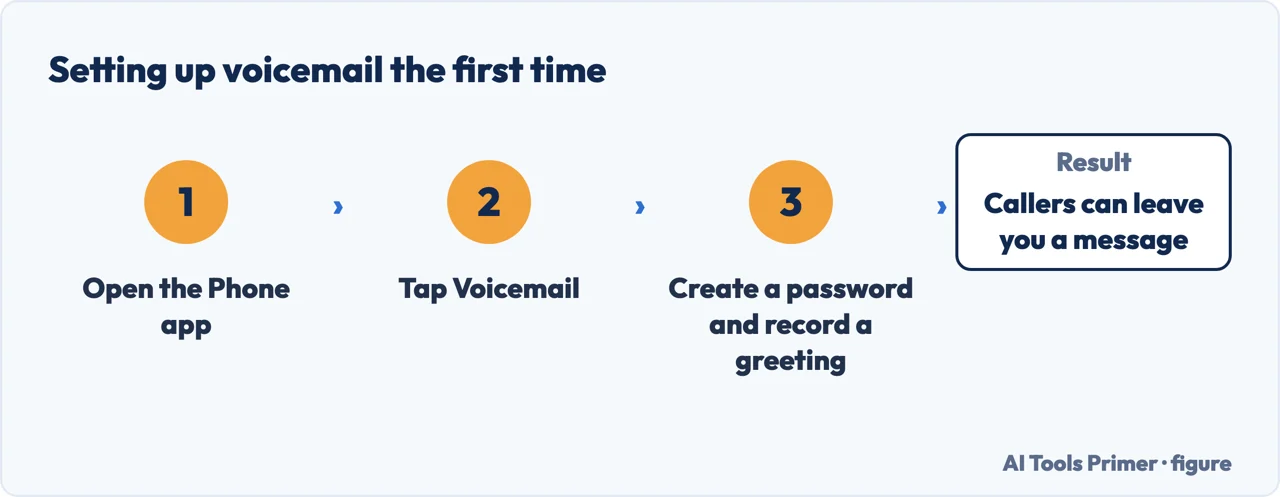
“The first time you tap Voicemail, you’re asked to create a voicemail password and record your voicemail greeting.”
That is the whole of setting it up, and it explains why there is no Voicemail entry waiting for you in Settings. It is also the one setting on the phone that closes something a number alone can otherwise reach: the FCC states that some voicemail services answer to a call that displays your own number, which is the exception in what somebody can do with your phone number. Apple does not treat this as a configuration screen: it is a prompt that appears once, in the Phone app, the first time you go looking. If you have never tapped Voicemail, you have never been asked — and there is nothing to find in Settings because the setup lives behind the button, not behind a menu.
- Open the Phone app. There is no voicemail section in Settings, which is why the question gets asked at all.
- Tap Voicemail. Apple: “The first time you tap Voicemail, you’re asked to create a voicemail password and record your voicemail greeting.” That is the setup, in one tap.
- Give it a password and a greeting. The password belongs to the carrier’s system, not to your Apple Account — Verizon, for instance, documents a “4-7 digit password”.
- Change the greeting later by the route your layout uses. Unified layout: tap Voicemails, then Edit, then Edit Voicemail Greeting. Classic layout: tap Voicemail at the bottom, then Greeting. Then choose Default or Custom.
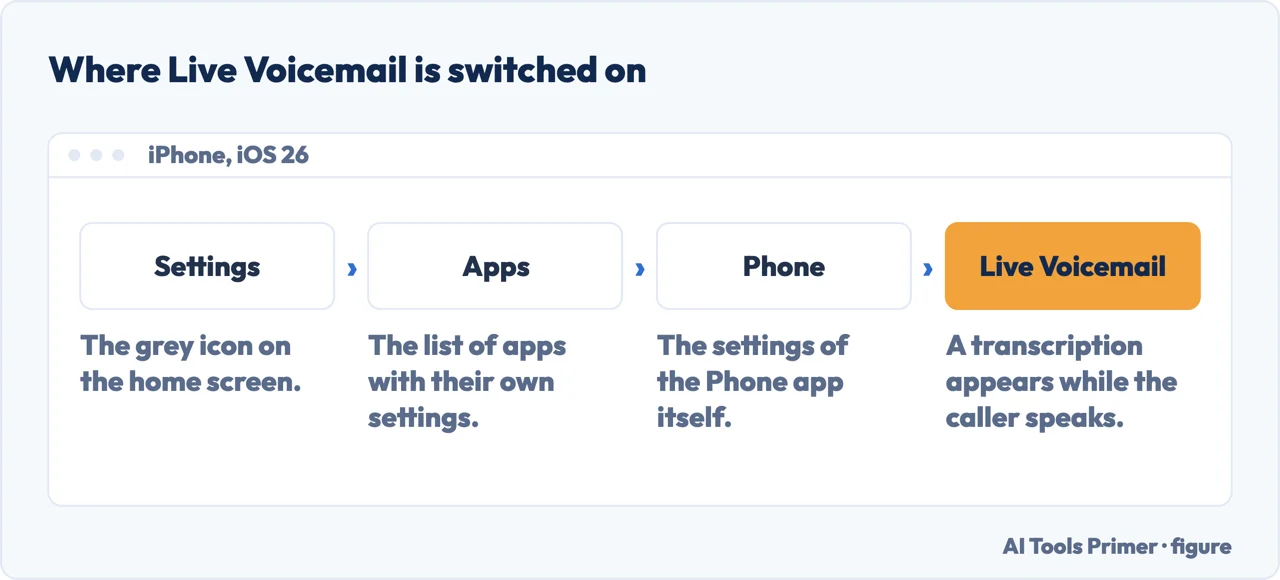
- Turn on Live Voicemail if you want to read messages as they arrive. Settings › Apps › Phone › Live Voicemail. It is a separate thing from the setup above, and it is off until you turn it on.
So the answer to “where is the voicemail setting” is: open the Phone app and tap Voicemail. If it has never been set up, the phone will ask for the two things it needs — a password and a greeting — and that is the setup finished.
Changing the greeting afterwards depends on which of the two Phone app layouts you are using, and Apple documents both.
Apple’s route starts with an on-screen icon rather than a word, then: Voicemails → Edit → Edit Voicemail Greeting.
Tap Voicemail at the bottom of the screen, then tap Greeting.
You can pick Default or Custom; choosing Custom lets you record a new greeting. That is the whole choice, which is worth saying because it is smaller than the question suggests.
The part that repays a couple of minutes is understanding that “voicemail” on this phone means three different things.
Three things called voicemail, and Apple keeps them separate
They are not versions of each other. Which one you get depends on your carrier, your settings, and whether the phone is switched on.
- Carrier Voicemail
- The one that belongs to the network rather than to the phone. Apple: “If your iPhone is turned off or is out of your carrier network’s range, the call is sent to carrier voicemail, if available.”
- Visual Voicemail
- “Shows you a list of your voicemail messages in the Phone app. You can choose which ones to play and delete without listening to them all.” A badge shows the number unheard.
- Live Voicemail
- “Lets you see a real-time transcription as someone is leaving you a message. You can even pick up the call as they’re leaving their voicemail.” The only one of the three that happens while the caller is still speaking.
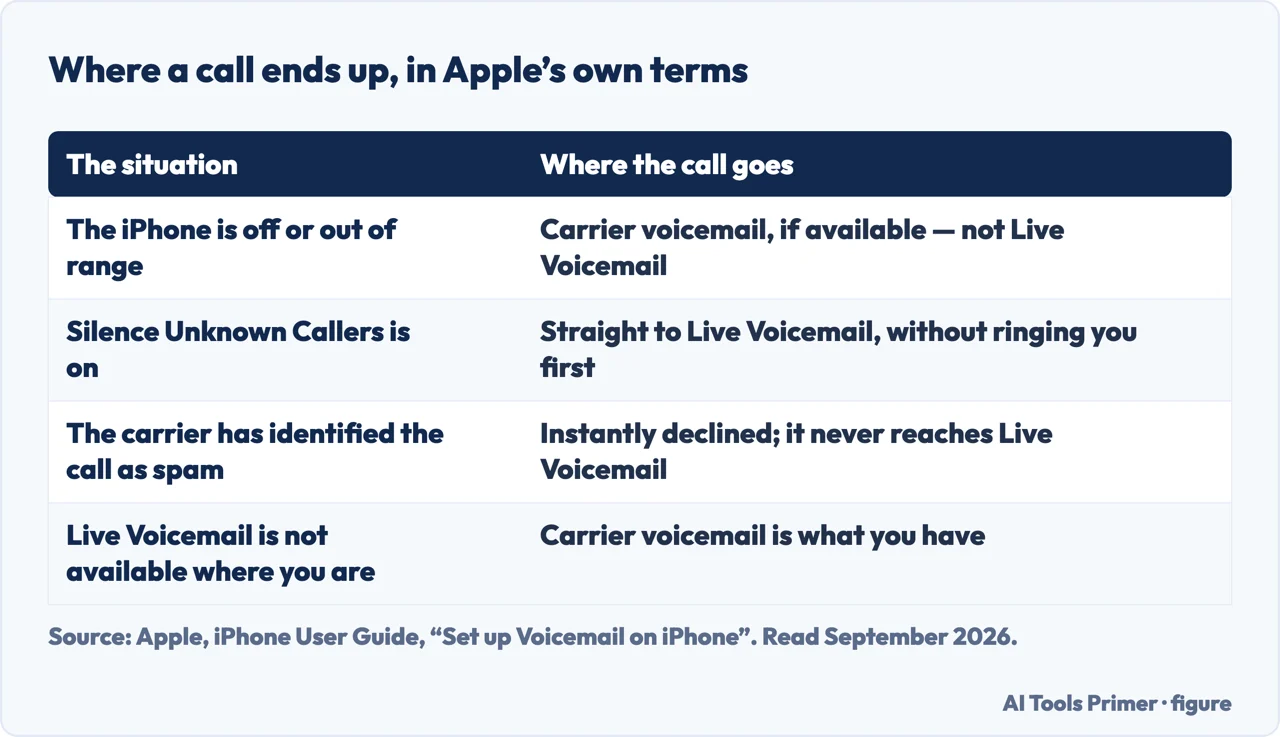
The distinction matters because they fail differently. Visual Voicemail is a way of reading a list; Live Voicemail is a way of watching a message arrive. And carrier voicemail is the fallback that exists outside the phone entirely — which is why, in Apple’s words, a call still reaches it when the iPhone is “turned off or is out of your carrier network’s range”. That one is not a feature of your handset at all.
To turn on the live transcription: Settings → Apps → Phone → turn on Live Voicemail. Apple attaches two practical notes. “Calling and data rates may apply.” And during a live voicemail, “the caller won’t be able to hear you and you won’t be able to hear them unless you choose to answer the call. To stop the incoming voicemail without answering or blocking the call, tap Stop.” That last option is worth knowing: there is a way out that is neither answering nor blocking.
“If you have Silence Unknown Callers turned on, unknown numbers go directly to Live Voicemail without ringing you first. Calls identified as spam by your carrier don’t go through Live Voicemail and are instead instantly declined.”
Two settings meeting, and the result is better than either alone. (What a number on the screen does and does not prove is a separate matter, and it does not change with either setting.) Silencing unknown callers normally means finding out later; with Live Voicemail on, a silenced call still arrives as a transcription you can read as it is being spoken — and Apple says you can pick it up mid-message. The delivery driver, the surgery, the school get through without the phone ever ringing. And the calls the carrier has already judged to be spam do not even reach that stage.
One more setting that decides where the messages end up. Apple documents storing voicemail in iCloud so that it syncs across devices: Settings → your name → iCloud → See All next to Saved to iCloud → turn on Phone & FaceTime. It covers both Live Voicemail and Carrier Voicemail, and it is off until you turn it on.
The condition that comes before all of it. Apple: “Voicemail, Visual Voicemail, and Live Voicemail are available from select carriers in select countries or regions.” And separately: “Live Voicemail isn’t available in all countries, regions, or languages.” So a missing feature here is not necessarily a missing setting — on this particular subject, what your phone can do is decided partly by the network it is on, and Apple says so twice on one page.
The guides below take it three ways: the setup itself, the three kinds and how they differ, and the call settings that decide what reaches voicemail in the first place.
Where to start
Three ways in.
- “There is no voicemail setting.”
- Start at where the setup is
- “What is Live Voicemail?”
- Go to the three kinds
- “I want unknown callers to leave a message.”
- That is what reaches voicemail
Where the setup is
Not in Settings. A prompt that appears the first time you tap Voicemail in the Phone app, asking for a password and a greeting — and never again after that.
The three kinds
Carrier, Visual and Live. One belongs to the network, one is a list you read, and one happens while the caller is still speaking.
What reaches voicemail
Silenced calls go there, blocked ones behave differently, and carrier-flagged spam never arrives at all. Three settings decide it, and none of them is on this screen.
Questions people also ask
How do I activate my voicemail on my iPhone?
Open the Phone app and tap Voicemail. Apple: “The first time you tap Voicemail, you’re asked to create a voicemail password and record your voicemail greeting.” Nothing in Settings is involved, and there is no second confirmation step.
Why won’t my iPhone let me set up voicemail?
Usually because the part you are looking at is not the iPhone’s. Carrier voicemail lives on the network, and carriers have their own activation — Verizon documents dialling *86 and setting a 4-7 digit password. Apple also warns that “Live Voicemail isn’t available in all countries, regions, or languages”.
What happens to unknown callers?
Apple documents it exactly: with Silence Unknown Callers on, “unknown numbers go directly to Live Voicemail without ringing you first”, and “calls identified as spam by your carrier don’t go through Live Voicemail and are instead instantly declined”. The second group leaves no message at all.
Where are my voicemails kept?
On the carrier’s system unless you move them. Apple documents an iCloud option that covers both kinds: Settings › your name › iCloud › See All next to Saved to iCloud › turn on Phone & FaceTime. It is off until you turn it on.
Not covered here. It will not tell you to look in Settings for the setup. Apple puts it behind the Voicemail button in the Phone app, once, and that is the whole reason people cannot find it.
It will not treat the three kinds as one feature. They are separately named and separately documented, and they behave differently when the phone is off.
And it will not promise the features are there. Apple says twice on one page that availability depends on the carrier, the country and the language. What holds instead is simple: the descriptions of Visual and Live Voicemail are Apple’s own, quoted with the Live Voicemail switch and the availability conditions.
Sources
- Apple, iPhone User Guide — Set up Voicemail on iPhone (that Visual Voicemail shows a list of messages in the Phone app which can be played or deleted individually, with a badge showing unheard messages and iCloud syncing across devices; that Live Voicemail shows a real-time transcription as a message is being left and allows picking up the call; that Voicemail, Visual Voicemail and Live Voicemail are available from select carriers in select countries or regions; that the first time you tap Voicemail you are asked to create a voicemail password and record a greeting; the greeting routes for the Unified and Classic Phone app layouts and the Default or Custom choice; the Settings → Apps → Phone route to turn on Live Voicemail, the note that calling and data rates may apply, that neither party can hear the other unless the call is answered, and the Stop option to end an incoming voicemail without answering or blocking; that a call goes to carrier voicemail if the iPhone is off or out of range; that with Silence Unknown Callers on, unknown numbers go directly to Live Voicemail without ringing, while calls identified as spam by the carrier are instantly declined; and the iCloud route to store Live and Carrier Voicemail) — support.apple.com, read 3 September 2026.
- Verizon — Set Up Voicemail: the carrier’s own side of the same job, with the *86 code, the 4-7 digit password and a separate step to activate Basic Visual Voicemail — www.verizon.com, read 3 September 2026.
Written by Alberto Gulotta
Founder and editor of AI Tools Primer, writing from Palermo, Italy. Thirty-five years of taking computers apart, starting with a Commodore 64 — the long version is on the about page.
Something wrong on this page? Write to aitoolsprimer@gmail.com and it gets fixed.
Written on 22 August 2026 · last checked 23 September 2026.
Independence and limits
No affiliate links and no paid placements anywhere on this site. Nobody pays to appear here, and no company has seen this page before you did.
This is general information, not professional advice. Where a page touches money, health, safety or the law, it names its source and the date it was read — and your situation may still differ. See the privacy page and the cookie policy.