
iPhone · guide
How to block a number on Android, and the three differences
By Alberto Gulotta · Updated · 10 min read
The instruction for how to block a number on Android is four taps, and it is below. The reason this guide is longer than four taps is that the same job on the two big phone systems produces different results — and each company documents its own behaviour in its own help pages, which is where the comparison below comes from.
The three routes, in Google’s own order
All of them live in the Phone app rather than in the system settings, which is the first difference from the other platform.
- Block one number
- Phone app → More → Call history → tap the call → Block / report spam. Google: “When the number tries to call you, your phone declines the call automatically.”
- Block unidentified callers
- Phone app → More → Settings → Blocked numbers → turn on Unknown. Read the next section before doing this — it does less than the name suggests.
- Unblock
- Phone app → More → Settings → Blocked numbers → Clear → Unblock.
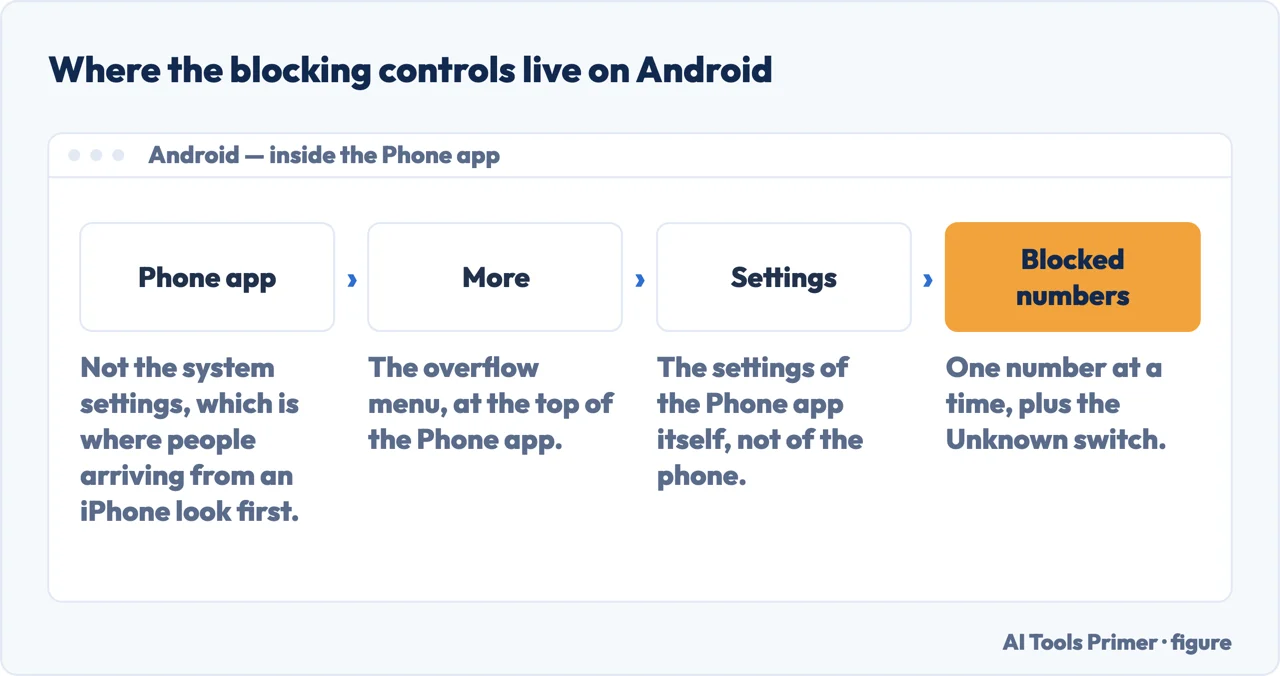
Note where all three live: inside the Phone app, behind a More menu, rather than in the system settings. On the other platform the equivalent controls sit in Settings, so the habit does not carry across.
“This will block calls from private or unidentified numbers. You will still receive calls from phone numbers that are not stored in your contacts.”
Google’s own note, and it narrows the setting considerably. Unknown here means withheld — a caller who has hidden their number. It does not mean unfamiliar. A number you have never seen, from a company you have never dealt with, is not private and is not blocked by this. Apple’s equivalent setting works the other way round, and the two are easy to confuse because they are described with the same English word.
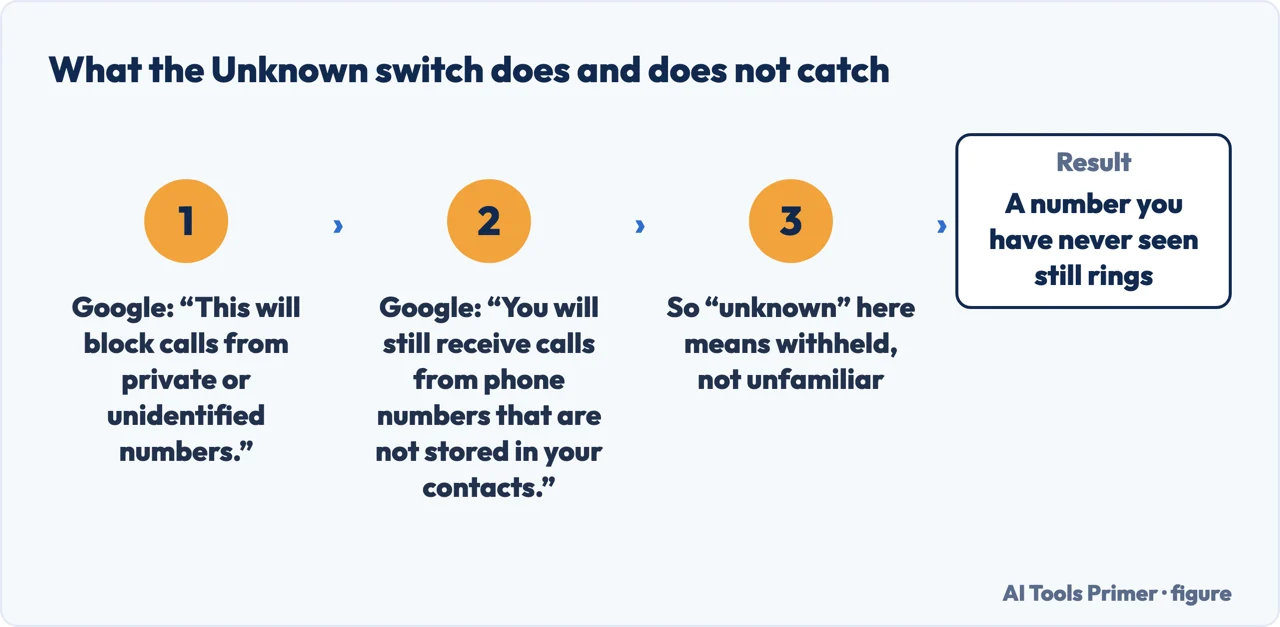
That single sentence is worth the visit on its own. If the calls bothering you show a number, this setting does not touch them: it acts on callers who withhold theirs. Google states the limit plainly, and the setting’s name does not.
Three differences, from the two companies’ own documentation
Can a blocked caller still leave a voicemail?
What does the “unknown” setting catch?
Is there a record of the blocked call?
Those three are not opinions and they are not benchmarks. Each is a line from the manufacturer’s own help page, and each has a practical consequence. If somebody blocked needs to be able to leave you a message, Android with visual voicemail on will not let them. On an iPhone the box stays open, which is why setting voicemail up and recording a greeting is worth doing before you need it. If you might later want a record that a blocked number tried to call, Google says Android’s call history will not have it — and Apple does not publish an equivalent statement, which is a gap rather than a reassurance. And if what you want is quiet from unfamiliar numbers rather than from withheld ones, the setting that does that is the one on the other platform.
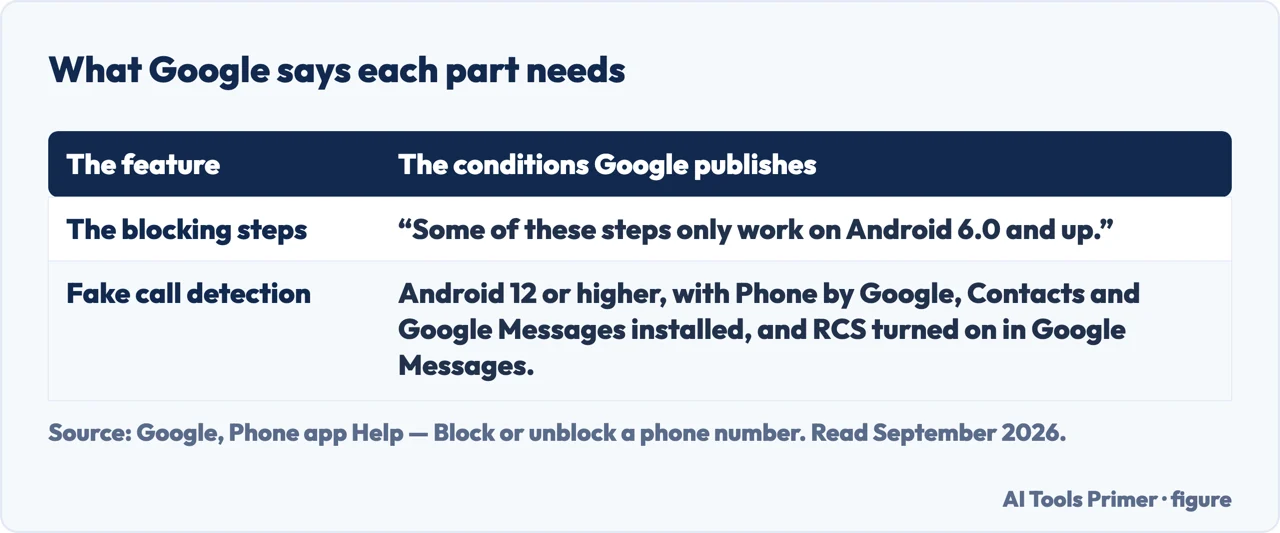
Two version notes Google puts at the top, not the bottom. “Some of these steps only work on Android 6.0 and up.” And the fake call detection feature has a longer list of conditions: Android 12 or higher, the apps Phone by Google, Contacts and Google Messages all installed, and RCS turned on in Google Messages. Android is not one phone, and a feature described in a guide may simply not exist on the handset in your hand — which is a reason to check the version before concluding something is broken.
There is one more thing worth knowing about the button you actually press, because it is doing two jobs at once. Google labels it Block / report spam — blocking is for you, reporting is for everybody, and reporting sends more than the number. Google’s own list of what a report contains, read on 16 September 2026: “The last 10 incoming messages from the spammer are reported to Google to improve spam detection when reporting a conversation as spam”, each one carrying “the sender’s phone number and a timestamp of the message”, plus an identifying RCS Message ID for an RCS message and an RCS Group ID for a group conversation. Google says plainly what happens to it: “Google employees and contractors may review your report to help improve Google’s spam and abuse protection”, and reported conversations “are also used to train AI models to improve spam and abuse protection”.
What is not sent is your side of it. “Your past replies to the spammer aren’t sent to Google”, “your name and phone number aren’t linked to the spammer’s messages”, and “the spammer can’t view your report and won’t know about it”. That is the trade, and it is worth knowing before pressing the button rather than after: blocking changes what reaches you and nothing else, while reporting hands Google the messages that arrived so it can act on a pattern rather than on one number. Neither is a substitute for the other.
The guides below take it three ways: the blocking routes themselves, what the settings do and do not catch, and the same problems on the other system.
Where to start
Three ways in.
- “Just tell me the taps.”
- Start at the three routes
- “I blocked them and something still happened.”
- Go to what blocking changes
- “I have an iPhone, not Android.”
- That is the other system
The three routes
Block one number, block withheld numbers, unblock. All three live inside the Phone app rather than in system settings, which is where people from the other platform look first.
What blocking changes
Voicemail, call history, and what the Unknown setting actually catches. Three answers that differ between the platforms, quoted from each manufacturer rather than compared by hand.
The other system
Most of this site’s phone guides are written for iPhone. These are the ones where the Android answer is genuinely different rather than merely a different menu.
Not covered here. It will not tell you the two platforms do the same thing differently only in the menus. On voicemail, on call history and on what “unknown” means, the outcomes differ — and both companies say so in writing.
It will not describe one Android. Google states version requirements at the top of its own page, and a feature can simply be absent from the handset you are holding.
And it will not recommend a call-blocking app. Every route on this guide is one Google already documents in the app you already have. What holds instead is simple: the three blocking routes and the meaning of the Unknown setting are quoted from Google’s Phone and Messages help, with the iPhone comparisons from Apple.
Sources
- Google, Phone app Help — Block or unblock a phone number (that a blocked number’s calls are declined automatically; that some steps only work on Android 6.0 and up; that fake call detection requires Android 12 or higher with Phone by Google, Contacts and Google Messages installed and RCS turned on; the route Phone app → More → Call history → the call → Block / report spam; the tip that with visual voicemail on, blocked callers cannot leave voicemails; the Blocked numbers → Unknown setting, which blocks private or unidentified numbers while calls from numbers not stored in your contacts are still received; the unblock route; and the tip that calls received while a number was blocked will not show in call history) — support.google.com, read 22 August 2026.
- Google, Messages Help — Report spam in Google Messages, Android tab (the block and report route, the Spam & blocked folder, and the list of what a report contains: the spammer’s phone number, the last 10 incoming messages from the spammer with each sender’s number and timestamp, an RCS Message ID for an RCS message and an RCS Group ID for a group, the group name and the profile names and numbers of the other participants, and the country code from SIM and IP; that Google employees and contractors may review the report and that reported conversations are used to train AI models; that past replies to the spammer are not sent, that the reporter’s name and number are not linked to the spammer’s messages and that the spammer cannot see the report; and, when a spam report is removed, that the last 10 incoming messages can be shared by choice. The article serves different steps per platform, and the ones quoted here are on the Android tab) — support.google.com, read 16 September 2026.
- Apple, Block phone numbers, contacts, and emails on your iPhone or iPad (that a blocked contact can still leave a voicemail without notifying you), and Apple, iPhone User Guide — Screen and block calls on iPhone (that the Silence option applies to unsaved numbers and that such calls are sent to voicemail and appear in the Recents list) — support.apple.com, read 22 August 2026.
Written by Alberto Gulotta
Founder and editor of AI Tools Primer, writing from Palermo, Italy. Thirty-five years of taking computers apart, starting with a Commodore 64 — the long version is on the about page.
Something wrong on this page? Write to aitoolsprimer@gmail.com and it gets fixed.
Written on 22 August 2026 · last checked 23 September 2026.
Independence and limits
No affiliate links and no paid placements anywhere on this site. Nobody pays to appear here, and no company has seen this page before you did.
This is general information, not professional advice. Where a page touches money, health, safety or the law, it names its source and the date it was read — and your situation may still differ. See the privacy page and the cookie policy.