To turn off Do Not Disturb on iPhone: open Control Centre and tap the Do Not Disturb icon on the Focus button. The version worth a page is the other one — when there is no Do Not Disturb to turn off, or when it comes back an hour later. Apple documents both.
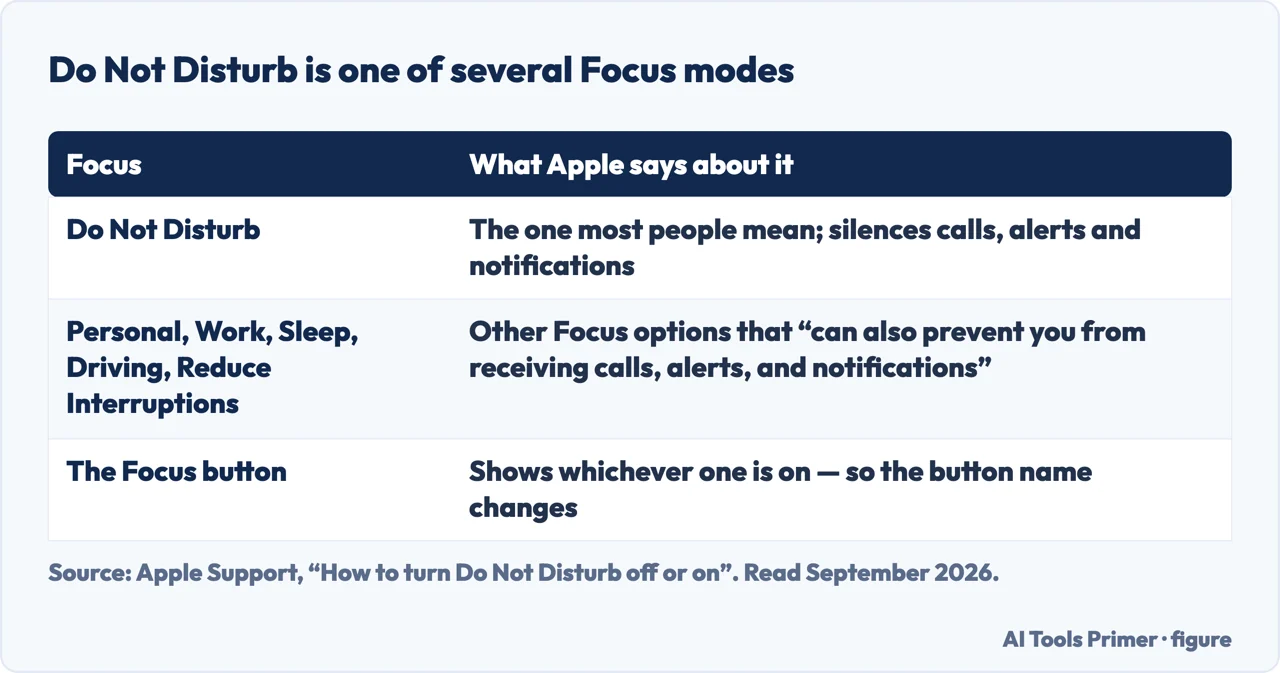
Do Not Disturb is one Focus among several, and each silences the same things
What it is
What Apple says about it
Source
Do Not Disturb
The one the question is usually about. Turned off,
“the icon color dims” and the button goes back to saying Focus
“Other Focus options can also prevent you from receiving calls, alerts, and
notifications”
Apple
A schedule
“Do Not Disturb may be scheduled to turn on at certain times”:
Settings › Focus › Do Not Disturb › Set a Schedule
Apple
Share Across Devices
Turning it on or off shows “on your other Apple
devices”
Apple
Your carrier’s own settings
A separate thing again: call forwarding and
blocking live with the network, not with the phone
Verizon
Turning off the wrong Focus changes nothing at all. Figure drawn by AI Tools Primer.
“If you don’t see Do Not Disturb in the Focus button but another Focus option (Personal,
Work, Sleep, Reduce Interruptions, or Driving), tap its icon to turn it off. Other Focus options
can also prevent you from receiving calls, alerts, and notifications.”
Apple, in the middle of its own instructions. Since iOS 15 Do Not Disturb is not a switch — it
is one of six, and the other five silence a phone just as thoroughly under names that do not
sound like silence. Looking for a Do Not Disturb to turn off and not finding one does not mean
nothing is on. It means what is on has a different name.
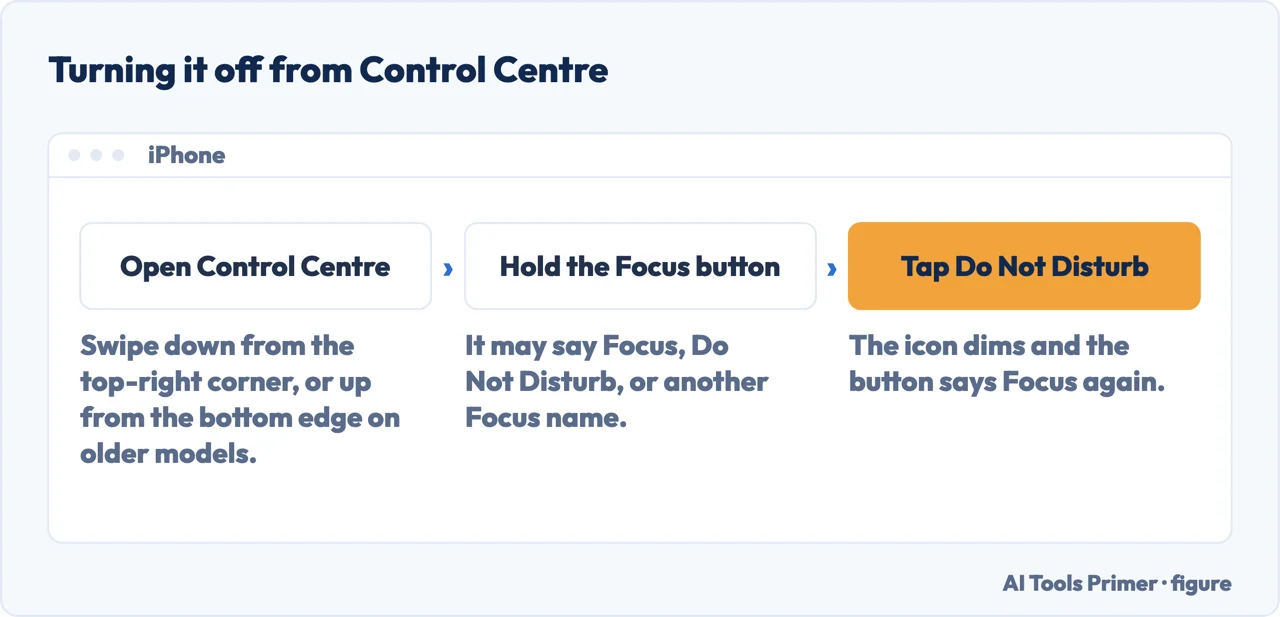
Open Control Centre. On iPhone X and later, swipe down from the top-right corner; on
iPhone SE and iPhone 8 and earlier, swipe up from the bottom edge.
Look at the Focus button before you press anything. It shows whichever Focus is on, so
it may say Do Not Disturb — or Personal, Work, Sleep, Reduce Interruptions or Driving.
Tap the Do Not Disturb icon on the Focus button. Apple’s test that it worked is that
“the icon color dims” and the button goes back to saying Focus.
If it is a different Focus, tap that one instead. They silence the same calls and
notifications, and turning off the wrong one changes nothing.
If it returns by itself, look for a schedule. Settings › Focus › Do Not Disturb, scroll
to Set a Schedule, and turn off any active one.
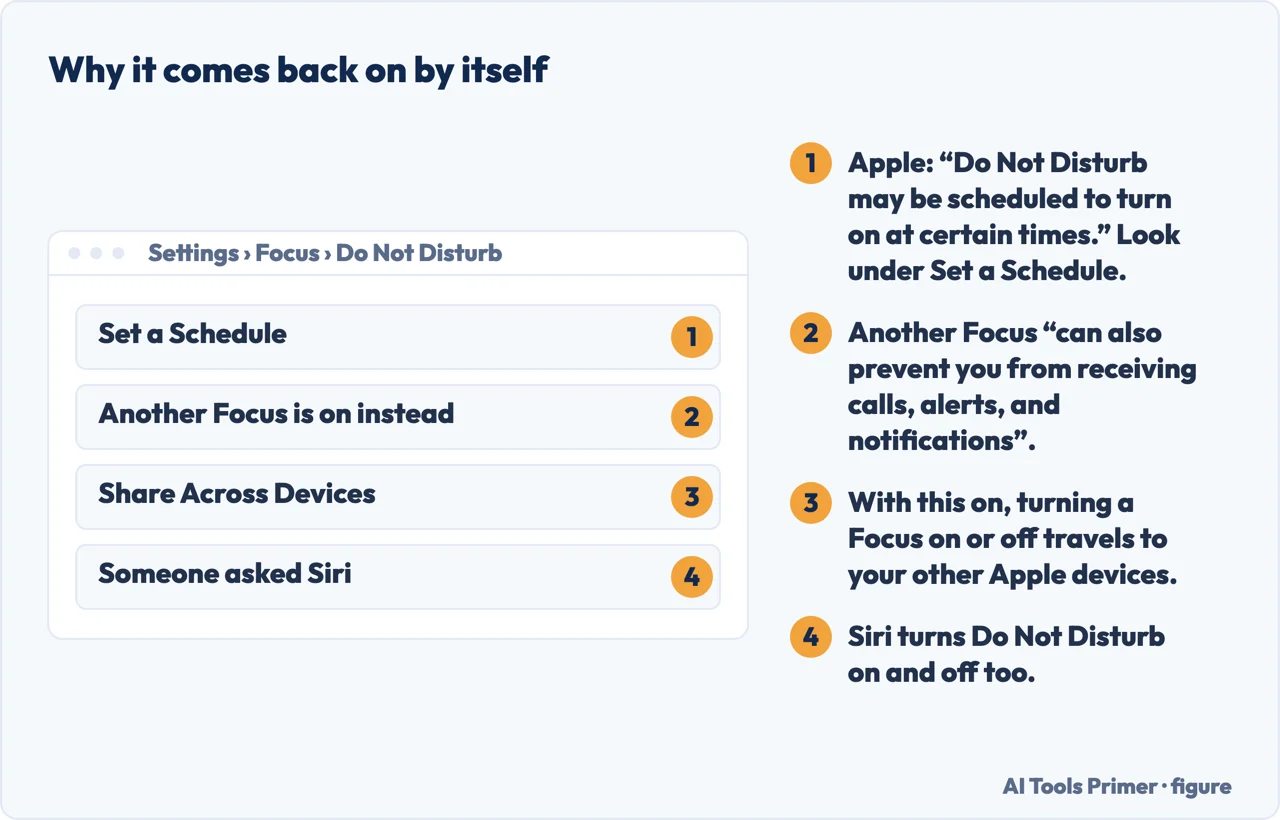
The button changes name with whichever Focus is on. Figure drawn by AI Tools Primer.Four reasons, and none of them is the switch you just pressed. Figure drawn by AI Tools Primer.
So the first move is not to look for a switch but to look at what is on. There are two ways into Control Center and only one of them shows you that.
The quick way
Open Control Center — swipe down from the top-right corner, or up from the bottom edge on an
iPhone SE or an iPhone 8 and earlier — and tap the icon on the Focus button directly.
Apple gives you a way to know it worked: “If the icon color dims and the button text changes
to ‘Focus,’ Do Not Disturb has been turned off.”
The way that shows you what is on
Same gesture, but tap and hold the button instead — whether it currently reads Focus,
Do Not Disturb, or one of the other names.
That opens the menu of all of them, which is the only screen that answers the real question:
not how to turn it off, but which one is on.
For anything more than a moment’s silence, the settings live in one place, and it is worth knowing the path because three of the four causes below are found down it.
Settings › Focus › Do Not Disturb
That screen holds four things: Allow Notifications, for the people and apps that should get through anyway; Customize Screens; Set a Schedule; and Focus Filters, which change how individual apps behave rather than whether they make a noise. The first of those is worth a look before you turn anything off, because it offers the middle option — silence, with an exception for the two people who might really need you.
Apple’s own heading: “If Do Not Disturb turns back on automatically”
A schedule. Settings › Focus › Do Not Disturb › Set a Schedule, then “check for
any active schedules to turn off.” Worth checking Sleep as well as Do Not Disturb: a schedule
agreed to once keeps arriving at the same hour without ever announcing itself again.
A place. A Focus can be set to turn on “at a set time, location, or while using a
certain app.” A Focus tied to an address switches on when you arrive there and off when you
leave, which looks exactly like a fault.
An app. The same setting covers opening a particular app — so the phone goes quiet
whenever you open that one thing, and nothing on screen connects the two.
A wallpaper. This one is real: since iOS 16 a Lock Screen can be linked to a Focus, and
Apple’s wording is unambiguous — “When you choose that wallpaper for your Lock Screen,
Do Not Disturb automatically turns on.” Changing how the phone looks changes what it does.
The fourth of those deserves a moment, because it inverts the usual relationship between how a phone looks and what it does. A Lock Screen wallpaper is decoration; a Focus is behaviour; and Apple lets you tie one to the other. Set up once and forgotten, it makes a phone appear to go silent for aesthetic reasons — which is a hard thing to arrive at by guessing and a quick one to check: Customize Screens, on the screen above.
And one line worth knowing if you own more than one Apple device. Apple: “If you use
Share Across Devices in your Focus settings, a notification that Do Not Disturb is on or
off will appear on your other Apple devices.” So the setting is not private to the phone in
your hand, and the iPad will tell you about it.
With one exception worth knowing if you have ever set something up twice: “Focus filters don’t get synced across devices when Share Across Devices is turned on.” The state travels; the
per-app rules do not.
Two smaller routes worth having. You can ask Siri to turn Do Not Disturb on or off, which is the fastest way to do it while driving — although Driving is itself one of the six, and turning that off is a different decision. And in the Focus menu opened by pressing and holding, you can switch directly from one Focus to another without turning anything off first — so leaving that menu does not necessarily mean the phone is no longer in one.
If none of the four causes applies and the phone is still silencing calls, the thing to check is whether it is Do Not Disturb at all. The Focus screen is not the only place a phone can be told to stay quiet, and from the outside a Focus that allows nobody through looks identical to a phone silenced somewhere else entirely.
The guides below take it four ways: finding which Focus is on, the schedule and the other automatic triggers, letting specific people through instead of everybody, and the settings that look like Do Not Disturb and are not.
Do Not Disturb is one of six, and the other five silence a phone just as completely. The first job is not switching something off but seeing what is switched on.
Open Control Centre and tap the Do Not Disturb icon on the Focus button. Apple’s own test that it worked is that “the icon color dims” and the button goes back to saying Focus.
Why does Do Not Disturb keep turning back on?
Usually a schedule. Apple: “Do Not Disturb may be scheduled to turn on at certain times.” Go to Settings › Focus › Do Not Disturb, scroll down to Set a Schedule, and turn off any active one.
I turned it off and calls are still silenced. Why?
Because another Focus is on. Personal, Work, Sleep, Reduce Interruptions and Driving “can also prevent you from receiving calls, alerts, and notifications”, and the Focus button shows whichever is running.
Why did it change on my iPad too?
Share Across Devices. With that on in your Focus settings, “a notification that Do Not Disturb is on or off will appear on your other Apple devices” — and the setting travels with it.
Not covered here. It will not tell you to restart the phone. Apple documents four reasons Do Not Disturb comes back, all of them settings, and a restart addresses none of them.
It will not treat Do Not Disturb as a single switch. It has been one of six since iOS 15, and half the difficulty in this question is looking for a name that is not on screen.
And it will not recommend turning notifications off instead. That is a different setting with a different failure mode, and it is the one you regret at the wrong moment. What holds instead is simple: the note that other Focus options silence a phone too is Apple’s own, quoted with the automatic triggers and the Share Across Devices behaviour.
How the phone tells you something happened
Four settings that decide whether it rings, buzzes, waits or says nothing at all.
Apple Support — How to turn Do Not Disturb off or on for iPhone or iPad (Do Not Disturb as a Focus option since iOS 15, both Control Center routes and how to tell it worked, the note that other Focus options also silence calls and notifications, the heading on what to do if it turns back on automatically, the Set a Schedule route, the Lock Screen wallpaper link and the Share Across Devices notification) — support.apple.com, read 22 August 2026.
Apple — iPhone User Guide, Set up a Focus on iPhone (the four things on the Do Not Disturb screen, scheduling a Focus by time, location or app, Focus filters, and the note that filters do not sync across devices with Share Across Devices on) — support.apple.com, read 16 September 2026.
Verizon — Apple iPhone, turn Do Not Disturb on or off: the same switch described by the carrier, which is also where call forwarding and blocking live — www.verizon.com, read 3 September 2026.
AG
Written by Alberto Gulotta
Founder and editor of AI Tools Primer, writing from Palermo, Italy. Thirty-five years of
taking computers apart, starting with a Commodore 64 — the long version is on the
about page.
Written on 22 August 2026 · last checked 23 September 2026.
§
Independence and limits
No affiliate links and no paid placements anywhere on this site. Nobody pays to appear here,
and no company has seen this page before you did.
This is general information, not professional advice. Where a page touches money, health,
safety or the law, it names its source and the date it was read — and your situation may
still differ. See the privacy page and the
cookie policy.